Docker Engine 29:到底什么会坏
API 最低版本前后改了两次,镜像存储只在全新安装时才切换,而每个容器的文件描述符上限从 1048576 悄悄掉到了 1024。九个月的踩坑记录,逐条对照上游确认。
- Docker
- containerd
- Linux
- 运维
Docker Engine 29 于 2025 年 11 月发布,一口气搞挂了大量安稳跑了好几年的软件。九个月过去,真正值得说的已经不是当时那波故障——而是头两周写出来的绝大部分文章现在都错了,因为人人都在记录的那项改动,在三个 minor 版本之后被部分回退了。如果你这个月要升级一台 Linux 服务器,你正在参考的是一份为早已不存在的 Docker 29 写的建议。
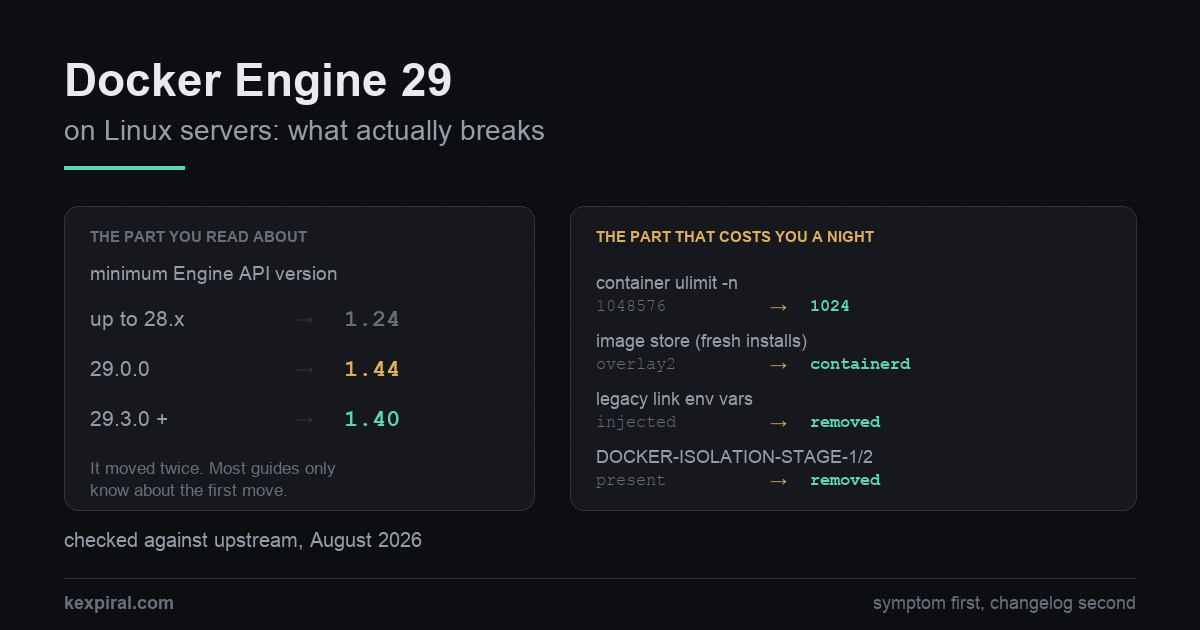
下面按你实际会撞上的先后顺序,讲清楚到底什么会坏、怎么修、以及每条对应的上游出处。面向的是在 Linux 服务器上跑 Docker Engine 的人,不是 Docker Desktop——后者有好几个问题的答案完全不同。文中用于诊断的命令都只读取状态;任何会改动系统的操作都是改配置、装包或重启,一眼就能看出来。上游没有公布日期或版本号的地方,本文直接写明「没有」,而不是编一个出来。
先从报错现象入手,别一上来啃 changelog
几乎没人是看着 changelog 找过来的。大家都是被一串报错、一个起不来的容器,或者一个显示环境不可达的面板逼过来的。所以这张表放最前面:先对上你的现象,再去看对应那一节。[rel29]
| 你看到的现象 | 实际是怎么回事 | 在哪儿修 |
|---|---|---|
client version 1.24 is too old. Minimum supported API version is 1.44 | 客户端比守护进程的 API 下限还旧。下限在 29.0.0 提高,又在 29.3.0 降了回来。 | 升级客户端。守护进程侧的覆盖开关是过桥板,不是修复。 |
client version 1.52 is too new. Maximum supported API version is 1.44 | 反过来的情况:新客户端连老守护进程。几乎都是 CI 里锁死版本的 Docker-in-Docker 服务。 | 把 DinD 镜像锁到与守护进程相同的主版本,两边一起改。 |
装完 29 之后 docker images 是空的 | containerd image store 在全新安装时是默认后端。你的 overlay2 内容是被隐藏了,不是被删了。 | 把后端切回去,或者有意识地导出再导入。 |
| 容器撞上以前从来没有过的连接数天花板 | 容器内默认 nofile 上限从 1048576 掉到了 1024。 | 按容器加 --ulimit,或在守护进程上配 default-ulimits。 |
CI job 在 service 健康检查这一步失败;No HOST or PORT found | 旧版 link 环境变量不再注入,于是那个等待 service 就绪的 helper 永远看不到它。 | 改用自定义网络加 DNS。逃生用的环境变量只是临时手段。 |
| 某个容器访问到了它本不该访问到的已发布端口 | DOCKER-ISOLATION-STAGE-1 和 -STAGE-2 两条链在 29.0 被移除。 | 发布到 127.0.0.1,别用通配地址。 |
你的 DOCKER-USER 防火墙规则不生效了 | 只有在你启用了 nftables 后端时才会发生,而它是实验性且需手动开启的。 | 切回去,或者自己写一张优先级更低的 nftables table。 |
Go 构建在 github.com/docker/docker 上失败 | 模块已迁到 github.com/moby/moby/client 和 .../api。 | 重写 import;客户端 API 的形态也在同时变了。 |
# Three numbers decide everything that follows. Get them before you change
# anything, on the machine that is actually misbehaving.

# 1. Engine version, and the API floor this daemon enforces.
docker version
# Server: Docker Engine - Community
#  Engine:
#   Version:          29.3.0
#   API version:      1.54 (minimum version 1.40)
#                                             ^^^^
# Do NOT assume 1.44. Engine 29.0.0 raised the floor from 1.24 to 1.44, and
# 29.3.0 lowered it again to 1.40. Which one you get depends on where in the
# 29 series you landed, and almost everything written about this in late 2025
# predates the second change. Read the number, do not remember it.

# 2. Which image store this daemon is using.
docker info -f '{{ .DriverStatus }}'
# [[driver-type io.containerd.snapshotter.v1]]              -> containerd store
# [[Backing Filesystem extfs] [Supports d_type true] ...]   -> legacy overlay2
docker info 2>/dev/null | grep -i 'storage driver'
# Storage Driver: overlayfs   -> containerd snapshotter
# Storage Driver: overlay2    -> graph driver

# 3. Which packet-filtering backend. nftables is opt-in and experimental in 29.x,
#    so on an untouched host this should say iptables.
docker info 2>/dev/null | grep -i 'firewall'

# And the one that is not a Docker question, but constrains Docker anyway:
stat -fc %T /sys/fs/cgroup/
# cgroup2fs -> unified hierarchy, nothing to do
# tmpfs     -> cgroup v1 or hybrid: deprecated in 29.0, supported until May 2029
其中三行其实是同一项底层改动的不同侧面,另有两行在任何你想得到的地方都查不到文档。动手之前,先把决定「哪几条与你相关」的三个事实确认清楚。
API 最低版本改过两次,你查到的那个数多半是错的
这就是最出名的那条。Engine 29.0.0 把守护进程愿意接受的 Engine API 最低版本提到了 1.44,对应 Docker 25.0。此前的下限是 1.24——而 1.24 本身也是 Docker 25.0 才引入的,它替换掉的是从 2016 年起一直没动过的 1.12——所以这已经是两年内的第二次收紧,只不过第一次没人察觉。任何写死了旧版本号、或者压根不会做版本协商的客户端,在守护进程重启的那一刻就废了。所以那一周里 Traefik、Portainer、Testcontainers、Watchtower、五六个自建面板和一大批 CI 流水线是一起倒下的。[pr51186][blog29]
接下来这段几乎没有一篇已发表的文章写到。在 2026 年 3 月发布的 29.3.0 里,上游又把下限调低了——从 1.44 退回 1.40,对应 Docker 19.03。当前源码中的默认值就是 1.40,而 1.24 只能通过显式覆盖才够得着。也就是说,去年 12 月被拒绝的 API 1.41 或 1.43 客户端,今天又能连上了;而告诉你最低版本是 1.44 的排障文章,描述的只是这个系列最初三条 minor 版本线的情况,而 29 系列早就走过它们了。查你自己的守护进程,别信互联网对它的记忆——版本号与 API 版本的对应关系是公开发布的,这也是这个故事里唯一一直成立的版本。[pr52067][config][apimatrix]
| 守护进程版本 | API 最低版本 | 会拒掉什么 |
|---|---|---|
| 25.0 – 28.x | 1.24 | 基本什么都不拒。更早的引擎下限是 1.12,从 2016 年起一直没变过。 |
| 29.0.0 – 29.2.x | 1.44 | 比 Docker 25.0 旧的客户端全拒。这就是人人都写过的那波故障。 |
| 29.3.0 及以后 | 1.40 | 比 Docker 19.03 旧的客户端。放宽幅度不小,却几乎没人提。 |
| 任意版本,开了覆盖开关 | 最低可到 1.24 | 没有命令行参数:只能用 daemon.json 里的配置项或 DOCKER_MIN_API_VERSION。上游称其为例外情况专用,未公布移除日期。 |
# The symptom, produced by the daemon, not the client:
#
#   Error response from daemon: client version 1.24 is too old.
#   Minimum supported API version is 1.44, please upgrade your client to a
#   newer version
#
# And its mirror image, which appears in CI far more often than on servers -
# a NEW client talking to an OLD daemon, typically a pinned docker:dind service:
#
#   Error response from daemon: client version 1.52 is too new.
#   Maximum supported API version is 1.44

# The correct fix is always to update the client. Every tool listed later in
# this article shipped a build that negotiates the API version instead of
# hardcoding one.

# The escape hatch is for the case where the client is a vendor appliance you
# cannot update this week. It is set on the DAEMON, not on the client, and it
# is available in daemon.json only - there is no dockerd command-line flag.
cat /etc/docker/daemon.json 2>/dev/null   # read it first, do not clobber other keys

# /etc/docker/daemon.json
{
  "min-api-version": "1.24"
}

sudo systemctl restart docker
docker version | grep -i 'minimum version'

# The equivalent, if you would rather leave daemon.json alone:
sudo systemctl edit docker.service
# [Service]
# Environment="DOCKER_MIN_API_VERSION=1.24"

# Upstream is unambiguous about the status of both: API versions older than the
# default "are deprecated and to be removed in a future release", and the
# environment variable and configuration option "should only be used for
# exceptional cases". No removal date is published anywhere. Treat this as a
# bridge of unknown length, put a ticket on it, and do not let it become the
# permanent shape of your fleet.
关于那个覆盖开关,有一点要提醒,因为这类配置往往比催生它的那次故障活得还久。上游把旧 API 版本描述为已弃用、将在未来某个版本中移除,并且明确说环境变量和配置项都只应用于例外情况。移除日期没有公布。Docker 自己的策略是:弃用的功能至少保留一个稳定版本,并且尽量在下线前提前数月告知,所以它不会一夜之间消失——但「至少一个版本」是下限,不是计划。用它撑过一周,别拿它当长期方案。[config][lifecycle]
「镜像全没了」是重装,不是升级
报得第二多的问题,看着最吓人,实际最无害:装完 Docker 29,跑 docker images,列表是空的。什么都没被删。Engine 29 把 containerd image store 设为默认后端,但是——这句话能解决几乎所有此类求助——只在全新安装时生效。原地做包升级会保留 overlay2 图形驱动,镜像照样看得见。把包 purge 掉再装一遍算全新安装,用配置管理重建主机同样算,而大多数人正是这么撞上的,而且完全不觉得自己干了什么特别的事。[cstore]
| 问题 | overlay2(图形驱动) | containerd snapshotter |
|---|---|---|
| 什么情况下会用它 | 从 28 及更早版本升级上来的一律保留它 | 29.0+ 的全新安装,userns-remap 除外 |
docker info 显示 | Storage Driver: overlay2 | Storage Driver: overlayfs,且 driver-type 为 io.containerd.snapshotter.v1 |
| 内容存在哪儿 | 在 data-root 下,通常是 /var/lib/docker | 在 containerd 自己的存储里,data-root 挪不动它 |
| 磁盘占用 | 只有解压后的层 | 压缩层和解压层都留,同样的镜像明显更占地方 |
| 多平台镜像与 attestation | 不支持 | 支持——这正是默认值改掉的真实原因 |
| 两者之间来回切 | 会隐藏另一后端的镜像和容器 | 反过来也一样。什么都不会删;没有原地转换 |
# "I upgraded and all my images are gone."
#
# Almost every report of this turns out to be a REINSTALL, not an upgrade.
# Docker 29 makes the containerd image store the default on fresh installations
# only; an in-place package upgrade keeps the overlay2 graph driver. Purging the
# packages and installing them again counts as fresh, and so does rebuilding the
# host from your configuration management.
#
# Nothing has been deleted. The two backends cannot see each other's content:
# switching "temporarily hides images and containers created with the other
# backend. Your data remains on disk."

docker info -f '{{ .DriverStatus }}'
docker system df

# To see the old content again, point the daemon back at where it lives:
# /etc/docker/daemon.json
{
  "features": { "containerd-snapshotter": false },
  "storage-driver": "overlay2"
}
sudo systemctl restart docker
# Understand what this buys you: the legacy graph drivers are themselves now
# deprecated, and Docker states the graph driver backend will be removed in a
# future release. Switching back is a stay of execution, not a destination.

# Moving forward deliberately instead. There is no supported in-place
# conversion: the documented paths are a registry round trip, or save/load.
docker save -o /var/tmp/keep.tar app:1.4 app:1.5
# ... switch the daemon to the containerd store, restart, then:
docker load -i /var/tmp/keep.tar

# An experimental automatic switch exists. Read what it actually does before
# using it: it only fires when there are NO containers at all and the image
# count is at or below the threshold you set.
# /etc/docker/daemon.json
{
  "features": { "containerd-migration": true }
}
# and, for the threshold, a systemd drop-in:
#   Environment="DOCKER_MIGRATE_SNAPSHOTTER_THRESHOLD=5"
# The documentation labels this experimental and tells you to take backups
# first. On a server, exporting the handful of images you actually care about
# is less work than recovering from a migration that half-happened.

# Two operational consequences that surface weeks later, not on day one:
#
#  - The containerd store keeps layers both compressed and uncompressed, so the
#    same images occupy noticeably more disk than they did under overlay2.
#
#  - "data-root" in daemon.json does NOT move containerd's content. If you put
#    /var/lib/docker on its own partition, containerd's storage is configured
#    separately - otherwise it quietly fills the root filesystem instead, which
#    is a page you will read at 03:00 rather than now.
#
#  - The containerd store is unavailable when user-namespace remapping is
#    enabled. That is a known bug, not a policy, and userns-remap hosts are
#    excluded from the fresh-install default for exactly that reason.
两个后端互相看不见对方的内容。上游写得很直白:切换会「临时隐藏用另一个后端创建的镜像和容器」,而且「你的数据仍在磁盘上」。如果你刚切完、列表看着是空的,千万别为了腾空间去 prune——那等于把看得见的这一半删掉,同时还在为看不见的那一半付存储费。
还有两个后果不是当天暴露,而是几周后才找上门。containerd 存储会同时保留压缩层和解压层,所以同样一批镜像占的磁盘明显比 overlay2 时代多。另外,daemon.json 里的 data-root 挪不动 containerd 的内容:如果你精心把 /var/lib/docker 放到了独立卷上,containerd 的存储是单独配置的,不管它就会去撑爆根文件系统。还有一种情况新默认值干脆不适用——使用用户命名空间重映射的主机被排除在外,原因是一个尚未修复的 bug,而不是什么策略决定。另外也要看清楚切回去到底买到了什么:旧的图形驱动本身也已经进入弃用,Docker 说过这套后端会在未来某个版本中移除。退回 overlay2 只是缓刑,不是赦免。[daemon][iss47377]
每个容器的文件描述符上限都掉到了 1024
这一条我敢打赌是被误诊最多的,因为它根本不在破坏性变更那一节里,而是藏在 containerd 版本升级条目下面的一个子项。Docker Engine 29.0.0 打包的是 containerd 2.1.5,它的 systemd unit 里不再设置 LimitNOFILE=infinity——于是每一个容器内部打开文件数的默认软限制从 1048576 掉到 1024。之后的 29.x 版本带的是更新的 containerd,但全都保持这个新行为。[iss51485][ctd215]
# The 29.0 change with the widest blast radius is not under a "breaking
# changes" heading at all. It is a sub-bullet under a containerd version bump.

docker run --rm ubuntu:24.04 bash -c 'ulimit -n; ulimit -Hn'
# soft 1048576   with containerd.io 1.7.x (Docker 28 and earlier)
# soft 1024      with containerd.io 2.1.5, shipped with Docker Engine 29.0.0
#
# Only the SOFT limit is documented as changing. The hard limit becomes
# whatever systemd's DefaultLimitNOFILE gives you on that host, so read both
# numbers on your own machine rather than trusting a value from an article.

# What happened: containerd 2.1.5 stopped setting LimitNOFILE=infinity in its
# systemd unit, so containers now inherit systemd's ordinary default. Docker
# Engine made the same change for BUILD containers back in v25.0; version 29
# extends it to every container. The reasoning is sound - with an effectively
# unlimited value, software that sizes its own buffers from `ulimit -n`
# (MySQL is the classic case) could consume the machine - and it is documented
# in the release notes. It is simply not where anyone looks.

# 1024 is a real ceiling, and the failures it produces rarely mention file
# descriptors: an Nginx worker refusing connections at a number that looks
# arbitrary, a JVM selector loop throwing at load, a connection pool that
# stalls under exactly the traffic it handled last week.

# Per container, which is the right place if only one workload needs it:
docker run --ulimit nofile=65535:65535 ...

# Or restore a default for every container on the host:
# /etc/docker/daemon.json
{
  "default-ulimits": {
    "nofile": { "Name": "nofile", "Soft": 65535, "Hard": 65535 }
  }
}

# The release notes show 1048576 in this example, which restores the exact old
# behaviour. Prefer a considered number. Copying 1048576 back wholesale also
# copies back the problem the change was made to solve, and you will not be the
# one who remembers that in two years.
改动的理由是站得住脚的,维护者也解释得很清楚:一个实际上等同于无限的值,叠加 Go 运行时的一个特性,可能把软限制直接抬到硬限制,而那些按 ulimit -n 自行计算缓冲区大小的软件——MySQL 是老生常谈的例子——就会把机器吃干。Docker 早在 v25.0 就对构建容器做过同样的改动,29 只是把它扩展到了全部容器。问题不在改动本身,而在于 1024 是一道实打实的天花板,而它引发的故障几乎从不提「文件描述符」四个字。你看到的是 Nginx worker 在一个看着莫名其妙的数字上开始拒连接、JVM 的 selector 在压力下抛异常、连接池卡在上周还扛得住的流量上。如果升级之后代码一行没动,但负载一上来就变慢、变不稳,先查这一条。[rel29]
旧版 link 变量被移除,最先中招的是 CI
Docker 29 不再往容器里注入旧版 link 环境变量——DB_PORT_5432_TCP_ADDR 及其同族。它们多年前就被弃用了,替代方案(自定义网络上的 DNS)从 2016 年起就能用。麻烦在于大量容器的 entrypoint 脚本还在读它们,而报出来的错跟 Docker 一点关系都看不出来。最经典的案例是 GitLab Runner:那个等待 services: 条目就绪的 helper 容器直接以 FATAL: No HOST or PORT found 退出,于是 job 挂在健康检查这一步,而那个 service 容器本身跑得好好的。[pr50719][gllinks]
# Docker 29 stopped injecting the legacy link environment variables:
#   DB_PORT_5432_TCP_ADDR, DB_PORT_5432_TCP_PORT, DB_NAME, DB_ENV_*
# They were deprecated years ago. A surprising number of CI images and entry
# point scripts still read them, and the failure does not mention Docker.

# The symptom in a GitLab CI job with a services: block is a health check that
# never passes: the runner's wait-for-service helper exits 1 with
#   FATAL: No HOST or PORT found
# and the job fails before your script runs. The service container itself
# started perfectly well - which is why this looks like an infrastructure
# outage rather than a Docker change.

# Confirm it in two lines. The db container must be on the DEFAULT BRIDGE:
# legacy links do not work on user-defined networks at all.
docker run -d --name db postgres:18
docker run --rm --link db:db alpine env | grep -c '^DB_PORT_'
# 0 on Engine 29, non-zero before it

# The fix is to stop parsing those variables. DNS on a user-defined network has
# worked since 2016, does not need --link at all, and survives restarts:
docker rm -f db
docker network create appnet
docker run -d --name db --network appnet postgres:18
docker run --rm --network appnet postgres:18 pg_isready -h db
# In Compose this is already the default: services on the same project network
# resolve each other by service name.

# The escape hatch, when the image is not yours to change and the release is
# next week. Daemon-side, and explicitly temporary:
sudo systemctl edit docker.service
# [Service]
# Environment="DOCKER_KEEP_DEPRECATED_LEGACY_LINKS_ENV_VARS=1"
sudo systemctl restart docker
# Upstream wording: "the escape hatch will be removed in a later version".
这一条真有点扎手:截至撰稿时,对应的 GitLab Runner issue 仍然是 open 状态,文档里给出的绕行办法只有两个——在守护进程上设置那个逃生用的环境变量,或者把 runner 的 Docker 版本锁死。如果你的 CI 会起 service 容器,先在一台 runner 上验证,再往整个集群铺——不是因为难修,而是因为这个故障会在所有 job 里同时出现,看起来像基础设施宕机,而不像一次配置变更。
隔离链被删掉了,这是可达性变化
这是动静最小、后果最大的一条。Engine 29 重写了 bridge 网络的 iptables 规则,并彻底移除了 DOCKER-ISOLATION-STAGE-1 和 DOCKER-ISOLATION-STAGE-2 两条链。发布说明把影响写得很直白,如果你曾经把不同的 bridge 网络当作安全边界,这段值得读两遍:现在,当 userland proxy 未运行时,容器可以访问到其他网络中的容器发布到宿主机地址上的端口;使用 nat-unprotected 网关模式时,还能访问到其他网络中容器地址上的端口。[pr49981][packet]
# 29.0 reworked the iptables rules for bridge networks and removed the
# DOCKER-ISOLATION-STAGE-1 and DOCKER-ISOLATION-STAGE-2 chains. The release
# notes state the two consequences plainly:
#
#   - containers can now access ports published to host addresses by containers
#     in other networks when the userland proxy is not running
#   - containers can now access ports on container addresses in other networks
#     that have gateway mode "nat-unprotected"
#
# If you were using separate bridge networks as a security boundary, re-read
# that. It is a reachability change, and nothing in the upgrade tells you.

# Find every port you publish to a wildcard address. Each one is a port that
# containers in other networks may now reach through the host.
docker ps --format '{{.Names}} {{.Ports}}' | grep '0.0.0.0'

# The durable fix is to stop publishing to the wildcard when you only meant
# localhost. This has always been the correct form and does not depend on any
# chain existing:
docker run -p 127.0.0.1:5432:5432 postgres:18

# In Compose:
#   ports:
#     - "127.0.0.1:5432:5432"

# Check the current shape of the rules rather than the shape you remember:
sudo iptables -S | grep -c 'DOCKER-ISOLATION'   # 0 on Engine 29
sudo iptables -S DOCKER-USER

# DOCKER-USER still exists and still works under the default iptables backend.
# It is only absent if you deliberately switch the daemon to nftables - which
# is the next section, and the answer there is "not on a production host yet".| 行为 | 28.x 及以前 | 29.0 起 | 该怎么办 |
|---|---|---|---|
| bridge 网络隔离链 | DOCKER-ISOLATION-STAGE-1 和 -STAGE-2 | 已移除 | 重新检查所有发布到通配地址上的东西。 |
| 旧版 link 环境变量 | 自动注入 | 不再注入 | 在自定义网络上用 DNS。 |
DOCKER-USER 链 | 存在 | iptables 下存在,nftables 下没有 | 依赖它就别启用 nftables 后端。 |
| SCTP checksum mangle 规则 | 只有设了 DOCKER_IPTABLES_SCTP_CHECKSUM=1 才会加 | 已移除 | 这个变量现在完全不起作用了。 |
| macvlan 与 ipvlan-l2 默认网关 | 自动推断 | 只有 IPAM 配置里写了 --gateway 才有 | 在网络定义里显式设置网关。 |
| 加密 overlay 网络 | 28.2.2 与 25.0.13–14 上是坏的 | 29.0.0 到 29.2.0 之间是坏的 | 29.2.1 修好了它,但已修复的节点无法与未修复的节点互通流量。整个 Swarm 要一起离开受影响的构建。 |
升级过程不会告诉你这事发生了,你的监控也不会——这是可达性变宽,不是报错。长期正确的做法不是把那两条链加回去,而是别再把本该只监听 localhost 的服务发布到通配地址上;后者本来就是正确写法,而且不依赖任何链存在。顺手记一个降级风险:在 29 上通过向默认地址池申请前缀长度创建出来的网络,在旧版守护进程上无法使用,必须删掉重建,所以动手之前先把网络定义记录下来,别等事后。[pr50114]
nftables 是真的,但实验性,而且没有 DOCKER-USER 链
Engine 29 还引入了 nftables 后端,它的状态值得说准确,因为当时的报道并不准确:它是实验性、需手动开启的,默认仍是 iptables,而且守护进程处于 Swarm 模式时根本无法启用。上游直接写明配置项、行为和实现都可能变。在当下的发行版上,你的 iptables 规则通常本来就是由 nftables 内核机制执行的,所以现在切过去几乎没什么收益。现在就得知道它的理由在于它对防火墙做了什么:Docker 的 nftables 实现里没有 DOCKER-USER 链,你的规则也不会被迁移进新的表。至于它们还跑不跑,得看这台机器的历史——在已有主机上切过去,FORWARD 链上那条旧的跳转还留着,所以规则会继续生效,直到跳转被删掉或者主机重启;而一开始就跑在 nftables 上的主机从来就没有那条跳转,只会无声地忽略它们。配置一模一样的两台机器,两套不同的防火墙。[nft][pr50476]
# The nftables backend in 29.x is EXPERIMENTAL and opt-in. The default is still
# iptables, which on a current distribution is usually iptables-nft underneath
# anyway - so you are already using the nftables kernel machinery either way.
# Upstream: "configuration options, behavior and implementation may all change
# in future releases", and it "cannot be enabled when the Docker daemon is
# running in Swarm mode".

docker info 2>/dev/null | grep -i 'firewall'

# Opting in, if you are testing it somewhere that is not production:
# /etc/docker/daemon.json
{
  "firewall-backend": "nftables"
}
sudo systemctl restart docker

sudo nft list tables
# table ip docker-bridges
# table ip6 docker-bridges

# The part that quietly changes your security posture:
# "In Docker's nftables implementation, there is no DOCKER-USER chain."
# Your rules are not migrated. Whether they still run depends on history:
# switching an existing host to nftables leaves the old FORWARD jump to
# DOCKER-USER in place, so those rules keep firing until the jump is removed
# or the host reboots. A host that started on nftables never had the jump, so
# the same rules do nothing at all. Both states look identical in your
# configuration management, which is the dangerous part.
sudo iptables -S FORWARD | grep DOCKER-USER   # if this prints, you have both worlds

# The replacement is your own table, with base chains of the same type and hook
# as Docker's and a LOWER priority number, so yours run first. "filter" is the
# same priority Docker uses, so subtract from it:
#
#   table ip my-filter {
#       chain my-forward {
#           type filter hook forward priority filter - 1; policy accept;
#           iifname "eth0" ip saddr != 192.0.2.2 counter drop
#       }
#   }

# One more difference that catches everybody: in nftables an accept is not
# final, so you cannot permit something Docker drops simply by accepting it
# earlier. Use a firewall mark and tell the daemon to honour it:
#   dockerd --bridge-accept-fwmark=1
#   dockerd --bridge-accept-fwmark=0x1/0x3    # with a mask
github.com/docker/docker 不再是你的 import 路径
如果你用 Go 调 Docker API,29 版是重写而不是小升级,而且这是本文唯一一条没法靠改配置绕过去的改动。模块 github.com/docker/docker 被弃用,改为 github.com/moby/moby/client 和 github.com/moby/moby/api;父模块现在被明确定位为内部实现细节,发布 tag 带 docker- 前缀。除了搬家之外,客户端 API 本身的形态也变了:[rel29]
- 选项结构体取代位置参数,涉及 image、config 和 prune 一系列操作。改动是机械性的,但面很广——一个典型的集成里几乎每个调用点都要动。
- 返回值被包进结构体。
ImageInspect、ImageHistory、ImageLoad和ImageSave返回的东西都不是原来那个了,ImagePull和ImagePush返回的对象则暴露消息迭代器。 - Filters 换地方了。 客户端有了自己的 filters 类型,所以引用旧 filters 包的代码得重构,光改导入路径不管用。
- 地址类型化。 IP 地址和子网现在是
netip.Addr和netip.Prefix,不再是字符串和net.IPNet;这是一次货真价实的改进,也是一个货真价实的上午的工作量。 client.ImageCreate没了,按你原先实际拿它做什么,改用ImagePull或ImageImport。
cgroup v1 进入弃用,而且给了明确日期
Docker 29 把 cgroup v1 标记为弃用——而且难得地给了日期。上游说明支持会持续到 2029 年 5 月,并且 2029 年 5 月的最后一个版本本身可能不再支持 cgroup v1,但至少会有一个维护中的分支继续支持。这个缓冲期相当宽裕,意味着你的服务器今年不会因为这一条而出任何问题。[deprecated][iss51111]
即便如此,也值得尽早处理,理由和 Docker 的时间表毫无关系:你的发行版会先一步到达终点。systemd 在 v258 里移除了 legacy 和 hybrid 层级,所以一台仍然带着 systemd.unified_cgroup_hierarchy=0 启动的主机——这个参数通常是多年前某人为了迁就某个老运行时加上去、然后再没删过的——会在远早于 2029 年的时间点撞上操作系统层面的墙。这个参数很好找,通常也很好删;难受的是你往往是在维护窗口里才发现它,而不是在某个平平无奇的周二。[systemd258][cgroupv2]
生态:哪些工具挂了,以及修复版本
兼容性这张表是整件事里文档做得最扎实的部分,很大程度上要归功于 Portainer 在事发当时就把影响详细写了出来。其中绝大多数都在几周内修好了。现在读这份清单,价值不在于修复方案,而在于看清楚里面有哪几个正跑在你手上。[portblog]
| 工具 | 坏在哪儿 | 修复版本 |
|---|---|---|
| Traefik | Docker provider 写死了 API 版本 1.24,导致路由完全配不出来。 | 3.6.1——写死的版本号换成了协商。 |
| Portainer | 自带的客户端被锁死在 API 1.41 且不做协商,一道严格的最低版本检查直接拒绝了连接,环境因此显示为不可达。 | 2.33.5 LTS / 2.36.0 STS。 |
| Testcontainers for Java | docker-java 默认用 API 1.32,测试找不到可用的 Docker 环境。 | 2.0.2,随包带上了会协商的 docker-java。 |
| Docker SDK for Python | 6.1.3 里 DEFAULT_DOCKER_API_VERSION 是 1.41。 | 7.1.0(1.44)。更好的做法是协商而不是写死。 |
| GitLab Runner | runner、job 镜像和 DinD 服务三者版本对不上;另外,service 的健康检查会以 No HOST or PORT found 失败。 | 锁定 DinD 镜像或指定 API 版本。健康检查那个问题在撰稿时仍未关闭。 |
| JetBrains 系 IDE | Docker 插件被 v29 守护进程拒绝。 | 插件构建 253.28294.x,随 2025.2.5 以及 2025.3 系列版本发布。 |
| Watchtower(containrrr) | 写死在 API 1.25,对着 v29 守护进程反复重启。 | 上游没有修复。仓库已于 2025 年 12 月被归档为只读。 |
| CapRover | docker-modem 锁在 API 1.43——离 29.0 的下限就差一个版本。 | 1.14.1。 |
Ansible community.docker | docker version 的 JSON 字段大小写变了,抛出 KeyError: 'ApiVersion'。 | Engine 29.0.1 恢复了原来的字段名。 |
| Docker Compose | 很老的构建低于 API 下限;官方没有公布兼容性矩阵。 | 从与 engine 相同的仓库安装当前版本的 docker-compose-plugin。 |
这个模式是一致的:凡是坏掉的,都是在某个地方写死了 API 版本而不去协商;凡是修好的,都是靠加上协商修好的。Portainer 是最清楚的例子:它自带的客户端被锁死在 API 1.41,完全不做协商,再加上一道针对守护进程上报的最低版本的严格检查,于是干脆拒绝连接——而那个守护进程本来完全愿意跟一个好好协商的客户端对话。GitLab Runner 尴尬的原因不一样:runner、job 镜像和 Docker-in-Docker 服务各自带一个客户端,其中任意两个都可能落到下限的两侧。那里的实操规则是:把 DinD 服务镜像锁到与运行它的守护进程相同的主版本,并且两边一起改。[traefik][testcontainers][glrunner]
清单的其余部分,正好是对你自己供应链的一次像样审计。Watchtower 是最有教育意义的案例:写死在 API 1.25,没有官方修复,仓库已在 2025 年 12 月被归档为只读——于是一个对你的 Docker socket 拥有永久访问权、且无人值守的进程,成了那个停止工作的东西,而且没有人会来修它。抛开 Docker 29 不谈,这本身就值得想一想。一个工具握着你的 socket,它的维护状态就是你安全态势的一部分;这次升级,异常清晰地审计出了你手上哪些工具还有人维护。[watchtower][portainer][jetbrains]
升级、锁版本,以及怎么退回去
这里的操作没什么高深的。升级就是一次普通的 apt 或 dnf 事务,装那五个标准包;文档里教你安装指定版本的方法,就是教你退回旧版本的方法。真正要紧的是顺序,以及事先弄清楚回滚撤不回哪些东西。[installubuntu][installrhel]
# Upgrading is an ordinary package transaction. The care is in the order, and
# in knowing in advance what a rollback will and will not undo.

# --- Debian / Ubuntu ---------------------------------------------------------
apt list --all-versions docker-ce | head
sudo apt update
sudo apt install docker-ce docker-ce-cli containerd.io \
                 docker-buildx-plugin docker-compose-plugin

# Staying on 28 deliberately - read the last section before choosing this:
sudo apt-mark hold docker-ce docker-ce-cli containerd.io
apt-mark showhold

# Going back. Take the exact version strings from the lists above. Pin
# containerd.io too: leaving it unpinned keeps containerd 2.x and its systemd
# unit, so the file-descriptor change described earlier survives the rollback.
apt list --all-versions containerd.io | head
VERSION_STRING=5:28.5.2-1~ubuntu.24.04~noble
CONTAINERD_STRING=1.7.29-1~ubuntu.24.04~noble
sudo apt install docker-ce="$VERSION_STRING" docker-ce-cli="$VERSION_STRING" \
                 containerd.io="$CONTAINERD_STRING" \
                 docker-buildx-plugin docker-compose-plugin

# --- RHEL / Rocky / AlmaLinux / Fedora ---------------------------------------
dnf list docker-ce --showduplicates | sort -r | head
sudo dnf install docker-ce docker-ce-cli containerd.io \
                 docker-buildx-plugin docker-compose-plugin
sudo systemctl enable --now docker
# A specific version, in the same shape as the apt form:
sudo dnf install docker-ce-3:28.5.2-1.el9 docker-ce-cli-3:28.5.2-1.el9 \
                 containerd.io docker-buildx-plugin docker-compose-plugin
# Pinning is a dnf feature, not a Docker one, and the plugin package name
# depends on which dnf you have:
#   RHEL / Rocky / Alma (dnf4):  sudo dnf install python3-dnf-plugin-versionlock
#   Fedora (dnf5):               sudo dnf install dnf5-plugin-versionlock
#   then:                        sudo dnf versionlock add docker-ce docker-ce-cli containerd.io

# Four things a downgrade does not undo:
#
#  1. If the daemon was switched to the containerd image store, a 28.x daemon
#     cannot see those images. They are still on disk; they are not in the
#     graph driver, and there is no conversion.
#  2. A network created on 29 by asking the default pool for a prefix size
#     (--subnet 0.0.0.0/24) is unusable on an older daemon. It has to be
#     deleted and recreated - so record your network definitions before you
#     start, not after.
#  3. Rootless installations from 29.5 onwards no longer receive slirp4netns
#     through Docker packaging. Reinstall it from your distribution if you go
#     back to a build that expects it.
#  4. The container file-descriptor limit, unless you pinned containerd.io as
#     well. That change lives in containerd's systemd unit, not in dockerd.
如果你的自动化是解析 Docker 的输出而不是调 API,还有一件事要知道:29.0.0 改了 docker version --format=json 里字段的大小写,直接让 Ansible 的 Docker collection 抛出一个光秃秃的 KeyError。这个在 29.0.1 里已经改回来了,所以只影响还停在第一个版本上的人——但它是个很好的提醒:--format json 也是一个带版本的接口,对任何靠爬输出干活的东西来说,锁到具体补丁版本是很便宜的保险。[ansible]
怎样才算真的验证过
「守护进程起来了」不叫验证。升级前跑一遍这个脚本,把输出留着,升完再跑一遍做 diff——关键在于 29 版改掉的大多是默认值,而默认值变了只会产出不同的输出,不会报错。
#!/usr/bin/env bash
# docker29-check.sh - Run it BEFORE the upgrade, keep the output, run it again
# afterwards and diff the two.
#
# Everything here only reads state, with one exception: the ulimit probe starts
# a throwaway container and will PULL ubuntu:24.04 if the host does not already
# have it. On a metered link, or on a host where you are watching disk, pull it
# in advance or swap in an image you already have.
set -uo pipefail

echo "=== engine, api floor, client ==="
docker version

echo "=== image store, storage driver, cgroup driver, firewall backend ==="
docker info 2>/dev/null | grep -Ei 'storage driver|driver-type|cgroup|firewall|logging driver|userns'

echo "=== the ulimit that changed underneath you ==="
docker run --rm ubuntu:24.04 bash -c 'ulimit -n; ulimit -Hn'

echo "=== everything that should be running, is ==="
docker ps --format '{{.Names}} {{.Status}} {{.Image}}' | sort

echo "=== images the daemon can actually see, and how much space they take ==="
docker images --format '{{.Repository}}:{{.Tag}}' | sort | head -50
docker system df

echo "=== published ports, from the host's point of view ==="
# -p needs root; without it you get the ports but not the owning process.
sudo ss -tlnp 2>/dev/null

echo "=== packet filtering: which world are we in ==="
sudo iptables -S DOCKER-USER 2>/dev/null || echo "no DOCKER-USER chain"
sudo iptables -S | grep -c DOCKER-ISOLATION
sudo nft list tables 2>/dev/null || echo "nft binary not present"

echo "=== every client that talks to this daemon ==="
# Anything listed here is a candidate for the API floor problem: an agent, a
# management UI, a CI runner, a monitoring exporter.
sudo ss -xp 2>/dev/null | grep docker.sock | sort -u
有两件事脚本替你查不了。第一是 Compose:Compose 版本与 Engine API 版本之间没有公开的兼容性矩阵,上游那个要求提供矩阵的 issue 被当成提问关掉了,所以唯一可靠的做法是从与 engine 相同的仓库安装当前版本的 docker-compose-plugin,而不是去推理哪个老构建可能还能用。第二是每一个握着你 Docker socket 的进程——agent、exporter、管理界面、CI runner。它们各自带一个 API 客户端,每一个都是本文第一节的候选人。[compose]
那到底该不该升?
答案是该升,理由不在功能列表。上游把 docker-28.x 标记为不再维护,并把「不再维护」定义为:不再积极开发、不接受贡献,且不在安全公告覆盖范围内。除此之外还在维护的分支只剩 25.0,它是为两个特定的下游发行版续命的,预计维护到 2026 年 12 月结束——离现在只有四个月,所以它是退路,不是方案。留在 28 感觉上稳妥,实际并不是保守选择;那是为了躲开升级到受支持版本的麻烦,而去跑一个不受支持的版本。[branches]
| 你的情况 | 实话实说 |
|---|---|
| 单机 Compose 环境,镜像都是自己构建的 | 升。先审一遍容器里的 ulimit -n;那是唯一可能让你意外的改动。 |
| CI runner 使用 Docker-in-Docker | 先在一台 runner 上试。把 DinD 服务镜像锁到守护进程的主版本,两边一起改。 |
| 你依赖某个自建的管理界面 | 先查它的维护状态,再查 Docker 的。这几个工具里,挡路的是界面,不是引擎。 |
你维护着自定义的 DOCKER-USER 防火墙规则 | 升——在默认的 iptables 后端下它们照常工作。别去开 nftables。 |
| 你把不同的 bridge 网络当作安全边界 | 升级前先读网络那一节,别等升完再读。这是真正有安全后果的改动。 |
| 你为了求稳打算继续留在 28 | docker-28.x 在上游已不再维护,且不在安全公告覆盖范围内。这是风险更高的选项,不是更安全的那个。 |
- 先盘客户端,再动守护进程。所有握着你 Docker socket 的东西都自带一个 API 客户端。决定这次升级是波澜不惊还是搭进去一个下午的,是那份清单,不是引擎版本号。
- ulimit 审计放在最前面,在 28 上做。今天就跑
docker run --rm ubuntu:24.04 bash -c 'ulimit -n',记下哪些业务在意这个值。这是本文性价比最高的十分钟,也是最容易在两周后以「莫名其妙的性能退化」形式冒出来的那项改动。 - 原地升级,不要重装。原地升级会保留 overlay2,镜像照样看得见。如果你是用配置管理重建主机,那就明确决定重建后的主机该用哪种镜像存储,因为这条路径下的默认值已经变了。
- 重新检查你发布出去的端口。隔离链没了。任何发布到
0.0.0.0的东西,在某些以前不可达的场景下,现在能被其他网络里的容器访问到。把那些本该只留本机的挪到127.0.0.1。 - nftables 先别碰。它是实验性的,会去掉
DOCKER-USER链,而且在 Swarm 下不可用。目前没有任何生产层面的理由去开它。
如果你连底下的操作系统一起升,服务器上从 Ubuntu 24.04 升级到 26.04 讲了那个彻底移除 cgroup v1、顺带换掉另外六项默认值的版本。如果读完这些你主要的感受是怀疑这套容器平台值不值它的复杂度,什么时候不该用 Kubernetes 论证了那个更小的答案,而 无聊的云架构 是一篇更长的论述:为什么要刻意选择变化缓慢的基础设施。
常见问题
Docker Engine 29 的 API 最低版本到底是多少?
取决于补丁版本,而这正是大多数教程漏掉的细节。Engine 29.0.0 把最低版本从 1.24 提到 1.44,29.3.0 又把它降回 1.40。上游源码中当前的默认值是 1.40,1.24 只能通过显式覆盖才够得着。用 docker version 查你自己的守护进程——server 那一段会在同一行里打印 API 版本和最低版本——别去信一篇 2025 年底写的文章里的数字。
client version is too old. Minimum supported API version is 1.44 怎么解决?
升级客户端,而这个客户端几乎总是某个工具,而不是 docker CLI 本身:Traefik 3.6.1、Portainer 2.33.5 LTS 或 2.36.0 STS、Testcontainers for Java 2.0.2、Docker SDK for Python 7.1.0、CapRover 1.14.1。如果这周确实升不了,可以让守护进程接受旧版本:在 /etc/docker/daemon.json 里加 "min-api-version": "1.24"(没有对应的命令行参数),或者在 systemd drop-in 里设 DOCKER_MIN_API_VERSION=1.24。上游称这两种方式都只适用于例外情况,并表示旧版本会在未来某个版本中移除,但没有公布日期。
升级到 Docker 29 之后镜像全不见了,怎么回事?
几乎可以肯定没丢。Engine 29 只在全新安装时把 containerd image store 设为默认,而两个后端互相看不见对方的内容——上游的说法是这次切换会隐藏镜像和容器,数据仍留在磁盘上。如果你做的是原地包升级,那应该还在 overlay2 上,东西也应该都还在;如果你 purge 后重装,或者用配置管理重建了主机,那你拿到的就是新默认值。跑 docker info -f '{{ .DriverStatus }}' 看当前用的是哪个后端。想切回原来的视图,在 daemon.json 里设 "features": {"containerd-snapshotter": false} 然后重启。在还没搞清楚状况之前,千万别跑 docker system prune。
升级后容器开始报 too many open files,是什么原因?
因为容器内默认的文件描述符上限从 1048576 掉到了 1024。Docker Engine 29 打包的 containerd 2.1.5 不再在 systemd unit 里设置 LimitNOFILE=infinity,于是容器现在继承的是 systemd 的普通默认值。Docker 在 v25.0 就对构建容器做过同样的改动,29 版把它扩展到了全部容器。按业务用 --ulimit nofile=65535:65535 单独调,或者在 daemon.json 里设 default-ulimits。选一个你说得出理由的数字,别直接把 1048576 填回去——那个旧值正是这次改动想要摆脱的东西。
Docker 29 会让 DOCKER-USER 防火墙规则失效吗?
在默认的 iptables 后端下不会,DOCKER-USER 依然存在、依然生效。只有你主动启用实验性的 nftables 后端时它才会消失——上游明确写着那里没有 DOCKER-USER 链,你的规则也不会被迁移过去。它们失效的方式还藏着一个坑:在已有主机上切过去,FORWARD 链上那条旧的跳转还留着,所以规则会继续生效,直到那条跳转被删除或者主机重启;而全新安装的 nftables 主机从一开始就忽略它们。真正对所有人都生效的改动是 DOCKER-ISOLATION-STAGE-1 和 DOCKER-ISOLATION-STAGE-2 两条链被移除,这扩大了一个网络里的容器能访问到另一个网络的范围。那是可达性变化,不是防火墙变化,也是这个版本里最值得审计的部分。
Docker 29 的 nftables 后端该不该开?
生产机上不该。它被明确标为实验性——上游警告配置项、行为和实现都可能变——守护进程处于 Swarm 模式时无法启用,而且它会移除 DOCKER-USER 链。在现代发行版上,你的 iptables 规则本来就已经由 nftables 内核机制执行,所以现在切过去的实际收益很小。真要试,就在一台「防火墙配错了也扛得住」的机器上试。
继续留在 Docker Engine 28 安全吗?
比升级更不安全,跟直觉正好相反。上游的分支表把 docker-28.x 标记为不再维护,并把它定义为:不再积极开发、不接受贡献、不在安全公告覆盖范围内。还在维护的分支只有 docker-29.x 和 25.0,而 25.0 是为两个特定的下游发行版续命的,预计维护到 2026 年 12 月结束。为了修客户端而临时锁在 28 上两周是合理的;把它当成长期策略,就意味着你在跑一个拿不到安全修复的版本。
Docker 29 能降级回退到 28 吗?
能——用包管理器安装指定的旧版本,步骤和安装文档写的完全一样。有三件事回滚撤不回来。如果守护进程已经切到 containerd image store,28.x 的守护进程看不到那些镜像;它们在磁盘上,但不在图形驱动里,而且没有转换工具。在 29 上通过向默认地址池申请前缀长度创建的网络,在旧版守护进程上无法使用,必须删掉重建。另外,从 29.5 起 rootless 安装不再通过 Docker 打包提供 slirp4netns,所以如果你退回到一个需要它的构建,得从发行版仓库重新装一遍。
Docker Engine 29 还支持 cgroup v1 吗?
支持。29 版把它标为弃用,但上游承诺支持到 2029 年 5 月,并说明即便到那时也至少会有一个维护中的分支继续支持。你的服务器今年不会因为 Docker 而出问题。压力来自另一个方向:systemd 上游已经移除了 legacy 和 hybrid 层级,所以你的 Linux 发行版会远早于 Docker 就砍掉 cgroup v1。仍然带着 systemd.unified_cgroup_hierarchy=0 启动的主机现在就该清理,趁它还只是改一行的事,而不是变成升级路上的拦路石。
底层的 init 系统同样变了:systemd 260 直接删除了 SysV 生成器、rc-local.service 和 systemd-sysv-install,所以把 init.d 脚本和 rc.local 迁移到 systemd unit已经不是可选的整理工作,而是有截止时间的任务。
资源控制层在同一批版本里也变了:systemd 258 直接删除了 cgroup v1,于是每台主机现在都会以统一层级启动,无论有没有人要求。从 cgroup v1 迁移到 cgroup v2讲的是盘点方法、逐个文件的转换表,以及那两处改变的是语义而不是拼写的转换。
底下的运行时走的是同一张时间表:containerd 1.7 在 2026 年 9 月离开延长支持,而对 Kubernetes 1.36,项目的支持矩阵只列了 2.3.0+ 和 2.2.0+,完全没有 1.x 条目。从 containerd 1.7 升级到 2.x讲的是 version 3 配置重写、会导致 CRI 插件加载失败的镜像仓库改造,以及为什么只有 2.3 值得作为目标。
参考来源
上文每一条说法都能追溯到以下来源之一。凡是关于引擎本身的,以 Docker 的发布说明、官方文档和 moby 源码树为准;兼容性方面的说法,以各受影响项目自己的 issue tracker 为准。关于这份清单,有两点要老实交代。第三方工具各自的修复版本号,一般来自该项目自己的发布说明,而不是这里链接的那份缺陷报告,要确认的话请去看项目本身。另外,上游没有公布日期或版本号的地方——最典型的是 API 版本覆盖开关的移除时间——本文直说没有,而不是猜一个。
- Docker — Docker Engine v29 release notes: the authoritative changelog for every behaviour change described here, including the API floor, the containerd packaging bump and the networking rules
- Docker — Docker Engine v29: Foundational Updates for the Future; the announcement post, and the source for the DOCKER_MIN_API_VERSION workaround
- Docker — Engine API reference: the version matrix mapping each Engine release to its maximum and minimum API version, which is the only reliable way to know what your daemon will accept
- Docker — Deprecated Engine features: the table that carries the cgroup v1 deprecation and its May 2029 support horizon
- Docker — containerd image store: fresh installs versus upgrades, how to check which backend is active, and the fact that switching hides rather than deletes content
- Docker — Docker and nftables: the experimental backend, the tables it creates, and the statement that there is no DOCKER-USER chain
- Docker — Packet filtering and firewalls: the iptables model, the DOCKER-USER chain and the gateway modes referenced in the networking section
- Docker — dockerd reference: daemon.json keys, default-ulimits, storage-driver and the feature flags used in this article
- Docker — Configure the daemon, including the data directory location and why containerd's storage is configured separately
- Docker — Install Docker Engine on Ubuntu: the apt repository, the exact package set and the documented way to install a specific version
- Docker — Install Docker Engine on RHEL: the dnf repository and the equivalent version-pinning procedure
- Docker — Release lifecycle: the stages Docker applies to features and the notice it commits to before retiring them
- moby/moby — Branches and tags: the branch maintenance table showing docker-29.x maintained and docker-28.x unmaintained, and the definition of unmaintained
- moby/moby — daemon/config/config.go: the MaxAPIVersion, defaultMinAPIVersion and MinAPIVersion constants, and the comment describing min-api-version as an exceptional-case option
- moby/moby #51186 — daemon: raise minimum API version to v1.44, the change that shipped in 29.0.0
- moby/moby #52067 — lower minimum API version from v1.44 to v1.40, the change that shipped in 29.3.0 and that most published coverage predates
- moby/moby #49981 — the bridge iptables rework that removed the DOCKER-ISOLATION-STAGE-1 and DOCKER-ISOLATION-STAGE-2 chains
- moby/moby #50719 — legacy link environment variables are no longer added automatically, with the DOCKER_KEEP_DEPRECATED_LEGACY_LINKS_ENV_VARS escape hatch
- moby/moby #50476 — the --bridge-accept-fwmark daemon option that lets a firewall mark override Docker's drop rules
- moby/moby #50114 — requesting a prefix size from the default address pools, and the warning that such networks are unusable after a downgrade
- moby/moby #51485 — LimitNOFILE is silently changed to the host soft limit with the new containerd: the report, the maintainer's explanation and the resulting release-note text
- moby/moby #51111 — the cgroup v1 deprecation tracking issue for Docker Engine
- moby/moby #47377 — the userns-remap bug that keeps the containerd image store unavailable when user-namespace remapping is enabled
- containerd v2.1.5 — the runtime version packaged with Docker Engine 29, and the origin of the changed LimitNOFILE default
- Linux kernel documentation — Control Group v2, the hierarchy Docker will require once cgroup v1 support ends
- systemd v258 release notes — the removal of the legacy and hybrid cgroup hierarchies upstream, which is why your Linux distribution will drop cgroup v1 well before Docker does
- traefik #12253 — the Docker provider's hardcoded API version 1.24 against a v29 daemon, fixed by moving to version negotiation
- portainer #12925 — local Docker environment unreachable on Engine 29, the primary report carrying the maintainers' fixed-version announcement; builds before 2.33.5 capped their Docker client at API 1.41 and checked the daemon's reported minimum strictly
- Portainer — Docker v29, and the fall-out: the most complete public inventory of management tools broken by the API floor and their fixed versions
- testcontainers-java #11235 — docker-java's default API version rejected by Engine 29, and the properties file workaround
- GitLab Runner #39129 — API version mismatches between the runner, the job image and the Docker-in-Docker service on Engine 29
- GitLab Runner #39131 — service health checks fail on Docker 29 because the wait-for-service helper relied on the legacy link environment variables that are no longer injected
- watchtower #2122 — a tool pinned to API version 1.25 whose repository has since been archived read-only, and what that means for anything holding your Docker socket that nobody maintains
- docker/docker-py — the Docker SDK for Python, whose DEFAULT_DOCKER_API_VERSION moved from 1.41 in 6.1.3 to 1.44 in 7.1.0
- community.docker #1185 — KeyError: 'ApiVersion' from the docker version JSON shape change in 29.0.0, corrected in 29.0.1
- JetBrains IJPL-217878 — the IDE Docker plugin rejected by a v29 daemon until the plugin build shipped with the 2025.3 releases
- docker/compose #13371 — the absence of a published Compose-to-Engine API compatibility matrix, and why old Compose builds fail against v29
这篇有帮助吗?