cgroup v1 已经没了,迁移要做对
systemd 258 直接删掉了 cgroup v1,于是不管有没有人提出要求,你的主机现在一律以统一层级启动。这里是审计方法、逐个接口文件的转换表,以及关于这次迁移流传最广、但根本站不住脚的四个说法。
- Linux
- cgroups
- systemd
- 容器
大多数迁移始于一个决定,这一次始于一个既成事实:2025 年 9 月,systemd 258 彻底删除了对 cgroup v1 的支持,连一年前 256 版引入的 SYSTEMD_CGROUP_ENABLE_LEGACY_FORCE=1 这条后路也一并删掉。凡是跑着这个版本或更新版本 systemd 的机器,统一层级都会在启动时挂载,而且没有任何受支持的办法让它换成别的。不管你的容器平台对 cgroup 怎么想,底下的操作系统已经先投过票了。
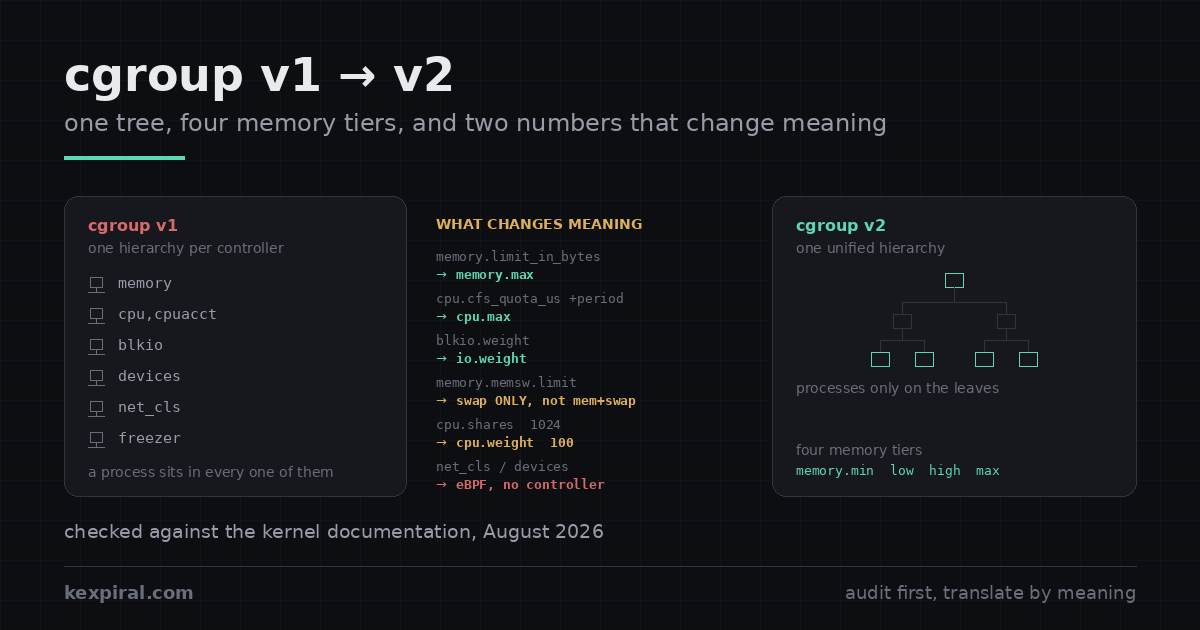
下面是这次迁移在真实机群上的实际走法:如何判断一台主机跑在哪套层级、又不被 hybrid 布局骗过去;逐个接口文件的转换表以及对应的 systemd 指令;两处照抄数字就会悄悄改变行为的翻译;2025 年在 OCI 运行时里被悄悄替换掉的 CPU 权重公式;还有对 Docker 和 Kubernetes 究竟做了什么、没做什么的老实交代——因为在最后这一点上,网上写的大部分是错的,照着做要么换来一次故障,要么换来一整年不必要的恐慌。
这不是你选的,而这正是重点
症状全是间接的,帮不上什么忙,因为没有哪件事会自报家门说“我是 cgroup 问题”。监控 agent 开始报零。容器的内存限制不再被执行。在老机器上跑得好好的 rootless 负载死活起不来。一个读了八年 /sys/fs/cgroup/memory/memory.usage_in_bytes 的脚本开始往日志里写 file-not-found,而那份日志没人看,所以没人发现。这些都是同一件事的不同侧面:路径搬家了,语义在底下变了,而且没有哪个环节报错报得足够响,响到能拦下一次发布。[sd258]
| 你看到的现象 | 通常意味着什么 | 在哪里处理 |
|---|---|---|
| 监控 agent 报告每个容器的内存和 CPU 都是零 | 它读的是 /sys/fs/cgroup/memory/… 或 cpu,cpuacct,而这些在统一层级下不存在 | 对照表 |
往 cgroup 里加 PID 时报 write error: Device or resource busy | no-internal-process 约束:这个 cgroup 已经把控制器委派给子节点了 | 三条规则 |
| 限制没变,容器却比以前 swap 得多得多 | memory.memsw.limit_in_bytes 被照抄进了 memory.swap.max,而后者限的只是 swap | 内存语义 |
rootless Podman 接受了 --memory,但并不执行 | systemd 没有把 memory 控制器委派给用户管理器 | 容器 |
| 竞争状态下容器拿到的 CPU 比以前少 | 线性的 shares 到 weight 换算把一核的 request 压到权重 39,而默认值是 100 | CPU 权重 |
节点镜像升级之后 kubelet 起不来 | cgroup v1 节点,kubelet v1.35 或更新,failCgroupV1 保持默认的 true | Kubernetes |
--oom-kill-disable 悄无声息地不起作用 | 在 cgroup v2 上被丢弃。没有等价物,也没有计划做一个 | 容器 |
有一个习惯值得在别的事情之前先戒掉。如果你的某个工具在 systemd 主机上直接往 /sys/fs/cgroup 里写,它不会以你想要的形态活过这次迁移。那棵树归 systemd 管,只要有 unit 发生变化,它就会按自己的认知重新刷一遍;上游自己的委派文档写得很清楚:每棵子树只能有一个写入者,这是规则,不是建议。在 v1 下你通常还能蒙混过去,在 v2 严格的自上而下委派下,蒙混不过去了。[sddeleg]
这台主机到底跑在哪套层级上
先把事实搞清楚,因为那些口口相传的命令会以一种固定而一致的方式骗你。Kubernetes 文档里那条检查才是对的,而且只有一条命令:问 /sys/fs/cgroup 的文件系统类型。在统一层级下,这个挂载点本身就是一个 cgroup2 文件系统,所以 stat 会报 cgroup2fs;在 v1 下——关键是在老的 hybrid 布局下也一样——它是一个 tmpfs,控制器目录挂在它里面。[k8scg]
# The only check that cannot lie. /sys/fs/cgroup is a tmpfs under v1 and under
# the old hybrid layout, and a cgroup2 filesystem under the unified hierarchy.
stat -fc %T /sys/fs/cgroup/
# cgroup2fs   -> unified, cgroup v2 only
# tmpfs       -> cgroup v1, or hybrid: v2 mounted under a v1 tmpfs

# Why `mount | grep cgroup2` is not enough: hybrid mounts a cgroup2 hierarchy
# too, at /sys/fs/cgroup/unified, with no controllers attached to it. Grepping
# for the string finds it and tells you the opposite of the truth.
mount | grep -E '^cgroup' | sed 's/ (.*//'
# cgroup2 on /sys/fs/cgroup type cgroup2          <- unified: good
# cgroup2 on /sys/fs/cgroup/unified type cgroup2  <- hybrid:  not good

# What the kernel will actually let you control here. Under the unified
# hierarchy this file exists at the top of the tree and lists the controllers.
# Under hybrid it is not here at all - it is one level down, at
# /sys/fs/cgroup/unified/cgroup.controllers, and it is empty. Its absence from
# the top level is the clearest single tell that you are not on v2.
cat /sys/fs/cgroup/cgroup.controllers 2>/dev/null
# cpuset cpu io memory hugetlb pids rdma misc

# Where a given process ended up. Under v2 there is exactly one line and it
# starts with `0::`. More than one line means controllers are still split.
cat /proc/self/cgroup
# 0::/user.slice/user-1000.slice/session-3.scope

# And the two userspace pieces that have to agree with the kernel:
systemctl --version | head -1
docker info --format 'driver={{.CgroupDriver}} version={{.CgroupVersion}}' 2>/dev/null
hybrid 这种情况,正是 mount | grep cgroup2 不只是不全、而是会主动误导你的原因:hybrid 会在 /sys/fs/cgroup/unified 挂一套真正的 cgroup2 层级,但上面一个控制器都没挂。grep 命中了,你据此断定自己在 v2 上,然后配的每一条限制统统落到 v1 控制器上。第二个判据是 /proc/self/cgroup:v2 下它只有一行,以 0:: 开头;v1 或 hybrid 下则是每个控制器一行。在做任何规划之前,先拿下面这段脚本把整个机群扫一遍——按我的经验,答案从来不是整齐划一的。[cgman]
#!/usr/bin/env bash
# Fleet audit. Read-only: it changes nothing. Run it before you plan anything,
# because the answer is almost never uniform across a real estate of servers.
set -u

host=$(hostname -s)
ver=$(stat -fc %T /sys/fs/cgroup/ 2>/dev/null)
case "$ver" in
  cgroup2fs) mode=unified ;;
  tmpfs)     [ -d /sys/fs/cgroup/unified ] && mode=hybrid || mode=legacy ;;
  *)         mode=unknown ;;
esac

kernel=$(uname -r)
sd=$(systemctl --version 2>/dev/null | awk 'NR==1{print $2}')
printf '%-16s mode=%-8s kernel=%-14s systemd=%s\n' "$host" "$mode" "$kernel" "$sd"

# --- the things that will break, rather than the things that will complain ---

# a) v1-only controllers with no v2 equivalent. If anything you run writes to
#    these, it needs an eBPF replacement, not a path change.
for c in net_cls net_prio devices; do
  [ -d "/sys/fs/cgroup/$c" ] && echo "  uses v1-only controller: $c"
done

# b) anything with a hardcoded v1 path. This is the single most common cause of
#    a migration failing three weeks later in an agent nobody remembered.
grep -rIl --exclude-dir=.git \
     -e '/sys/fs/cgroup/memory/' \
     -e '/sys/fs/cgroup/cpu,cpuacct/' \
     -e 'memory.limit_in_bytes' \
     -e 'cpu.cfs_quota_us' \
     /etc /opt /usr/local 2>/dev/null | sed 's/^/  hardcoded v1 path: /'

# c) kernel command line pinning the old hierarchy. On systemd 258 and later
#    this parameter no longer does anything, which is its own kind of trap:
#    the host silently boots unified and the runbook still says otherwise.
grep -o 'systemd\.unified_cgroup_hierarchy=[01]' /proc/cmdline \
  | sed 's/^/  kernel cmdline: /'
grep -o 'SYSTEMD_CGROUP_ENABLE_LEGACY_FORCE=1' /proc/cmdline \
  | sed 's/^/  legacy force flag (removed in systemd 258): /'

# d) container runtimes and their drivers, which have to match the kernel
command -v docker  >/dev/null && docker info 2>/dev/null \
  | grep -E 'Cgroup (Driver|Version)' | sed 's/^/ /'
command -v podman  >/dev/null && podman info --format \
  '  podman cgroupVersion={{.Host.CgroupsVersion}} manager={{.Host.CgroupManager}}' 2>/dev/null
[ -f /var/lib/kubelet/config.yaml ] && \
  grep -E '^(cgroupDriver|failCgroupV1):' /var/lib/kubelet/config.yaml | sed 's/^/  kubelet /'
每台主机都要跑,别挑一台“有代表性的”。2026 年还留在 v1 上的机器,几乎按定义就是没人动过的机器:那台一体机、2019 年某人手工拉起来的构建节点、被刻意排除在配置管理之外的数据库节点。恰恰是这些主机上埋着写死的
/sys/fs/cgroup/memory/路径,也恰恰是这些主机坏了不会有人发现。
谁真的删了,谁只是说说
牵涉进来的一共四个项目,它们的时间线完全不同,这是这次迁移最大的混乱来源。systemd 动得最早,也动得最狠。2024 年 6 月的 256 版本不再默认以 cgroup v1 启动,但留了一条后路。2025 年 9 月的 258 版本直接把代码删了——发行说明毫不含糊:已移除对 cgroup v1(“legacy”与“hybrid”层级)的支持,并且 cgroup v2 在系统启动时将始终被挂载。同一个版本还把内核基线抬到了 5.4,推荐 5.7。[sdnews][sd256]
| 项目 | 实际发生了什么 | 时间 | 对你意味着什么 |
|---|---|---|---|
| systemd 256 | 不再默认以 cgroup v1 启动;新增 SYSTEMD_CGROUP_ENABLE_LEGACY_FORCE=1 | 2024 年 6 月 | 257 仍然认这个开关,所以 257 才是最后一个你还能要 v1 并且真能要到的版本 |
| systemd 258 | 彻底移除 cgroup v1 支持,连后路一起删;内核基线抬到 5.4,推荐 5.7 | 2025 年 9 月 | 这才是截止日期。统一层级是代码里唯一的模式 |
| Kubernetes 1.35 | 弃用 cgroup v1;kubelet 默认拒绝在 v1 节点上启动 | 2025 年 12 月 | 可以用 failCgroupV1: false 覆盖。不是移除 |
| Kubernetes 1.38+ | KEP-5573 执行代码移除的最早版本 | 尚未排期 | 你的时间比那些标题说的要宽裕 |
| Docker Engine 29.0 | 弃用 cgroup v1;没有设定移除版本 | 2025 年 11 月 | 只是弃用。文档写明支持会持续到 2029 年 5 月 |
| runc / crun | 把线性的 shares 到 weight 换算换成了基于对数的换算 | 2025 年内 | 会改变你已经迁移过的节点上的 CPU 优先级 |
另外三个项目并没有做你多半读到的那些事,而这个差别直接影响排期。Kubernetes 在 v1.35 里把 cgroup v1 标记为弃用——kubelet 现在默认拒绝在 v1 节点上启动,但这个默认值是一个你可以翻转的配置字段,而且 KEP-5573 白纸黑字写着代码移除不会早于 1.38,而这个版本没有附任何日期。Docker 在 2025 年 11 月发布的 Engine v29.0 里同样只是把 cgroup v1 标记为弃用,压根没定移除版本;Docker 自己的弃用页面写明支持会持续到 2029 年 5 月,也就是那些仍然需要它的企业发行版走到生命周期终点的时候。所以:操作系统已经删了,编排系统只是宣布了。按操作系统排期。[kep5573][dockdep]
| 发行版 | 默认层级 | 备注 |
|---|---|---|
| Fedora 31 及以后 | 统一层级(v2) | 第一个切换过去的主流发行版;Fedora 43 继承了 systemd 258 的移除 |
| Debian 11 及以后 | 统一层级(v2) | Debian 13 带的是 systemd 257,所以它是最后一个还留有 legacy 路径的版本 |
| Ubuntu 21.10 及以后 | 统一层级(v2) | 你现在多半还在跑的是 22.04 LTS 及更新的版本 |
| RHEL 9 及以后 | 统一层级(v2) | RHEL 9.4 正式弃用 v1;RHEL 10 根本不会以 v1 启动 |
| SLES 15 SP6 及以后 | 统一层级(v2) | SP3 到 SP5 默认是 hybrid,也就是会骗过 grep 的那种布局 |
| 更老的任何版本 | v1 或 hybrid | 而且到现在也已经脱离支持了。cgroup 这件事不是最急的那件 |
也就是说,任何一台机器上真正的截止日期,是它的发行版带的 systemd 版本,而不是任何容器平台的路线图。大多数机群其实早就在统一层级上跑了很多年,只是没人注意——Fedora 从 31 起、Debian 从 11 起、Ubuntu 从 21.10 起、RHEL 从 9 起。工作量集中在剩下的那些零头,以及那些不管主机怎么跑、照旧假设 v1 路径的工具上。[rhel10][moby51111]
三条规则,专打手工搭出来的层级
v2 与 v1 的区别有三条结构性规则,每一条都会打碎在 v1 下手工搭出来的层级。第一条是统一层级本身:一个进程在一棵树里只有一个位置,所有控制器都读同一个位置,这也是 /proc/self/cgroup 从十几行缩成一行的原因。第二条是自上而下的委派:只有父节点通过 cgroup.subtree_control 显式把控制器交下去,子 cgroup 里才存在这个控制器。第三条才是真正会疼的那条。[kdoc][knoint]
# DEMONSTRATION ONLY. This writes into the cgroup tree by hand, which is the
# exact thing the rest of this article tells you not to do on a systemd host.
# Read it to understand the rules, then set limits through systemd.

# Rule 1 - one tree. Under v1 a process had a position in each controller's
# hierarchy independently, which is why /proc/PID/cgroup had a dozen lines.
# Under v2 it has one, and every controller reads the same position.
cd /sys/fs/cgroup
mkdir -p demo/worker demo/batch

# Rule 2 - a controller only exists in a child if the parent hands it down.
# cgroup.controllers is what you HAVE; cgroup.subtree_control is what you GIVE.
cat demo/cgroup.controllers        # what the parent has delegated so far
echo '+cpu +memory +io' > cgroup.subtree_control   # root delegates to demo
cat demo/cgroup.controllers        # cpu io memory
echo '+cpu +memory' > demo/cgroup.subtree_control  # demo delegates to its kids
ls demo/worker/ | grep -E '^(cpu|memory)\.'        # the knobs now exist

# Rule 3 - no internal processes. A cgroup may hold processes, or hand
# resources to children, never both. This is the rule that breaks hand-built
# v1 layouts, and it fails at write() time with a very unhelpful error.
echo $$ > demo/cgroup.procs
# bash: echo: write error: Device or resource busy
#
# ... because demo already has subtree_control set. Processes live on leaves:
echo $$ > demo/worker/cgroup.procs   # fine

# The root cgroup is exempt from rule 3, which is why the mistake survives
# testing at the top level and only shows up one directory down.
no-internal-process 约束规定:非根 cgroup 要么装进程,要么把资源分给子节点,绝不能两样都干。它的存在是为了消掉 v1 里一个实打实的歧义——父节点自己的进程和它的子节点之间没有明确规则地互相竞争。落到实处,意味着一个在树的每一层都设了限制的 v1 布局是搬不过来的:你必须把进程推到叶子上,让中间节点保持为空。而且它的失败方式是最不友好的那种——往 cgroup.procs 里 echo 时得到一句光秃秃的 write error: Device or resource busy,完全看不出你违反的是两条规则中的哪一条。根 cgroup 是豁免的,这也正是为什么在顶层随手一测发现不了这个错误。[kdeleg]
逐个文件的对照表
对照表如下,每一对旁边都附了 systemd 指令,因为在任何 systemd 主机上,你真正应该去设的就是那条指令。改名字的比改语义的多,但有三行改的是含义而不是拼写,已经标出来了。特别注意 cpu.max 把 v1 的两个文件合并成了一个双值文件,以及 CPU 权重的刻度和 CPU shares 的刻度不是一回事——光默认值就差了十倍。[sdresctl]
| cgroup v1 | cgroup v2 | systemd 指令 | 备注 |
|---|---|---|---|
memory.limit_in_bytes | memory.max | MemoryMax= | 改名。含义不变:硬限制,越界触发 OOM kill |
memory.soft_limit_in_bytes | memory.high | MemoryHigh= | 升级。软限制基本被无视;memory.high 是真的会节流 |
| — | memory.low / memory.min | MemoryLow= / MemoryMin= | 新增。保护下限,v1 里没有对应物 |
memory.memsw.limit_in_bytes | memory.swap.max | MemorySwapMax= | 含义不同。memsw 是内存加 swap;这个只是 swap |
memory.usage_in_bytes | memory.current | — | 改名 |
memory.failcnt | memory.events | — | 更好:low、high、max、oom 和 oom_kill 分开计数 |
cpu.shares | cpu.weight | CPUWeight= | 刻度不同。默认 1024 变成默认 100;见换算一节 |
cpu.cfs_quota_us + cpu.cfs_period_us | cpu.max | CPUQuota= + CPUQuotaPeriodSec= | 两个文件合成一个,写作 "$MAX $PERIOD"。CPUQuota= 只设其中配额那一半 |
cpuacct.usage | cpu.stat | — | 现在还包含 nr_throttled 和 throttled_usec |
blkio.weight | io.weight | IOWeight= | 改名,但底下的统计终于是对的了 |
blkio.throttle.*_bps_device | io.max | IOReadBandwidthMax= 等 | 一个嵌套键文件取代四个文件;现在也覆盖缓冲写 |
pids.max | pids.max | TasksMax= | 没变 |
freezer.state | cgroup.freeze | — | 改名;写 1 或 0 |
devices.allow / devices.deny | —(eBPF) | DeviceAllow= | 没有控制器。由 BPF_PROG_TYPE_CGROUP_DEVICE 取代 |
net_cls.classid / net_prio.* | —(eBPF) | — | 既没有控制器,也没有替代文件。在 cgroup 路径上用 eBPF |
| — | cpu.pressure / memory.pressure / io.pressure | — | 新增。PSI:迁移的理由,而不是迁移的代价 |
有三个 v1 控制器在 v2 里根本没有对应物,这一行把机械式迁移变成了一件工程活。net_cls 和 net_prio 是被直接删掉的,没有重新实现;按 cgroup 做流量分类和整形,现在靠挂在 cgroup v2 路径上的 eBPF 程序完成,iptables 和 nftables 侧有对应的匹配支持。devices 控制器走的是同一条路:白名单文件没有了,取而代之的是一个 BPF_PROG_TYPE_CGROUP_DEVICE 类型的 eBPF 程序,它拿到主设备号、次设备号、设备类型和访问类型,返回放行或者 -EPERM。如果你的平台直接用过这几个控制器中的任何一个,请按真正的开发工作量排期,而不是按一次路径替换。[cgman][bpfdev]
内存才是语义真正变了的地方
内存是马虎迁移悄悄造成损失的地方,因为数字照抄过去仍然对得上,行为却已经变了。v1 下你有一条硬限制,外加一条大多数内核实际上不理会的软限制。v2 下你有四层,而其中只有一层能杀东西:memory.max 是硬限制,触发 cgroup 内部的 OOM kill;memory.high 是节流阀,会把这个 cgroup 压进重度回收,用内核自己的话说,它从不调用 OOM killer;memory.low 是尽力而为的保护;memory.min 是硬保护,任何情况下都不会被回收。[kmem][kv1mem]
# --- cgroup v1: two numbers, and the second one is not what people think ---
#   memory.limit_in_bytes        = 2G   -> hard limit on memory
#   memory.memsw.limit_in_bytes  = 3G   -> hard limit on memory PLUS swap
#                                          (so: 2G RAM + up to 1G of swap)
#   memory.soft_limit_in_bytes   = 1G   -> best-effort, and widely ignored
#
# --- cgroup v2: four memory tiers, plus a separate swap cap ---------------
cd /sys/fs/cgroup/demo/worker

echo 2G       > memory.max        # hard limit. Over this, OOM kill inside the cgroup.
echo 1800M    > memory.high       # throttle. Over this, heavy reclaim - never an OOM kill.
echo 512M     > memory.low        # best-effort protection. Reclaimed only as a last resort.
echo 256M     > memory.min        # hard protection. Never reclaimed, at all.
echo 1G       > memory.swap.max   # SWAP ONLY. Not memory+swap. Read that twice.

# The migration trap, stated as arithmetic:
#   v1: memsw.limit=3G with limit=2G  ->  2G RAM, 1G swap
#   v2: memory.swap.max=3G            ->  memory.max RAM, 3G swap
# Copying 3G across gives the workload three times the swap it used to have.
# The correct translation is (memsw.limit - limit), and if that is zero you
# want memory.swap.max=0, not "unset".

# What is actually happening, rather than what you configured:
cat memory.current                 # bytes in use right now
cat memory.events                  # low high max oom oom_kill oom_group_kill
# low 0
# high 148          <- throttled 148 times: memory.high is doing work
# max 0
# oom 0
# oom_kill 0        <- and it never had to kill anything
cat memory.pressure                # PSI: how much time was lost waiting on memory
# some avg10=0.42 avg60=0.31 avg300=0.11 total=9214430
# full avg10=0.00 avg60=0.00 avg300=0.00 total=118221

# memory.high plus memory.events is the pair that turns "the box OOMs at 3am"
# into a number you can alert on before it happens. v1 could not do this.| v2 文件 | 作用 | 会杀进程吗? | 最接近的 v1 等价物 |
|---|---|---|---|
memory.min | 硬保护:低于这个值的内存在任何压力下都不会被回收 | 间接会 | 无 |
memory.low | 尽力而为的保护:只有在没有未受保护的内存可回收时才回收 | 不会 | 无 |
memory.high | 节流:超过之后 cgroup 被压进重度回收,里面的进程会变慢 | 不会 | 勉强算 memory.soft_limit_in_bytes |
memory.max | 硬限制:超过且回收不出来,cgroup 内部的 OOM killer 就动手 | 会 | memory.limit_in_bytes |
memory.swap.max | 只限 swap 用量,与 memory.max 相互独立 | 间接会 | memory.memsw.limit_in_bytes 减去内存限制 |
memory.events | 计数器:上面每一项各被触发过多少次,含 oom_kill | — | memory.failcnt,且不分项 |
坑在 memory.swap.max 上,这里值得把话说重一点,因为把数字照抄过去是最自然的动作。v1 里 memory.memsw.limit_in_bytes 限的是内存加 swap 的总和;v2 里 memory.swap.max 限的是 swap 本身。一个原来 limit=2G, memsw=3G 的容器,允许用 2 GB 内存加 1 GB swap。你把 memory.swap.max=3G 一设,等于把它的 swap 额度直接放大到原来的三倍,而且故障表现不是崩溃,是机器在压力下越来越慢,慢在任何一张内存曲线上都看不出来。正确的换算是两个 v1 数字的差值;如果差值是零,你要的是显式的 0,而不是一个没设过的文件。作为交换,你拿到了 memory.events,它把 v1 全都塞进一个 failcnt 的那些计数拆开分项统计;还有 memory.pressure,这个在 v1 里根本没有对应物:一个停顿度量,让你能在 OOM killer 动手之前很久就对一个正在挣扎的负载告警。[psi]
CPU 配额,以及一个终于算得准的 I/O 控制器
CPU 干净地拆成了两个在 v1 里被混在一起的概念。cpu.weight 是竞争状态下 CPU 时间的相对份额——机器闲着的时候它什么也不做,它是表达优先级的正确工具。cpu.max 是绝对上限,写成微秒单位的 "$MAX $PERIOD",取代了 v1 那两个人们经常搞反关系的独立文件。真正值得接进监控的是 cpu.stat:nr_throttled 和 throttled_usec 回答的是“这个服务慢,是不是因为我们给它设了上限”,而这个问题从外面几乎无从确定。[kio]
# --- CPU: two knobs, and only one of them is a limit ---------------------
cd /sys/fs/cgroup/demo/worker

# Weight: relative share of contended CPU. Default 100, range 1-10000.
# It does nothing at all while the machine is idle.
echo 200 > cpu.weight

# Quota: an absolute ceiling, written as "$MAX $PERIOD" in microseconds.
# 150000 out of every 100000us = 1.5 CPUs. "max" removes the ceiling.
echo '150000 100000' > cpu.max
echo 20000 > cpu.max.burst      # allow short bursts above quota (v2 only)

# The v1 equivalents were three files, and the period was easy to forget:
#   cpu.shares = 200            -> but the scale was different: default 1024
#   cpu.cfs_quota_us  = 150000
#   cpu.cfs_period_us = 100000

# Throttling, which is the number people actually need and rarely find:
cat cpu.stat
# usage_usec 918422311
# nr_periods 41822
# nr_throttled 219       <- how often the quota was hit
# throttled_usec 411920  <- and how much time was lost to it

# --- IO: blkio became io, and the numbers finally mean something ----------
# v1's blkio.throttle.* only saw direct IO; buffered writes were charged to
# whatever kernel thread flushed them, so the accounting was fiction.
echo '259:0 rbps=104857600 wbps=52428800 riops=max wiops=2000' > io.max
echo 'default 100' > io.weight
cat io.stat
# 259:0 rbytes=2841579520 wbytes=1120043008 rios=48211 wios=22103 dbytes=0 dios=0
cat io.pressure
# some avg10=1.94 avg60=0.88 avg300=0.31 total=41822193

# Device numbers, because io.max will not take a path:
lsblk -no MAJ:MIN,NAME /dev/nvme0n1| v2 文件 | 类型 | 默认值 | 用途 |
|---|---|---|---|
cpu.weight | 相对值 | 100(范围 1–10000) | 竞争时的优先级。机器闲着时毫无作用 |
cpu.max | 绝对值 | max 100000 | 上限。150000 100000 就是 1.5 核 |
cpu.max.burst | 绝对值 | 0 | 允许短暂超出配额,而不是立刻被节流 |
cpu.stat | 只读 | — | nr_throttled 和 throttled_usec:上限确实在伤人的证据 |
io.weight | 相对值 | default 100 | 磁盘时间的相对份额,可按设备或整体设置 |
io.max | 绝对值 | 未设置 | 按 MAJ:MIN 设 rbps、wbps、riops、wiops |
io.latency | 目标值 | 未设置 | 保的是延迟目标,而不是一个带宽数字 |
I/O 控制器是 v2 里真正算得上改进、而不只是改名的部分。v1 的 blkio 限流只看得见直接 I/O;缓冲写会记到最后把它刷盘的那个内核线程头上,所以按 cgroup 统计写入量,客气点说是虚构。v2 的 io 控制器认得 writeback,会把它归回到弄脏页面的那个 cgroup。就这一处改动,让 io.max 和 io.weight 在数据库主机上值得去配,而 v1 里的对应设置基本不值得配。io.latency 和 io.cost 走得更远,保的是负载的延迟目标而不是带宽数字——如果你不确定从哪儿下手,两者之中 io.latency 的侵入性更小。[kdoc]
没人通知过你的那次 CPU 权重改动
这件事值得单开一节,因为它动了每一个容器化负载的 CPU 优先级,而且是在一个大多数人不会去翻 changelog 的组件里动的。Kubernetes 一直按 milliCPU × 1024 / 1000 从 request 推导出 CPU shares,所以一个申请 1 核的容器拿到 1024 shares。OCI 运行时再把 shares 换算成 v2 权重,而最初的换算是在内核的 [2, 262144] shares 区间上做线性映射。拿 1024 shares 算一下,得到的权重是 39——而 cgroup v2 的默认值是 100。[k8scpu][runcissue]
# A quiet change that moved every containerised workload's CPU priority, with
# no release note in most people's changelog because it happened in the OCI
# runtime rather than in the orchestrator.

# Kubernetes derives shares from the CPU request, and always has:
#   cpu.shares = milliCPU * 1024 / 1000
#   request 1000m -> 1024 shares      request 100m -> 102 shares

# runc then converted shares to a v2 weight. The original conversion was
# linear over the kernel's [2, 262144] share range:
#   weight = 1 + ((shares - 2) * 9999) / 262142
python3 -c 'print(1 + ((1024 - 2) * 9999) // 262142)'
# 39
#
# 39. Against a cgroup v2 default of 100. Every container asking for a full CPU
# was scheduled at roughly a third of the weight of anything not in a
# container - including the kubelet and the runtime themselves.

# The replacement is log-based, and is chosen so that one CPU lands on the
# default rather than well below it:
python3 - <<'PY'
import math
def weight(shares):
    if shares == 0: return 0
    if shares <= 2: return 1
    if shares >= 262144: return 10000
    l = math.log2(shares)
    return math.floor(10 ** ((l*l + 125*l) / 612.0 - 7/34) + 0.99)
for req, sh in (("100m",102), ("500m",512), ("1",1024), ("4",4096), ("16",16384)):
    print("%-6s shares=%-6d weight=%d" % (req, sh, weight(sh)))
PY
# 100m   shares=102    weight=17
# 500m   shares=512    weight=59
# 1      shares=1024   weight=100
# 4      shares=4096   weight=303
# 16     shares=16384  weight=942
#
# 1024 lands on exactly 100 because the curve is fitted through three fixed
# points: 2 -> 1, 1024 -> 100, and 262144 -> 10000.

# Check what your nodes are doing, because this depends on the runtime version
# and not on the Kubernetes version. The new conversion ships in runc 1.3.2 and
# later, and in crun 1.23 and later:
runc --version; crun --version 2>/dev/null
cat /sys/fs/cgroup/kubepods.slice/*/*/cpu.weight 2>/dev/null | sort -n | uniq -c
后果是:一个申请了整整一核的容器,在同一个节点上跟任何不在容器里的东西(包括系统守护进程和 kubelet 自己)竞争时,优先级大约只有对方的三分之一。修复用一条基于对数的曲线替换了线性映射,曲线穿过三个固定点——2 shares 对应权重 1、1024 对应 100、262144 对应 10000——于是申请一核现在正好落在 cgroup v2 的默认值上。它随 runc 1.3.2 及以后和 crun 1.23 及以后发布。有两件事很容易漏掉。第一,这是运行时的改动,不是 Kubernetes 的改动:它随你升级 runc 或 crun 而生效,跟集群升级不一定同步,所以要查的是运行时版本而不是集群版本。第二,它会改变已经迁移过的节点上各个负载之间的相对优先级,所以如果你在这次改动之前在 v2 上压过 CPU 行为,那份基准数据已经过期了。[runcpr]
走 systemd,别去写 /sys
在任何 systemd 主机上,正确的接口是 systemd,不是文件系统。这不是风格问题。cgroup 树是 systemd 建的,而且每当某个 unit 被 reload、restart 或改配置,它就会把自己那份资源设置重新刷上去——所以你 echo 进 memory.max 的值,能活到下一次毫不相干的变更为止,然后无声无息地消失,日志里一行都没有。上游的委派文档把规则说得很直白:每棵子树一个写入者。走 systemd 还白送你重启后依然生效,这一点手工改文件永远做不到。[sddeleg][sdresctl]
# Writing into /sys/fs/cgroup by hand works exactly until systemd next touches
# that unit, at which point your values are overwritten without warning.
# systemd owns the tree; ask it, and the setting also survives a reboot.

# Try a limit on something already running, for this boot only:
systemctl set-property --runtime nginx.service MemoryHigh=1G IOWeight=50

# Make it permanent. This writes a drop-in for you - under
# /etc/systemd/system.control/nginx.service.d/, not /etc/systemd/system/, which
# is why hand-searching for your setting in the obvious place turns up nothing.
# No daemon-reload needed.
systemctl set-property nginx.service MemoryMax=2G MemoryHigh=1800M CPUWeight=200

# Or write the drop-in yourself, which is what you want in configuration
# management: /etc/systemd/system/nginx.service.d/50-resources.conf
#
#   [Service]
#   MemoryMax=2G            # -> memory.max
#   MemoryHigh=1800M        # -> memory.high
#   MemoryMin=256M          # -> memory.min
#   MemorySwapMax=0         # -> memory.swap.max
#   CPUWeight=200           # -> cpu.weight
#   CPUQuota=150%           # -> cpu.max  (150% of one CPU)
#   IOWeight=50             # -> io.weight
#   IOReadBandwidthMax=/dev/nvme0n1 100M
#   TasksMax=512            # -> pids.max
#
# Note CPUQuota is a percentage of ONE CPU, not of the machine: 150% is 1.5
# cores. This is the systemd unit that trips people most often.

# Put a limit on a command you are about to run, without writing a unit:
systemd-run --scope --user -p MemoryMax=4G -p CPUQuota=200% -- ./import-job.sh

# And look at the tree systemd actually built, not the one you configured:
systemd-cgls --unit nginx.service
systemd-cgtop --order=memory --iterations=1

# Reading the values back. Note that there is no CPUQuota property to query:
# the unit-file setting CPUQuota= is exposed as CPUQuotaPerSecUSec, and asking
# for the name you wrote is the usual reason this returns nothing.
systemctl show nginx.service -p MemoryMax -p MemoryHigh -p CPUQuotaPerSecUSec日常工作大部分靠三条命令。systemctl set-property 立即生效并写入磁盘,下次启动仍然有效,除非你加 --runtime 让它只是临时的。systemd-run --scope -p … 给你即将执行的命令套一层限制,这是约束一次临时导入或备份的老实做法,而不是听天由命。systemd-cgtop 按 cgroup 而不是按进程显示资源占用,容器主机一忙起来,这才是你真正想要的视角,而 top 只会给你两百个进程和零结构。有一条指令能坑到所有人:CPUQuota= 是单个 CPU 的百分比,所以 150% 是一核半,不是整机的 150%。[sdctl][sdcgtop]
Docker、Podman,以及终于生效的 rootless 限制
容器这边消息基本是好的,因为翻译由运行时来做。--memory、--cpus、--memory-reservation 和 --pids-limit 的含义都没变,只是现在分别落到 memory.max、cpu.max、memory.low 和 pids.max 上。在统一层级的主机上,Docker 默认使用 systemd cgroup 驱动和私有 cgroup 命名空间,这两个默认值都是对的。值得知道的例外是 --oom-kill-disable:Docker 自己的文档说它在 v2 上会被丢弃——不是翻译,不是告警,是丢弃。设计上就没有 v2 等价物,所以依赖它的东西需要重新设计,而不是移植。[dockrun]
# --- Docker ---------------------------------------------------------------
docker info --format 'version={{.CgroupVersion}} driver={{.CgroupDriver}}'
# version=2 driver=systemd     <- the defaults on a unified host

# Most flags are unchanged, because the daemon translates them for you:
docker run --memory 2g --memory-reservation 1g --cpus 1.5 --pids-limit 512 nginx
#          -> memory.max        memory.low       cpu.max      pids.max

# Two that are not:
#   --oom-kill-disable   is discarded on cgroup v2. Not translated - discarded.
#                        There is no v2 equivalent, by design.
#   --kernel-memory      removed from the Engine in v23.0. It is gone, not moved.

# Setting the driver explicitly, in /etc/docker/daemon.json. Use systemd unless
# something specific stops you: it is the default on v2 and it is the only
# option that keeps one writer per subtree.
#   { "exec-opts": ["native.cgroupdriver=systemd"] }

# --- Podman rootless: this is the part that only works on v2 --------------
# Under v1, an unprivileged user could not be given controllers at all, so
# rootless resource limits silently did nothing. Under v2 they work, but only
# once systemd delegates the controllers to the user manager:
#
#   /etc/systemd/system/user@.service.d/delegate.conf
#   [Service]
#   Delegate=cpu cpuset io memory pids
#
sudo systemctl daemon-reload    # then log out and back in

# Verify from inside the user session, before blaming the container:
cat /sys/fs/cgroup/user.slice/user-$(id -u).slice/cgroup.controllers
# cpuset cpu io memory pids     <- if memory is missing, --memory does nothing
podman info --format '{{.Host.CgroupsVersion}} {{.Host.CgroupManager}} {{.Host.OCIRuntime.Name}}'
# v2 systemd crun
rootless 容器是唯一一处 v2 不是成本、而是功能的地方。把 v1 控制器委派给非特权用户从来就不被认为是安全的做法,所以大多数 rootless 实现在 v1 主机上干脆不支持资源限制。v2 下安全的子树委派让它们真的能用起来——但前提是 systemd 已经把控制器委派给用户管理器,做法是给 user@.service 加一个 drop-in 再重新登录一次,这一步正是几乎每一份“rootless Podman 不理 --memory”报告背后缺掉的那一环。怪容器之前,先看看你自己那个 user slice 里的 cgroup.controllers:如果里面没有 memory,你传什么参数都不会被执行。额外委派 cpuset 还需要 systemd 244 或更新版本。[podman][crun]
Kubernetes:事实是什么,你反复读到的又是什么
现在说最常被传错的那部分,说得仔细一点。Kubernetes 没有移除 cgroup v1。文档里标记的是自 v1.35 起弃用,实际后果是 kubelet 默认拒绝在 cgroup v1 节点上启动。那个默认值是 KubeletConfiguration 里的一个字段 failCgroupV1,设成 false 就恢复原来的行为。KEP-5573——最终会执行移除的那个增强提案——写的是移除不会早于 1.38。如果哪篇博客告诉你 1.36 删掉了 cgroup v1,那是错的;而“弃用但可以覆盖”和“已移除”之间的差别,就是一次有计划的迁移和一个搭进去的周末之间的差别。[k8scg][kep5573]
# What the cluster thinks it is standing on. Run this first; mixed node pools
# are the normal case, not the exception.
kubectl get nodes -o custom-columns=\
'NODE:.metadata.name,KERNEL:.status.nodeInfo.kernelVersion,'\
'RUNTIME:.status.nodeInfo.containerRuntimeVersion,OS:.status.nodeInfo.osImage'

# The kernel version alone does not tell you the hierarchy. Ask each node.
# Note the -it: without it, kubectl debug does not attach, the output goes to
# the debug pod's log instead of your terminal, and you are left with one
# orphaned pod per node.
kubectl get nodes -o name | while read -r n; do
  printf '%-40s ' "${n#node/}"
  kubectl debug "$n" -it --image=busybox --profile=general -- \
    stat -fc %T /host/sys/fs/cgroup/ 2>/dev/null || echo '(debug unavailable)'
done
# Clean up afterwards - the debug pods are not removed for you:
kubectl delete pod -l app.kubernetes.io/managed-by=kubectl-debug 2>/dev/null

# On the node itself - the three files that have to agree:
stat -fc %T /sys/fs/cgroup/                       # cgroup2fs
grep -E '^(cgroupDriver|failCgroupV1):' /var/lib/kubelet/config.yaml
grep -A2 'runc.options' /etc/containerd/config.toml   # SystemdCgroup = true

# --- what is actually true about Kubernetes and cgroup v1 -----------------
# cgroup v1 is DEPRECATED as of v1.35, not removed. The kubelet refuses to
# start on a v1 node by default, and that default is overridable:
#
#   /var/lib/kubelet/config.yaml
#   apiVersion: kubelet.config.k8s.io/v1beta1
#   kind: KubeletConfiguration
#   cgroupDriver: systemd
#   failCgroupV1: false        # <- the escape hatch. Buys time, not a fix.
#
# KEP-5573 states the code removal will happen no earlier than 1.38.

# The v2-only features you get in exchange, and how to see them:
NODE=$(kubectl get nodes -o jsonpath='{.items[0].metadata.name}')
kubectl get --raw "/api/v1/nodes/$NODE/proxy/metrics/cadvisor" \
  | grep -E '^container_pressure_(cpu|memory|io)_' | head
# container_pressure_memory_stalled_seconds_total{...}
# container_pressure_memory_waiting_seconds_total{...}
节点侧的要求并不苛刻,但值得去实际检查而不是想当然:内核 5.8 或更新、containerd v1.4+ 或 CRI-O v1.20+,以及 kubelet 和运行时明确配置成使用 systemd 这个 cgroup 驱动——不是随便哪个驱动一致就行。最后这一条过去经常制造“半好不坏”的节点,因为它依赖两个配置文件保持一致;从 v1.34 起 kubelet 直接向 CRI 运行时询问它用的是哪个驱动,只要运行时版本够新,这一整类问题就退休了。作为迁移的回报,你拿到一组只有 v2 上才存在的能力:[k8sdriver][k8spsi]
- PSI 指标,在 v1.36 里 GA。kubelet 按 cgroup 读取
cpu.pressure、memory.pressure和io.pressure,通过 Summary API 和 cAdvisor 指标端点暴露出来。这些文件在 v1 下压根不存在,所以这不是一个能往回移植的特性——它是迁移的理由。 - Memory QoS。kubelet 可以按
memoryThrottlingFactor设置memory.high,让容器在被杀掉之前先被狠狠回收;另外在memoryReservationPolicy: TieredReservation之下,它还能给 Guaranteed pod 设memory.min、给 Burstable pod 设memory.low。截至 v1.36 它仍是 alpha 且默认关闭,所以把它当成可以试的东西,而不是可以依赖的东西——但它的形状正是四层内存模型的用意所在。 - 真正能执行限制的 rootless 和用户命名空间负载。Podman 那一节讲的东西对 Kubernetes 节点同样成立,这也是用户命名空间 GA 和 cgroup v2 是同一个故事、而不是两件巧合的原因。
- 诚实的按 pod 计的 I/O 统计。缓冲写会归到真正造成它的那个 cgroup 头上,于是每个 pod 的磁盘用量变成一个你可以据此行动的数字,而不是一个需要你替它解释的数字。
混合环境里有一个容易搞错的排期问题。因为推动力来自 systemd 而不是 Kubernetes,节点池往往随着基础镜像滚动而自己就迁移了,远远早于任何集群层面的决定。这没问题,但意味着你可能得到一个半数节点在 v2、半数不在的集群,跑着同样的负载却有实质不同的内存和 CPU 行为——而任何地方都不会有告警来提醒你。去审计节点,别从集群版本去推断。[k8sqos]
在还没打开的地方把 v2 打开
如果你还有主机在 v1 或 hybrid 上,下面是机械操作的部分,很短。先说清楚:在 systemd 258 及以后,没有什么可开、也没有什么可关——统一层级是代码唯一支持的模式。不过,那些主机上的旧内核参数还是要删掉。systemd 258 自己不再理会它,但如果 initrd 仍然按它行事、挂起了一套 v1 层级,PID 1 会拒绝启动,并提示你把这条过期的命令行选项清掉——这比无声无息地失败要好得多,但仍然是一次得跑到控制台前才能修好的启动。下面的内容只适用于老到还有得选的主机;而在那些主机上,这个选择应该放在一个同时更换容器运行时的维护窗口里做,因为一台带着 cgroupfs 驱动重启进 v2 的节点,回来之后状态会很有意思。[sd258]
# Only needed on hosts old enough to still default to v1 or hybrid. On
# systemd 258 and later there is nothing to enable: unified is the only mode.

# 1. Check you can. Kubernetes wants kernel 5.8+; systemd 258 needs 5.4 as an
#    absolute floor and recommends 5.7. Below that, upgrade the OS instead.
uname -r

# 2. Set the kernel parameter. Debian and Ubuntu. The grep guard matters:
#    without it, running this twice adds the parameter twice.
grep -q 'systemd.unified_cgroup_hierarchy' /etc/default/grub || \
  sudo sed -i 's/^GRUB_CMDLINE_LINUX="/&systemd.unified_cgroup_hierarchy=1 /' \
       /etc/default/grub
sudo update-grub

#    RHEL, Fedora, Rocky, Alma - grubby, and note ALL rather than the running
#    kernel, or the setting vanishes at the next kernel update:
sudo grubby --update-kernel=ALL --args="systemd.unified_cgroup_hierarchy=1"

# 3. Line up the container runtimes in the SAME maintenance window. A node
#    that reboots into v2 with a cgroupfs driver is a node that does not come
#    back cleanly.
#    /etc/docker/daemon.json      -> "exec-opts": ["native.cgroupdriver=systemd"]
#    /etc/containerd/config.toml  -> SystemdCgroup = true
#    /var/lib/kubelet/config.yaml -> cgroupDriver: systemd

sudo reboot

# 4. Verify, in this order. If step one disagrees with step three, stop.
stat -fc %T /sys/fs/cgroup/            # cgroup2fs
cat /sys/fs/cgroup/cgroup.controllers  # non-empty
systemctl --failed
docker info --format '{{.CgroupVersion}}/{{.CgroupDriver}}'   # 2/systemd

# Rolling back is removing the parameter and rebooting - but only while your
# systemd is older than 258. After that the parameter is inert and the only
# way back is downgrading the OS, which is not a rollback plan.| 会坏掉的东西 | 原因 | 改用什么 |
|---|---|---|
读 /sys/fs/cgroup/memory/… 的脚本 | 统一层级下不存在按控制器分的目录 | 读扁平的 v2 路径,或者向 systemctl show 要这个值 |
| 往 systemd 管辖的 cgroup 里写的工具 | 只要 unit 有任何变化,systemd 就悄悄把自己的设置刷回去 | systemctl set-property,或者一个 drop-in 文件 |
基于 net_cls 的流量打标 | 控制器被删,且没有替代文件 | 把 eBPF 挂到 cgroup 路径上,从 nftables 里匹配 |
devices.allow 白名单 | 控制器被一种 eBPF 程序类型取代 | 在 unit 里写 DeviceAllow=,或者自己写 eBPF 设备程序 |
| 在树的每一层都设限制的布局 | no-internal-process 约束 | 把进程推到叶子上;让中间的 cgroup 保持为空 |
--oom-kill-disable | 在 v2 上按设计被丢弃 | 把 memory.max 设到合适大小,并用 memory.high 提前拿到预警 |
| 原样照抄过来的 swap 限制 | memory.swap.max 限的只是 swap,不是内存加 swap | 设成两个 v1 数字的差值,或者显式写 0 |
关于回滚有两点,毕竟没人会不带回滚方案就做迁移。只要你的 systemd 还是 257 或更老的版本,回滚就是去掉内核参数再重启一次,代价确实很低。一旦上了 258 或更新版本,除了把操作系统降级之外没有任何受支持的退路——那不叫回滚方案,那叫重装。机群的顺序照此安排:先做还有退路的主机,从中把经验拿到手,然后再动那些没有退路的。[dockrun]
去验证,而不是去祈祷
验证不是品味问题。下面这段脚本的要点是:每一行要么打印 OK,要么把自己解释清楚,退出码就是失败项的数量,所以它可以直接塞进重启之后要跑的流程里。其中有两项检查特别值得留着。第一项会打印一份清单,列出所有确实设了 MemoryMax 的运行中 unit,你拿它和你本来打算配置的那份名单去对——某个 unit 没出现在输出里,就说明它的 drop-in 放错了目录,而不知道预期状态就没有别的办法发现这一点。第二项把整棵树扫一遍找节流,因为一个没人抱怨的服务上 nr_throttled 却在涨,正是限制翻译得过紧的典型征兆。[sdcgls]
#!/usr/bin/env bash
# Post-migration verification. Every check either prints OK or explains
# itself; nothing here is judged by eye. Exit code is the number of failures.
fail=0
chk() { if eval "$2" >/dev/null 2>&1; then printf 'OK   %s\n' "$1";
        else printf 'FAIL %s\n' "$1"; fail=$((fail+1)); fi; }

chk 'unified hierarchy'        '[ "$(stat -fc %T /sys/fs/cgroup/)" = cgroup2fs ]'
chk 'controllers available'    '[ -s /sys/fs/cgroup/cgroup.controllers ]'
chk 'memory controller'        'grep -qw memory /sys/fs/cgroup/cgroup.controllers'
chk 'io controller'            'grep -qw io     /sys/fs/cgroup/cgroup.controllers'
chk 'single cgroup line'       '[ "$(wc -l < /proc/self/cgroup)" -eq 1 ]'
chk 'no v1 leftovers mounted'  '! mount | grep -q "type cgroup "'
chk 'no failed units'          '[ -z "$(systemctl list-units --state=failed --no-legend)" ]'
chk 'PSI available'            '[ -r /sys/fs/cgroup/cpu.pressure ]'

# Limits are actually applied, rather than merely configured. A unit whose
# MemoryMax reads "infinity" after you set it is a unit whose drop-in is in
# the wrong place - a very common outcome of hand-editing.
for u in $(systemctl list-units --type=service --state=running \
           --no-legend --plain | awk '{print $1}'); do
  m=$(systemctl show "$u" -p MemoryMax --value)
  [ "$m" != "infinity" ] && printf '     %-34s MemoryMax=%s\n' "$u" "$m"
done

# Nothing is being silently throttled. nr_throttled climbing on a service that
# is not busy means cpu.max is too tight, and it will not appear in load
# average. Search the whole tree, not just the top-level slices: throttling
# happens on the leaf that holds the process.
find /sys/fs/cgroup -name cpu.stat -exec \
  awk '/^nr_throttled/ && $2>0 {print FILENAME": "$0}' {} + 2>/dev/null

# Containers agree with the host.
command -v docker >/dev/null && \
  chk 'docker on v2/systemd' '[ "$(docker info -f "{{.CgroupVersion}}/{{.CgroupDriver}}")" = 2/systemd ]'

printf '\n%d failure(s)\n' "$fail"; exit "$fail"
迁移之前也跑一遍,把输出留着。被算到 cgroup 迁移头上的问题,有很大一部分在迁移之前就已经成立了,而知道这一点的唯一办法就是先量过。如果上周那个服务的 nr_throttled 就已经在涨,那不是新层级造成的。
这件事的执行顺序
把决策压缩一下。老实的总结是:大多数人其实已经在没有立项的情况下迁完了,剩下的不是主机而是工具链——那些仍然读 v1 路径、并且会一直安静地返回零直到有人去查的脚本、agent 和看板。Kubernetes 最早给到 1.38,Docker 给得还要长,但这两个日期都不是你的截止日期。你的截止日期是下一次基础镜像升级把 systemd 带过 258 的那一刻——在大多数环境里,那一刻已经过去了。[kep5573]
| 如果你的情况是… | 那么截止日期是… | 要做的事是… |
|---|---|---|
所有机器都已经报 cgroup2fs | 早就悄无声息地过去了 | 只剩工具链:把仍然在读的 v1 路径找出来改掉 |
| 还有零星几台老主机在 v1 或 hybrid 上 | 它们下一次操作系统升级落地的时候 | 内核参数加运行时驱动,每台一个维护窗口 |
| Kubernetes 节点跑在混合的基础镜像上 | 随节点镜像滚动,而不是随集群升级 | 逐节点审计;不要从集群版本去推断层级 |
| 纯 Docker 主机,没有编排系统 | Engine v29.0 弃用了它;移除还有好几年 | Docker 这边不急,但 systemd 反正会先把主机带走 |
| 自研工具直接写 cgroup 文件 | 现在,而且这才是真正的项目 | 在主机从你脚下搬走之前,改成对着 systemd 的接口写 |
| 你改不动的一体机或厂商 agent | 厂商的时间表,那不是你的时间表 | 让他们把话写下来;如果答复不能接受,就把这台主机隔离 |
- 先审计,再规划。在每一台主机上跑那段机群脚本,把输出留档。你要找两样东西:仍然在 v1 或 hybrid 上的主机,以及
/etc、/opt和/usr/local里写死的 v1 路径。第二张清单几乎总是比第一张长,而且它才是真正的工作量。 - 趁两套层级都还在,先把工具修好。任何读
/sys/fs/cgroup的东西都应该同时处理两种布局,或者改成通过systemctl show去读。在主机搬家之前做这件事,意味着你能拿它要修的那个场景去验证修复。 - 按含义翻译限制,不要按名字翻译。对照表里有两行会改变行为:swap,
memory.swap.max限的只是 swap 本身;以及 CPU 权重,它的刻度和 shares 差了十倍不止。其余每一行都只是改名。 - 运行时和主机放在同一个窗口里动。内核参数、Docker 驱动、containerd 的
SystemdCgroup、kubelet 的cgroupDriver——四件一起改,重启一次,验证通过再动下一批。 - 把红利拿走。把
memory.high和memory.events接起来,把 PSI 放上看板,打开那些在 v1 下不值得设的按 cgroup 计的 I/O 限制。这次迁移的终点本身没有任何新功能,除非你主动去拿一个。
这件事和同一场变动里的另外三块内容挨在一起,而且会互相叠加:把 SysV init 脚本和 rc.local 迁移到 systemd unit,因为两处改动落在同一批 systemd 版本、同一批服务器上;Ubuntu 24.04 到 26.04 的服务器升级,大多数机群其实是在这里跨过那条线的;还有 Docker Engine 29 的破坏性变更,它对 cgroup v1 的弃用是这个故事的容器那一半。如果你在掂量自己到底需不需要这么多复杂度,什么时候不该用 Kubernetes 是这场争论的另一面。
常见问题
怎么查看当前是 cgroup v1 还是 v2?
跑一条 stat -fc %T /sys/fs/cgroup/。如果打印 cgroup2fs,你在统一层级上;如果打印 tmpfs,你在 v1 或者 hybrid 布局上。不要用 mount | grep cgroup2:hybrid 布局会在 /sys/fs/cgroup/unified 挂一套没有任何控制器的 cgroup2 层级,于是 grep 命中了,却告诉你一个与事实相反的结论。第二个确认手段是 /proc/self/cgroup,v2 下它只有一行,以 0:: 开头。
Kubernetes 1.36 是不是把 cgroup v1 删掉了?
没有。cgroup v1 是自 Kubernetes v1.35 起被标记为弃用,实际效果是 kubelet 默认拒绝在 cgroup v1 节点上启动。那个默认值是 KubeletConfiguration 里的一个字段 failCgroupV1,设成 false 就恢复此前的行为。KEP-5573,也就是最终会移除这部分代码的增强提案,写明移除不会早于 v1.38。有几篇转发量很大的文章说的不是这样;以 KEP 为准。
memory.swap.max 和 memory.memsw.limit_in_bytes 是一回事吗?
不是,而且这是整个迁移里危害最大的一个误解。在 cgroup v1 里,memory.memsw.limit_in_bytes 限的是内存加 swap 的总和,所以一个 limit=2G 且 memsw=3G 的 cgroup 可以用 2 GB 内存再加 1 GB swap。在 cgroup v2 里,memory.swap.max 限的只是 swap 本身。把 3G 照抄过去,等于把原来的 swap 额度放大到三倍。正确的换算是两个 v1 数值的差值;差值为零的地方,要显式写一个 0。
memory.high 和 memory.max 有什么区别?
memory.max 是硬限制:cgroup 达到它又回收不出来时,OOM killer 会在这个 cgroup 内部动手。memory.high 是节流阀:超过它会把 cgroup 压进重度回收压力、让里面的进程变慢,内核文档明确写着超过它绝不会调用 OOM killer。实践中你把 memory.high 设得比 memory.max 低一些,并对 memory.events 里的 high 计数告警,这样在任何东西被杀之前你就先拿到了预警。cgroup v1 没有对应的机制。
切到 cgroup v2 之后容器的 CPU 变少了,是为什么?
是 shares 到 weight 的换算造成的,不是 v2 本身。Kubernetes 按 milliCPU × 1024 / 1000 从 CPU request 推出 cpu.shares,所以申请 1 核会得到 1024 shares。OCI 运行时最初的换算把它线性映射到 v2 的权重区间上,结果是 39,而 cgroup v2 的默认值是 100——于是容器在竞争时的优先级大约只有容器外进程的三分之一。基于对数的新换算把 1024 shares 正好映射到 100,它随 runc 1.3.2 及以后、crun 1.23 及以后发布。要查的是你的运行时版本,不是 Kubernetes 版本:这个改动是随节点镜像或运行时升级到来的,不是随控制面升级到来的。
还能用 systemd.unified_cgroup_hierarchy=0 强制回 cgroup v1 吗?
只有 systemd 257 及更老的版本可以,而且内核命令行上 systemd.unified_cgroup_hierarchy=0 和 SYSTEMD_CGROUP_ENABLE_LEGACY_FORCE=1 两个都得加。systemd 256 不再默认以 cgroup v1 启动,同时引入了这条后路;257 仍然认它;systemd 258 把 cgroup v1 支持连同这条后路一起彻底删除。在 258 及以后,systemd 不再理会这个选项——但请把它删掉,而不是留在那里,因为如果你的 initrd 仍然按它行事、挂起了一套 v1 层级,PID 1 会拒绝运行,并提示你清掉这条过期的命令行选项。
devices、net_cls 和 net_prio 控制器用什么替代?
三个都是 eBPF。设备访问控制现在是一个 BPF_PROG_TYPE_CGROUP_DEVICE 类型的 eBPF 程序,它拿到主设备号、次设备号、设备类型和访问类型,返回放行或者 -EPERM;在 systemd 主机上,unit 里的 DeviceAllow= 指令会替你驱动这套机制。网络分类和优先级则既没有 v2 控制器,也没有替代的接口文件:你需要把一个 eBPF 程序挂到 cgroup 路径上,再从 iptables 或 nftables 里去匹配。这就是对照表里需要真做开发、而不是替换路径的那三行。
rootless Podman 在 cgroup v2 上不执行内存限制怎么办?
几乎总是因为 systemd 没有把 memory 控制器委派给你的用户管理器。给 user@.service 建一个 drop-in,写上 Delegate=cpu cpuset io memory pids,reload systemd,然后退出登录再登进来。用 cat /sys/fs/cgroup/user.slice/user-$(id -u).slice/cgroup.controllers 验证:如果这个列表里没有 memory,你传给 Podman 的任何参数都无法被执行。单独委派 cpuset 需要 systemd 244 或更新版本。在 cgroup v1 下,把控制器委派给非 root 用户不被认为是安全的做法,大多数 rootless 实现干脆就不支持,所以这是 v2 新增的能力,而不是 v2 带来的退步。
迁到 cgroup v2 之后 Docker 命令需要改吗?
基本不用。--memory、--cpus、--memory-reservation 和 --pids-limit 含义都不变,会被翻译到 memory.max、cpu.max、memory.low 和 pids.max 上。有两个例外要注意:--oom-kill-disable 在 cgroup v2 上被丢弃且没有等价物,而 --kernel-memory 早在 v23.0 就从 Engine 里移除了。在统一层级的主机上,Docker 默认用 systemd cgroup 驱动和私有 cgroup 命名空间,除非有具体理由,这两个都别动。
迁移到 cgroup v2 有性能收益吗,还是纯粹的迁移成本?
有实打实的收益,集中在 I/O 和可观测性上。v1 的 blkio 控制器只统计直接 I/O,缓冲写被记到最后刷盘的那个内核线程头上,所以按 cgroup 设的写入限制基本是装饰;v2 的 io 控制器认得 writeback 并且归属正确,这让 io.max 和 io.latency 在数据库主机和构建机上值得配。再加上 PSI——cpu.pressure、memory.pressure、io.pressure——只在 v2 下存在,它决定的是你到底能知道机器正在承压,还是等到东西挂掉才发现。
底下的运行时走的是同一张时间表:containerd 1.7 在 2026 年 9 月离开延长支持,而对 Kubernetes 1.36,项目的支持矩阵只列了 2.3.0+ 和 2.2.0+,完全没有 1.x 条目。从 containerd 1.7 升级到 2.x讲的是 version 3 配置重写、会导致 CRI 插件加载失败的镜像仓库改造,以及为什么只有 2.3 值得作为目标。
同一批节点上的 Service 数据面走的是另一张时间表:Kubernetes 1.37 把 kube-proxy 的 ipvs 模式放进 feature gate 标记为弃用,1.40 默认关闭,1.43 直接删代码。把 kube-proxy 从 IPVS 切到 nftables讲的是 5.13 的内核门槛、会在你不知情时改变的 NodePort 行为,以及没人清理就会吞掉流量的残留 kube-ipvs0。
补一条版本层面的说明,因为 1.37 的账本和大多数报道说的并不一样:真正可能让 Pod 卡在 ContainerCreating 的是 SELinuxMount 转为 GA;cgroup v1 的失败在 1.35 落地,静态 Pod 的限制在 1.34,而 containerd 的悬崖还在前面的 1.38。升级到 Kubernetes 1.37 时真正会坏的东西把这三栏拆开,并给出应当在升级之前、而不是之后执行的排查。
参考资料
一手资料优先:内核文档定义了这里引用的每一个接口文件,各项目自己的发行说明和增强提案是“什么时候移除了什么”唯一可靠的说法。凡是本文与二手报道相左的地方——尤其是 Kubernetes 和 Docker 这两处——分歧针对的是标题,而不是一手资料。
- Linux kernel — Control Group v2: the normative document. Every interface file, default value and range quoted in this article was checked here, including the fact that memory.max defaults to "max" and cpu.max defaults to "max 100000"
- Control Group v2 — Memory interface files: memory.min, memory.low, memory.high and memory.max, and the sentence that going over memory.high never invokes the OOM killer. This is the four-tier model cgroup v1 did not have
- Control Group v2 — IO interface files: io.weight, io.max with its rbps/wbps/riops/wiops keys, io.latency and io.cost. The v2 io controller is also the first one that accounts for writeback correctly
- Control Group v2 — No Internal Process Constraint: non-root cgroups can only distribute resources to children when they hold no processes of their own. This single rule is what breaks hand-rolled v1 layouts on contact
- Control Group v2 — Delegation: the model that makes rootless containers possible, and the reason a delegated subtree must not be allowed to write its own resource-control files
- Linux kernel — Memory Resource Controller (cgroup v1): the source for what memory.limit_in_bytes and memory.memsw.limit_in_bytes actually meant, which is the only way to see how different memory.swap.max is
- cgroups(7) — the manual page, including the statement that there is no direct equivalent of the net_cls and net_prio controllers, and that iptables gained support for eBPF filters hooking on cgroup v2 pathnames instead
- BPF_PROG_TYPE_CGROUP_DEVICE — the eBPF program type that replaced the v1 devices controller: it receives major, minor, device type and access type, and returns allow or -EPERM
- systemd — NEWS: the upstream changelog and the authoritative statement of what happened in which release. The v258 section carries both the cgroup v1 removal and the kernel baseline bump quoted here
- systemd v258 release notes — "Support for cgroup v1 ('legacy' and 'hybrid' hierarchies) has been removed", and the bump of the minimum kernel baseline to v5.4 with v5.7 recommended
- systemd v256 release notes — the release that stopped booting cgroup v1 by default and introduced the SYSTEMD_CGROUP_ENABLE_LEGACY_FORCE=1 escape hatch that v258 then took away
- systemd.resource-control(5) — MemoryMax=, MemoryHigh=, MemoryLow=, MemoryMin=, MemorySwapMax=, CPUWeight=, CPUQuota=, IOWeight=, IOReadBandwidthMax= and TasksMax=: the directive names for every interface file in the conversion table
- systemctl(1) — set-property, and the fact that it applies changes immediately and stores them on disk for future boots unless --runtime is passed
- systemd-run(1) — --scope and --property=, the pair that lets you put a limit on a command you are about to run without writing a unit file first
- systemd-cgls(1) — recursively show control group contents: the fastest way to see the tree systemd actually built, as opposed to the one you think you configured
- systemd-cgtop(1) — top control groups by resource usage, which is the per-cgroup view that plain top cannot give you
- systemd — Control Group APIs and Delegation: upstream's own rules for who owns which part of the tree, and why writing into systemd's cgroups from outside systemd is a bug rather than a technique
- Kubernetes — About cgroup v2: the requirements (kernel 5.8 or later, containerd v1.4+, cri-o v1.20+, systemd cgroup driver), the stat -fc %T check, and the deprecation notice marking cgroup v1 deprecated as of v1.35
- KEP-5573, Remove cgroup v1 support — the document that says removal "will be done no earlier than 1.38". Worth reading before believing any headline that says Kubernetes has already removed it
- Kubernetes blog — New Conversion from cgroup v1 CPU Shares to v2 CPU Weight: why a container requesting 1 CPU ended up below the default weight on v2, and the replacement formula
- runc pull request 4785 — the dependency bump that pulls the new shares-to-weight conversion into runc. The conversion itself lives in the opencontainers/cgroups library, which is where the change reaches everyone regardless of orchestrator
- runc issue 4772 — the report behind that change: the linear conversion gave 1024 shares a weight of 39 against a default of 100, so containers lost CPU to everything not in a container
- Kubernetes blog — Autoconfiguration for Node Cgroup Driver Goes GA: the kubelet now asks the CRI runtime which cgroup driver it uses instead of trusting two files to agree
- Kubernetes — Understand PSI metrics: pressure stall information read from cpu.pressure, memory.pressure and io.pressure, which exist only under cgroup v2
- Kubernetes blog — Tiered Memory Protection with Memory QoS: the kubelet writing memory.high and, under memoryReservationPolicy, memory.min and memory.low. None of this has a cgroup v1 equivalent
- Docker — Runtime metrics: the cgroup v2 requirements (containerd v1.4+, kernel v4.15+ with v5.2+ recommended), the default driver being systemd on v2 and cgroupfs on v1, and the sentence that --oom-kill-disable is discarded on v2
- Docker Engine — Deprecated features: the table row recording that support for cgroup v1 was deprecated in Engine v29.0, with no removal version set, and that the kernel memory limit was removed back in v23.0
- moby issue 51111 — the proposal to deprecate cgroup v1 while maintaining it until the enterprise distributions that still need it reach end of life. This is why Docker's deadline is much later than systemd's
- Rootless Containers — cgroup v2: the systemd user-manager Delegate= drop-in that gives an unprivileged user real cpu, memory, io and pids limits, and the note that delegating cpuset needs systemd 244 or newer
- crun — the OCI runtime with native cgroup v2 support and the default on current Podman installations, which matters because runc reached v2 later and older builds handle it badly
- Red Hat Enterprise Linux 10 release notes — the release where systemd no longer supports booting in cgroup v1 mode at all, for readers whose deadline is an enterprise distribution rather than upstream
- Linux kernel — PSI, Pressure Stall Information: what the numbers in cpu.pressure, memory.pressure and io.pressure mean, and why "some" and "full" are different questions
这篇有帮助吗?