Ubuntu 24.04 → 26.04 服务器升级
升级通道随 26.04.1 在 8 月 27 日开放。有六个默认值在你脚下被换掉了,有两种情况会让升级器直接拒绝执行,发布说明里还藏着两个真实的服务器回归。
- Ubuntu
- Linux
- systemd
- 系统升级
2026 年 8 月 27 日(周四),Canonical 发布 Ubuntu 26.04.1,从 24.04 到 26.04 的 LTS 到 LTS 升级通道随之对所有人开放。[schedule] 那一周你能搜到的每一篇教程,都会带你走一遍 do-release-upgrade,然后就结束了。可那条命令根本不是难的部分——它是这件事里唯一一个真的会替你把活干完的环节。难的部分在于:从 Noble Numbat 到 Resolute Raccoon,Ubuntu 把基础系统里六个被服务器自动化默默依赖的组件换掉了底层实现,同时新增了两种会让升级器干脆拒绝执行的前置条件,还带来了两个有官方记录、却几乎没人提起的服务器回归问题。
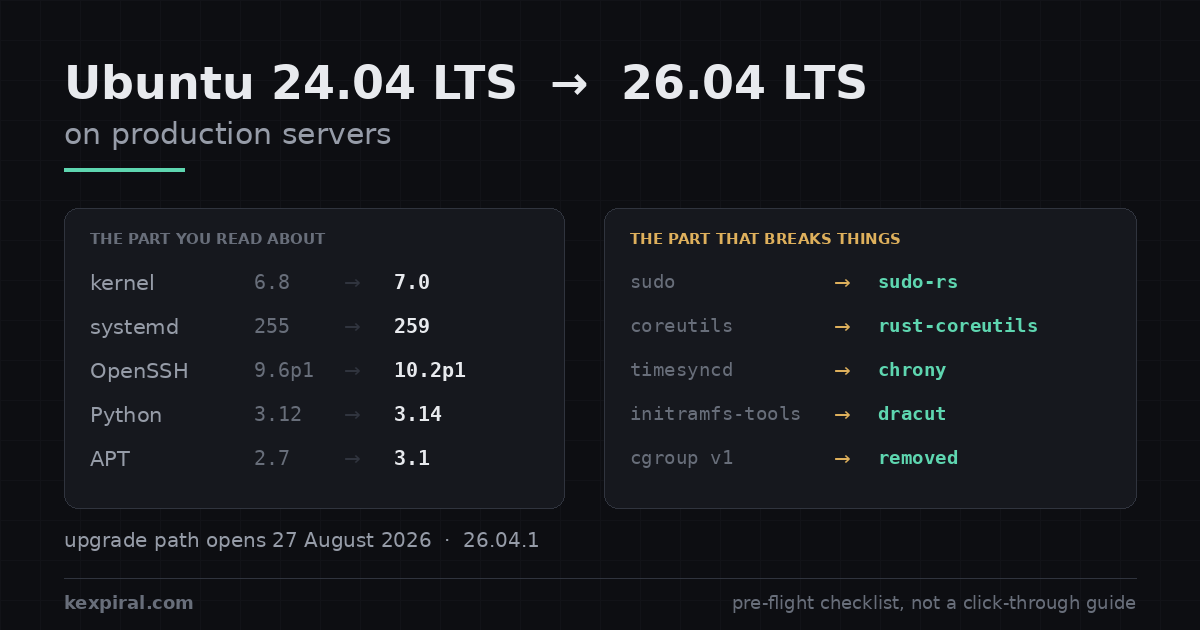
下面是我在真实机器上实际使用的检查清单。它是写给把 Ubuntu 当服务器用的人的:没有桌面,没有 GNOME,没有 snap 商店,也不假设你有一块显卡需要操心。文中所有事实都来自 Canonical 官方发布说明和上游项目文档;凡是官方说明没有给出具体版本号的地方——OpenSSL 就是最典型的一例——我不会去编一个出来,只描述能力本身。除非注释里明确写了会改动系统,否则所有命令都是只读的,你可以在任何一台生产机上放心地把它们贴进去,先看清楚现状再决定要不要动手。文章的组织顺序也就是我实际的执行顺序:先确认这件事什么时候才轮到你,再做一次只读盘点,然后逐项过一遍那些被换掉的默认值,最后才是执行和验证。如果你时间有限,只读两节的话,读 cgroup 和云主机机型那两节——它们是仅有的两项必须在你敲下 do-release-upgrade 之前就解决掉的问题:前者会让升级器当场拒绝执行,后者会让你落到一套官方已经不再支持的软硬件组合上。
为什么 8 月 27 日才是关键日期
Ubuntu 不会在新 LTS 发布当天就把它推给你。它会等这个版本的第一个点版本,那通常在四个月之后落地,把早期最严重的回归问题吸收掉。对 26.04 来说,这个点版本就是 2026 年 8 月 27 日的 26.04.1。在那之前,一台采用标准 Prompt=lts 策略的 24.04 服务器会明确告诉你「没有可升级的新版本」——这不是 bug,也不是需要你去绕过的东西,而是这套策略在按设计工作。真正值得先确认的是 /etc/update-manager/release-upgrades 里那一行到底写的是什么:lts 意味着「下一个 LTS,且要等它的点版本」,这是服务器上唯一正确的取值;normal 意味着每六个月的过渡版本都会被提供给你,对几乎所有服务器都是错的;never 则意味着永远不提供,这正是你在变更冻结期里应该显式写下的那个值。你在技术社区里看到的那些「我已经升上去了」的帖子,几乎都是用开发通道强行拉起来的,那条路径和你手上这台跑生产的机器没有关系。[schedule][upgradedoc]
# Ubuntu does NOT offer one LTS to the next until the first point release.
# For 26.04 that is 26.04.1, scheduled for Thursday 27 August 2026. Before that
# date `do-release-upgrade` on a 24.04 box correctly answers "No new release".

lsb_release -a
# Description:  Ubuntu 24.04.4 LTS
# Codename:     noble

# The policy that decides what you are offered. On servers it should be `lts`.
grep -v '^#' /etc/update-manager/release-upgrades
# [DEFAULT]
# Prompt=lts

# Prompt=lts     -> next LTS, but only after ITS point release. Correct for servers.
# Prompt=normal  -> every 6-month interim release. Wrong for almost all servers.
# Prompt=never   -> never offered. Use this to pin a fleet during a change freeze.

sudo do-release-upgrade -c          # -c = check only, changes nothing
# Checking for a new Ubuntu release
# No new release found.

# You CAN force it before 27 August with `-d`, which targets the development
# upgrade path. Do not do this on a production server: -d is how you end up
# being the person who finds the release-upgrader bug, and the point release
# exists precisely to absorb the first four months of regressions.
这也正是为什么日历上的压力其实没有你感觉到的那么大。Ubuntu 24.04 LTS 的标准安全维护一直持续到 2029 年 4 月。8 月 27 日不是把你推下悬崖,而是给你开了一扇门。唯一真实的截止日期是你自己定的那个,而合理的定法是「在下一个版本发布之前」,而不是「等合规审计来问的那一周」。把这件事写进季度计划、给它一个负责人和一个日期,比在群里反复讨论「要不要升」有用得多——因为升级本身从来不是决策难点,难点是没人愿意为那两个小时的窗口签字。[releasecycle]
如果你需要更长的窗口,Ubuntu Pro 的扩展安全维护(ESM)能把 24.04 延到 2034 年 4 月。对于一批你打算刻意冻结的机器——一体机、隔离网环境、正在走下线流程的资产——这是完全正当的策略,而且往往比强行升级更负责任。但对一批你还在持续开发、持续交付的机器来说,这是个糟糕的策略:你的工具链会往前走,新的 Python、新的数据库、新的语言运行时都会假设一个更新的基础系统,而你最后会陷入把所有东西都往回移植的境地,把本该由发行版承担的工作变成你自己团队的长期负债。区别在于你是在冻结一件成品,还是在冻结一个还在长的东西。[pro]
| 你的情况 | 8 月 27 日对你意味着什么 | 合理的做法 |
|---|---|---|
标准 24.04 服务器,Prompt=lts | 升级变为可用。没有任何东西被推送给你。 | 做计划。先做试点,然后放到九月或十月。 |
| 处于变更冻结期的机器群 | 什么都不变,但同事可能开始升级测试机。 | 显式设置 Prompt=never,而不是靠惯性。 |
| 一体机或隔离网环境 | 无关。24.04 支持到 2029 年 4 月。 | 留在原地。冻结期长的话可以考虑 Ubuntu Pro 的 ESM 到 2034 年。 |
| 上一代云主机机型 | 在实例迁移之前,你根本无法升级。 | 先把规格换到当前世代实例族。这件事和操作系统无关。 |
| 还在 22.04 上 | 没有直接路径。22.04 → 24.04 → 26.04,按这个顺序。 | 现在就把第一跳做掉;两跳里它是无聊的那一跳。 |
升级前的只读盘点,以及它为什么必须只读
下面这些都在 24.04 机器上运行,在你动任何东西之前。它不写入任何内容,不安装任何东西,也不需要你在维护窗口里执行。它的目的不是产出一份好看的报告,而是产出一份可以在升级之后用同一个脚本再跑一遍、然后做 diff 的输出——这样「机器起来了」就从一句感觉变成了一个你真的能核对的结论。把它的输出连同日期一起存进版本库或者工单里;三个月后当某个服务莫名其妙不在了的时候,这份文件就是你唯一能依靠的对照组。
#!/usr/bin/env bash
# noble-preflight.sh - read-only. Run it BEFORE the upgrade, save the output,
# and diff it against the same script run afterwards. Nothing here changes state.
set -uo pipefail
echo "=== identity ==="
lsb_release -ds; uname -r; systemctl --version | head -1

echo "=== 1. third-party repositories (the usual cause of a stuck upgrade) ==="
# do-release-upgrade disables these and does NOT re-enable them for you.
grep -rhs --include='*.list'    -E '^deb ' /etc/apt/sources.list /etc/apt/sources.list.d/
grep -rhs --include='*.sources' -E '^URIs' /etc/apt/sources.list.d/

echo "=== 2. packages not from the Ubuntu archive ==="
# Do NOT filter on the suite name: Docker's repo suite is literally `noble` and
# PGDG's is `noble-pgdg`, so grepping the codename hides exactly the two vendors
# you care about. Ask apt-cache policy where each package actually came from -
# in ONE invocation, because per-package calls reload the cache each time and
# turn this section into several minutes on a normal server.
#
# Set MIRROR to your own archive host if you run a local mirror, otherwise
# every package on the box gets reported as third-party and the output is noise.
# [.] rather than \. - awk processes escapes in a -v assignment and would warn.
MIRROR='archive[.]ubuntu[.]com|security[.]ubuntu[.]com|ports[.]ubuntu[.]com|archive[.]canonical[.]com'

apt-cache policy $(dpkg-query -f '${binary:Package} ' -W) 2>/dev/null | awk -v m="$MIRROR" '
  /^[a-zA-Z0-9]/ { pkg = $0; sub(/:$/, "", pkg) }
  /\*\*\*/     { getline; if ($2 !~ m && $2 != "/var/lib/dpkg/status")
                     printf "%-40s %s\n", pkg, $2 }'

echo "=== 3. held and manually installed packages ==="
apt-mark showhold
apt-mark showmanual | wc -l

echo "=== 4. locally modified config files you will be asked about ==="
# Every one of these produces a "keep or replace?" prompt mid-upgrade. Decide
# NOW, in writing, not at 02:00 with the package manager waiting on you.
debsums -ec 2>/dev/null || echo "install debsums to get this list"

echo "=== 5. services that must come back up ==="
systemctl list-unit-files --state=enabled --type=service --no-pager --no-legend | awk '{print $1}'

echo "=== 6. disk headroom - /boot is the one that bites ==="
df -h / /boot /var 2>/dev/null

echo "=== 7. cgroup hierarchy - a HARD upgrade blocker (see the cgroup section) ==="
stat -fc %T /sys/fs/cgroup/
# The parameter is a systemd boolean: 0/false/no/off all mean v1. Do not match
# only [01] or you will report "fine" on a host that is explicitly forced to v1.
grep -o 'systemd.unified_cgroup_hierarchy=[^ ]*' /proc/cmdline || echo "cmdline: default (v2)"

echo "=== 8. CPU capability for the AMD64v3 cloud images ==="
for f in avx avx2 bmi1 bmi2 f16c fma abm movbe osxsave; do
  grep -qw "$f" /proc/cpuinfo || echo "  MISSING: $f"
done

echo "=== 9. anything still using System V init scripts ==="
ls -1 /etc/init.d/ | grep -v README
其中有四项之所以值得单独拿出来说,是因为它们正是把一次 40 分钟的升级变成一个糟糕夜晚的那几项:
- 第三方软件源。
do-release-upgrade在开始之前会禁用所有非 Ubuntu 官方的软件源,而且事后不会帮你重新启用。这个行为本身是正确的——它避免了一个还没有resolute套件的厂商源在事务中途把依赖关系搅乱——但它意味着:凡是你从厂商源装的东西,Docker、PostgreSQL 的 PGDG、Node、某个 APM 探针,在升级完成的那一刻起就静默地停止接收更新,一直到你亲手把它重新指向resolute套件为止。没有告警,没有报错,只有一台看起来一切正常、实际上已经不再打补丁的机器。 - 本地改过的配置文件。每一个都会在事务中途弹出一次「保留还是替换」的交互式提问。请提前决定,并且写下来。默认答案是保留你的版本,这对应用配置是安全的选择,对任何跟安全相关、且已经被上游加固了两年的文件则是错误的选择。凌晨两点、包管理器停在那里等你回车的时候,不是你该第一次思考这个问题的时刻。
- 磁盘余量。
/需要好几 GB 的空闲空间;单独划出来的小/boot是经典的翻车点,因为 dracut 加上多个内核会把它填满,升级会在中途失败,留给你一个配置到一半的系统——而这种状态比彻底失败更难处理,因为它既不是旧版本也不是新版本。 - cgroup 层级和 CPU 特性标志。这两项下面都有专门的章节。它们的共同点是:都能在 24.04 上用一条命令查清楚,也都在你排维护窗口之前就该有答案,而不是等到升级器在窗口里当面拒绝你、或者等到你发现自己跑在一套官方已经不再构建镜像的硬件上。
两个版本之间真正动了什么
先看几个标题性的数字,因为它们决定了你对其余一切的预期。两年的 Ubuntu 开发是一次很长的跳跃——这不是一个补丁包,而是把整条工具链、整个内核、以及你依赖的每一个数据库大版本都往前推了一大步。读这张表的正确方式不是看差了几个版本号,而是逐行问自己「这一格底下挂着我的什么东西」:内核那一行对应的是你有没有树外模块和 DKMS 构建,glibc 那一行对应的是你有没有本地编译的二进制,PostgreSQL 和 MySQL 那两行对应的是你必须提前排期的停机窗口。[ltssummary]
| 组件 | Ubuntu 24.04 LTS | Ubuntu 26.04 LTS | 在服务器上为什么要紧 |
|---|---|---|---|
| Linux 内核 | 6.8 | 7.0 | 新硬件支持;检查树外模块和 DKMS 构建。 |
| systemd | 255 | 259 | 移除 cgroup v1;最后一个支持 System V 脚本的版本。 |
| OpenSSH | 9.6p1 | 10.2p1 | 后量子密钥协商默认开启;DSA 被彻底移除。 |
| Python | 3.12 | 3.14 | 跨过 3.13 及其被删掉的十九个标准库模块。 |
| APT | 2.7 | 3.1 | apt-key 被移除;新求解器;TLS 走 OpenSSL。 |
| glibc / GCC | 2.39 / 14 | 2.43 / 15.2 | 本地编译过的东西都要用新工具链重新构建。 |
| PostgreSQL | 16 | 18 | 跨大版本——必须 pg_upgrade,不会自动完成。 |
| MySQL | 8.0 | 8.4 LTS | 废弃选项被移除;没有 32 位服务端了。 |
| PHP | 8.3 | 8.5 | 你托管的任何东西都要跨两个语言大版本的变更。 |
| OpenJDK 默认版本 | 21 | 25 | 显式固定版本的话,老的 LTS JDK 仍然可用。 |
这张表里有一行悄悄地最值得注意。从 OpenSSH 9.6 跨到 10.2,意味着混合式后量子密钥协商 mlkem768x25519-sha256 已经可用,并且在默认算法列表里排在前面——注意是「可用且优先」,不是「每条连接都一定用上」:对端如果还是 9.6,协商出来的仍然是经典算法,后量子只有在两端都支持时才会真正生效。同时 DSA 支持被彻底移除;26.04 里的 OpenSSL 也获得了 ML-KEM、ML-DSA 和 SLH-DSA 这几个 NIST 标准算法的能力。如果你一直在推迟「后量子」这个话题,那么这次升级已经把那次迁移的很大一部分打包塞进来了,不管你有没有为它做过规划。这在绝大多数情况下是好事,而且不需要你做任何配置;唯一需要确认的是有没有哪个老旧客户端、跳板脚本或者网络设备还在依赖 DSA 主机密钥——如果有,它在升级后会直接连不上,而报错信息通常不会告诉你真正的原因。同样值得顺手看一眼的是 glibc 和 GCC 那一行:任何你在本机上编译过、又没有走发行版打包流程的二进制,都应该在新工具链下重新构建一次,而不是指望它继续跑。[openssh][openssl35][fips203]
六个在你脚下被换掉的默认值
这一节是其他所有教程里都缺失的部分,也是这篇文章存在的理由。Ubuntu 不只是把版本号往上推:它把六个你每天都在敲、或者每天都在依赖的东西,换掉了底层实现。它们大多数其实是改进,而且从工程角度看方向都是对的。其中只有一项会让升级当场停下来;其余的都不会大声报错,只会在某个凌晨三点把你团队里的某个人绕晕,如果没人事先把这些写下来的话——而「写下来」这件事,恰恰是升级计划里最容易被跳过的一步。下面这张表是速查版,之后的几个小节逐一展开:先看表,把和你相关的那几行圈出来,再去读对应的段落。[ltssummary]
| 你敲的命令 | 24.04 给你的是 | 26.04 给你的是 | 该怎么应对 |
|---|---|---|---|
sudo | sudo(Todd C. Miller) | sudo-rs | 审计 sudoers:不支持的指令会直接报错拒绝。回退要装 sudo.ws 并且切 update-alternatives。 |
ls、sort、date | GNU coreutils | rust-coreutils | 测试所有解析输出的脚本。GNU 版可用 gnuls 等。cp、mv、rm 仍是 GNU 实现。 |
| 时间同步 | systemd-timesyncd | chrony(仅全新安装) | 升级上来的主机保留 timesyncd。手动迁移,或者明知故犯地偏离默认。 |
| initramfs | initramfs-tools | dracut 成为默认 | 两者都仍受支持。先查清你这台到底用的是哪一套;配置在 /etc/dracut.conf.d/。 |
| 软件源密钥 | apt-key | 只能用 Signed-By | 重写每一个调用 apt-key add 的部署脚本,国内镜像源条目同样要改。 |
| cgroup 层级 | 默认 v2,仍可切回 v1 | 只有 v2 | 还在 v1 上的主机会被拒绝升级。先在 24.04 上清掉那个内核参数。 |
sudo 现在是 sudo-rs
26.04 发布说明里最让人意外的一行:sudo-rs 现在是默认的 sudo 提供者,而 Todd C. Miller 的原版 sudo 被改名成了 sudo.ws 这个包。sudo-rs 是一个内存安全的重新实现,覆盖了几乎所有人实际会用到的那部分 sudoers 语法:用户和用户组规格、主机规格、NOPASSWD、Cmnd_Alias、%group、includedir。这里最容易被写错的一点是它对不支持的指令的处理方式:sudo-rs 有明确记录的行为是直接报错并拒绝执行(fail closed),而不是打个警告悄悄忽略掉。方向上这是对的——你不会得到一项静默失效的安全控制——但也正因为如此,审计必须发生在升级之前而不是之后:一条它不认识的指令会让 sudo 直接不能用,而这台机器上你修东西恰恰要靠 sudo。有一小组被明确列出来的指令属于例外,它们会被接受然后忽略——env_reset、visiblepw、verifypw、mail_badpass、always_set_home、log_denied 以及另外一两个——这几个都不会放宽任何访问权限,所以不必为它们担心。要特别留意的是资源限制和 umask,它们转由 PAM 处理,以及 sendmail 集成——那个直接被去掉了。正确的做法是主动去 grep 你的 /etc/sudoers 和 /etc/sudoers.d/,把可能受影响的指令找出来,而不是等着某个凌晨被一条「command not found」之外的错误挡在门外。任何脚本化的修改之后都记得跑一次 sudo visudo -c,用与当前提供者匹配的校验器验证语法。[sudors]
# 26.04 makes sudo-rs the default sudo provider. The original sudo by
# Todd C. Miller is still packaged, renamed to `sudo.ws`.

sudo --version
update-alternatives --display sudo    # which implementation is actually selected

# sudo-rs implements the sudoers subset that essentially everyone uses:
# user/group specs, host specs, NOPASSWD, Cmnd_Alias, %group, includedir.
# Its documented behaviour on something it does NOT support is to fail closed
# with a clear error, not to ignore it. That is the safe direction - but it
# means an unsupported directive stops sudo from working rather than quietly
# degrading it, so you want to find those directives before the upgrade, not
# from a locked-out root account afterwards. A short enumerated set is accepted
# and ignored instead (env_reset, visiblepw, verifypw, mail_badpass,
# always_set_home, log_denied among them); none of those loosen access.

# Resource limits and umask move to PAM; sendmail integration is simply gone.
grep -rEn 'Defaults.*(umask|rlimit|mailto|mailerpath|env_keep|logfile|SELinux|role|type)' \
     /etc/sudoers /etc/sudoers.d/ 2>/dev/null

# Whatever you change, validate with the checker that matches your provider.
# visudo uses it automatically; run it by hand after any scripted edit.
sudo visudo -c

# --- If you find something sudo-rs will not honour ---
# Both implementations coexist; the provider is chosen through alternatives,
# so installing the package is only half the job:
sudo apt install sudo.ws
sudo update-alternatives --config sudo
# Treat this as a migration window rather than a destination: fix the sudoers
# file so you do not depend on the fallback staying available.

# --- One removal has no fallback ---
# The `sudo-ldap` package is gone. If your sudoers rules live in LDAP you must
# move that authorisation to PAM before upgrading, not after:
dpkg -l sudo-ldap 2>/dev/null | grep '^ii' && echo "ACTION REQUIRED: sudo-ldap is removed in 26.04"有两点实务上的说明。第一,两套实现是共存的,具体用哪一个由 update-alternatives 决定,所以「装回 sudo.ws」只完成了回退的一半——包装上了,提供者还没切,你必须再跑一次 sudo update-alternatives --config sudo 并明确选择它,然后用 sudo --version 确认你拿到的确实是 Todd C. Miller 的那一版。这个细节值得写进你的运维手册,因为「我明明装了却没生效」是这次变更最常见的一种困惑。第二,有一处移除是完全没有退路的:sudo-ldap 这个包没有了。如果你的 sudo 授权规则放在 LDAP 里,那必须在升级之前迁到基于 PAM 的 LDAP 认证——否则你会落到一台规则根本不存在的机器上,而且取决于你的提权路径是怎么串起来的,很可能是一台没有控制台就修不回来的机器。这在有统一目录服务的企业环境里并不罕见,值得在盘点阶段用一条 dpkg -l sudo-ldap 明确确认一遍。
ls、sort、date 现在是 Rust 写的
第二个意外:核心工具集现在换成了 Rust 实现的 rust-coreutils(也就是 uutils 项目)。GNU 版的二进制仍然装着,只是加了 gnu 前缀——gnuls、gnudate、gnusort,你可以随时用它们对照行为差异。值得特别注意的是,cp、mv、rm 在 rust-coreutils 包内部仍然是 GNU 实现,因为还有未解决的 bug 而被有意保留下来。这个决定是对的,它意味着最有能力毁掉数据的那几个工具,恰恰是没有被换掉的那几个——知道这一点也能省下你在错误的方向上找回归问题的时间。在你对这次替换形成判断之前,还有一条值得知道:26.04 的发布说明里公开披露了针对 rust-coreutils 的二十个已知 CVE。公开披露远好过藏着,这里面也没有哪一条值得恐慌,但它确实意味着核心工具集从此要进你的补丁雷达,而不该继续留在「这东西从来不会变」的那一类心理分类里。真正会咬人的地方在于解析输出的脚本,以及依赖某个 GNU 独有选项的用法:行为很接近,但不是一模一样,错误信息的文本也不同,而很多监控脚本恰好就是靠字符串匹配活着的。如果确实有一段你改不动的代码依赖 GNU 行为,可以整体切回 coreutils-from-gnu,之后也能再切回 coreutils-from-uutils;但这两条命令都需要 --allow-remove-essential,因为 coreutils 是 Essential:yes。请把这个参数当作它字面上的警告来读:在一个你能恢复的控制台里执行,而不是在你马上就要用到的那条 SSH 会话里。[uutils]
# Core utilities now come from rust-coreutils (the uutils project). The GNU
# binaries are still installed, prefixed with `gnu`: gnuls, gnudate, gnusort...

ls --version | head -1        # uutils
gnuls --version | head -1     # GNU

# Worth knowing before you decide: the 26.04 release notes ship a list of
# twenty known CVEs against rust-coreutils (CVE-2026-35341 through -35377).
# That is disclosed, not hidden, and none of it is a reason to panic - but it
# is a reason to keep this package on your patching radar rather than assuming
# core utilities are the boring part of the system.

# cp, mv and rm are STILL the GNU implementations inside rust-coreutils, held
# back over unresolved bugs. So the utilities most likely to destroy data are
# the ones that did not change - which is the right call, and worth knowing
# before you go hunting for a regression in the wrong place.

# Where this actually bites: scripts that parse output, or lean on a GNU-only
# flag. Behaviour is close, not identical, and error text differs.
# Test the parsers, not the interactive use:
sort --help | grep -c . ; date --help | grep -c .

# --- Reverting, if a script you cannot change depends on GNU behaviour ---
sudo apt install coreutils-from-gnu --allow-remove-essential
# ...and back again:
sudo apt install coreutils-from-uutils --allow-remove-essential
# `--allow-remove-essential` is required because coreutils is Essential:yes.
# Read that flag as the warning it is: run it from a console you can recover,
# not over the SSH session you are about to need.
chrony 取代 systemd-timesyncd——但不包括你这台
第三项,也是我见过被漏掉次数最多的一项:chrony 取代 systemd-timesyncd 成为默认时间守护进程——但只对全新安装生效。你升级上来的服务器仍然跑着 timesyncd,仍然能正常工作,时间也不会走偏,同时悄悄地不再符合文档、不再符合各类加固基线,也不再符合任何按 26.04 写出来的运维手册。Canonical 给出了手动迁移的步骤——apt-mark auto systemd-timesyncd 之后 apt install chrony——但没有任何东西会替你执行它。这项变更之所以容易被漏掉,正是因为它不会造成任何故障:新装的机器和升级上来的机器从此走上两条路,而这种分叉要到半年后有人写自动化、发现同一批机器上命令不一致时才会暴露出来。[chrony]
# Chrony replaces systemd-timesyncd as the default time daemon - but ONLY for
# fresh installs. An upgraded 24.04 server keeps timesyncd and will not tell
# you it is now off the default path. This is the change most likely to be
# missed, because nothing breaks: you just quietly stop matching the docs.

timedatectl show --property=NTP --property=NTPSynchronized
systemctl is-active systemd-timesyncd chrony 2>/dev/null

# --- The migration Canonical documents for upgraded systems ---
sudo apt-mark auto systemd-timesyncd     # demote it to an automatic dependency
sudo apt install chrony                  # installing chrony displaces timesyncd

# Verify you have exactly one time daemon running, not zero and not two:
systemctl is-active chrony
chronyc tracking
chronyc sources -v

# --- The trap, if you had ever edited chrony.conf ---
# Ubuntu's NTS-authenticated pool now lives in a separate drop-in file. If your
# old chrony.conf still lists servers, you will poll the same pool twice.
grep -E '^(server|pool)' /etc/chrony/chrony.conf
cat /etc/chrony/sources.d/ubuntu-ntp-pools.sources
# Keep the drop-in, comment out the duplicates in chrony.conf, then:
sudo systemctl restart chrony && chronyc sources -v
这次迁移在终点线的另一侧藏了一个坑。Ubuntu 带 NTS 认证的时间源池现在放在
/etc/chrony/sources.d/ubuntu-ntp-pools.sources里。如果你曾经编辑过chrony.conf并且在里面留下了pool或server行,你就会对同一批服务器轮询两次——这不致命,但它正是那种半年之后有人来排查时钟偏移、看着 chronyc 输出一脸困惑的东西。正确的做法是保留那个 drop-in 文件,把chrony.conf里重复的行注释掉,重启服务,然后用chronyc sources -v确认列表是你预期的样子。同样要确认的是:机器上正好有一个时间守护进程在跑,不是零个,也不是两个。
dracut 取代 initramfs-tools
第四项:dracut 取代 initramfs-tools 成为默认的 initramfs 构建工具。发布说明在这里的措辞是很克制的,我们也应该同样克制——initramfs-tools 仍然受支持,两套实现之间可以互相切换。一台升级上来的主机最终究竟用的是哪一套,不是可以从任何一篇博客(包括这一篇)里推断出来的事情。去查,然后按查到的结果行动:[dracut][dracutconf]
- 问机器,别靠推断。
dpkg -l dracut initramfs-tools告诉你装了哪些,dracut --version告诉你它是不是真的能用。注意lsinitrd没有--version这个参数,所以网上那条「用 lsinitrd 判断有没有 dracut」的一行命令给出的是错误答案——请改用dracut --version。先把这两条跑一遍,再决定下面两条对你适不适用。 - 配置文件位置变了。如果你确实切过去了,
/etc/initramfs-tools/就不再是那个地方。dracut 读取/etc/dracut.conf.d/,任何自定义 hook、模块列表或强制加载的驱动都必须为它重写一遍。如果你的机器上有为了某块 RAID 卡或者某种加密根分区而写的钩子脚本,那份文件不会自动迁移,也不会有人提醒你它已经不再被读取——这部分重写才是真正的工作量,没有人会替你做。 - 检查镜像内容,不要重新生成它。把镜像里的内容列出来,确认你的存储和网络驱动确实在里面——NVMe、virtio、megaraid、mpt3sas,你的硬件或虚拟化平台需要什么就确认什么。反过来,在一台刚做完发行版升级、还没有完整重启验证过两次的机器上立刻重新生成 initramfs,是这一整页里风险最高的动作:你会用一个未经验证的镜像覆盖掉那个刚刚把你带起来的镜像。先看,不要写。
cgroup v1 彻底消失,并会直接拦下升级
26.04 里的 systemd 259 完全没有 cgroup v1。上游在 systemd 258 里移除了 legacy 和 hybrid 两种层级,启动时只挂载 cgroup v2,没有任何兼容开关可以把它们请回来。Ubuntu 24.04 本身就已经默认 v2,所以绝大多数服务器跨过这条线时什么感觉都没有,容器照跑,资源限制照常生效。会出事的是那些例外,而例外的特征非常固定,一条命令就能查出来。关键在于 Canonical 并没有把这件事留给你去撞:他们把它做成了一道硬闸门,原话是「运行在 cgroup v1 上的 Ubuntu 系统将不被允许升级到 Ubuntu 26.04 LTS」。所以这里的失败模式是升级被拒绝,而不是一台被弄坏的主机。这是好结果,也值得说得精确一些——因为关于这项变更的很多二手报道给人的印象恰恰相反。[systemd258][cgroupv2]
# systemd 259 in 26.04 has NO cgroup v1. The legacy and hybrid hierarchies
# were removed upstream in systemd 258; only cgroup v2 is mounted at boot.
#
# Canonical turned that into a hard gate rather than a surprise: "Ubuntu
# installations running cgroup v1 will not be allowed to upgrade to Ubuntu
# 26.04 LTS." So the failure mode is a REFUSED upgrade, not a bricked host -
# which is the good outcome, and the reason to check now is that you would
# otherwise discover it inside your maintenance window.

stat -fc %T /sys/fs/cgroup/
# cgroup2fs   -> v2, the upgrade will proceed
# tmpfs       -> v1 or hybrid, the upgrader will refuse. Fix it first.

# The parameter is a systemd boolean: 0, false, no and off all select v1.
grep -o 'systemd.unified_cgroup_hierarchy=[^ ]*' /proc/cmdline
grep -o 'systemd.legacy_systemd_cgroup_controller=[^ ]*' /proc/cmdline

# --- Fix it on 24.04, reboot, and confirm the workload still works ---
sudoedit /etc/default/grub
#   remove systemd.unified_cgroup_hierarchy=0 from GRUB_CMDLINE_LINUX*
sudo update-grub && sudo reboot
# after the reboot:
stat -fc %T /sys/fs/cgroup/     # must print cgroup2fs

# Two related consequences that are easy to miss, both from the release notes:
#   - a 26.04 CONTAINER will not run on a host still booted with cgroup v1
#   - a 26.04 HOST will not run containers that require v1 (e.g. images based
#     on Ubuntu older than 18.04). Check your base images, not just your hosts.

# --- The other systemd deadline, and it is closer than you think ---
# 26.04 is the LAST release that runs System V init scripts. systemd 260 has
# already dropped the support upstream, so the release that loses it is 26.10
# - October 2026, not some comfortable date in 2028.
ls -1 /etc/init.d/ | grep -v README
systemctl list-units --type=service --no-pager | grep -i 'LSB:'
要找的模式是一个内核命令行参数,通常是 systemd.unified_cgroup_hierarchy=0,很多年前为了迁就一个老版本 Docker、一个老的 Kubernetes 节点或者某个 JVM 监控探针而加上去,然后就再也没人删掉——因为从来没有任何东西提醒过谁它还在那里,而机器一直跑得好好的。之所以要现在就把它找出来、而不是等到升级当晚,理由很朴素:一次拒绝虽然不会毁掉主机,但它照样会花掉你整个维护窗口,而且你还得在窗口里临时安排一次重启才能把参数清掉。先在 24.04 上把它从 /etc/default/grub 里删掉,update-grub,重启,用 stat -fc %T /sys/fs/cgroup/ 确认输出是 cgroup2fs,再确认业务还能正常跑,然后才谈升级——这一步和升级决策无关,无论如何都该做。还有两个容易被漏掉的连带影响:一个 26.04 的容器无法跑在仍然以 cgroup v1 启动的宿主机上,而一台 26.04 的宿主机也跑不了那些要求 v1 的容器——比如基于 Ubuntu 18.04 之前版本构建的镜像。所以要查的不只是你的主机,还有你的基础镜像。另外单独说一句:26.04 是最后一个还能运行 System V init 脚本的 Ubuntu 版本,而这个期限比看上去近得多——systemd 260 在上游已经把这项支持删掉了,所以真正失去它的版本是 26.10,也就是 2026 年 10 月,而不是 2028 年某个还很宽裕的日子。现在把 /etc/init.d/ 里剩下的东西列一遍只需要五分钟;等到那时候再做,它就是一个迁移项目了。[since2510][mobycgroup][systemd260]
APT 3 与 apt-key 的移除
APT 从 2.7 跳到 3.1,其中会直接打断自动化的那项变更是 apt-key 被移除。它已经被废弃很多年了,而且这次没有兼容垫片:签名校验现在直接交给 gpgv,每一个软件源都必须自己指明用哪把密钥。任何还在调用 apt-key add 的部署脚本在 26.04 上都会失败——而且因为这类调用通常出现在初始化流程很靠前的位置,它会在任何有用的事情发生之前就先失败。替代方案本身很简单:把密钥 dearmor 成一个独立文件放进 /etc/apt/keyrings/,然后在软件源里用 Signed-By 指向它,无论你用的是新的 deb822 .sources 格式还是仍然是单行的 deb [signed-by=...] 写法。改完之后一条 apt update 就能把漏掉的源全都暴露出来,它们会明确报错而不是默默降级,这一点值得庆幸。[aptsecure][aptsources]
# APT 3 in 26.04 removes `apt-key` entirely. Verification goes straight to
# gpgv, and every repository must name its key explicitly.

apt --version                       # apt 3.1.x
command -v apt-key || echo "apt-key: gone, as expected"

# Find repositories that still rely on the deleted trusted keyring. These are
# what break: not the tool, the repositories that assumed it.
ls -l /etc/apt/trusted.gpg /etc/apt/trusted.gpg.d/ 2>/dev/null

# --- The replacement: one key per repository, referenced by path ---
# Create the directory explicitly. It exists on a normal install and does NOT
# on a minimal container image, which is exactly where bootstrap scripts run.
sudo install -m 0755 -d /etc/apt/keyrings
# Dearmor the key into its own file (note .gpg for binary, .asc for armoured):
curl -fsSL https://example.com/repo.asc \
  | sudo gpg --dearmor -o /etc/apt/keyrings/example.gpg
sudo chmod 0644 /etc/apt/keyrings/example.gpg

# Then point the repository at it. Modern deb822 format, /etc/apt/sources.list.d/example.sources:
#   Types: deb
#   URIs: https://example.com/apt
#   Suites: resolute
#   Components: main
#   Signed-By: /etc/apt/keyrings/example.gpg
#
# Or the one-line form, if you still use it:
#   deb [signed-by=/etc/apt/keyrings/example.gpg] https://example.com/apt resolute main

sudo apt update                     # any repo you missed fails loudly here

# --- Worth knowing about, not worth planning around ---
# APT 3 adds transaction history. It replays package operations; it does not
# restore data, and it cannot undo a release upgrade.
apt history-list
sudo apt history-undo <ID>
国内的服务器几乎都指向域内镜像源——阿里云、清华 TUNA、中科大 USTC——这些同样要过一遍:镜像站的 sources.list 条目在升级后既要把发行代号改成 resolute,也要按 Signed-By 的方式显式指定密钥路径,不能再依赖以前 apt-key add 留在全局 keyring 里的那把。如果你的机器是从某个内部黄金镜像克隆出来的,这类条目往往还散落在 /etc/apt/sources.list.d/ 下面好几个文件里,值得一次性清理干净。除此之外,APT 3 还带来了新的依赖求解器(在经典求解器找不到解时会自动接管),以及带 apt history-list、apt history-undo 和 apt history-rollback 的事务历史。在依赖这个历史功能之前请仔细读它的说明:它重放的是软件包操作。它不恢复数据,它不知道你的数据库,它也无法撤销一次发行版升级——把它理解成一个更方便的「装错了退回去」,而不是一个备份方案。
Python 3.12 → 3.14 跨过了「死电池」那一版
Ubuntu 24.04 带的是 Python 3.12,26.04 带的是 3.14。这意味着这次升级跨过了 3.13——也就是按 PEP 594 删掉十九个标准库模块的那一版。已经没有任何废弃警告可以让你提前捕获了,因为警告期是 3.11 和 3.12,而你正是在那两个版本上安然无恙地跑了两年。你能拿到的只有一个运行时 ImportError,出现在最先执行到那行 import 的定时任务、钩子脚本或请求处理函数里——也就是说,问题不一定在升级当晚暴露,很可能是在下一个整点、下一次日切、或者下一次有人触发那条冷路径的时候。所以这一项应该在升级之前用一次全局 grep 扫掉,而不是留给运行时去发现。[py313][pep594]
# 24.04 shipped Python 3.12. 26.04 ships 3.14 as the system interpreter - so
# this upgrade crosses 3.13, the release that deleted nineteen standard-library
# modules under PEP 594. Nothing warns you: the import simply fails at runtime,
# in whichever cron job or handler happens to reach that line first.

python3 --version                   # Python 3.14.x

# Scan everything you own for the removed modules, before the upgrade. Note
# the module name is matched anywhere on an import line, not just directly
# after the keyword - otherwise `import os, cgi` slips straight through.
grep -rInE '^[[:space:]]*(import|from)[[:space:]].*\b(aifc|audioop|cgi|cgitb|chunk|crypt|imghdr|mailcap|msilib|nis|nntplib|ossaudiodev|pipes|sndhdr|spwd|sunau|telnetlib|uu|xdrlib)\b' \
  --include='*.py' /opt /srv /usr/local/lib /home 2>/dev/null

# The three that actually turn up on servers, and what to do about each:
#   cgi / cgitb -> old WSGI shims and form parsing. Move to the framework's
#                  parser, or `pip install standard-cgi` as a stopgap.
#   crypt       -> /etc/shadow hashing in provisioning scripts.
#                  Replace with `passlib` or a libxcrypt binding.
#   telnetlib   -> network-device automation. Replace with `netmiko`/`pexpect`,
#                  or better, stop using telnet.
# Pure-Python removals are republished on PyPI under `standard-*` names, which
# buys you a release cycle. It does not fix the code.

# Do not forget the interpreter under your virtualenvs: a venv created against
# 3.12 keeps pointing at a binary the upgrade removes. -xdev keeps this out of
# /proc, /sys and network mounts; -print0 survives paths with spaces.
find / -xdev -name pyvenv.cfg -print0 2>/dev/null \
  | xargs -0 -r grep -H 'version'   # rebuild every one of these afterwards
十九个里有三个在服务器上出现得相当频繁:老式 WSGI 垫片和表单解析辅助代码里的 cgi 与 cgitb,用来往 /etc/shadow 写哈希的部署脚本里的 crypt,以及网络设备自动化里的 telnetlib。三者的正确出路各不相同:cgi 应该换成框架自带的解析器,crypt 换成 passlib 或者一个 libxcrypt 绑定,telnetlib 换成 netmiko 或 pexpect——或者干脆别再用 telnet。其中纯 Python 实现的那些已经以 standard- 前缀的名字重新发布到了 PyPI 上,这能给你争取一个发布周期的时间去把代码真正改对,但它只是缓兵之计,不是修复。还有别忘了虚拟环境:一个基于 3.12 二进制创建的 venv,指向的是升级会一并删掉的那个解释器。把机器上所有的 pyvenv.cfg 找出来,升级之后逐个重建——这项工作枯燥,但它是那种不做就一定会在某个下午突然爆发的枯燥。[py314]
你的云主机机型可能已经不再受支持
Ubuntu 26.04 面向 AMD64 的云镜像是按 x86-64-v3 微架构等级编译的。请把「镜像」这两个字读仔细,因为很多报道没有读仔细:变的是官方预构建的那些云镜像,不是软件源本身。x86-64-v3 等于 v2 基线再加上 AVX、AVX2、BMI1、BMI2、F16C、FMA、LZCNT、MOVBE 和 OSXSAVE——注意是九项,不是常被引用的那五项。不具备这些指令的 CPU 根本无法执行它们,所以这是一条硬件下限,不是性能开关,也没有任何内核参数能把它缓和掉。检查本身只需要一秒钟:grep -qw avx2 /proc/cpuinfo 是最快的代理指标,想更严谨就把九个标志逐个查一遍。请在排维护窗口之前做这个检查,而不是在窗口里做——因为如果答案是「不支持」,你要面对的就不只是一次升级,还有一次实例迁移,那是完全不同量级的排期。[ltssummary][x86levels]
# Ubuntu 26.04 cloud IMAGES for AMD64 are built for the x86-64-v3
# microarchitecture level. Read that word carefully: it is the prebuilt images
# that moved, not the archive. The archive stays baseline x86-64, so an
# in-place upgrade still pulls baseline packages. What you lose on an old
# instance family is SUPPORT and a launchable image - not, by itself, the boot.
# That is a smaller problem than "it will not come back", and still one you
# want to solve before you build anything else on top of it.

# x86-64-v3 is the v2 baseline plus AVX, AVX2, BMI1, BMI2, F16C, FMA, LZCNT,
# MOVBE and OSXSAVE. AVX2 is a decent proxy; the loop is the real check.
# Note `abm`: Linux exposes LZCNT under that capflag, and there is no `lzcnt`
# string in /proc/cpuinfo - grep for the obvious name and every host on earth
# reports a missing feature it actually has.
for f in avx avx2 bmi1 bmi2 f16c fma abm movbe osxsave; do
  grep -qw "$f" /proc/cpuinfo && echo "  $f yes" || echo "  $f MISSING"
done

# --- AWS: previous-generation families are out ---
# M1 M2 M3 M4 / C1 C3 C4 / R3 R4 / I2 / G3 / P2 P3 P3dn are no longer supported
# from 26.04. Note the [a-z]* before the dot: without it you miss p3dn and g3s,
# which are precisely two of the families you are hunting for.
aws ec2 describe-instances \
  --query 'Reservations[].Instances[].{Id:InstanceId,Type:InstanceType}' \
  --output text | grep -E '^\S+[[:space:]]+(m[1-4]|c[134]|r[34]|i2|g3|p[23])[a-z]*\.'
# The fix is a migration, not a config change: resize onto a current family
# (m6i/m7i, c6i/c7i, r6i/r7i) FIRST, then upgrade the OS.

# --- Google Cloud: N1 on Sandy Bridge or Ivy Bridge is out ---
gcloud compute instances list --format='table(name,zone,machineType,cpuPlatform)'

# --- Bare metal / on-prem: opt in only after you have checked every host ---
# The archive itself stays baseline x86-64; the v3 build is opt-in:
echo 'APT::Architecture-Variants "amd64v3";' | sudo tee /etc/apt/apt.conf.d/99enable-amd64v3
sudo apt update && sudo apt upgrade| 平台 | 26.04 起不再支持 | 必须采取的动作 |
|---|---|---|
| AWS EC2 | M1、M2、M3、M4;C1、C3、C4;R3、R4;I2;G3;P2、P3、P3dn | 在升级操作系统之前先迁到当前世代实例族(m6i/m7i、c6i/c7i、r6i/r7i)。 |
| Google Compute Engine | 运行在 Intel Sandy Bridge 和 Intel Ivy Bridge CPU 平台上的 N1 | 先把实例换到更新的 CPU 平台或机器类型。 |
| 裸金属 / 自建机房 | 没有——软件源保持基线 x86-64 | 什么都不用做。v3 构建是可选加入的,只需要一行 apt.conf.d 配置。 |
| IBM Z(s390x) | z14 世代(LinuxONE II)及更早 | 新的最低要求是 z15,而且 ubuntu-release-upgrader 会直接拦下这次升级。 |
| RISC-V | 低于 RVA23S64 ISA profile 的一切 | RVA20 开发板继续留在 24.04。 |
它在实践中的后果比恐慌版本要窄,但仍然值得认真处理。在 AWS 上,上一代实例族从 26.04 起不再受支持,官方也不会为它们构建 26.04 镜像。而一次原地执行的 do-release-upgrade 拉取的是软件源里的基线 amd64 软件包,所以这首先是一个「支持」问题,而不是自动等于一个「启动」问题——把它说成「升级完就再也起不来」是不准确的。但反过来也别把它当成没事:让生产负载跑在一套没有人在测试的软硬件组合上,不是你应该主动选择的位置。如果你有一台 M3 在跑某个重要的东西——而且相当多的人确实有,因为它已经稳稳跑了十年,从来没有给过任何人理由去动它——正确的做法是先把规格换到当前世代实例族,然后再升级操作系统。用一条 describe-instances 把整个账号里的机型列出来,比逐台登录去查 CPU 快得多。Google Compute Engine 上对应的检查是实例的 CPU 平台,跑在 Sandy Bridge 或 Ivy Bridge 上的 N1 同样出局。裸金属上则完全没有东西逼你动手:软件源保持基线 x86-64,v3 构建严格是可选加入的,需要你显式写一行 apt.conf.d 配置才会启用。[awsprev]
逐个服务:哪些真的需要做迁移
版本号往上跳通常都是波澜不惊的,包管理器会把大部分事情安静地做完。下面这些是维护者改了某些东西、以至于你必须主动做点什么的那些,按「不做的话后果有多糟」排序。这张表值得你按照自己机器上实际装了什么过滤一遍,然后把标着「高」的那几行从操作系统升级里单独拆出来,各自给一个窗口和一个回滚方案。其中 PostgreSQL 和 apache2 那两行还牵扯到 Canonical 官方已知问题列表里的内容,本节之后会单独展开:
| 服务 | 变更 | 工作量 |
|---|---|---|
| RabbitMQ | 由于功能标志的关系,无法直接跨这次跳跃升级。 | 高——需要手动步骤,按独立维护窗口规划。 |
| Dovecot | 2.4 重写了配置文件格式。 | 高——把配置迁移当成一个独立项目来做。 |
| Samba AD/DC | 必须在升级之前安装 samba-ad-dc 包。 | 高——漏掉的话实际上无法挽回。今天就去查。 |
| PostgreSQL | 16 → 18 必须做 pg_upgrade;另有 Linux 7.0 的性能回归,除非 huge_pages=on。 | 高——回归是静默的。翻开关之前先把大页池算好、配好。 |
| apache2 + mod-php | 单元里的 MemoryDenyWriteExecute=yes 会让 PHP 的 JIT 失效。 | 中——改用 php-fpm,或者明知后果地覆盖这条指令。 |
| HAProxy | 2.x → 3.2:URI 解析更严格,enabled 被拒绝,tune.ocsp-update 改名。 | 中——改配置,容易提前测试。 |
| Squid | 7.2 移除了 client_delay_access、ftp_epsv 和持久连接相关指令。 | 中——一条被移除的指令会让守护进程起不来。 |
| MySQL | 8.0 → 8.4 LTS,废弃选项被移除,32 位服务端消失。 | 中——事前审配置,不要事后。 |
| SSSD | 现在以 sssd 用户运行,不再是 root。 | 低——验证它仍能访问 secrets 和 keytab。 |
| Postfix | 默认不再安装在 chroot 中。 | 低——但如果你定制过 chroot,要重新核对路径。 |
| OpenSSH | 9.6 → 10.2:DSA 消失,后量子密钥协商成为默认。 | 低——通常什么都不用做。确认没有客户端还需要 DSA。 |
RabbitMQ 凭它自身的理由就该排在第一行:由于功能标志(feature flags)的关系,它无法直接跨过这次跳跃升级,Canonical 为它记录了手动步骤。请把它从操作系统升级里拆出来,当成一次独立的、有自己回滚方案的维护来做。Dovecot 2.4 把配置文件格式整个重写了——这同样应该被当作一次独立的变更来规划,而不是操作系统升级的副产品;一个邮件系统在升级后起不来,影响面通常比你估计的更广。HAProxy 从 2.x 系列跳到 3.2,它会拒绝动态服务器上的 enabled 关键字,对非标准 URI 的解析更严格,并把 tune.ssl.ocsp-update 改名成了 tune.ocsp-update。好消息是 HAProxy 的配置可以离线校验,所以这三项都能在升级之前就测出来。[rabbitmq][dovecot24][haproxy32]
其余的都是常规操作,但没有一个是自动完成的。PostgreSQL 18 需要从 16 做 pg_upgrade,这意味着一段你必须提前排期的停机时间,以及一份你必须提前验证过的备份;MySQL 从 8.0 到 8.4 LTS 会移除早已废弃的选项,并且不再提供 32 位服务端,所以配置文件要在升级前审一遍,而不是在数据库起不来之后。SSSD 现在以非特权的 sssd 用户身份运行而不是 root,所以要验证它仍然读得到自己的 secrets 和 keytab——这类权限问题通常表现为登录变慢或者间歇性失败,而不是干脆的报错。Postfix 默认不再运行在 chroot 里,如果你定制过 chroot 内部的路径,那些路径现在的语义变了。还有,如果你在跑 Samba 的 Active Directory 域控但没有显式安装 samba-ad-dc 包,请在升级之前把它装上——否则域控功能不会存活下来,而你用来修复它所需要的组件,恰恰就是那些没有被装上的。这一条今天就能查,花不了一分钟。[postgres18][mysql84][sssd]
真正会咬到服务器的两个已知问题
Canonical 在发布说明之外还维护一份已知问题列表,其中有两条比几乎所有关于 26.04 的文字都更具体。这两条都不会阻止你升级,但都会在升级之后悄悄改变服务器的行为方式——而且如果你事先不知道要往哪里看,你几乎一定会把它们归因到别的东西上去。第一条是 apache2:它的 systemd 单元现在设置了 MemoryDenyWriteExecute=yes 作为加固措施,这条指令禁止同时可写又可执行的内存页,而那恰恰是 JIT 编译器需要的东西。在 libapache2-mod-php 这种把 PHP 跑在 Apache 进程里的部署方式下,PHP 的 JIT 会因此失效,日志里出现 Allocation of JIT memory failed,同时伴随一次没有人会联想到操作系统升级的性能下降。推荐的解法是改用 php-fpm(它不受影响);如果你必须留在 mod-php 上,那就用 systemctl edit apache2 明确地把这条指令覆盖掉——并且清楚地知道你关掉的是一项缓解措施,而不是修好了一个 bug。[since2510][apachebug]
# Both of these are in Canonical's own known-issues list for 26.04, and both
# are more concrete than most of what gets written about this release. Neither
# stops the upgrade; both change how your server behaves afterwards.

# --- 1. apache2 + mod-php: the PHP JIT stops working ---
# The apache2 systemd unit now sets MemoryDenyWriteExecute=yes as hardening.
# That forbids memory that is writable and executable at once, which is exactly
# what a JIT needs. Symptom:
#   Warning: preg_match(): Allocation of JIT memory failed, PCRE JIT will be disabled.
dpkg -l 'libapache2-mod-php*' 2>/dev/null | grep '^ii'

# Recommended fix: move to php-fpm, which is not affected. Note the a2dismod -
# without it apache2 keeps loading mod_php and the JIT stays broken, which is
# the most common way this "fix" gets applied and then reported as not working.
sudo apt install php-fpm
sudo a2dismod php8.5 && sudo a2dismod mpm_prefork
sudo a2enmod mpm_event proxy_fcgi setenvif && sudo a2enconf php8.5-fpm
sudo systemctl restart apache2 php8.5-fpm

# If you must stay on mod-php, override the hardening deliberately - and
# understand that you are turning off a mitigation, not fixing a bug:
sudo systemctl edit apache2
#   [Service]
#   MemoryDenyWriteExecute=no
sudo systemctl restart apache2

# --- 2. PostgreSQL on the 7.0 kernel: throughput and latency regression ---
# A Linux 7.0 change can cost PostgreSQL significant throughput and latency.
# Systems using huge pages are NOT affected, so this is a configuration
# question rather than a wait-for-a-patch question.
sudo -u postgres psql -tAc 'SHOW huge_pages;'      # want: on

# huge_pages=try (the default) silently falls back to normal pages, which is
# how you end up affected without any error telling you so.
#
# Size the pool FIRST. PostgreSQL will compute the number for you - no
# arithmetic, no guessing at shared_buffers overhead:
sudo -u postgres postgres -D /var/lib/postgresql/18/main \
     -C shared_memory_size_in_huge_pages
# 3170
grep -E 'Hugepagesize|HugePages_Total' /proc/meminfo
sudo sysctl -w vm.nr_hugepages=3170                # use YOUR number, then
                                                   # persist it in /etc/sysctl.d/
# ...and only now turn it on:
sudo -u postgres psql -c "ALTER SYSTEM SET huge_pages = 'on';"
sudo systemctl restart postgresql
# huge_pages=on means PostgreSQL REFUSES TO START if the pages are not
# available. That is the point - it fails loudly instead of quietly slowly -
# but it means you size the pool before you flip the setting, not after.
第二条是 PostgreSQL,也是我敢打赌最容易被误诊的那一条。Linux 7.0 里的一项变更会导致明显的吞吐量和延迟回归——但使用大页(huge pages)的系统不受影响,这就把它从「等补丁」变成了一个配置问题。麻烦在于 PostgreSQL 的默认值 huge_pages=try 在拿不到大页时会静默回落到普通页,所以一台受影响的服务器什么都不会报告:没有错误,没有告警,只有一组比上周更难看的数字。正确的做法是显式设置 huge_pages=on,但在此之前先把大页池的尺寸算好并配置好(shared_buffers 加上开销,按 Hugepagesize 换算成页数,写进 /etc/sysctl.d/),因为 on 意味着大页不可用时 PostgreSQL 会拒绝启动。这个取舍本身是对的——宁可大声失败,也不要安静地变慢——但它不是那种适合在一个漫长维护窗口的末尾顺手翻过去的开关。[pghugepages][pgkernel][systemdexec]
执行升级
下面这些没有一条是聪明的做法。全部价值都在顺序上,以及在拒绝跳过第 0 步上。第 0 步是一个你真的从中恢复过一次的回滚方案——虚拟机快照,或者文件系统级备份。如果你没有它,你不是在升级,你是在赌。第 0 步之后的顺序同样不是随意的:先把 24.04 打满补丁并重启到最新内核,再准备一个断线也能活下来的会话,然后才执行升级,最后按固定顺序做验证和清理。每一步都在为下一步排除一类可能的干扰,跳过任何一步,你都会在后面某个环节多花一倍时间去分辨「这是升级带来的,还是本来就坏的」。[upgradedoc]
# Nothing below is clever. The value is entirely in the order and in refusing
# to skip step 0.

# --- 0. A rollback you have actually tested ---
# Snapshot the VM, or take a filesystem-level backup you have restored from at
# least once. `do-release-upgrade` has no undo, and neither does apt history.
# If you cannot roll back, you are not upgrading, you are gambling.

# --- 1. Land on a fully patched 24.04 first ---
sudo apt update && sudo apt full-upgrade
sudo apt --purge autoremove
sudo reboot                        # boot the newest 24.04 kernel BEFORE upgrading
uname -r

# --- 2. Survive a dropped connection ---
# The upgrade takes 20-60 minutes and will kill your shell if the link drops
# mid-transaction. do-release-upgrade opens a standby sshd on 1022 by itself;
# run it inside tmux or screen anyway.
sudo apt install tmux
tmux new -s upgrade
# detach with Ctrl-b d, reattach after a disconnect with: tmux attach -t upgrade

# --- 3. Run it ---
sudo do-release-upgrade
# Answer the config-file prompts from the list you produced in the pre-flight.
# Default is "keep your currently-installed version" (N). For sshd_config and
# anything security-relevant, take the maintainer's version and re-apply your
# changes as a drop-in afterwards - your 2019 hardening file is not better
# than the 2026 defaults.

# --- 4. Reboot and verify, in this order ---
sudo reboot
lsb_release -ds                    # Ubuntu 26.04.1 LTS
uname -r                           # 7.x
systemctl --failed                 # must be empty
journalctl -p err -b --no-pager | head -50
ss -tlnp                           # every listener you expect, and nothing new

# --- 5. Clean up what the upgrade left behind ---
sudo apt --purge autoremove        # read the list before confirming
ls /etc/apt/sources.list.d/        # re-enable third-party repos, resolute suites
dpkg -l | grep '^rc' | wc -l       # removed-but-not-purged leftovers
有一个判断需要明确说出来,因为默认答案并不总是对的那个。当升级过程问到某个被改动过的配置文件时,保留你自己的版本对应用配置是安全的选择,对任何跟安全相关的文件则是错误的选择。你 2019 年写的 sshd_config 加固配置并不比 2026 年的默认值更好。但这条建议必须带着它显而易见的但书一起听:接受维护者版本的 sshd_config,同时也会丢掉写在同一个文件里的自定义 Port、AllowUsers、PermitRootLogin 或者 Match 段落,而且 sshd 会在你还来不及把它们重新加回去之前就重启——重启的正是你此刻用来做升级的那条连接。所以正确的顺序是:让 do-release-upgrade 在 1022 端口起的那个备用会话一直开着别关,采用维护者的版本,然后把你真正需要的本地改动以 drop-in 的形式重新写进 sshd_config.d/(放在那里,下一次升级就不会再来碰它们),确认新配置下能从另一台机器重新登录进来,最后才关掉第一个 shell。另外两件小事也值得说:整个过程放在 tmux 或 screen 里跑;以及在开始之前先把 24.04 打满补丁、重启到最新的 24.04 内核,再动升级——从一个干净的已知状态出发,比从一个「大概没问题」的状态出发要省下很多排查时间。
升级之后,认真地做验证
「它启动了」不算验证。这是升级前那个脚本的对照面——但用法上要说清楚一点:两个脚本刻意打印的是不同的章节,所以不要把它们整体拿去 diff,那样你只会得到一屏噪音。真正可以直接逐行对照的是两处:enabled 状态的服务清单,以及 ss -tlnp 的输出——同样的一批单元处于 enabled,同样的一批端口在监听。如果某个服务之前是 enabled 而现在不是,你会在这里发现——而不是在周一有人开工单的时候。同样值得当场确认的还有几件事:systemctl --failed 必须是空的,ss -tlnp 里每一个你预期的监听端口都在、并且没有多出来你不认识的,以及 journalctl -p err -b 的头几十行里没有你看不懂的东西。
#!/usr/bin/env bash
# noble-postflight.sh - the counterpart to the pre-flight script. The two print
# DIFFERENT sections on purpose, so do not diff them against each other
# wholesale. The blocks that are directly comparable are the enabled-services
# list and `ss -tlnp`: same units enabled, same ports listening.
# "It booted" is not a verification; "the same 41 services are enabled and
# listening on the same ports" is.
set -uo pipefail

echo "=== the defaults that changed under you ==="
sudo --version | head -1                    # sudo-rs, unless you reverted
update-alternatives --display sudo | head -2
ls --version | head -1                      # uutils, unless you reverted
systemctl is-active chrony systemd-timesyncd 2>/dev/null   # exactly one active
stat -fc %T /sys/fs/cgroup/                 # cgroup2fs

echo "=== which initramfs generator is this host ACTUALLY using? ==="
# Both are supported in 26.04 and either can be in place after an upgrade, so
# do not assume - ask. (lsinitrd has no --version; dracut does.)
dpkg -l dracut initramfs-tools 2>/dev/null | grep '^ii' || true
command -v dracut >/dev/null && dracut --version

echo "=== crypto, which moved a long way in two years ==="
ssh -V                                      # OpenSSH 10.2p1 in 26.04, from 9.6p1
ssh -Q kex | grep -c mlkem                  # post-quantum key agreement offered
# OpenSSL spells these with hyphens - ML-KEM-768, not mlkem - so grep for both
# or you will "prove" that a correctly configured box has no PQ support.
openssl list -kem-algorithms | grep -ciE 'ml-?kem'

echo "=== DSA host keys are gone; make sure nothing still expects one ==="
ls /etc/ssh/ssh_host_*_key 2>/dev/null
sudo sshd -t && echo "sshd config: valid"

echo "=== services ==="
systemctl --failed --no-pager
systemctl list-unit-files --state=enabled --type=service --no-pager --no-legend | awk '{print $1}'
ss -tlnp

echo "=== rebuild every virtualenv that pointed at python3.12 ==="
find / -xdev -name pyvenv.cfg 2>/dev/null

echo "=== the two server known-issues from the release notes ==="
# 1. apache2 now sets MemoryDenyWriteExecute=yes, which breaks the PHP JIT
#    under libapache2-mod-php. php-fpm is unaffected and is the recommendation.
dpkg -l libapache2-mod-php\* 2>/dev/null | grep -q '^ii' && \
  echo "mod-php present -> move to php-fpm, or: systemctl edit apache2 (MemoryDenyWriteExecute=no)"
# 2. A Linux 7.0 change can cost PostgreSQL significant throughput and latency.
#    Systems using huge pages are not affected.
command -v psql >/dev/null && sudo -u postgres psql -tAc 'show huge_pages'
#    Anything other than `on` here is worth fixing before you call this done.

echo "=== boot integrity: inspect, do not regenerate ==="
# READ ONLY on purpose. Regenerating the initramfs immediately after a release
# upgrade is the riskiest thing you could do on this page; look first.
# /boot/initrd.img-* is mode 0600 root:root, hence the sudo on both branches.
if command -v lsinitrd >/dev/null; then
  sudo lsinitrd | grep -E 'nvme|virtio|megaraid|mpt3sas' | head
elif command -v lsinitramfs >/dev/null; then
  sudo lsinitramfs /boot/initrd.img-"$(uname -r)" | grep -E 'nvme|virtio|megaraid|mpt3sas' | head
else
  echo "neither lsinitrd nor lsinitramfs present - install the tool matching your generator"
fi
有两件事脚本替你查不了。第一,你的 netplan 配置:26.04 带的是 Netplan 1.2,其中包含一个自定义的 systemd-networkd-wait-online,它会等到有一个可路由的接口为止,所以一台网卡起得比较慢的主机,启动行为可能和以前不一样——在有绑定网卡、VLAN 或者依赖 DHCP 的环境里尤其值得留意。第二,升级前清单里的每一个第三方软件源——把它重新指向 resolute 套件并配上 Signed-By 密钥,然后确认 apt update 是干净的。一批机器静默地停止接收厂商安全更新,是这次升级可能出错的最安静的一种方式:没有告警,没有故障,只有一个在几个月后才会体现出来的风险敞口。最后别忘了把所有基于旧解释器建立的虚拟环境重建一遍。[netplan]
所以:现在升、十一月升,还是拖到 2027 年?
在把这件事在细致的和粗放的两种机器群上都做过之后,我的诚实建议是下面这四条,顺序本身就是建议的一部分。它们的共同前提是:这次升级不是一个需要抢时间的事件,你有整整两年半的余量,所以任何以「赶在某个日期之前」为理由的加速都是自找的:
- 不要在 8 月 27 日当天升级。点版本的存在就是为了吸收回归问题,但它没接住的那些,会在随后的两周里由那些风险胃口比生产环境应有的水平高得多的人发现。让他们去发现,然后你去读他们的工单——这是整份计划里性价比最高的一项。
- 九月上旬先升级一台非关键服务器。要选一台真实到足够有意义的机器——一台构建代理、一个内部工具——但没人会因为它半夜给你打电话。跑一遍升级前和升级后的脚本,把 diff 留着。那份 diff 就是你其余所有机器的迁移文档,而且它比任何一篇博客(包括这一篇)都更贴合你自己的环境。
- 先把两个会让升级器直接拒绝的条件在所有机器上清掉。一台仍然以 cgroup v1 启动的主机,以及任何跑在 IBM Z z14 或更早世代上的系统,都会被升级器拒绝——所以要在围绕它们排期之前先把它们找出来。顺手把 AMD64v3 那批实例族也纳入同一次盘点:它们不会被拒绝,但让生产跑在一套官方不再支持的组合上是一个选择,而这个选择应该是你有意做出的,不是默认落进去的。这三项今天都能在 24.04 上查清楚,和你要不要升级这个决定完全无关。
- 然后把其余的分批放到十月和十一月。到那时候,你依赖的第三方软件源大都已经有了
resolute套件,国内镜像站也早已完成同步,剩下的摩擦力也就消掉了大半。分批的粒度按爆炸半径来划,而不是按机器数量。
还有,去读已知问题页面,而不是只读那份变更摘要。已知问题页是在发布之后持续更新的,而这恰恰是你想要的属性——摘要告诉你原本打算做什么,已知问题列表告诉你实际发生了什么。这两者之间的差距,就是你在维护窗口里会遇到的那部分。同样的道理也适用于本文:在你按下回车之前,请对着官方发布说明再核对一遍你环境里最关键的那两三项,因为任何一篇二手文章都有可能落后于实际情况,包括这一篇。[since2510]
如果你反正都要动 init 和定时任务了,systemd timer 与 cron 的对比 讲的正是这个版本让它变得刻不容缓的那次迁移。这次升级里 SSH 和 TLS 的那一面是 后量子 SSH 与 TLS 的主题,那篇讲的是连接层面要验证什么,而不是软件包层面。而如果这篇文章的主要效果是让你觉得「下次要升级的活动部件应该更少一点」,那正是 无聊的云架构 想说的。
常见问题
2026 年 8 月 27 日之前能从 Ubuntu 24.04 升到 26.04 吗?
技术上可以,用 do-release-upgrade -d,它指向的是开发版升级通道。但你不应该在生产服务器上这么做。点版本的存在就是专门用来吸收发布后四个月里的回归问题的,强行提前升级意味着由你来充当那个发现 release-upgrader bug 的人。在一台一小时就能恢复的笔记本上,这是件合理的事,甚至是有价值的事;在一台承载真实流量的服务器上,不是。在那之前,一台标准配置的 24.04 机器执行 do-release-upgrade -c 会告诉你没有可用的新版本,这是正确行为,不需要处理。
我必须升级吗?24.04 还能用多久?
Ubuntu 24.04 LTS 的标准安全维护到 2029 年 4 月,Ubuntu Pro 的 ESM 可以把它延到 2034 年 4 月。2026 年 8 月没有任何紧迫性,也没有任何东西会被强制推送到你的机器上。真正促使你升级的理由是你自己的工具链会往前走——更新的 Python、更新的 PostgreSQL、更新的语言运行时都会假设一个更新的基础系统——原地不动最终意味着所有东西都得你自己往回移植,把本该由发行版承担的维护工作变成团队的长期负债。对于一体机或者正在走下线流程的资产,冻结是完全正当的选择;对于一个你还在上面持续建设的平台,这是个糟糕的选择。
最有可能让我白白损失一个维护窗口的那一项变更是什么?
残留的 systemd.unified_cgroup_hierarchy=0 内核参数。systemd 259 里已经完全没有 cgroup v1,而 Canonical 把这一点做成了一道硬闸门:一台仍然以 cgroup v1 启动的主机不被允许升级。你不会得到一台坏掉的机器——你得到的是一次拒绝,而且恰好发生在你已经为停机预留了一小时的那个时刻。第二名是 Linux 7.0 内核上的 PostgreSQL 性能回归,因为和第一名不同,它根本不产生任何错误,只是数字变难看了。这两项今天都能在 24.04 上用不到一分钟查完,而且都在你承诺任何日期之前就能查。
sudo-rs 在生产环境上安全吗?
对绝大多数系统实际拥有的那种 sudoers 配置来说是安全的:用户和用户组规格、主机规格、NOPASSWD、命令别名、includedir 都没问题。需要留意的是边角情况。sudo-rs 并没有实现全部的 Defaults 条目;资源限制和 umask 转由 PAM 处理,sendmail 集成则被去掉了。它对不支持的指令的既定行为是直接报错并拒绝执行,而不是忽略掉——这是安全的方向,但也意味着一条你没有检查过的指令可能让 sudo 在一台「修东西全靠 sudo」的机器上直接不能用。另有一小组被明确列举的指令会被接受然后忽略,它们都不会放宽任何访问权限。所以请在升级之前审计你的 sudoers 文件,而不是假设,并且在任何脚本化修改之后跑一次 sudo visudo -c。如果确实需要回退:两套实现是共存的,装上 sudo.ws,再用 update-alternatives --config sudo 选中它——只装包并不会切换提供者。另外,sudo-ldap 包被彻底移除,这一项没有任何退路。
升级之后我的 Docker 容器还能跑吗?
绝大多数情况下可以,因为 Ubuntu 24.04 本身就默认 cgroup v2,而现代 Docker 支持 v2 已经很多年了。例外是那些以前有人在内核命令行上设置了 systemd.unified_cgroup_hierarchy=0 来迁就老版本 Docker 或 Kubernetes 节点的主机——这样的主机会被直接拒绝升级。检查 stat -fc %T /sys/fs/cgroup/——它必须输出 cgroup2fs——并且在 24.04 上就把这个参数从 GRUB 配置里删掉、update-grub、重启、确认业务仍然能跑,然后再去升级操作系统。还有两个相关的限制更容易被漏掉:一个 26.04 的容器无法跑在仍以 cgroup v1 启动的宿主机上,而一台 26.04 的宿主机也跑不了那些要求 v1 的容器——例如基于 Ubuntu 18.04 之前版本构建的镜像。所以基础镜像和宿主机都要查。
为什么升级之后我的 Python 脚本不工作了?
最可能的原因是碰到了 Python 3.13 里被删除的模块导致的 ImportError。Ubuntu 24.04 带的是 Python 3.12,26.04 带的是 3.14,所以这次升级跨过了那个按 PEP 594 删掉十九个标准库模块的版本,而警告期在 3.11 和 3.12 就已经过去了,你不会收到任何提示。在服务器上出现最频繁的三个是 cgi、crypt 和 telnetlib。其中纯 Python 实现的那些已经以 standard- 前缀的名字重新发布到 PyPI 上,可以当作过渡方案,但正确的做法还是换掉调用方。另外,任何基于 3.12 二进制创建的虚拟环境都需要重建,因为它指向的解释器已经不存在了;用 find 把所有 pyvenv.cfg 列出来是最快的排查方式。
我需要从 systemd-timesyncd 迁到 chrony 吗?
严格来说不需要——timesyncd 仍然能用,升级上来的服务器也会继续保留它,时间不会出问题。但 chrony 是全新安装 26.04 的默认,所以如果你什么都不做,你升级上来的主机和你新装出来的主机就会分叉,而每一份按 26.04 写的运维手册或加固基线都会对不上。Canonical 记录的迁移步骤是 apt-mark auto systemd-timesyncd 然后 apt install chrony,安装 chrony 会顶掉 timesyncd。如果你做了迁移,请用 chronyc sources -v 检查 chrony.conf 里还列着的服务器有没有和 /etc/chrony/sources.d/ubuntu-ntp-pools.sources 这个 drop-in 重复,并确认机器上正好有一个时间守护进程在运行。
升级出问题的话能回滚吗?
用 Ubuntu 自带的任何工具都不行。do-release-upgrade 没有撤销功能,新的 apt history-undo 重放的是软件包操作而不是恢复系统——它不知道你的数据,也无法逆转一次发行版升级。你的回滚方案是虚拟机快照,或者一份你至少真的从中恢复过一次的文件系统级备份;「有备份」和「验证过能恢复」之间的差距,正好就是出事那天你会付出的代价。如果这个你没有,那你不是在升级,你是在赌一个期望值不错、但下行风险无界的局。
底层的容器运行时同样发生了变化:升级到 Docker Engine 29 会破坏什么 讲清楚了 API 下限、镜像存储,以及那个悄无声息改掉的文件描述符上限。
底层的 init 系统同样变了:systemd 260 直接删除了 SysV 生成器、rc-local.service 和 systemd-sysv-install,所以把 init.d 脚本和 rc.local 迁移到 systemd unit已经不是可选的整理工作,而是有截止时间的任务。
资源控制层在同一批版本里也变了:systemd 258 直接删除了 cgroup v1,于是每台主机现在都会以统一层级启动,无论有没有人要求。从 cgroup v1 迁移到 cgroup v2讲的是盘点方法、逐个文件的转换表,以及那两处改变的是语义而不是拼写的转换。
参考来源
上面每一条说法都能追溯到下面其中一处。凡是 Ubuntu 相关的内容,以 Canonical 的发布说明和发布计划为准;其余以上游项目文档为准。凡是官方说明没有给出版本号的地方,本文只描述能力,不去猜一个数字。链接都指向一手来源,建议在动手之前至少把前四条读一遍:发布说明、面向 LTS 用户的变更摘要、自 25.10 以来的变更与已知问题、以及发布计划。这四份文档加起来的阅读时间大约二十分钟,却能替你省掉维护窗口里最容易出现的那几类意外。
- Canonical — Ubuntu 26.04 LTS (Resolute Raccoon) release notes; released 23 April 2026, supported until April 2031
- Canonical — Ubuntu 26.04 LTS summary for LTS users: the authoritative list of changes since 24.04, and the source for every default swap described here
- Canonical — Ubuntu 26.04 LTS changes since 25.10, including the known-issues list and the cgroup v1 removal detail
- Canonical — Resolute Raccoon release schedule; the 26.04.1 point release is listed for Thursday 27 August 2026
- Ubuntu Server documentation — How to upgrade your release (do-release-upgrade, the -d flag, and the LTS-to-LTS point release rule)
- Canonical — Ubuntu 24.04 LTS (Noble Numbat) release notes, the baseline this article upgrades from
- Canonical — Ubuntu release cycle: LTS cadence, five years of standard support, ESM through Ubuntu Pro
- Canonical — Ubuntu Pro documentation (ESM, Livepatch, and the ten-year maintenance window on 24.04)
- Trifecta Tech Foundation — sudo-rs, the memory-safe sudo and su implementation that is now Ubuntu's default sudo provider
- uutils/coreutils — the Rust reimplementation of the GNU core utilities shipped as rust-coreutils
- systemd v258 release notes — removal of cgroup v1 (legacy and hybrid hierarchies) and the raised kernel baseline
- systemd NEWS — the upstream changelog covering v256 through v259, including the System V compatibility deprecation
- Linux kernel documentation — Control Group v2, the only hierarchy systemd still mounts
- moby/moby #51111 — Docker's cgroup v1 deprecation discussion and support timeline
- apt-secure(8) — repository signing after the removal of apt-key, and the Signed-By mechanism that replaces it
- sources.list(5) — the deb822 .sources format and the Signed-By field
- dracut(8) — the initramfs infrastructure that replaces initramfs-tools as Ubuntu's default
- dracut.conf(5) — configuration in /etc/dracut.conf.d/, including hostonly and the drivers to force-include
- chrony.conf(5) — the configuration file, source directories and NTS options for Ubuntu's new default time daemon
- What's New In Python 3.13 — the release that removed the nineteen PEP 594 'dead battery' standard-library modules
- PEP 594 — Removing dead batteries from the standard library; the full list of removed modules and their replacements
- What's New In Python 3.14 — the interpreter Ubuntu 26.04 ships as the system Python
- OpenSSL 3.5 series release notes — ML-KEM, ML-DSA and SLH-DSA support and the default hybrid TLS groups
- OpenSSH release notes index — covers the 9.6 to 10.2 range that this upgrade crosses, including DSA removal
- NIST FIPS 203 — Module-Lattice-Based Key-Encapsulation Mechanism Standard (ML-KEM), the algorithm behind the new OpenSSL and OpenSSH defaults
- AWS — previous generation EC2 instances; the families that lose Ubuntu support because of the AMD64v3 cloud image baseline
- x86-64 microarchitecture levels — what x86-64-v3 requires (AVX2, BMI1/2, FMA, MOVBE)
- RabbitMQ — upgrade documentation and feature flags, the reason RabbitMQ is not directly upgradable across this release
- Dovecot — upgrading from 2.3 to 2.4, the release that rewrote the configuration format (26.04 ships 2.4.2)
- HAProxy 3.2 configuration manual — the breaking changes since the 2.x series shipped in 24.04
- PostgreSQL 18 release notes — the major version 26.04 ships, requiring pg_upgrade from 16
- MySQL 8.4 LTS release notes — the series replacing 8.0, including removed deprecated options
- Netplan 1.2 documentation — the series shipped in Ubuntu 26.04
- SSSD 2.10 release notes — the change that makes the daemon run as the unprivileged sssd user rather than root
- systemd v260 release notes — System V service script support already dropped upstream, which is why 26.10 is the release that loses it
- PostgreSQL documentation — the huge_pages configuration parameter, the documented mitigation for the Linux 7.0 regression
- PostgreSQL documentation — configuring Linux huge pages for the server
- LP #2144455 — apache2's MemoryDenyWriteExecute hardening breaking the PHP JIT under libapache2-mod-php
- systemd.exec(5) — MemoryDenyWriteExecute=, the hardening directive apache2 now sets by default
这篇有帮助吗?