Ubuntu 24.04 → 26.04 on servers
The upgrade path opens on 27 August with 26.04.1. Six defaults changed underneath you, two conditions make the upgrader refuse outright, and the release notes hide two real server regressions.
- Ubuntu
- Linux
- systemd
- Upgrades
On Thursday 27 August 2026 Canonical ships Ubuntu 26.04.1, and with it the LTS-to-LTS upgrade path from 24.04 opens for everyone.[schedule] Every guide you will find that week walks through do-release-upgrade and stops. That command is not the hard part. The hard part is that between Noble Numbat and Resolute Raccoon, Ubuntu replaced six pieces of the base system that server automation quietly depends on, added two conditions under which the upgrader will refuse to run at all, and shipped two known server regressions that are documented but almost never mentioned.
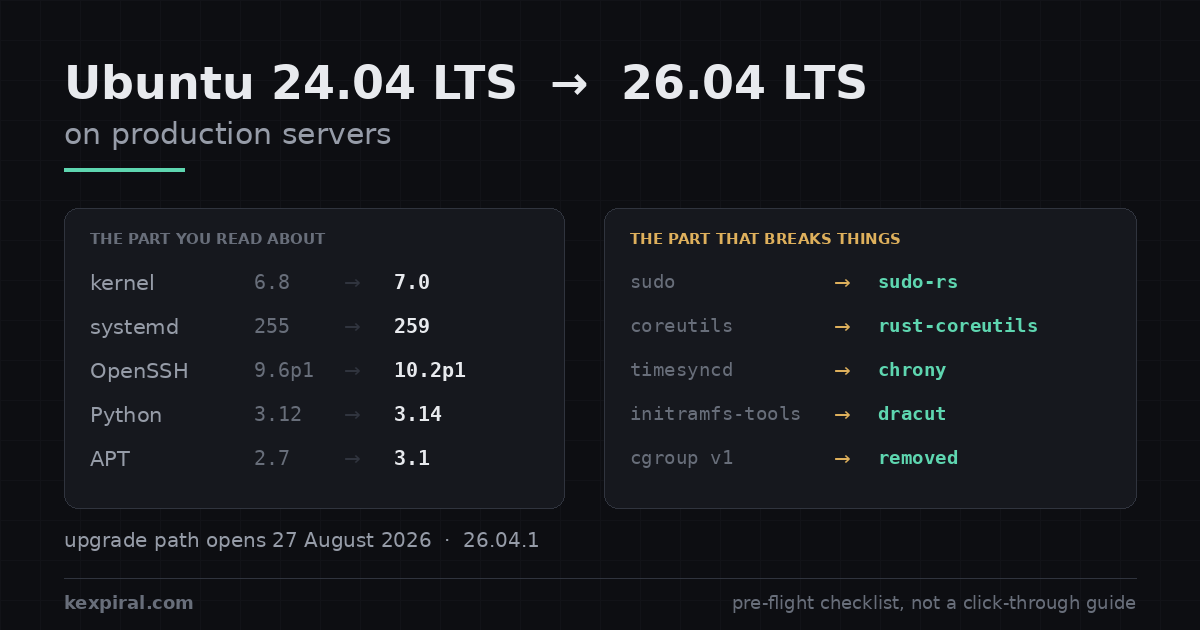
This is the checklist I use on real machines. It is written for people who run Ubuntu as a server: no desktop, no GNOME, no snap store. Everything factual here comes from Canonical's own release notes and the upstream projects, and where the official notes do not state a version number — OpenSSL is the interesting case — I have not invented one. Commands are read-only unless the comment says otherwise.
Why 27 August is the date that matters
Ubuntu does not offer you the next LTS the day it is released. It waits for that release's first point release, which lands roughly four months later and absorbs the worst of the early regressions. For 26.04 that point release is 26.04.1 on 27 August 2026. Until then, a 24.04 server with the standard Prompt=lts policy will correctly tell you there is nothing to upgrade to — which is not a bug, and not something to work around.[schedule][upgradedoc]
# Ubuntu does NOT offer one LTS to the next until the first point release.
# For 26.04 that is 26.04.1, scheduled for Thursday 27 August 2026. Before that
# date `do-release-upgrade` on a 24.04 box correctly answers "No new release".

lsb_release -a
# Description:  Ubuntu 24.04.4 LTS
# Codename:     noble

# The policy that decides what you are offered. On servers it should be `lts`.
grep -v '^#' /etc/update-manager/release-upgrades
# [DEFAULT]
# Prompt=lts

# Prompt=lts     -> next LTS, but only after ITS point release. Correct for servers.
# Prompt=normal  -> every 6-month interim release. Wrong for almost all servers.
# Prompt=never   -> never offered. Use this to pin a fleet during a change freeze.

sudo do-release-upgrade -c          # -c = check only, changes nothing
# Checking for a new Ubuntu release
# No new release found.

# You CAN force it before 27 August with `-d`, which targets the development
# upgrade path. Do not do this on a production server: -d is how you end up
# being the person who finds the release-upgrader bug, and the point release
# exists precisely to absorb the first four months of regressions.
This is also why the calendar is less urgent than it feels. Ubuntu 24.04 LTS has standard security maintenance until April 2029. You are not being pushed off a cliff on 27 August; you are being given a door. The only real deadline is the one you set yourself, and the sensible one is before the next release lands rather than the week your compliance auditor asks.[releasecycle]
If you need longer, Ubuntu Pro extends 24.04 with Expanded Security Maintenance to April 2034. That is a legitimate strategy for a fleet you are deliberately freezing — an appliance, an air-gapped estate, something being decommissioned. It is a bad strategy for a fleet you are still developing against, because your toolchain moves on and you end up backporting everything.[pro]
| Situation | What 27 August means for you | Reasonable move |
|---|---|---|
Standard 24.04 server, Prompt=lts | The upgrade becomes available. Nothing is pushed to you. | Plan it. September or October, after a pilot. |
| Fleet under a change freeze | Nothing changes, but staff may start upgrading test boxes. | Set Prompt=never explicitly rather than relying on inertia. |
| Appliance or air-gapped estate | Irrelevant. 24.04 is supported to April 2029. | Stay. Consider Ubuntu Pro for ESM to 2034 if the freeze is long. |
| Previous-generation cloud instance | You cannot upgrade at all until the instance is migrated. | Resize onto a current family first. This is independent of the OS. |
| Already on 22.04 | No direct path. 22.04 → 24.04 → 26.04, in that order. | Do the first hop now; it is the less interesting of the two. |
The pre-flight inventory, and why it is read-only
Everything below runs on the 24.04 machine, before you touch anything. It writes nothing. The point is not to produce a pretty report — it is to produce output you can diff against the same script after the upgrade, so that "it came back up" becomes a claim you can actually check.
#!/usr/bin/env bash
# noble-preflight.sh - read-only. Run it BEFORE the upgrade, save the output,
# and diff it against the same script run afterwards. Nothing here changes state.
set -uo pipefail
echo "=== identity ==="
lsb_release -ds; uname -r; systemctl --version | head -1

echo "=== 1. third-party repositories (the usual cause of a stuck upgrade) ==="
# do-release-upgrade disables these and does NOT re-enable them for you.
grep -rhs --include='*.list'    -E '^deb ' /etc/apt/sources.list /etc/apt/sources.list.d/
grep -rhs --include='*.sources' -E '^URIs' /etc/apt/sources.list.d/

echo "=== 2. packages not from the Ubuntu archive ==="
# Do NOT filter on the suite name: Docker's repo suite is literally `noble` and
# PGDG's is `noble-pgdg`, so grepping the codename hides exactly the two vendors
# you care about. Ask apt-cache policy where each package actually came from -
# in ONE invocation, because per-package calls reload the cache each time and
# turn this section into several minutes on a normal server.
#
# Set MIRROR to your own archive host if you run a local mirror, otherwise
# every package on the box gets reported as third-party and the output is noise.
# [.] rather than \. - awk processes escapes in a -v assignment and would warn.
MIRROR='archive[.]ubuntu[.]com|security[.]ubuntu[.]com|ports[.]ubuntu[.]com|archive[.]canonical[.]com'

apt-cache policy $(dpkg-query -f '${binary:Package} ' -W) 2>/dev/null | awk -v m="$MIRROR" '
  /^[a-zA-Z0-9]/ { pkg = $0; sub(/:$/, "", pkg) }
  /\*\*\*/     { getline; if ($2 !~ m && $2 != "/var/lib/dpkg/status")
                     printf "%-40s %s\n", pkg, $2 }'

echo "=== 3. held and manually installed packages ==="
apt-mark showhold
apt-mark showmanual | wc -l

echo "=== 4. locally modified config files you will be asked about ==="
# Every one of these produces a "keep or replace?" prompt mid-upgrade. Decide
# NOW, in writing, not at 02:00 with the package manager waiting on you.
debsums -ec 2>/dev/null || echo "install debsums to get this list"

echo "=== 5. services that must come back up ==="
systemctl list-unit-files --state=enabled --type=service --no-pager --no-legend | awk '{print $1}'

echo "=== 6. disk headroom - /boot is the one that bites ==="
df -h / /boot /var 2>/dev/null

echo "=== 7. cgroup hierarchy - a HARD upgrade blocker (see the cgroup section) ==="
stat -fc %T /sys/fs/cgroup/
# The parameter is a systemd boolean: 0/false/no/off all mean v1. Do not match
# only [01] or you will report "fine" on a host that is explicitly forced to v1.
grep -o 'systemd.unified_cgroup_hierarchy=[^ ]*' /proc/cmdline || echo "cmdline: default (v2)"

echo "=== 8. CPU capability for the AMD64v3 cloud images ==="
for f in avx avx2 bmi1 bmi2 f16c fma abm movbe osxsave; do
  grep -qw "$f" /proc/cpuinfo || echo "  MISSING: $f"
done

echo "=== 9. anything still using System V init scripts ==="
ls -1 /etc/init.d/ | grep -v README
Four of those sections earn their place because they are the ones that turn a 40-minute upgrade into a bad night:
- Third-party repositories.
do-release-upgradedisables every non-Ubuntu repository before it starts, and does not re-enable them afterwards. That is correct behaviour, and it means anything you installed from a vendor repo — Docker, PostgreSQL's PGDG, Node, an APM agent — stops receiving updates the moment you finish, silently, until you go and re-point it at theresolutesuite. - Locally modified config files. Each one produces an interactive keep-or-replace prompt in the middle of the transaction. Decide in advance, in writing. The default answer keeps your version, which is the safe choice for application config and the wrong choice for anything security-relevant that has had two years of upstream hardening.
- Disk headroom.
/needs several gigabytes free; a separate small/bootis the classic failure, because dracut and multiple kernels will fill it and the upgrade fails partway through with a half-configured system. - The cgroup hierarchy and the CPU flags. Both are covered in detail below. Both are things you want to discover now, not from a serial console.
What actually moved between the two releases
The headline numbers first, because they set expectations for everything else. Two years of Ubuntu development is a long jump — this is not a service pack.[ltssummary]
| Component | Ubuntu 24.04 LTS | Ubuntu 26.04 LTS | Why it matters on a server |
|---|---|---|---|
| Linux kernel | 6.8 | 7.0 | New hardware support; check out-of-tree modules and DKMS builds. |
| systemd | 255 | 259 | cgroup v1 removed; last release with System V script support. |
| OpenSSH | 9.6p1 | 10.2p1 | Post-quantum key agreement by default; DSA removed entirely. |
| Python | 3.12 | 3.14 | Crosses 3.13 and its nineteen removed stdlib modules. |
| APT | 2.7 | 3.1 | apt-key removed; new solver; TLS via OpenSSL. |
| glibc / GCC | 2.39 / 14 | 2.43 / 15.2 | Rebuild anything compiled locally against the old toolchain. |
| PostgreSQL | 16 | 18 | Major version jump — pg_upgrade required, not automatic. |
| MySQL | 8.0 | 8.4 LTS | Deprecated options removed; no 32-bit server. |
| PHP | 8.3 | 8.5 | Two major versions of language changes for anything you host. |
| OpenJDK default | 21 | 25 | Older LTS JDKs remain available if you pin explicitly. |
One of those rows is quietly the most interesting. Crossing OpenSSH 9.6 to 10.2 means the hybrid post-quantum key agreement mlkem768x25519-sha256 is available and preferred by default — not guaranteed, since a 9.6 peer still negotiates a classical exchange — and DSA support is gone entirely. OpenSSL in 26.04 gains ML-KEM, ML-DSA and SLH-DSA, the NIST standards. If you have been putting off the post-quantum conversation, this upgrade brings a good part of that migration with it whether you planned for it or not.[openssh][openssl35][fips203]
Six defaults that changed underneath you
This is the section that is missing from every other guide, and it is the reason this article exists. Ubuntu did not just bump versions: it replaced the implementation behind six things you type or rely on every day. Most of them are improvements. Only one of them will stop the upgrade dead. The rest will simply confuse somebody on your team at 3am if nobody wrote them down.[ltssummary]
| What you type | 24.04 gives you | 26.04 gives you | What to do about it |
|---|---|---|---|
sudo | sudo (Todd C. Miller) | sudo-rs | Audit sudoers: unsupported directives fail closed. Revert via sudo.ws plus update-alternatives. |
ls, sort, date | GNU coreutils | rust-coreutils | Test output-parsing scripts. GNU available as gnuls etc. cp, mv and rm stay GNU. |
| Time sync | systemd-timesyncd | chrony (fresh installs only) | Upgraded hosts keep timesyncd. Migrate manually or knowingly diverge from the default. |
| initramfs | initramfs-tools | dracut is now the default | Both remain supported. Check which you actually have; config moves to /etc/dracut.conf.d/. |
| Repository keys | apt-key | Signed-By only | Rewrite every provisioning script that calls apt-key add. |
| cgroup hierarchy | v2 default, v1 still possible | v2 only | A host on v1 is refused the upgrade. Clear the kernel parameter on 24.04 first. |
sudo is now sudo-rs
The single most surprising line in the 26.04 release notes: sudo-rs is now the default sudo provider, and the original sudo by Todd C. Miller has been renamed to the sudo.ws package. sudo-rs is a memory-safe reimplementation covering the sudoers subset that almost everyone actually uses. Its documented behaviour on something it does not support is to fail closed with a clear error — not to ignore it. That is the right direction, and it is also the reason to audit before rather than after: an unsupported directive stops sudo working, on a machine where sudo is how you fix things. A short enumerated set is accepted and ignored instead — env_reset, visiblepw, verifypw, mail_badpass, always_set_home, log_denied and a couple more — and none of those loosen access.[sudors]
# 26.04 makes sudo-rs the default sudo provider. The original sudo by
# Todd C. Miller is still packaged, renamed to `sudo.ws`.

sudo --version
update-alternatives --display sudo    # which implementation is actually selected

# sudo-rs implements the sudoers subset that essentially everyone uses:
# user/group specs, host specs, NOPASSWD, Cmnd_Alias, %group, includedir.
# Its documented behaviour on something it does NOT support is to fail closed
# with a clear error, not to ignore it. That is the safe direction - but it
# means an unsupported directive stops sudo from working rather than quietly
# degrading it, so you want to find those directives before the upgrade, not
# from a locked-out root account afterwards. A short enumerated set is accepted
# and ignored instead (env_reset, visiblepw, verifypw, mail_badpass,
# always_set_home, log_denied among them); none of those loosen access.

# Resource limits and umask move to PAM; sendmail integration is simply gone.
grep -rEn 'Defaults.*(umask|rlimit|mailto|mailerpath|env_keep|logfile|SELinux|role|type)' \
     /etc/sudoers /etc/sudoers.d/ 2>/dev/null

# Whatever you change, validate with the checker that matches your provider.
# visudo uses it automatically; run it by hand after any scripted edit.
sudo visudo -c

# --- If you find something sudo-rs will not honour ---
# Both implementations coexist; the provider is chosen through alternatives,
# so installing the package is only half the job:
sudo apt install sudo.ws
sudo update-alternatives --config sudo
# Treat this as a migration window rather than a destination: fix the sudoers
# file so you do not depend on the fallback staying available.

# --- One removal has no fallback ---
# The `sudo-ldap` package is gone. If your sudoers rules live in LDAP you must
# move that authorisation to PAM before upgrading, not after:
dpkg -l sudo-ldap 2>/dev/null | grep '^ii' && echo "ACTION REQUIRED: sudo-ldap is removed in 26.04"
Two practical notes. First, both implementations coexist and the provider is selected through update-alternatives, so installing sudo.ws is only half of a revert. Second, there is one removal with no fallback at all: the sudo-ldap package is gone. If your sudo authorisation rules live in LDAP, that has to move to PAM-based LDAP authentication before you upgrade — otherwise you land on a system where the rules simply are not there, and depending on how your escalation paths are wired, possibly one you cannot fix without console access.
ls, sort and date are now Rust
Second surprise: the core utilities are now the Rust rust-coreutils implementation. The GNU binaries are still installed under a gnu prefix — gnuls, gnudate, gnusort. Notably, cp, mv and rm are still GNU inside the Rust package, held back over unresolved bugs. That is the right call, and it means the utilities most capable of destroying data are the ones that did not change. Worth knowing before you form an opinion: the 26.04 release notes disclose twenty known CVEs against rust-coreutils. Disclosed is much better than hidden, and none of it is cause for alarm — but it does mean core utilities belong on your patching radar rather than in the mental category of things that never move.[uutils]
# Core utilities now come from rust-coreutils (the uutils project). The GNU
# binaries are still installed, prefixed with `gnu`: gnuls, gnudate, gnusort...

ls --version | head -1        # uutils
gnuls --version | head -1     # GNU

# Worth knowing before you decide: the 26.04 release notes ship a list of
# twenty known CVEs against rust-coreutils (CVE-2026-35341 through -35377).
# That is disclosed, not hidden, and none of it is a reason to panic - but it
# is a reason to keep this package on your patching radar rather than assuming
# core utilities are the boring part of the system.

# cp, mv and rm are STILL the GNU implementations inside rust-coreutils, held
# back over unresolved bugs. So the utilities most likely to destroy data are
# the ones that did not change - which is the right call, and worth knowing
# before you go hunting for a regression in the wrong place.

# Where this actually bites: scripts that parse output, or lean on a GNU-only
# flag. Behaviour is close, not identical, and error text differs.
# Test the parsers, not the interactive use:
sort --help | grep -c . ; date --help | grep -c .

# --- Reverting, if a script you cannot change depends on GNU behaviour ---
sudo apt install coreutils-from-gnu --allow-remove-essential
# ...and back again:
sudo apt install coreutils-from-uutils --allow-remove-essential
# `--allow-remove-essential` is required because coreutils is Essential:yes.
# Read that flag as the warning it is: run it from a console you can recover,
# not over the SSH session you are about to need.
chrony replaces systemd-timesyncd — but not on your box
Third, and the one I have seen missed most often: chrony is now the default time daemon instead of systemd-timesyncd — for fresh installs only. Your upgraded server keeps timesyncd, keeps working, and quietly stops matching the documentation, the hardening baselines and every runbook written against 26.04. Canonical documents the manual migration; nothing performs it for you.[chrony]
# Chrony replaces systemd-timesyncd as the default time daemon - but ONLY for
# fresh installs. An upgraded 24.04 server keeps timesyncd and will not tell
# you it is now off the default path. This is the change most likely to be
# missed, because nothing breaks: you just quietly stop matching the docs.

timedatectl show --property=NTP --property=NTPSynchronized
systemctl is-active systemd-timesyncd chrony 2>/dev/null

# --- The migration Canonical documents for upgraded systems ---
sudo apt-mark auto systemd-timesyncd     # demote it to an automatic dependency
sudo apt install chrony                  # installing chrony displaces timesyncd

# Verify you have exactly one time daemon running, not zero and not two:
systemctl is-active chrony
chronyc tracking
chronyc sources -v

# --- The trap, if you had ever edited chrony.conf ---
# Ubuntu's NTS-authenticated pool now lives in a separate drop-in file. If your
# old chrony.conf still lists servers, you will poll the same pool twice.
grep -E '^(server|pool)' /etc/chrony/chrony.conf
cat /etc/chrony/sources.d/ubuntu-ntp-pools.sources
# Keep the drop-in, comment out the duplicates in chrony.conf, then:
sudo systemctl restart chrony && chronyc sources -v
The migration has a trap on the far side. Ubuntu's NTS-authenticated pool now lives in
/etc/chrony/sources.d/ubuntu-ntp-pools.sources. If you had ever editedchrony.confand leftpoolorserverlines in it, you will poll the same servers twice — which is not fatal, but it is the kind of thing that produces a confusing chronyc output six months later when somebody investigates clock skew.
dracut replaces initramfs-tools
Fourth: dracut is now the default initramfs infrastructure, replacing initramfs-tools. The release notes are careful here and so should we be — initramfs-tools remains supported, and you can switch between the two implementations. Which one an upgraded host actually ends up with is not something to assume from a blog post, this one included. Check it, then act on what you find:[dracut][dracutconf]
- Ask the machine, do not infer it.
dpkg -l dracut initramfs-toolstells you what is installed anddracut --versionwhether it is usable. Note thatlsinitrdhas no--versionflag, so the obvious one-liner for detecting dracut reports the wrong answer — usedracut --versioninstead. - Configuration lives somewhere else. If you do move,
/etc/initramfs-tools/stops being the place: dracut reads/etc/dracut.conf.d/, and any custom hook, module list or forced driver has to be rewritten for it. That rewrite is the actual work, and it is not done for you. - Inspect the image, do not regenerate it. List the contents and confirm your storage and network drivers are present — NVMe, virtio, megaraid, mpt3sas, whatever your hardware or hypervisor needs. Regenerating the initramfs immediately after a release upgrade, on a host you have not yet rebooted twice, is the riskiest thing you could do on this page.
cgroup v1 is gone, and it blocks the upgrade
systemd 259 in 26.04 has no cgroup v1 at all. Upstream removed the legacy and hybrid hierarchies in systemd 258; only cgroup v2 is mounted at boot. Canonical turned that into a hard gate rather than a surprise — in their words, "Ubuntu installations running cgroup v1 will not be allowed to upgrade to Ubuntu 26.04 LTS". So the failure mode here is a refused upgrade, not a bricked host. That is the good outcome, and it is worth being precise about it, because plenty of coverage of this change implies otherwise.[systemd258][cgroupv2]
# systemd 259 in 26.04 has NO cgroup v1. The legacy and hybrid hierarchies
# were removed upstream in systemd 258; only cgroup v2 is mounted at boot.
#
# Canonical turned that into a hard gate rather than a surprise: "Ubuntu
# installations running cgroup v1 will not be allowed to upgrade to Ubuntu
# 26.04 LTS." So the failure mode is a REFUSED upgrade, not a bricked host -
# which is the good outcome, and the reason to check now is that you would
# otherwise discover it inside your maintenance window.

stat -fc %T /sys/fs/cgroup/
# cgroup2fs   -> v2, the upgrade will proceed
# tmpfs       -> v1 or hybrid, the upgrader will refuse. Fix it first.

# The parameter is a systemd boolean: 0, false, no and off all select v1.
grep -o 'systemd.unified_cgroup_hierarchy=[^ ]*' /proc/cmdline
grep -o 'systemd.legacy_systemd_cgroup_controller=[^ ]*' /proc/cmdline

# --- Fix it on 24.04, reboot, and confirm the workload still works ---
sudoedit /etc/default/grub
#   remove systemd.unified_cgroup_hierarchy=0 from GRUB_CMDLINE_LINUX*
sudo update-grub && sudo reboot
# after the reboot:
stat -fc %T /sys/fs/cgroup/     # must print cgroup2fs

# Two related consequences that are easy to miss, both from the release notes:
#   - a 26.04 CONTAINER will not run on a host still booted with cgroup v1
#   - a 26.04 HOST will not run containers that require v1 (e.g. images based
#     on Ubuntu older than 18.04). Check your base images, not just your hosts.

# --- The other systemd deadline, and it is closer than you think ---
# 26.04 is the LAST release that runs System V init scripts. systemd 260 has
# already dropped the support upstream, so the release that loses it is 26.10
# - October 2026, not some comfortable date in 2028.
ls -1 /etc/init.d/ | grep -v README
systemctl list-units --type=service --no-pager | grep -i 'LSB:'
The pattern to look for is a kernel command-line parameter, usually systemd.unified_cgroup_hierarchy=0, added years ago to keep an old Docker, an old Kubernetes node or a JVM monitoring agent happy — and then never removed, because nothing ever reminded anybody it was there. The reason to find it now rather than on the night is simply that a refusal inside your maintenance window still costs you the window. Two knock-on effects are easy to miss: a 26.04 container will not run on a host still booted with cgroup v1, and a 26.04 host will not run containers that require v1 — anything based on Ubuntu older than 18.04, for instance. Check your base images, not just your hosts. Separately, 26.04 is the last release that runs System V init scripts, and that deadline is closer than it looks: systemd 260 has already dropped the support upstream, so the release that loses it is 26.10, in October 2026 — not some comfortable date in 2028.[since2510][mobycgroup][systemd260]
APT 3 and the removal of apt-key
APT moves from 2.7 to 3.1, and the change that breaks automation is the removal of apt-key. It has been deprecated for years and there is no shim: signature verification now goes directly to gpgv, and every repository must name its own key. Any provisioning script still calling apt-key add fails on 26.04 — and because that call is usually early in a bootstrap, it fails before anything useful has happened.[aptsecure][aptsources]
# APT 3 in 26.04 removes `apt-key` entirely. Verification goes straight to
# gpgv, and every repository must name its key explicitly.

apt --version                       # apt 3.1.x
command -v apt-key || echo "apt-key: gone, as expected"

# Find repositories that still rely on the deleted trusted keyring. These are
# what break: not the tool, the repositories that assumed it.
ls -l /etc/apt/trusted.gpg /etc/apt/trusted.gpg.d/ 2>/dev/null

# --- The replacement: one key per repository, referenced by path ---
# Create the directory explicitly. It exists on a normal install and does NOT
# on a minimal container image, which is exactly where bootstrap scripts run.
sudo install -m 0755 -d /etc/apt/keyrings
# Dearmor the key into its own file (note .gpg for binary, .asc for armoured):
curl -fsSL https://example.com/repo.asc \
  | sudo gpg --dearmor -o /etc/apt/keyrings/example.gpg
sudo chmod 0644 /etc/apt/keyrings/example.gpg

# Then point the repository at it. Modern deb822 format, /etc/apt/sources.list.d/example.sources:
#   Types: deb
#   URIs: https://example.com/apt
#   Suites: resolute
#   Components: main
#   Signed-By: /etc/apt/keyrings/example.gpg
#
# Or the one-line form, if you still use it:
#   deb [signed-by=/etc/apt/keyrings/example.gpg] https://example.com/apt resolute main

sudo apt update                     # any repo you missed fails loudly here

# --- Worth knowing about, not worth planning around ---
# APT 3 adds transaction history. It replays package operations; it does not
# restore data, and it cannot undo a release upgrade.
apt history-list
sudo apt history-undo <ID>
APT 3 also brings a new dependency solver, which engages automatically when the classic one cannot find a solution, and a transaction history with apt history-undo and apt history-rollback. Read that history feature carefully before you rely on it: it replays package operations. It does not restore data, it does not know about your database, and it cannot undo a release upgrade.
Python 3.12 → 3.14 crosses the dead batteries
Ubuntu 24.04 ships Python 3.12; 26.04 ships 3.14. That means this upgrade crosses 3.13, the release that deleted nineteen standard-library modules under PEP 594. There is no deprecation warning left to catch, because the warning period was 3.11 and 3.12. What you get instead is an ImportError at runtime, in whichever cron job, hook or request handler reaches that import first.[py313][pep594]
# 24.04 shipped Python 3.12. 26.04 ships 3.14 as the system interpreter - so
# this upgrade crosses 3.13, the release that deleted nineteen standard-library
# modules under PEP 594. Nothing warns you: the import simply fails at runtime,
# in whichever cron job or handler happens to reach that line first.

python3 --version                   # Python 3.14.x

# Scan everything you own for the removed modules, before the upgrade. Note
# the module name is matched anywhere on an import line, not just directly
# after the keyword - otherwise `import os, cgi` slips straight through.
grep -rInE '^[[:space:]]*(import|from)[[:space:]].*\b(aifc|audioop|cgi|cgitb|chunk|crypt|imghdr|mailcap|msilib|nis|nntplib|ossaudiodev|pipes|sndhdr|spwd|sunau|telnetlib|uu|xdrlib)\b' \
  --include='*.py' /opt /srv /usr/local/lib /home 2>/dev/null

# The three that actually turn up on servers, and what to do about each:
#   cgi / cgitb -> old WSGI shims and form parsing. Move to the framework's
#                  parser, or `pip install standard-cgi` as a stopgap.
#   crypt       -> /etc/shadow hashing in provisioning scripts.
#                  Replace with `passlib` or a libxcrypt binding.
#   telnetlib   -> network-device automation. Replace with `netmiko`/`pexpect`,
#                  or better, stop using telnet.
# Pure-Python removals are republished on PyPI under `standard-*` names, which
# buys you a release cycle. It does not fix the code.

# Do not forget the interpreter under your virtualenvs: a venv created against
# 3.12 keeps pointing at a binary the upgrade removes. -xdev keeps this out of
# /proc, /sys and network mounts; -print0 survives paths with spaces.
find / -xdev -name pyvenv.cfg -print0 2>/dev/null \
  | xargs -0 -r grep -H 'version'   # rebuild every one of these afterwards
Three of the nineteen turn up on servers with real regularity: cgi and cgitb in old WSGI shims and form-parsing helpers, crypt in provisioning scripts that write /etc/shadow hashes, and telnetlib in network-device automation. The pure-Python ones were republished on PyPI under standard- prefixed names, which buys you a release cycle to fix the code properly. And do not forget virtualenvs: one created against the 3.12 binary keeps pointing at an interpreter the upgrade removes.[py314]
Your cloud instance may not be supported any more
Ubuntu 26.04 cloud images for AMD64 are built for the x86-64-v3 microarchitecture level. Read that word carefully, because a lot of coverage does not: it is the prebuilt images that moved, not the archive. x86-64-v3 is the v2 baseline plus AVX, AVX2, BMI1, BMI2, F16C, FMA, LZCNT, MOVBE and OSXSAVE — a CPU without them cannot execute those instructions at all, so there is no kernel parameter that softens it.[ltssummary][x86levels]
# Ubuntu 26.04 cloud IMAGES for AMD64 are built for the x86-64-v3
# microarchitecture level. Read that word carefully: it is the prebuilt images
# that moved, not the archive. The archive stays baseline x86-64, so an
# in-place upgrade still pulls baseline packages. What you lose on an old
# instance family is SUPPORT and a launchable image - not, by itself, the boot.
# That is a smaller problem than "it will not come back", and still one you
# want to solve before you build anything else on top of it.

# x86-64-v3 is the v2 baseline plus AVX, AVX2, BMI1, BMI2, F16C, FMA, LZCNT,
# MOVBE and OSXSAVE. AVX2 is a decent proxy; the loop is the real check.
# Note `abm`: Linux exposes LZCNT under that capflag, and there is no `lzcnt`
# string in /proc/cpuinfo - grep for the obvious name and every host on earth
# reports a missing feature it actually has.
for f in avx avx2 bmi1 bmi2 f16c fma abm movbe osxsave; do
  grep -qw "$f" /proc/cpuinfo && echo "  $f yes" || echo "  $f MISSING"
done

# --- AWS: previous-generation families are out ---
# M1 M2 M3 M4 / C1 C3 C4 / R3 R4 / I2 / G3 / P2 P3 P3dn are no longer supported
# from 26.04. Note the [a-z]* before the dot: without it you miss p3dn and g3s,
# which are precisely two of the families you are hunting for.
aws ec2 describe-instances \
  --query 'Reservations[].Instances[].{Id:InstanceId,Type:InstanceType}' \
  --output text | grep -E '^\S+[[:space:]]+(m[1-4]|c[134]|r[34]|i2|g3|p[23])[a-z]*\.'
# The fix is a migration, not a config change: resize onto a current family
# (m6i/m7i, c6i/c7i, r6i/r7i) FIRST, then upgrade the OS.

# --- Google Cloud: N1 on Sandy Bridge or Ivy Bridge is out ---
gcloud compute instances list --format='table(name,zone,machineType,cpuPlatform)'

# --- Bare metal / on-prem: opt in only after you have checked every host ---
# The archive itself stays baseline x86-64; the v3 build is opt-in:
echo 'APT::Architecture-Variants "amd64v3";' | sudo tee /etc/apt/apt.conf.d/99enable-amd64v3
sudo apt update && sudo apt upgrade| Platform | No longer supported from 26.04 | Required action |
|---|---|---|
| AWS EC2 | M1, M2, M3, M4; C1, C3, C4; R3, R4; I2; G3; P2, P3, P3dn | No 26.04 image is built for them. Migrate to a current family (m6i/m7i, c6i/c7i, r6i/r7i) first. |
| Google Compute Engine | N1 on Intel Sandy Bridge and Intel Ivy Bridge CPU platforms | Move the instance to a newer CPU platform or machine type first. |
| Bare metal / on-prem | Nothing — the archive stays baseline x86-64 | No action. The AMD64v3 build is opt-in, via a single apt.conf.d line. |
| IBM Z (s390x) | Generation z14 (LinuxONE II) and older | z15 is the new minimum, and ubuntu-release-upgrader blocks the upgrade outright. |
| RISC-V | Anything below the RVA23S64 ISA profile | 24.04 remains the release for RVA20 boards. |
What that means in practice is narrower than the panic version, and still worth acting on. The previous-generation AWS families are no longer supported from 26.04, and no 26.04 image is built for them. An in-place do-release-upgrade pulls baseline amd64 packages from the archive, so it is a support problem rather than automatically a boot problem — but running an unsupported combination under production load, on hardware nobody is testing against, is not a position to choose deliberately. If you have an M3 running something important — and a surprising number of people do, because it has been fine for a decade — resize onto a current family first, then upgrade. On bare metal nothing forces your hand at all: the archive stays baseline x86-64 and the v3 build is strictly opt-in.[awsprev]
Service by service: the ones with real migrations
Version bumps are usually uneventful. These are the ones where the maintainers changed something that requires you to act, roughly ordered by how badly it goes if you do not:
| Service | Change | Effort |
|---|---|---|
| RabbitMQ | Not directly upgradable across this jump because of feature flags. | High — manual steps, plan as its own maintenance. |
| Dovecot | 2.4 rewrote the configuration format. | High — treat the config migration as a separate project. |
| Samba AD/DC | The samba-ad-dc package must be installed before the upgrade. | High — irreversible in practice if missed. Check today. |
| PostgreSQL | 16 → 18 needs pg_upgrade; and a Linux 7.0 regression unless huge_pages=on. | High — the regression is silent. Size the huge page pool before flipping it. |
| apache2 + mod-php | MemoryDenyWriteExecute=yes on the unit breaks the PHP JIT. | Medium — move to php-fpm, or override the directive knowingly. |
| HAProxy | 2.x → 3.2: stricter URI parsing, enabled rejected, tune.ocsp-update renamed. | Medium — config edits, easy to test in advance. |
| Squid | 7.2 removed client_delay_access, ftp_epsv, the persistent-connection directives. | Medium — a removed directive stops the daemon starting. |
| MySQL | 8.0 → 8.4 LTS. Deprecated options removed; 32-bit server gone. | Medium — review the config before, not after. |
| SSSD | Now runs as user sssd, not root. | Low — verify access to secrets and keytabs. |
| Postfix | No longer installed in a chroot by default. | Low — but re-check paths if you customised the chroot. |
| OpenSSH | 9.6 → 10.2: DSA gone, post-quantum key agreement default. | Low — usually nothing to do. Verify no client needs DSA. |
RabbitMQ deserves the top row on its own merits: because of feature flags it is not directly upgradable across this jump, and Canonical documents manual steps for it. Dovecot 2.4 rewrote the configuration format outright — plan that as its own change, not as a side effect of the OS upgrade. HAProxy moves from the 2.x series to 3.2, which rejects the enabled keyword for dynamic servers, parses non-standard URIs more strictly, and renames tune.ssl.ocsp-update to tune.ocsp-update.[rabbitmq][dovecot24][haproxy32]
The rest are ordinary but not automatic. PostgreSQL 18 needs pg_upgrade from 16; MySQL 8.0 to 8.4 LTS drops long-deprecated options and removes 32-bit server support. SSSD now runs as an unprivileged sssd user rather than root, so verify it can still read its secrets and keytabs. Postfix is no longer chrooted by default. And if you run a Samba Active Directory domain controller without the samba-ad-dc package explicitly installed, install it before upgrading — otherwise the domain controller functionality does not survive, and the components you need to fix it are the ones that did not get installed.[postgres18][mysql84][sssd]
The two known issues that actually bite servers
Canonical publishes a known-issues list alongside the release notes, and two entries on it are more concrete than almost anything else written about 26.04. Neither blocks the upgrade. Both change how your server behaves afterwards, quietly, in a way you will attribute to something else if you do not know to look. The first is apache2: its systemd unit now sets MemoryDenyWriteExecute=yes as a hardening measure, which forbids memory that is writable and executable at the same time — precisely what a JIT compiler needs. Under libapache2-mod-php that breaks PHP's JIT, with Allocation of JIT memory failed in your logs and a performance drop nobody connects to an OS upgrade.[since2510][apachebug]
# Both of these are in Canonical's own known-issues list for 26.04, and both
# are more concrete than most of what gets written about this release. Neither
# stops the upgrade; both change how your server behaves afterwards.

# --- 1. apache2 + mod-php: the PHP JIT stops working ---
# The apache2 systemd unit now sets MemoryDenyWriteExecute=yes as hardening.
# That forbids memory that is writable and executable at once, which is exactly
# what a JIT needs. Symptom:
#   Warning: preg_match(): Allocation of JIT memory failed, PCRE JIT will be disabled.
dpkg -l 'libapache2-mod-php*' 2>/dev/null | grep '^ii'

# Recommended fix: move to php-fpm, which is not affected. Note the a2dismod -
# without it apache2 keeps loading mod_php and the JIT stays broken, which is
# the most common way this "fix" gets applied and then reported as not working.
sudo apt install php-fpm
sudo a2dismod php8.5 && sudo a2dismod mpm_prefork
sudo a2enmod mpm_event proxy_fcgi setenvif && sudo a2enconf php8.5-fpm
sudo systemctl restart apache2 php8.5-fpm

# If you must stay on mod-php, override the hardening deliberately - and
# understand that you are turning off a mitigation, not fixing a bug:
sudo systemctl edit apache2
#   [Service]
#   MemoryDenyWriteExecute=no
sudo systemctl restart apache2

# --- 2. PostgreSQL on the 7.0 kernel: throughput and latency regression ---
# A Linux 7.0 change can cost PostgreSQL significant throughput and latency.
# Systems using huge pages are NOT affected, so this is a configuration
# question rather than a wait-for-a-patch question.
sudo -u postgres psql -tAc 'SHOW huge_pages;'      # want: on

# huge_pages=try (the default) silently falls back to normal pages, which is
# how you end up affected without any error telling you so.
#
# Size the pool FIRST. PostgreSQL will compute the number for you - no
# arithmetic, no guessing at shared_buffers overhead:
sudo -u postgres postgres -D /var/lib/postgresql/18/main \
     -C shared_memory_size_in_huge_pages
# 3170
grep -E 'Hugepagesize|HugePages_Total' /proc/meminfo
sudo sysctl -w vm.nr_hugepages=3170                # use YOUR number, then
                                                   # persist it in /etc/sysctl.d/
# ...and only now turn it on:
sudo -u postgres psql -c "ALTER SYSTEM SET huge_pages = 'on';"
sudo systemctl restart postgresql
# huge_pages=on means PostgreSQL REFUSES TO START if the pages are not
# available. That is the point - it fails loudly instead of quietly slowly -
# but it means you size the pool before you flip the setting, not after.
The second is PostgreSQL, and it is the one I would put money on being misdiagnosed. A change in Linux 7.0 can cause a significant throughput and latency regression — but systems using huge pages are not affected, which makes this a configuration question rather than a wait-for-a-patch question. The catch is that PostgreSQL's default huge_pages=try falls back to normal pages silently, so an affected server reports nothing at all: no error, no warning, just worse numbers than it had last week. Set huge_pages=on deliberately, and size the huge page pool before you do, because on means PostgreSQL refuses to start if the pages are not there. That is the correct trade — fail loudly rather than quietly slowly — but it is not a setting to flip at the end of a long maintenance window.[pghugepages][pgkernel][systemdexec]
Running the upgrade
None of this is clever. The value is entirely in the order, and in refusing to skip step zero.[upgradedoc]
# Nothing below is clever. The value is entirely in the order and in refusing
# to skip step 0.

# --- 0. A rollback you have actually tested ---
# Snapshot the VM, or take a filesystem-level backup you have restored from at
# least once. `do-release-upgrade` has no undo, and neither does apt history.
# If you cannot roll back, you are not upgrading, you are gambling.

# --- 1. Land on a fully patched 24.04 first ---
sudo apt update && sudo apt full-upgrade
sudo apt --purge autoremove
sudo reboot                        # boot the newest 24.04 kernel BEFORE upgrading
uname -r

# --- 2. Survive a dropped connection ---
# The upgrade takes 20-60 minutes and will kill your shell if the link drops
# mid-transaction. do-release-upgrade opens a standby sshd on 1022 by itself;
# run it inside tmux or screen anyway.
sudo apt install tmux
tmux new -s upgrade
# detach with Ctrl-b d, reattach after a disconnect with: tmux attach -t upgrade

# --- 3. Run it ---
sudo do-release-upgrade
# Answer the config-file prompts from the list you produced in the pre-flight.
# Default is "keep your currently-installed version" (N). For sshd_config and
# anything security-relevant, take the maintainer's version and re-apply your
# changes as a drop-in afterwards - your 2019 hardening file is not better
# than the 2026 defaults.

# --- 4. Reboot and verify, in this order ---
sudo reboot
lsb_release -ds                    # Ubuntu 26.04.1 LTS
uname -r                           # 7.x
systemctl --failed                 # must be empty
journalctl -p err -b --no-pager | head -50
ss -tlnp                           # every listener you expect, and nothing new

# --- 5. Clean up what the upgrade left behind ---
sudo apt --purge autoremove        # read the list before confirming
ls /etc/apt/sources.list.d/        # re-enable third-party repos, resolute suites
dpkg -l | grep '^rc' | wc -l       # removed-but-not-purged leftovers
One judgement call deserves saying out loud, because the default answer is not always the right one. When the upgrade asks about a modified config file, keeping your version is the safe choice for application configuration and usually the wrong choice for anything security-relevant: your sshd_config hardening from 2019 is not better than the 2026 defaults. But take that advice with the obvious caveat attached. Accepting the maintainer's sshd_config also discards a custom Port, AllowUsers, PermitRootLogin or Match block living in that file, and sshd restarts before you have re-applied them — over the connection you are upgrading through. Keep the standby session on port 1022 open, re-apply your genuine local changes as a drop-in in sshd_config.d/ where the next upgrade will leave them alone, and only then close the first shell.
Verifying afterwards, properly
"It booted" is not verification. This is the counterpart to the pre-flight script — and to be precise about how to use them, the two scripts deliberately print different sections, so do not diff one against the other wholesale. The blocks worth comparing directly are the enabled-services list and ss -tlnp: same units enabled, same ports listening. If a service was enabled before and is not now, this is where you find out, rather than when someone opens a ticket on Monday.
#!/usr/bin/env bash
# noble-postflight.sh - the counterpart to the pre-flight script. The two print
# DIFFERENT sections on purpose, so do not diff them against each other
# wholesale. The blocks that are directly comparable are the enabled-services
# list and `ss -tlnp`: same units enabled, same ports listening.
# "It booted" is not a verification; "the same 41 services are enabled and
# listening on the same ports" is.
set -uo pipefail

echo "=== the defaults that changed under you ==="
sudo --version | head -1                    # sudo-rs, unless you reverted
update-alternatives --display sudo | head -2
ls --version | head -1                      # uutils, unless you reverted
systemctl is-active chrony systemd-timesyncd 2>/dev/null   # exactly one active
stat -fc %T /sys/fs/cgroup/                 # cgroup2fs

echo "=== which initramfs generator is this host ACTUALLY using? ==="
# Both are supported in 26.04 and either can be in place after an upgrade, so
# do not assume - ask. (lsinitrd has no --version; dracut does.)
dpkg -l dracut initramfs-tools 2>/dev/null | grep '^ii' || true
command -v dracut >/dev/null && dracut --version

echo "=== crypto, which moved a long way in two years ==="
ssh -V                                      # OpenSSH 10.2p1 in 26.04, from 9.6p1
ssh -Q kex | grep -c mlkem                  # post-quantum key agreement offered
# OpenSSL spells these with hyphens - ML-KEM-768, not mlkem - so grep for both
# or you will "prove" that a correctly configured box has no PQ support.
openssl list -kem-algorithms | grep -ciE 'ml-?kem'

echo "=== DSA host keys are gone; make sure nothing still expects one ==="
ls /etc/ssh/ssh_host_*_key 2>/dev/null
sudo sshd -t && echo "sshd config: valid"

echo "=== services ==="
systemctl --failed --no-pager
systemctl list-unit-files --state=enabled --type=service --no-pager --no-legend | awk '{print $1}'
ss -tlnp

echo "=== rebuild every virtualenv that pointed at python3.12 ==="
find / -xdev -name pyvenv.cfg 2>/dev/null

echo "=== the two server known-issues from the release notes ==="
# 1. apache2 now sets MemoryDenyWriteExecute=yes, which breaks the PHP JIT
#    under libapache2-mod-php. php-fpm is unaffected and is the recommendation.
dpkg -l libapache2-mod-php\* 2>/dev/null | grep -q '^ii' && \
  echo "mod-php present -> move to php-fpm, or: systemctl edit apache2 (MemoryDenyWriteExecute=no)"
# 2. A Linux 7.0 change can cost PostgreSQL significant throughput and latency.
#    Systems using huge pages are not affected.
command -v psql >/dev/null && sudo -u postgres psql -tAc 'show huge_pages'
#    Anything other than `on` here is worth fixing before you call this done.

echo "=== boot integrity: inspect, do not regenerate ==="
# READ ONLY on purpose. Regenerating the initramfs immediately after a release
# upgrade is the riskiest thing you could do on this page; look first.
# /boot/initrd.img-* is mode 0600 root:root, hence the sudo on both branches.
if command -v lsinitrd >/dev/null; then
  sudo lsinitrd | grep -E 'nvme|virtio|megaraid|mpt3sas' | head
elif command -v lsinitramfs >/dev/null; then
  sudo lsinitramfs /boot/initrd.img-"$(uname -r)" | grep -E 'nvme|virtio|megaraid|mpt3sas' | head
else
  echo "neither lsinitrd nor lsinitramfs present - install the tool matching your generator"
fi
Two things to check that the script cannot check for you. First, your netplan configuration: 26.04 ships Netplan 1.2, including a custom systemd-networkd-wait-online that waits for a routable interface, so a host with a NIC that comes up late may boot differently than it used to. Second, every third-party repository from the pre-flight list — re-point it at the resolute suite with a Signed-By key, and confirm apt update is clean. An estate that silently stopped receiving vendor security updates is the quietest possible way for this upgrade to have gone wrong.[netplan]
So: now, November, or 2027?
My honest advice, having done this on both careful and careless fleets:
- Do not upgrade on 27 August. The point release exists to absorb regressions, but the ones it does not catch surface in the following fortnight, found by people with more appetite for risk than a production estate should have.
- Upgrade one non-critical server in early September. Something real enough to be interesting — a build agent, an internal tool — but that nobody pages you about. Run the pre-flight and post-flight scripts and keep the diff. That diff is your migration document for everything else.
- Clear the two upgrade blockers first, everywhere. A host still booted on cgroup v1, and anything running on IBM Z z14 or older, will be refused by the upgrader — so find them before you schedule work around them. Add the AMD64v3 instance families to the same sweep: those are not blocked, but running an unsupported combination is a choice, and it should be a deliberate one. All three are checkable on 24.04 today, independently of any upgrade decision.
- Then batch the rest through October and November. By then the third-party repositories you depend on have
resolutesuites, which removes most of the remaining friction.
And read the known-issues page rather than only the summary. It is updated after release, which is precisely the property you want from it — the summary tells you what was intended, the known-issues list tells you what actually happened.[since2510]
If you are touching init and scheduling anyway, systemd timers versus cron covers the migration this release makes overdue. The SSH and TLS side of the upgrade is the subject of post-quantum SSH and TLS, which goes into what to verify on the connections rather than the packages. And if this article has mostly made you want fewer moving parts to upgrade in the first place, that is the argument in boring cloud architectures.
Frequently asked questions
Can I upgrade from Ubuntu 24.04 to 26.04 before 27 August 2026?
Technically yes, with do-release-upgrade -d, which targets the development upgrade path. You should not do this on a production server. The point release exists specifically to absorb four months of post-release regressions, and forcing the upgrade early means you are the person who finds the release-upgrader bugs. On a laptop you can restore in an hour, it is a reasonable thing to do; on a server carrying real traffic it is not.
Do I have to upgrade at all? How long is 24.04 supported?
Ubuntu 24.04 LTS has standard security maintenance until April 2029, and Ubuntu Pro extends that with ESM to April 2034. There is no urgency in August 2026. The reason to upgrade is that your own toolchain moves on — newer Python, newer PostgreSQL, newer language runtimes — and staying put eventually means backporting everything yourself. Freezing is a legitimate choice for an appliance or an estate being decommissioned, and a poor one for a platform you are still building on.
What is the single change most likely to cost me a maintenance window?
A leftover systemd.unified_cgroup_hierarchy=0 kernel parameter. systemd 259 has no cgroup v1 at all, and Canonical made this a hard gate: a host still booted on cgroup v1 is not allowed to upgrade. You do not get a broken machine — you get a refusal, at the point where you had budgeted an hour of downtime. Second place is the PostgreSQL regression on the Linux 7.0 kernel, because unlike the first it produces no error at all, just worse numbers. Both are checkable in under a minute on 24.04, today, before you commit to any date.
Is sudo-rs safe to use in production?
Yes for the sudoers configuration that the overwhelming majority of systems actually have: user and group specs, host specs, NOPASSWD, command aliases, includedir. The care is needed at the edges. sudo-rs does not implement the full range of Defaults entries; resource limits and umask move to PAM, and sendmail integration is gone. Its documented behaviour on an unsupported directive is to fail closed with a clear error rather than to ignore it — the safe direction, but it means a directive you did not check can stop sudo working on a machine where sudo is how you fix things. A short enumerated set is accepted and ignored instead, and none of those loosen access. Audit the file before you upgrade. If you do need to revert, both implementations coexist: install sudo.ws and select it with update-alternatives --config sudo — installing the package alone does not switch the provider.
Will my Docker containers still work after the upgrade?
In almost all cases yes, because Ubuntu 24.04 already defaults to cgroup v2 and modern Docker has supported v2 for years. The exception is a host where somebody previously set systemd.unified_cgroup_hierarchy=0 on the kernel command line to keep an older Docker or Kubernetes node happy — such a host is refused the upgrade outright. Check stat -fc %T /sys/fs/cgroup/: it must print cgroup2fs. Two related limits are easier to miss. A 26.04 container will not run on a host still booted with cgroup v1, and a 26.04 host will not run containers that require v1 — images based on Ubuntu older than 18.04, for example. So check your base images as well as your hosts.
Why did my Python script stop working after upgrading?
Most likely an ImportError on a module removed in Python 3.13. Ubuntu 24.04 shipped Python 3.12 and 26.04 ships 3.14, so this upgrade crosses the release that deleted nineteen standard-library modules under PEP 594. The three that appear on servers most often are cgi, crypt and telnetlib. Pure-Python removals were republished on PyPI under standard- prefixed names as a stopgap. Separately, any virtualenv created against the 3.12 binary needs rebuilding, because the interpreter it points at no longer exists.
Do I need to migrate from systemd-timesyncd to chrony?
Not strictly — timesyncd still works and an upgraded server keeps it. But chrony is the default on fresh 26.04 installs, so if you do nothing, your upgraded hosts and your newly built hosts diverge, and every runbook or hardening baseline written against 26.04 stops matching. Canonical documents the migration as apt-mark auto systemd-timesyncd followed by apt install chrony. If you migrate, check that any servers still listed in chrony.conf are not duplicated by the drop-in at /etc/chrony/sources.d/ubuntu-ntp-pools.sources.
Can I roll back if the upgrade goes wrong?
Not with any Ubuntu tooling. do-release-upgrade has no undo, and the new apt history-undo replays package operations rather than restoring a system — it does not know about your data and cannot reverse a release upgrade. Your rollback is a VM snapshot or a filesystem-level backup you have actually restored from at least once. If you do not have one, you are not upgrading; you are gambling with a good expected value and an unbounded downside.
The container runtime underneath all of this moved too: what breaks when you move to Docker Engine 29 covers the API floor, the image store and the file-descriptor limit that changed without an error message.
The init system underneath moved as well: systemd 260 deleted the SysV generator, rc-local.service and systemd-sysv-install outright, so migrating SysV init scripts and rc.local to systemd units is now a dated piece of work rather than an optional tidy-up.
The resource-control layer moved in the same releases: systemd 258 removed cgroup v1 outright, so every host now boots the unified hierarchy whether or not anything asked it to. migrating from cgroup v1 to cgroup v2 covers the audit, the file-by-file conversion, and the two translations that change behaviour rather than spelling.
Sources
Every claim above traces to one of these. Canonical's release notes and schedule are the authority for anything Ubuntu-specific; upstream project documentation for everything else. Where the official notes do not state a version, this article describes the capability instead of guessing a number.
- Canonical — Ubuntu 26.04 LTS (Resolute Raccoon) release notes; released 23 April 2026, supported until April 2031
- Canonical — Ubuntu 26.04 LTS summary for LTS users: the authoritative list of changes since 24.04, and the source for every default swap described here
- Canonical — Ubuntu 26.04 LTS changes since 25.10, including the known-issues list and the cgroup v1 removal detail
- Canonical — Resolute Raccoon release schedule; the 26.04.1 point release is listed for Thursday 27 August 2026
- Ubuntu Server documentation — How to upgrade your release (do-release-upgrade, the -d flag, and the LTS-to-LTS point release rule)
- Canonical — Ubuntu 24.04 LTS (Noble Numbat) release notes, the baseline this article upgrades from
- Canonical — Ubuntu release cycle: LTS cadence, five years of standard support, ESM through Ubuntu Pro
- Canonical — Ubuntu Pro documentation (ESM, Livepatch, and the ten-year maintenance window on 24.04)
- Trifecta Tech Foundation — sudo-rs, the memory-safe sudo and su implementation that is now Ubuntu's default sudo provider
- uutils/coreutils — the Rust reimplementation of the GNU core utilities shipped as rust-coreutils
- systemd v258 release notes — removal of cgroup v1 (legacy and hybrid hierarchies) and the raised kernel baseline
- systemd NEWS — the upstream changelog covering v256 through v259, including the System V compatibility deprecation
- Linux kernel documentation — Control Group v2, the only hierarchy systemd still mounts
- moby/moby #51111 — Docker's cgroup v1 deprecation discussion and support timeline
- apt-secure(8) — repository signing after the removal of apt-key, and the Signed-By mechanism that replaces it
- sources.list(5) — the deb822 .sources format and the Signed-By field
- dracut(8) — the initramfs infrastructure that replaces initramfs-tools as Ubuntu's default
- dracut.conf(5) — configuration in /etc/dracut.conf.d/, including hostonly and the drivers to force-include
- chrony.conf(5) — the configuration file, source directories and NTS options for Ubuntu's new default time daemon
- What's New In Python 3.13 — the release that removed the nineteen PEP 594 'dead battery' standard-library modules
- PEP 594 — Removing dead batteries from the standard library; the full list of removed modules and their replacements
- What's New In Python 3.14 — the interpreter Ubuntu 26.04 ships as the system Python
- OpenSSL 3.5 series release notes — ML-KEM, ML-DSA and SLH-DSA support and the default hybrid TLS groups
- OpenSSH release notes index — covers the 9.6 to 10.2 range that this upgrade crosses, including DSA removal
- NIST FIPS 203 — Module-Lattice-Based Key-Encapsulation Mechanism Standard (ML-KEM), the algorithm behind the new OpenSSL and OpenSSH defaults
- AWS — previous generation EC2 instances; the families that lose Ubuntu support because of the AMD64v3 cloud image baseline
- x86-64 microarchitecture levels — what x86-64-v3 requires (AVX2, BMI1/2, FMA, MOVBE)
- RabbitMQ — upgrade documentation and feature flags, the reason RabbitMQ is not directly upgradable across this release
- Dovecot — upgrading from 2.3 to 2.4, the release that rewrote the configuration format (26.04 ships 2.4.2)
- HAProxy 3.2 configuration manual — the breaking changes since the 2.x series shipped in 24.04
- PostgreSQL 18 release notes — the major version 26.04 ships, requiring pg_upgrade from 16
- MySQL 8.4 LTS release notes — the series replacing 8.0, including removed deprecated options
- Netplan 1.2 documentation — the series shipped in Ubuntu 26.04
- SSSD 2.10 release notes — the change that makes the daemon run as the unprivileged sssd user rather than root
- systemd v260 release notes — System V service script support already dropped upstream, which is why 26.10 is the release that loses it
- PostgreSQL documentation — the huge_pages configuration parameter, the documented mitigation for the Linux 7.0 regression
- PostgreSQL documentation — configuring Linux huge pages for the server
- LP #2144455 — apache2's MemoryDenyWriteExecute hardening breaking the PHP JIT under libapache2-mod-php
- systemd.exec(5) — MemoryDenyWriteExecute=, the hardening directive apache2 now sets by default
Was this useful?