cgroup v1 is gone. Move properly.
systemd 258 removed cgroup v1 outright, so your hosts now boot unified whether or not anything asked them to. Here is the audit, the file-by-file conversion, and the four claims about this migration that are simply wrong.
- Linux
- cgroups
- systemd
- Containers
Most migrations start with a decision. This one starts with a fact: in September 2025, systemd 258 removed support for cgroup v1 entirely, along with the SYSTEMD_CGROUP_ENABLE_LEGACY_FORCE=1 escape hatch that version 256 had introduced a year earlier. The unified hierarchy is now mounted at boot, on every machine running that systemd or newer, and there is no supported way to ask for anything else. Whatever your container platform thinks about cgroups, the operating system underneath has already voted.
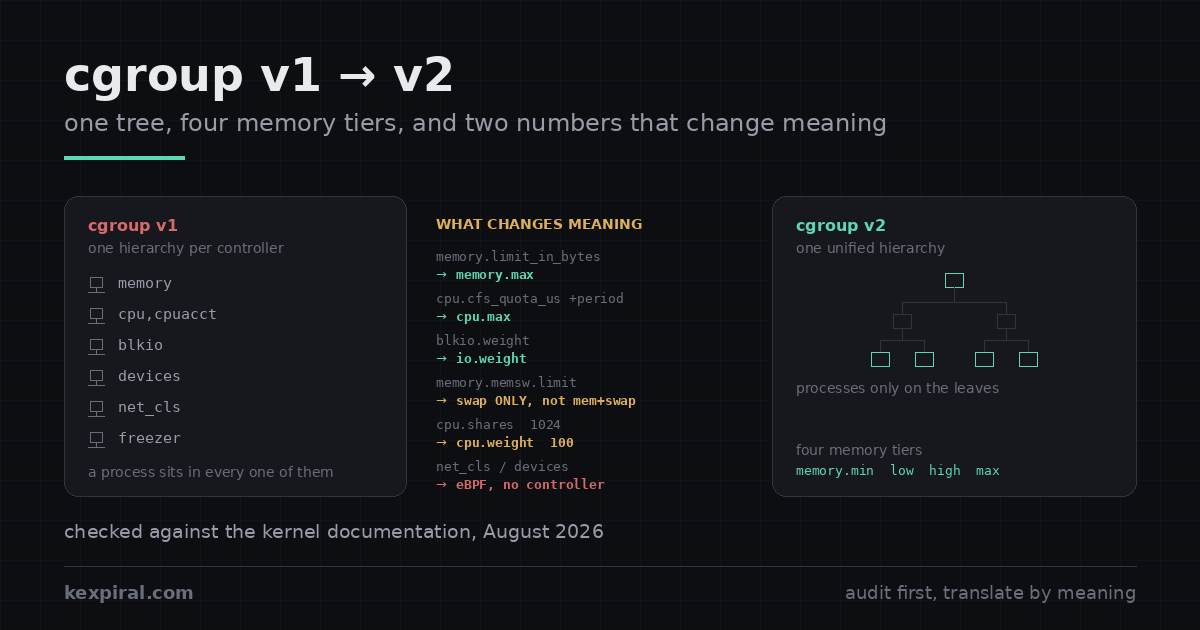
What follows is the migration as it actually goes on real fleets: how to tell which hierarchy a host is on without being fooled by the hybrid layout, a file-by-file conversion table with the matching systemd directives, the two translations that silently change behaviour if you copy the numbers across, the CPU weight formula that was quietly replaced in the OCI runtimes in 2025, and an honest account of what Docker and Kubernetes have and have not done — because on that last point most of what is written is wrong, and acting on it costs you either an outage or a year of unnecessary panic.
You did not choose this, and that is the point
The symptoms are unhelpfully indirect, because nothing announces itself as a cgroup problem. A monitoring agent starts reporting zeroes. A container's memory limit stops being enforced. A rootless workload that ran fine on the old box refuses to start. A script that has read /sys/fs/cgroup/memory/memory.usage_in_bytes for eight years starts logging a file-not-found that nobody notices, because it writes to a log nobody reads. All of these are the same event seen from different angles: the paths moved, the semantics changed underneath them, and nothing errored loudly enough to stop a deployment.[sd258]
| What you see | What it usually means | Where it is dealt with |
|---|---|---|
| A monitoring agent reports zero memory or CPU for every container | It reads /sys/fs/cgroup/memory/… or cpu,cpuacct, which do not exist under the unified hierarchy | The conversion table |
write error: Device or resource busy when adding a PID to a cgroup | The no-internal-process constraint: that cgroup already delegates controllers to children | Three rules |
| A container swaps far more than it used to, with the same limits | memory.memsw.limit_in_bytes was copied into memory.swap.max, which means swap alone | Memory semantics |
Rootless Podman accepts --memory and does not enforce it | systemd has not delegated the memory controller to the user manager | Containers |
| Containers get less CPU under contention than they used to | The linear shares-to-weight conversion put a one-CPU request at weight 39 against a default of 100 | CPU weight |
kubelet refuses to start after a node image upgrade | cgroup v1 node, kubelet v1.35 or later, failCgroupV1 at its default of true | Kubernetes |
--oom-kill-disable silently has no effect | Discarded on cgroup v2. There is no equivalent and none is planned | Containers |
One habit is worth abandoning before anything else. If a tool of yours writes directly into /sys/fs/cgroup on a systemd host, it is not going to survive this migration in a form you want. systemd owns that tree and reasserts its view of it whenever a unit changes; upstream's own delegation document is explicit that a single writer per subtree is the rule, not a suggestion. Under v1 you could usually get away with breaking it. Under v2, with its strict top-down delegation, you cannot.[sddeleg]
Which hierarchy is this host actually on?
Start by establishing the truth, because the folklore commands lie in a specific and consistent way. The check Kubernetes documents is the right one and it is a single command: ask the filesystem type of /sys/fs/cgroup. Under the unified hierarchy that mount point is a cgroup2 filesystem, so stat reports cgroup2fs. Under v1 — and, crucially, under the old hybrid layout too — it is a tmpfs with controller directories mounted inside it.[k8scg]
# The only check that cannot lie. /sys/fs/cgroup is a tmpfs under v1 and under
# the old hybrid layout, and a cgroup2 filesystem under the unified hierarchy.
stat -fc %T /sys/fs/cgroup/
# cgroup2fs   -> unified, cgroup v2 only
# tmpfs       -> cgroup v1, or hybrid: v2 mounted under a v1 tmpfs

# Why `mount | grep cgroup2` is not enough: hybrid mounts a cgroup2 hierarchy
# too, at /sys/fs/cgroup/unified, with no controllers attached to it. Grepping
# for the string finds it and tells you the opposite of the truth.
mount | grep -E '^cgroup' | sed 's/ (.*//'
# cgroup2 on /sys/fs/cgroup type cgroup2          <- unified: good
# cgroup2 on /sys/fs/cgroup/unified type cgroup2  <- hybrid:  not good

# What the kernel will actually let you control here. Under the unified
# hierarchy this file exists at the top of the tree and lists the controllers.
# Under hybrid it is not here at all - it is one level down, at
# /sys/fs/cgroup/unified/cgroup.controllers, and it is empty. Its absence from
# the top level is the clearest single tell that you are not on v2.
cat /sys/fs/cgroup/cgroup.controllers 2>/dev/null
# cpuset cpu io memory hugetlb pids rdma misc

# Where a given process ended up. Under v2 there is exactly one line and it
# starts with `0::`. More than one line means controllers are still split.
cat /proc/self/cgroup
# 0::/user.slice/user-1000.slice/session-3.scope

# And the two userspace pieces that have to agree with the kernel:
systemctl --version | head -1
docker info --format 'driver={{.CgroupDriver}} version={{.CgroupVersion}}' 2>/dev/null
The hybrid case is why mount | grep cgroup2 is actively misleading rather than merely incomplete: hybrid mounts a real cgroup2 hierarchy at /sys/fs/cgroup/unified, with no controllers attached to it. The grep matches, you conclude you are on v2, and every limit you then configure lands on a v1 controller. The second tell is /proc/self/cgroup: under v2 it contains exactly one line beginning 0::, and under v1 or hybrid it contains one line per controller. Run the audit below across the fleet before you plan anything, because in my experience the answer is never uniform.[cgman]
#!/usr/bin/env bash
# Fleet audit. Read-only: it changes nothing. Run it before you plan anything,
# because the answer is almost never uniform across a real estate of servers.
set -u

host=$(hostname -s)
ver=$(stat -fc %T /sys/fs/cgroup/ 2>/dev/null)
case "$ver" in
  cgroup2fs) mode=unified ;;
  tmpfs)     [ -d /sys/fs/cgroup/unified ] && mode=hybrid || mode=legacy ;;
  *)         mode=unknown ;;
esac

kernel=$(uname -r)
sd=$(systemctl --version 2>/dev/null | awk 'NR==1{print $2}')
printf '%-16s mode=%-8s kernel=%-14s systemd=%s\n' "$host" "$mode" "$kernel" "$sd"

# --- the things that will break, rather than the things that will complain ---

# a) v1-only controllers with no v2 equivalent. If anything you run writes to
#    these, it needs an eBPF replacement, not a path change.
for c in net_cls net_prio devices; do
  [ -d "/sys/fs/cgroup/$c" ] && echo "  uses v1-only controller: $c"
done

# b) anything with a hardcoded v1 path. This is the single most common cause of
#    a migration failing three weeks later in an agent nobody remembered.
grep -rIl --exclude-dir=.git \
     -e '/sys/fs/cgroup/memory/' \
     -e '/sys/fs/cgroup/cpu,cpuacct/' \
     -e 'memory.limit_in_bytes' \
     -e 'cpu.cfs_quota_us' \
     /etc /opt /usr/local 2>/dev/null | sed 's/^/  hardcoded v1 path: /'

# c) kernel command line pinning the old hierarchy. On systemd 258 and later
#    this parameter no longer does anything, which is its own kind of trap:
#    the host silently boots unified and the runbook still says otherwise.
grep -o 'systemd\.unified_cgroup_hierarchy=[01]' /proc/cmdline \
  | sed 's/^/  kernel cmdline: /'
grep -o 'SYSTEMD_CGROUP_ENABLE_LEGACY_FORCE=1' /proc/cmdline \
  | sed 's/^/  legacy force flag (removed in systemd 258): /'

# d) container runtimes and their drivers, which have to match the kernel
command -v docker  >/dev/null && docker info 2>/dev/null \
  | grep -E 'Cgroup (Driver|Version)' | sed 's/^/ /'
command -v podman  >/dev/null && podman info --format \
  '  podman cgroupVersion={{.Host.CgroupsVersion}} manager={{.Host.CgroupManager}}' 2>/dev/null
[ -f /var/lib/kubelet/config.yaml ] && \
  grep -E '^(cgroupDriver|failCgroupV1):' /var/lib/kubelet/config.yaml | sed 's/^/  kubelet /'
Run this on every host, not on a representative one. The machines that are still on v1 in 2026 are, almost by definition, the machines nobody has touched — the appliance, the build agent someone stood up by hand in 2019, the database node that is deliberately excluded from the configuration-management run. Those are exactly the hosts where a hardcoded
/sys/fs/cgroup/memory/path is waiting, and exactly the hosts where nobody will notice it broke.
Who removed what, and who only said they would
Four projects are involved and they are on completely different timelines, which is the single biggest source of confusion about this migration. systemd moved first and moved hardest. Version 256, in June 2024, stopped booting cgroup v1 by default while leaving an escape hatch. Version 258, in September 2025, removed the code — the release notes are unambiguous: support for cgroup v1 ('legacy' and 'hybrid' hierarchies) has been removed, and cgroup v2 will always be mounted during system bootup. That release also raised the minimum kernel baseline to 5.4, with 5.7 recommended.[sdnews][sd256]
| Project | What actually happened | When | What it means for you |
|---|---|---|---|
| systemd 256 | Stopped booting cgroup v1 by default; added SYSTEMD_CGROUP_ENABLE_LEGACY_FORCE=1 | June 2024 | 257 still honours that flag, so 257 is the last release where you can ask for v1 and get it |
| systemd 258 | Removed cgroup v1 support entirely, escape hatch included; kernel baseline raised to 5.4, 5.7 recommended | September 2025 | This is the deadline. Unified is the only mode the code has |
| Kubernetes 1.35 | Deprecated cgroup v1; kubelet refuses to start on a v1 node by default | December 2025 | Overridable with failCgroupV1: false. Not a removal |
| Kubernetes 1.38+ | Earliest release in which KEP-5573 will remove the code | Not scheduled | You have more time than the headlines suggest |
| Docker Engine 29.0 | Deprecated cgroup v1; no removal version set | November 2025 | Deprecation only. The documentation states support continues until May 2029 |
| runc / crun | Replaced the linear shares-to-weight conversion with a log-based one | During 2025 | Changes CPU priority on nodes you already migrated |
The other three have not done what you have probably read that they did, and the difference matters for planning. Kubernetes deprecated cgroup v1 in v1.35 — the kubelet now refuses to start on a v1 node by default, but that default is a configuration field you can flip, and KEP-5573 states in as many words that the code removal will be done no earlier than 1.38, with no date attached to it. Docker deprecated cgroup v1 in Engine v29.0, released in November 2025, with no removal version set at all; Docker's own deprecation page says support continues until May 2029, which is when the enterprise rebuilds that still need it reach end of life. So: the OS has already removed it, the orchestrators have only announced it. Plan against the OS.[kep5573][dockdep]
| Distribution | Default hierarchy | Note |
|---|---|---|
| Fedora 31 and later | Unified (v2) | First mainstream distribution to switch; Fedora 43 inherits the systemd 258 removal |
| Debian 11 and later | Unified (v2) | Debian 13 ships systemd 257, so it is the last with any legacy path at all |
| Ubuntu 21.10 and later | Unified (v2) | 22.04 LTS and newer are the ones you are likely to still be running |
| RHEL 9 and later | Unified (v2) | RHEL 9.4 formally deprecated v1; RHEL 10 will not boot v1 at all |
| SLES 15 SP6 and later | Unified (v2) | SP3 to SP5 defaulted to hybrid, which is the layout that fools grep |
| Anything older | v1 or hybrid | Also, by now, out of support. The cgroup question is not the urgent one |
Which means the real deadline on any given machine is the systemd version its distribution ships, not any container platform's roadmap. Most fleets are already unified and have been for years without anyone noticing — Fedora since 31, Debian since 11, Ubuntu since 21.10, RHEL since 9. The work is concentrated in whatever is left over, and in the tooling that still assumes v1 paths regardless of what the host is doing.[rhel10][moby51111]
Three rules that break hand-built layouts
Three structural rules distinguish v2 from v1, and every one of them will break a layout that was built by hand under v1. The first is the unified hierarchy itself: a process has one position in one tree, and every controller reads that same position, which is why /proc/self/cgroup shrank from a dozen lines to one. The second is top-down delegation: a controller exists in a child cgroup only if the parent explicitly hands it down through cgroup.subtree_control. The third is the one that actually hurts.[kdoc][knoint]
# DEMONSTRATION ONLY. This writes into the cgroup tree by hand, which is the
# exact thing the rest of this article tells you not to do on a systemd host.
# Read it to understand the rules, then set limits through systemd.

# Rule 1 - one tree. Under v1 a process had a position in each controller's
# hierarchy independently, which is why /proc/PID/cgroup had a dozen lines.
# Under v2 it has one, and every controller reads the same position.
cd /sys/fs/cgroup
mkdir -p demo/worker demo/batch

# Rule 2 - a controller only exists in a child if the parent hands it down.
# cgroup.controllers is what you HAVE; cgroup.subtree_control is what you GIVE.
cat demo/cgroup.controllers        # what the parent has delegated so far
echo '+cpu +memory +io' > cgroup.subtree_control   # root delegates to demo
cat demo/cgroup.controllers        # cpu io memory
echo '+cpu +memory' > demo/cgroup.subtree_control  # demo delegates to its kids
ls demo/worker/ | grep -E '^(cpu|memory)\.'        # the knobs now exist

# Rule 3 - no internal processes. A cgroup may hold processes, or hand
# resources to children, never both. This is the rule that breaks hand-built
# v1 layouts, and it fails at write() time with a very unhelpful error.
echo $$ > demo/cgroup.procs
# bash: echo: write error: Device or resource busy
#
# ... because demo already has subtree_control set. Processes live on leaves:
echo $$ > demo/worker/cgroup.procs   # fine

# The root cgroup is exempt from rule 3, which is why the mistake survives
# testing at the top level and only shows up one directory down.
The no-internal-process constraint says a non-root cgroup may hold processes, or distribute resources to children, but never both. It exists to remove a genuine ambiguity in v1, where a parent's own processes competed against its children with no defined rule. In practice it means that a v1 layout with limits at every level of the tree does not translate: you have to push the processes down to leaves and keep the interior nodes empty. And it fails in the least helpful way possible — a bare write error: Device or resource busy from an echo into cgroup.procs, with nothing to say which of the two rules you broke. The root cgroup is exempt, which is exactly why the mistake survives a quick test at the top level.[kdeleg]
The conversion table, file by file
Here is the mapping, with the systemd directive next to each pair, because on any systemd host the directive is the thing you should actually be setting. Names change more than values do, but three rows change meaning rather than spelling, and those are marked. Note in particular that cpu.max collapses two v1 files into one two-value file, and that the CPU weight scale is not the CPU shares scale — the defaults alone differ by a factor of ten.[sdresctl]
| cgroup v1 | cgroup v2 | systemd directive | Note |
|---|---|---|---|
memory.limit_in_bytes | memory.max | MemoryMax= | Rename. Same meaning: hard limit, OOM kill on breach |
memory.soft_limit_in_bytes | memory.high | MemoryHigh= | Upgrade. The soft limit was mostly ignored; memory.high genuinely throttles |
| — | memory.low / memory.min | MemoryLow= / MemoryMin= | New. Protection floors, with no v1 equivalent |
memory.memsw.limit_in_bytes | memory.swap.max | MemorySwapMax= | Different meaning. memsw was memory+swap; this is swap alone |
memory.usage_in_bytes | memory.current | — | Rename |
memory.failcnt | memory.events | — | Better: separate counters for low, high, max, oom and oom_kill |
cpu.shares | cpu.weight | CPUWeight= | Different scale. Default 1024 becomes default 100; see the conversion |
cpu.cfs_quota_us + cpu.cfs_period_us | cpu.max | CPUQuota= + CPUQuotaPeriodSec= | Two files become one, written as "$MAX $PERIOD". CPUQuota= sets only the quota half |
cpuacct.usage | cpu.stat | — | Now includes nr_throttled and throttled_usec |
blkio.weight | io.weight | IOWeight= | Rename, but the accounting underneath is finally correct |
blkio.throttle.*_bps_device | io.max | IOReadBandwidthMax= etc. | One nested-key file instead of four; now covers buffered writes |
pids.max | pids.max | TasksMax= | Unchanged |
freezer.state | cgroup.freeze | — | Rename; write 1 or 0 |
devices.allow / devices.deny | — (eBPF) | DeviceAllow= | No controller. Replaced by BPF_PROG_TYPE_CGROUP_DEVICE |
net_cls.classid / net_prio.* | — (eBPF) | — | No controller and no replacement file. Use eBPF on cgroup paths |
| — | cpu.pressure / memory.pressure / io.pressure | — | New. PSI: the reason to migrate rather than a cost of migrating |
Three v1 controllers have no v2 counterpart at all, and this is the row that turns a mechanical migration into an engineering task. net_cls and net_prio were removed outright rather than reimplemented; per-cgroup traffic classification and shaping is now done with eBPF programs attached to cgroup v2 paths, with matching support in iptables and nftables. The devices controller went the same way: instead of a whitelist file, an eBPF program of type BPF_PROG_TYPE_CGROUP_DEVICE receives the major and minor numbers, the device type and the access type, and returns allow or -EPERM. If your platform used any of these directly, budget for real work rather than a path substitution.[cgman][bpfdev]
Memory is where the semantics really changed
Memory is where a careless migration does its quiet damage, because the numbers still fit and the behaviour still changes. Under v1 you had one hard limit and a soft limit that most kernels effectively ignored. Under v2 you have four tiers, and only one of them can kill anything: memory.max is the hard limit and triggers an in-cgroup OOM kill; memory.high is a throttle that puts the cgroup under heavy reclaim and, in the kernel's own words, never invokes the OOM killer; memory.low is best-effort protection; memory.min is hard protection that is never reclaimed at all.[kmem][kv1mem]
# --- cgroup v1: two numbers, and the second one is not what people think ---
#   memory.limit_in_bytes        = 2G   -> hard limit on memory
#   memory.memsw.limit_in_bytes  = 3G   -> hard limit on memory PLUS swap
#                                          (so: 2G RAM + up to 1G of swap)
#   memory.soft_limit_in_bytes   = 1G   -> best-effort, and widely ignored
#
# --- cgroup v2: four memory tiers, plus a separate swap cap ---------------
cd /sys/fs/cgroup/demo/worker

echo 2G       > memory.max        # hard limit. Over this, OOM kill inside the cgroup.
echo 1800M    > memory.high       # throttle. Over this, heavy reclaim - never an OOM kill.
echo 512M     > memory.low        # best-effort protection. Reclaimed only as a last resort.
echo 256M     > memory.min        # hard protection. Never reclaimed, at all.
echo 1G       > memory.swap.max   # SWAP ONLY. Not memory+swap. Read that twice.

# The migration trap, stated as arithmetic:
#   v1: memsw.limit=3G with limit=2G  ->  2G RAM, 1G swap
#   v2: memory.swap.max=3G            ->  memory.max RAM, 3G swap
# Copying 3G across gives the workload three times the swap it used to have.
# The correct translation is (memsw.limit - limit), and if that is zero you
# want memory.swap.max=0, not "unset".

# What is actually happening, rather than what you configured:
cat memory.current                 # bytes in use right now
cat memory.events                  # low high max oom oom_kill oom_group_kill
# low 0
# high 148          <- throttled 148 times: memory.high is doing work
# max 0
# oom 0
# oom_kill 0        <- and it never had to kill anything
cat memory.pressure                # PSI: how much time was lost waiting on memory
# some avg10=0.42 avg60=0.31 avg300=0.11 total=9214430
# full avg10=0.00 avg60=0.00 avg300=0.00 total=118221

# memory.high plus memory.events is the pair that turns "the box OOMs at 3am"
# into a number you can alert on before it happens. v1 could not do this.| v2 file | What it does | Can it kill? | Nearest v1 equivalent |
|---|---|---|---|
memory.min | Hard protection: memory below this is never reclaimed, under any pressure | Indirectly | None |
memory.low | Best-effort protection: reclaimed only when nothing unprotected is left | No | None |
memory.high | Throttle: over this, the cgroup is put under heavy reclaim and its processes slow down | No | memory.soft_limit_in_bytes, loosely |
memory.max | Hard limit: over this and unable to reclaim, the in-cgroup OOM killer runs | Yes | memory.limit_in_bytes |
memory.swap.max | Cap on swap usage only, independent of memory.max | Indirectly | memory.memsw.limit_in_bytes minus the memory limit |
memory.events | Counters: how often each of the above was hit, including oom_kill | — | memory.failcnt, with no breakdown |
The trap is memory.swap.max, and it is worth being blunt about it because copying the number across is the natural thing to do. In v1, memory.memsw.limit_in_bytes capped memory plus swap together; in v2, memory.swap.max caps swap alone. A container that had limit=2G, memsw=3G was allowed 2 GB of RAM and 1 GB of swap. Set memory.swap.max=3G and you have just given it three times the swap it used to have, and the failure mode is not a crash but a machine that gets slower under load in a way that does not show up in any memory graph. The correct translation is the difference between the two v1 numbers, and if that difference is zero you want an explicit 0, not an unset file. In exchange you get memory.events, which breaks out the counters v1 lumped into a single failcnt, and memory.pressure, which has no v1 equivalent at all: a stall measurement that lets you alert on a workload struggling long before the OOM killer runs.[psi]
CPU quota, and an I/O controller that finally counts
CPU splits cleanly into two ideas that v1 blurred. cpu.weight is a relative share of contended CPU time — it does nothing whatsoever on an idle machine, and it is the right tool for priority. cpu.max is an absolute ceiling written as "$MAX $PERIOD" in microseconds, replacing the two separate v1 files whose relationship people routinely got backwards. The cpu.stat file is the one worth wiring into monitoring: nr_throttled and throttled_usec answer the question "is this service slow because we capped it?", which is otherwise nearly impossible to establish from outside.[kio]
# --- CPU: two knobs, and only one of them is a limit ---------------------
cd /sys/fs/cgroup/demo/worker

# Weight: relative share of contended CPU. Default 100, range 1-10000.
# It does nothing at all while the machine is idle.
echo 200 > cpu.weight

# Quota: an absolute ceiling, written as "$MAX $PERIOD" in microseconds.
# 150000 out of every 100000us = 1.5 CPUs. "max" removes the ceiling.
echo '150000 100000' > cpu.max
echo 20000 > cpu.max.burst      # allow short bursts above quota (v2 only)

# The v1 equivalents were three files, and the period was easy to forget:
#   cpu.shares = 200            -> but the scale was different: default 1024
#   cpu.cfs_quota_us  = 150000
#   cpu.cfs_period_us = 100000

# Throttling, which is the number people actually need and rarely find:
cat cpu.stat
# usage_usec 918422311
# nr_periods 41822
# nr_throttled 219       <- how often the quota was hit
# throttled_usec 411920  <- and how much time was lost to it

# --- IO: blkio became io, and the numbers finally mean something ----------
# v1's blkio.throttle.* only saw direct IO; buffered writes were charged to
# whatever kernel thread flushed them, so the accounting was fiction.
echo '259:0 rbps=104857600 wbps=52428800 riops=max wiops=2000' > io.max
echo 'default 100' > io.weight
cat io.stat
# 259:0 rbytes=2841579520 wbytes=1120043008 rios=48211 wios=22103 dbytes=0 dios=0
cat io.pressure
# some avg10=1.94 avg60=0.88 avg300=0.31 total=41822193

# Device numbers, because io.max will not take a path:
lsblk -no MAJ:MIN,NAME /dev/nvme0n1| v2 file | Kind | Default | What it is for |
|---|---|---|---|
cpu.weight | Relative | 100 (range 1–10000) | Priority under contention. No effect on an idle machine |
cpu.max | Absolute | max 100000 | A ceiling. 150000 100000 is 1.5 CPUs |
cpu.max.burst | Absolute | 0 | Allows short overruns of the quota rather than instant throttling |
cpu.stat | Read-only | — | nr_throttled and throttled_usec: proof that a cap is hurting |
io.weight | Relative | default 100 | Relative share of disk time, per device or overall |
io.max | Absolute | unset | rbps, wbps, riops, wiops per MAJ:MIN |
io.latency | Target | unset | Protects a latency target rather than a bandwidth number |
The I/O controller is the part of v2 that is a genuine improvement rather than a rename. The v1 blkio throttling only ever saw direct I/O; buffered writes were charged to whichever kernel thread eventually flushed them, so per-cgroup write accounting was, politely, fiction. The v2 io controller understands writeback and attributes it back to the cgroup that dirtied the pages. That single change makes io.max and io.weight worth configuring on a database host, where the equivalent v1 settings mostly were not. io.latency and io.cost go further, protecting a workload's latency target rather than its bandwidth — and if you are unsure where to start, io.latency is the less invasive of the two.[kdoc]
The CPU weight change nobody announced to you
This one deserves its own section because it moved every containerised workload's CPU priority, and it did so in a component that most people do not read the changelog of. Kubernetes has always derived CPU shares from the request as milliCPU × 1024 / 1000, so a container asking for one CPU got 1024 shares. The OCI runtime then converted shares to a v2 weight, and the original conversion was linear across the kernel's [2, 262144] share range. Run that arithmetic for 1024 shares and you get a weight of 39 — against a cgroup v2 default of 100.[k8scpu][runcissue]
# A quiet change that moved every containerised workload's CPU priority, with
# no release note in most people's changelog because it happened in the OCI
# runtime rather than in the orchestrator.

# Kubernetes derives shares from the CPU request, and always has:
#   cpu.shares = milliCPU * 1024 / 1000
#   request 1000m -> 1024 shares      request 100m -> 102 shares

# runc then converted shares to a v2 weight. The original conversion was
# linear over the kernel's [2, 262144] share range:
#   weight = 1 + ((shares - 2) * 9999) / 262142
python3 -c 'print(1 + ((1024 - 2) * 9999) // 262142)'
# 39
#
# 39. Against a cgroup v2 default of 100. Every container asking for a full CPU
# was scheduled at roughly a third of the weight of anything not in a
# container - including the kubelet and the runtime themselves.

# The replacement is log-based, and is chosen so that one CPU lands on the
# default rather than well below it:
python3 - <<'PY'
import math
def weight(shares):
    if shares == 0: return 0
    if shares <= 2: return 1
    if shares >= 262144: return 10000
    l = math.log2(shares)
    return math.floor(10 ** ((l*l + 125*l) / 612.0 - 7/34) + 0.99)
for req, sh in (("100m",102), ("500m",512), ("1",1024), ("4",4096), ("16",16384)):
    print("%-6s shares=%-6d weight=%d" % (req, sh, weight(sh)))
PY
# 100m   shares=102    weight=17
# 500m   shares=512    weight=59
# 1      shares=1024   weight=100
# 4      shares=4096   weight=303
# 16     shares=16384  weight=942
#
# 1024 lands on exactly 100 because the curve is fitted through three fixed
# points: 2 -> 1, 1024 -> 100, and 262144 -> 10000.

# Check what your nodes are doing, because this depends on the runtime version
# and not on the Kubernetes version. The new conversion ships in runc 1.3.2 and
# later, and in crun 1.23 and later:
runc --version; crun --version 2>/dev/null
cat /sys/fs/cgroup/kubepods.slice/*/*/cpu.weight 2>/dev/null | sort -n | uniq -c
The consequence was that a container requesting a full CPU competed at roughly a third of the priority of anything not in a container, on the same node, including system daemons and the kubelet itself. The fix replaces the linear map with a log-based curve fitted through three fixed points — 2 shares to weight 1, 1024 to 100, and 262144 to 10000 — so a one-CPU request now lands on exactly the cgroup v2 default. It ships in runc 1.3.2 and later and in crun 1.23 and later. Two things follow that are easy to miss. First, this is a runtime change, not a Kubernetes one: it arrives when you upgrade runc or crun, which may or may not coincide with a cluster upgrade, so check the runtime version rather than the cluster version. Second, it changes relative priorities between workloads on nodes you have already migrated, so if you benchmarked CPU behaviour on v2 before the change, that benchmark is stale.[runcpr]
Do it through systemd, not through /sys
On any systemd host the correct interface is systemd, not the filesystem. This is not stylistic. systemd creates the cgroup tree, and it reapplies its own view of a unit's resource settings whenever that unit is reloaded, restarted or reconfigured — so a value you echoed into memory.max survives exactly until the next unrelated change, and then vanishes with no log line. Upstream's delegation document states the rule plainly: one writer per subtree. Going through systemd also gets you persistence across reboots for free, which hand-editing never does.[sddeleg][sdresctl]
# Writing into /sys/fs/cgroup by hand works exactly until systemd next touches
# that unit, at which point your values are overwritten without warning.
# systemd owns the tree; ask it, and the setting also survives a reboot.

# Try a limit on something already running, for this boot only:
systemctl set-property --runtime nginx.service MemoryHigh=1G IOWeight=50

# Make it permanent. This writes a drop-in for you - under
# /etc/systemd/system.control/nginx.service.d/, not /etc/systemd/system/, which
# is why hand-searching for your setting in the obvious place turns up nothing.
# No daemon-reload needed.
systemctl set-property nginx.service MemoryMax=2G MemoryHigh=1800M CPUWeight=200

# Or write the drop-in yourself, which is what you want in configuration
# management: /etc/systemd/system/nginx.service.d/50-resources.conf
#
#   [Service]
#   MemoryMax=2G            # -> memory.max
#   MemoryHigh=1800M        # -> memory.high
#   MemoryMin=256M          # -> memory.min
#   MemorySwapMax=0         # -> memory.swap.max
#   CPUWeight=200           # -> cpu.weight
#   CPUQuota=150%           # -> cpu.max  (150% of one CPU)
#   IOWeight=50             # -> io.weight
#   IOReadBandwidthMax=/dev/nvme0n1 100M
#   TasksMax=512            # -> pids.max
#
# Note CPUQuota is a percentage of ONE CPU, not of the machine: 150% is 1.5
# cores. This is the systemd unit that trips people most often.

# Put a limit on a command you are about to run, without writing a unit:
systemd-run --scope --user -p MemoryMax=4G -p CPUQuota=200% -- ./import-job.sh

# And look at the tree systemd actually built, not the one you configured:
systemd-cgls --unit nginx.service
systemd-cgtop --order=memory --iterations=1

# Reading the values back. Note that there is no CPUQuota property to query:
# the unit-file setting CPUQuota= is exposed as CPUQuotaPerSecUSec, and asking
# for the name you wrote is the usual reason this returns nothing.
systemctl show nginx.service -p MemoryMax -p MemoryHigh -p CPUQuotaPerSecUSec
Three commands do most of the day-to-day work. systemctl set-property applies a limit immediately and writes it to disk for future boots, unless you pass --runtime to make it temporary. systemd-run --scope -p … puts a limit around a command you are about to run, which is the honest way to constrain an ad-hoc import or backup instead of hoping. And systemd-cgtop shows resource usage per cgroup rather than per process, which is the view you actually want when a container host is busy and top shows you two hundred processes and no structure. One directive catches everyone: CPUQuota= is a percentage of a single CPU, so 150% means one and a half cores, not 150% of the machine.[sdctl][sdcgtop]
Docker, Podman, and rootless limits that now work
For containers the news is mostly good, because the runtime does the translation. --memory, --cpus, --memory-reservation and --pids-limit all still mean what they meant; they simply land on memory.max, cpu.max, memory.low and pids.max now. On a unified host Docker defaults to the systemd cgroup driver and to a private cgroup namespace, both of which are the right defaults. The exception worth knowing is --oom-kill-disable, which Docker's own documentation says is discarded on v2 — not translated, not warned about, discarded. There is no v2 equivalent by design, so anything relying on it needs rethinking rather than porting.[dockrun]
# --- Docker ---------------------------------------------------------------
docker info --format 'version={{.CgroupVersion}} driver={{.CgroupDriver}}'
# version=2 driver=systemd     <- the defaults on a unified host

# Most flags are unchanged, because the daemon translates them for you:
docker run --memory 2g --memory-reservation 1g --cpus 1.5 --pids-limit 512 nginx
#          -> memory.max        memory.low       cpu.max      pids.max

# Two that are not:
#   --oom-kill-disable   is discarded on cgroup v2. Not translated - discarded.
#                        There is no v2 equivalent, by design.
#   --kernel-memory      removed from the Engine in v23.0. It is gone, not moved.

# Setting the driver explicitly, in /etc/docker/daemon.json. Use systemd unless
# something specific stops you: it is the default on v2 and it is the only
# option that keeps one writer per subtree.
#   { "exec-opts": ["native.cgroupdriver=systemd"] }

# --- Podman rootless: this is the part that only works on v2 --------------
# Under v1, an unprivileged user could not be given controllers at all, so
# rootless resource limits silently did nothing. Under v2 they work, but only
# once systemd delegates the controllers to the user manager:
#
#   /etc/systemd/system/user@.service.d/delegate.conf
#   [Service]
#   Delegate=cpu cpuset io memory pids
#
sudo systemctl daemon-reload    # then log out and back in

# Verify from inside the user session, before blaming the container:
cat /sys/fs/cgroup/user.slice/user-$(id -u).slice/cgroup.controllers
# cpuset cpu io memory pids     <- if memory is missing, --memory does nothing
podman info --format '{{.Host.CgroupsVersion}} {{.Host.CgroupManager}} {{.Host.OCIRuntime.Name}}'
# v2 systemd crun
Rootless containers are the one place where v2 is not a tax but a feature. Delegating v1 controllers to an unprivileged user was never considered safe, so most rootless implementations simply did not support resource limits on a v1 host. Under v2, safe subtree delegation makes them work properly — but only after systemd delegates the controllers to the user manager, which is a drop-in for user@.service and a re-login, and is the missing step behind almost every "rootless Podman ignores --memory" report. Check cgroup.controllers inside your own user slice before blaming the container: if memory is not listed there, no flag you pass is going to be enforced. Delegating cpuset additionally needs systemd 244 or newer.[podman][crun]
Kubernetes: what is true, and what you keep reading
Now the part that is most often reported wrongly, stated carefully. Kubernetes has not removed cgroup v1. The documentation marks it deprecated as of v1.35, and the practical consequence is that the kubelet refuses to start on a cgroup v1 node by default. That default is a KubeletConfiguration field, failCgroupV1, and setting it to false restores the old behaviour. KEP-5573 — the enhancement that will eventually do the removal — says the removal will be done no earlier than 1.38. If a blog post told you 1.36 deleted cgroup v1, it was wrong, and the difference between "deprecated with an override" and "removed" is the difference between a planned migration and a weekend.[k8scg][kep5573]
# What the cluster thinks it is standing on. Run this first; mixed node pools
# are the normal case, not the exception.
kubectl get nodes -o custom-columns=\
'NODE:.metadata.name,KERNEL:.status.nodeInfo.kernelVersion,'\
'RUNTIME:.status.nodeInfo.containerRuntimeVersion,OS:.status.nodeInfo.osImage'

# The kernel version alone does not tell you the hierarchy. Ask each node.
# Note the -it: without it, kubectl debug does not attach, the output goes to
# the debug pod's log instead of your terminal, and you are left with one
# orphaned pod per node.
kubectl get nodes -o name | while read -r n; do
  printf '%-40s ' "${n#node/}"
  kubectl debug "$n" -it --image=busybox --profile=general -- \
    stat -fc %T /host/sys/fs/cgroup/ 2>/dev/null || echo '(debug unavailable)'
done
# Clean up afterwards - the debug pods are not removed for you:
kubectl delete pod -l app.kubernetes.io/managed-by=kubectl-debug 2>/dev/null

# On the node itself - the three files that have to agree:
stat -fc %T /sys/fs/cgroup/                       # cgroup2fs
grep -E '^(cgroupDriver|failCgroupV1):' /var/lib/kubelet/config.yaml
grep -A2 'runc.options' /etc/containerd/config.toml   # SystemdCgroup = true

# --- what is actually true about Kubernetes and cgroup v1 -----------------
# cgroup v1 is DEPRECATED as of v1.35, not removed. The kubelet refuses to
# start on a v1 node by default, and that default is overridable:
#
#   /var/lib/kubelet/config.yaml
#   apiVersion: kubelet.config.k8s.io/v1beta1
#   kind: KubeletConfiguration
#   cgroupDriver: systemd
#   failCgroupV1: false        # <- the escape hatch. Buys time, not a fix.
#
# KEP-5573 states the code removal will happen no earlier than 1.38.

# The v2-only features you get in exchange, and how to see them:
NODE=$(kubectl get nodes -o jsonpath='{.items[0].metadata.name}')
kubectl get --raw "/api/v1/nodes/$NODE/proxy/metrics/cadvisor" \
  | grep -E '^container_pressure_(cpu|memory|io)_' | head
# container_pressure_memory_stalled_seconds_total{...}
# container_pressure_memory_waiting_seconds_total{...}
The node-side requirements are modest and worth checking rather than assuming: kernel 5.8 or later, containerd v1.4+ or CRI-O v1.20+, and the kubelet and runtime configured to use the systemd cgroup driver specifically — not merely a matching one. That last condition used to be a recurring source of nodes that half-worked, because it depended on two configuration files agreeing; since v1.34 the kubelet asks the CRI runtime directly what driver it uses, which retires the whole class of problem for anyone on a recent enough runtime. What you get back for the migration is a set of features that exist only on v2:[k8sdriver][k8spsi]
- PSI metrics, GA in v1.36. The kubelet reads
cpu.pressure,memory.pressureandio.pressureper cgroup and exposes them through the Summary API and the cAdvisor metrics endpoint. These files do not exist under v1, so this is not a feature you can backport — it is a reason to migrate. - Memory QoS. The kubelet can set
memory.highfrom thememoryThrottlingFactorso that a container is reclaimed hard before it is killed, and separately, undermemoryReservationPolicy: TieredReservation, it can setmemory.minfor Guaranteed pods andmemory.lowfor Burstable ones. As of v1.36 it is alpha and off by default, so treat it as something to test rather than to rely on — but the shape of it is what the four-tier memory model was for. - Rootless and user-namespace workloads that actually enforce limits. Everything in the Podman section applies to a Kubernetes node too, and it is the reason user namespaces going GA and cgroup v2 are related stories rather than coincidental ones.
- Honest I/O accounting per pod. Buffered writes attributed to the cgroup that caused them, which makes per-pod disk usage a number you can act on rather than a number you apologise for.
One planning note that is easy to get wrong in a mixed estate. Because the forcing function is systemd rather than Kubernetes, node pools tend to migrate themselves as their base images roll forward, well ahead of any cluster-level decision. That is fine, but it means you can end up with a cluster where half the nodes are on v2 and half are not, running the same workloads with materially different memory and CPU behaviour — and no alert anywhere is going to tell you. Audit the nodes, do not infer them from the cluster version.[k8sqos]
Turning v2 on where it is not on yet
If you still have hosts on v1 or hybrid, this is the mechanical part, and it is short. Note first that on systemd 258 and later there is nothing to enable and nothing to disable: unified is the only mode the code supports. Do not leave the old kernel parameter behind on those hosts, though. systemd 258 no longer acts on it, but if an initrd still does and mounts a v1 hierarchy, PID 1 refuses to start and tells you to remove the stale command-line option — which is a much better failure than a silent one, and still a boot you have to fix from a console. Everything below applies only to hosts old enough to still have a choice, and on those the change belongs in a maintenance window that also moves the container runtimes, because a node that reboots into v2 with a cgroupfs driver is a node that comes back in an interesting state.[sd258]
# Only needed on hosts old enough to still default to v1 or hybrid. On
# systemd 258 and later there is nothing to enable: unified is the only mode.

# 1. Check you can. Kubernetes wants kernel 5.8+; systemd 258 needs 5.4 as an
#    absolute floor and recommends 5.7. Below that, upgrade the OS instead.
uname -r

# 2. Set the kernel parameter. Debian and Ubuntu. The grep guard matters:
#    without it, running this twice adds the parameter twice.
grep -q 'systemd.unified_cgroup_hierarchy' /etc/default/grub || \
  sudo sed -i 's/^GRUB_CMDLINE_LINUX="/&systemd.unified_cgroup_hierarchy=1 /' \
       /etc/default/grub
sudo update-grub

#    RHEL, Fedora, Rocky, Alma - grubby, and note ALL rather than the running
#    kernel, or the setting vanishes at the next kernel update:
sudo grubby --update-kernel=ALL --args="systemd.unified_cgroup_hierarchy=1"

# 3. Line up the container runtimes in the SAME maintenance window. A node
#    that reboots into v2 with a cgroupfs driver is a node that does not come
#    back cleanly.
#    /etc/docker/daemon.json      -> "exec-opts": ["native.cgroupdriver=systemd"]
#    /etc/containerd/config.toml  -> SystemdCgroup = true
#    /var/lib/kubelet/config.yaml -> cgroupDriver: systemd

sudo reboot

# 4. Verify, in this order. If step one disagrees with step three, stop.
stat -fc %T /sys/fs/cgroup/            # cgroup2fs
cat /sys/fs/cgroup/cgroup.controllers  # non-empty
systemctl --failed
docker info --format '{{.CgroupVersion}}/{{.CgroupDriver}}'   # 2/systemd

# Rolling back is removing the parameter and rebooting - but only while your
# systemd is older than 258. After that the parameter is inert and the only
# way back is downgrading the OS, which is not a rollback plan.| What breaks | Why | What to do instead |
|---|---|---|
Scripts reading /sys/fs/cgroup/memory/… | Per-controller directories do not exist under the unified hierarchy | Read the flat v2 paths, or ask systemctl show for the value |
| Tools writing into systemd-owned cgroups | systemd reasserts its settings on any unit change, silently | systemctl set-property, or a drop-in file |
net_cls-based traffic marking | Controller removed with no replacement file | eBPF attached to the cgroup path, matched from nftables |
devices.allow whitelists | Controller replaced by an eBPF program type | DeviceAllow= in a unit, or an eBPF device program |
| Layouts with limits at every level of the tree | No-internal-process constraint | Push processes onto leaves; keep interior cgroups empty |
--oom-kill-disable | Discarded on v2, by design | Right-size memory.max, and use memory.high to get warning first |
| Swap limits copied across verbatim | memory.swap.max is swap alone, not memory plus swap | Set the difference between the two v1 numbers, or an explicit 0 |
Two notes on rollback, since nobody plans a migration without one. While your systemd is 257 or older, rollback is removing the kernel parameter and rebooting, and it is genuinely cheap. Once you are on 258 or later, there is no supported path back short of downgrading the operating system, which is not a rollback plan — it is a reinstall. Sequence your fleet accordingly: do the hosts that still have an escape route first, learn from them, and only then move the ones that do not.[dockrun]
Verifying, rather than hoping
Verification is not a matter of taste. The point of the script below is that every line either prints OK or explains itself, and the exit code is the number of failures, so it can go straight into whatever runs after a reboot. Two parts of it earn their place. The first prints an inventory of every running unit that actually has a MemoryMax set, which you diff against the list you meant to configure — a unit missing from that output has a drop-in in the wrong directory, and there is no way to detect that without knowing the intended state. The second scans the whole tree for throttling, because nr_throttled climbing on a service nobody is complaining about is the classic sign of a limit that was translated too tightly.[sdcgls]
#!/usr/bin/env bash
# Post-migration verification. Every check either prints OK or explains
# itself; nothing here is judged by eye. Exit code is the number of failures.
fail=0
chk() { if eval "$2" >/dev/null 2>&1; then printf 'OK   %s\n' "$1";
        else printf 'FAIL %s\n' "$1"; fail=$((fail+1)); fi; }

chk 'unified hierarchy'        '[ "$(stat -fc %T /sys/fs/cgroup/)" = cgroup2fs ]'
chk 'controllers available'    '[ -s /sys/fs/cgroup/cgroup.controllers ]'
chk 'memory controller'        'grep -qw memory /sys/fs/cgroup/cgroup.controllers'
chk 'io controller'            'grep -qw io     /sys/fs/cgroup/cgroup.controllers'
chk 'single cgroup line'       '[ "$(wc -l < /proc/self/cgroup)" -eq 1 ]'
chk 'no v1 leftovers mounted'  '! mount | grep -q "type cgroup "'
chk 'no failed units'          '[ -z "$(systemctl list-units --state=failed --no-legend)" ]'
chk 'PSI available'            '[ -r /sys/fs/cgroup/cpu.pressure ]'

# Limits are actually applied, rather than merely configured. A unit whose
# MemoryMax reads "infinity" after you set it is a unit whose drop-in is in
# the wrong place - a very common outcome of hand-editing.
for u in $(systemctl list-units --type=service --state=running \
           --no-legend --plain | awk '{print $1}'); do
  m=$(systemctl show "$u" -p MemoryMax --value)
  [ "$m" != "infinity" ] && printf '     %-34s MemoryMax=%s\n' "$u" "$m"
done

# Nothing is being silently throttled. nr_throttled climbing on a service that
# is not busy means cpu.max is too tight, and it will not appear in load
# average. Search the whole tree, not just the top-level slices: throttling
# happens on the leaf that holds the process.
find /sys/fs/cgroup -name cpu.stat -exec \
  awk '/^nr_throttled/ && $2>0 {print FILENAME": "$0}' {} + 2>/dev/null

# Containers agree with the host.
command -v docker >/dev/null && \
  chk 'docker on v2/systemd' '[ "$(docker info -f "{{.CgroupVersion}}/{{.CgroupDriver}}")" = 2/systemd ]'

printf '\n%d failure(s)\n' "$fail"; exit "$fail"
Run it before the migration too, and keep the output. A large fraction of what gets blamed on a cgroup migration was already true beforehand, and the only way to know is to have measured. If nr_throttled was already climbing on that service last week, the new hierarchy did not cause it.
The order to do this in
The decision, compressed. The honest summary is that most people have already migrated without a project, and what remains is not the hosts but the tooling: the scripts, agents and dashboards that still read v1 paths and will keep quietly returning zeroes until someone checks. Kubernetes gives you until 1.38 at the earliest, and Docker rather longer than that, but neither of those dates is your deadline. Your deadline is whenever the next base image bump moves systemd past 258 — and on most estates that already happened.[kep5573]
| If your situation is… | Then the deadline is… | And the work is… |
|---|---|---|
Everything already reports cgroup2fs | Already passed, quietly | Only the tooling: find the v1 paths still being read and fix them |
| A handful of old hosts on v1 or hybrid | Whenever their next OS upgrade lands | Kernel parameter plus runtime drivers, one maintenance window each |
| Kubernetes nodes on mixed base images | As node images roll forward, not at cluster upgrade | Audit per node; do not infer the hierarchy from the cluster version |
| Docker hosts, no orchestrator | Engine v29.0 deprecated it; removal is years out | Low urgency from Docker, but systemd will move the host first anyway |
| Custom tooling writing cgroup files directly | Now, and it is the real project | Rewrite against systemd's interfaces before the hosts move under you |
| An appliance or vendor agent you cannot change | Vendor's timeline, which is not yours | Get it in writing, and isolate the host if the answer is unsatisfying |
- Audit before you plan. Run the fleet script on every host and keep the output. You are looking for two things: hosts still on v1 or hybrid, and hardcoded v1 paths in
/etc,/optand/usr/local. The second list is almost always longer than the first and is the actual work. - Fix the tooling first, while both hierarchies still exist. Anything reading
/sys/fs/cgroupshould handle both layouts, or read throughsystemctl showinstead. Doing this before the hosts move means you can test the fix against the thing it is meant to fix. - Translate limits by meaning, not by name. Two rows in the conversion table change behaviour: swap, where
memory.swap.maxis swap alone, and CPU weight, whose scale differs from shares by more than a factor of ten. Every other row is a rename. - Move the runtimes and the hosts in the same window. Kernel parameter, Docker driver, containerd
SystemdCgroup, kubeletcgroupDriver— all four, one reboot, then verify before moving on to the next batch. - Take the payoff. Wire up
memory.highandmemory.events, put PSI on a dashboard, and turn on the per-cgroup I/O limits that were not worth setting under v1. This migration has no feature at the end of it unless you claim one.
This sits alongside three other pieces of the same shift, and they compound: migrating SysV init scripts and rc.local to systemd units, because both changes land in the same systemd releases and on the same servers; the Ubuntu 24.04 to 26.04 server upgrade, which is where most fleets will actually cross the line; and the breaking changes in Docker Engine 29, whose deprecation of cgroup v1 is the container half of this story. If you are weighing up how much of this complexity you need at all, when not to use Kubernetes is the other side of that argument.
Frequently asked questions
How do I tell whether I am on cgroup v1 or v2?
Run stat -fc %T /sys/fs/cgroup/. If it prints cgroup2fs you are on the unified hierarchy; if it prints tmpfs you are on v1 or on the hybrid layout. Do not use mount | grep cgroup2: the hybrid layout mounts a cgroup2 hierarchy at /sys/fs/cgroup/unified with no controllers attached, so the grep matches and tells you the opposite of the truth. A second confirmation is /proc/self/cgroup, which contains exactly one line starting 0:: under v2.
Did Kubernetes 1.36 remove cgroup v1?
No. cgroup v1 is deprecated as of Kubernetes v1.35, and the practical effect is that the kubelet refuses to start on a cgroup v1 node by default. That default is a KubeletConfiguration field, failCgroupV1, and setting it to false restores the previous behaviour. KEP-5573, the enhancement that will eventually remove the code, states that removal will happen no earlier than v1.38. Several widely shared posts say otherwise; the KEP is the authority.
Is memory.swap.max the same as memory.memsw.limit_in_bytes?
No, and this is the most damaging misunderstanding in the whole migration. In cgroup v1, memory.memsw.limit_in_bytes capped memory and swap together, so a cgroup with limit=2G and memsw=3G could use 2 GB of RAM plus 1 GB of swap. In cgroup v2, memory.swap.max caps swap alone. Copying 3G across grants three times the previous swap allowance. The correct translation is the difference between the two v1 values, and where that difference is zero, set an explicit 0.
What is the difference between memory.high and memory.max?
memory.max is a hard limit: when a cgroup reaches it and cannot reclaim, the OOM killer runs inside that cgroup. memory.high is a throttle: exceeding it puts the cgroup under heavy reclaim pressure and slows its processes down, and the kernel documentation is explicit that going over it never invokes the OOM killer. In practice you set memory.high somewhat below memory.max and alert on the high counter in memory.events, which gives you warning before anything is killed. cgroup v1 had no equivalent mechanism.
Why did my containers get less CPU after moving to cgroup v2?
Because of the shares-to-weight conversion, not because of v2 itself. Kubernetes derives cpu.shares from the CPU request as milliCPU × 1024 / 1000, so a one-CPU request produced 1024 shares. The original conversion in the OCI runtimes mapped that linearly onto the v2 weight range and produced 39, against a cgroup v2 default of 100 — so containers competed at roughly a third of the priority of processes outside any container. The log-based replacement puts 1024 shares on exactly 100, and it ships in runc 1.3.2 and later and crun 1.23 and later. Check your runtime version, not your Kubernetes version: this arrives with a node image or runtime upgrade, not with a control-plane one.
Can I still force cgroup v1 with systemd.unified_cgroup_hierarchy=0?
Only on systemd 257 and older, and there it needs both systemd.unified_cgroup_hierarchy=0 and SYSTEMD_CGROUP_ENABLE_LEGACY_FORCE=1 on the kernel command line. systemd 256 stopped booting cgroup v1 by default and introduced that escape hatch; 257 still honours it; systemd 258 removed cgroup v1 support entirely, escape hatch included. On 258 and later systemd no longer acts on the option — but do remove it rather than leaving it in place, because if your initrd still acts on it and mounts a v1 hierarchy, PID 1 refuses to run and tells you to clear the stale command-line option.
What replaces the devices, net_cls and net_prio controllers?
eBPF, in all three cases. Device access control is now an eBPF program of type BPF_PROG_TYPE_CGROUP_DEVICE, which receives the major and minor numbers, the device type and the access type and returns allow or -EPERM; on a systemd host the DeviceAllow= unit directive drives this for you. Network classification and prioritisation have no v2 controller and no replacement interface file: you attach an eBPF program to the cgroup path and match on it from iptables or nftables. These are the three rows of the conversion table that require engineering rather than a path substitution.
Why does rootless Podman ignore my memory limit on cgroup v2?
Almost always because systemd has not delegated the memory controller to your user manager. Create a drop-in for user@.service containing Delegate=cpu cpuset io memory pids, reload systemd, then log out and back in. Verify with cat /sys/fs/cgroup/user.slice/user-$(id -u).slice/cgroup.controllers: if memory is not in that list, no flag you pass to Podman can be enforced. Delegating cpuset specifically requires systemd 244 or newer. Under cgroup v1, delegating controllers to a non-root user was not considered safe and most rootless implementations did not support it, so this is a capability v2 adds rather than a regression v2 introduced.
Do I have to change my Docker commands?
Mostly no. --memory, --cpus, --memory-reservation and --pids-limit all keep their meaning and are translated onto memory.max, cpu.max, memory.low and pids.max. Two exceptions matter: --oom-kill-disable is discarded on cgroup v2 with no equivalent, and --kernel-memory was removed from the Engine back in v23.0. On a unified host Docker defaults to the systemd cgroup driver and a private cgroup namespace, and you should leave both alone unless something specific forces otherwise.
Is there any performance benefit, or is this pure migration cost?
There is a real benefit, concentrated in I/O and in observability. The v1 blkio controller only accounted for direct I/O, so buffered writes were charged to whichever kernel thread flushed them and per-cgroup write limits were largely decorative; the v2 io controller understands writeback and attributes it correctly, which makes io.max and io.latency worth configuring on database and build hosts. On top of that, PSI — cpu.pressure, memory.pressure, io.pressure — exists only under v2, and it is the difference between knowing a machine is under pressure and finding out when something dies.
The runtime underneath is on the same clock: containerd 1.7 leaves extended support in September 2026, and for Kubernetes 1.36 the project's support matrix lists only 2.3.0+ and 2.2.0+ — no 1.x entry at all. migrating containerd 1.7 to 2.x covers the version-3 configuration rewrite, the registry conversion that stops the CRI plugin from loading, and why 2.3 is the only branch worth targeting.
The Service data plane on the same nodes is on its own clock: Kubernetes 1.37 deprecated kube-proxy's ipvs mode behind a feature gate, 1.40 turns it off by default and 1.43 deletes the code. migrating kube-proxy from IPVS to nftables covers the kernel 5.13 floor, the NodePort behaviour that changes underneath you, and the leftover kube-ipvs0 that black-holes traffic if nobody cleans it up.
One release-level note, because the ledger for 1.37 is not what most coverage says it is: the change that can actually leave pods in ContainerCreating is SELinuxMount reaching GA, while the cgroup v1 failure landed in 1.35, the static pod restriction in 1.34, and the containerd cliff is still ahead in 1.38. what actually breaks when you upgrade to Kubernetes 1.37 separates the three columns and gives the audit to run before the upgrade rather than after it.
Sources
Primary sources first: the kernel documentation defines every interface file quoted here, and the projects' own release notes and enhancement proposals are the only reliable statement of what was removed when. Where this article contradicts secondary coverage — on Kubernetes and on Docker in particular — the disagreement is with the headline, not with the primary source.
- Linux kernel — Control Group v2: the normative document. Every interface file, default value and range quoted in this article was checked here, including the fact that memory.max defaults to "max" and cpu.max defaults to "max 100000"
- Control Group v2 — Memory interface files: memory.min, memory.low, memory.high and memory.max, and the sentence that going over memory.high never invokes the OOM killer. This is the four-tier model cgroup v1 did not have
- Control Group v2 — IO interface files: io.weight, io.max with its rbps/wbps/riops/wiops keys, io.latency and io.cost. The v2 io controller is also the first one that accounts for writeback correctly
- Control Group v2 — No Internal Process Constraint: non-root cgroups can only distribute resources to children when they hold no processes of their own. This single rule is what breaks hand-rolled v1 layouts on contact
- Control Group v2 — Delegation: the model that makes rootless containers possible, and the reason a delegated subtree must not be allowed to write its own resource-control files
- Linux kernel — Memory Resource Controller (cgroup v1): the source for what memory.limit_in_bytes and memory.memsw.limit_in_bytes actually meant, which is the only way to see how different memory.swap.max is
- cgroups(7) — the manual page, including the statement that there is no direct equivalent of the net_cls and net_prio controllers, and that iptables gained support for eBPF filters hooking on cgroup v2 pathnames instead
- BPF_PROG_TYPE_CGROUP_DEVICE — the eBPF program type that replaced the v1 devices controller: it receives major, minor, device type and access type, and returns allow or -EPERM
- systemd — NEWS: the upstream changelog and the authoritative statement of what happened in which release. The v258 section carries both the cgroup v1 removal and the kernel baseline bump quoted here
- systemd v258 release notes — "Support for cgroup v1 ('legacy' and 'hybrid' hierarchies) has been removed", and the bump of the minimum kernel baseline to v5.4 with v5.7 recommended
- systemd v256 release notes — the release that stopped booting cgroup v1 by default and introduced the SYSTEMD_CGROUP_ENABLE_LEGACY_FORCE=1 escape hatch that v258 then took away
- systemd.resource-control(5) — MemoryMax=, MemoryHigh=, MemoryLow=, MemoryMin=, MemorySwapMax=, CPUWeight=, CPUQuota=, IOWeight=, IOReadBandwidthMax= and TasksMax=: the directive names for every interface file in the conversion table
- systemctl(1) — set-property, and the fact that it applies changes immediately and stores them on disk for future boots unless --runtime is passed
- systemd-run(1) — --scope and --property=, the pair that lets you put a limit on a command you are about to run without writing a unit file first
- systemd-cgls(1) — recursively show control group contents: the fastest way to see the tree systemd actually built, as opposed to the one you think you configured
- systemd-cgtop(1) — top control groups by resource usage, which is the per-cgroup view that plain top cannot give you
- systemd — Control Group APIs and Delegation: upstream's own rules for who owns which part of the tree, and why writing into systemd's cgroups from outside systemd is a bug rather than a technique
- Kubernetes — About cgroup v2: the requirements (kernel 5.8 or later, containerd v1.4+, cri-o v1.20+, systemd cgroup driver), the stat -fc %T check, and the deprecation notice marking cgroup v1 deprecated as of v1.35
- KEP-5573, Remove cgroup v1 support — the document that says removal "will be done no earlier than 1.38". Worth reading before believing any headline that says Kubernetes has already removed it
- Kubernetes blog — New Conversion from cgroup v1 CPU Shares to v2 CPU Weight: why a container requesting 1 CPU ended up below the default weight on v2, and the replacement formula
- runc pull request 4785 — the dependency bump that pulls the new shares-to-weight conversion into runc. The conversion itself lives in the opencontainers/cgroups library, which is where the change reaches everyone regardless of orchestrator
- runc issue 4772 — the report behind that change: the linear conversion gave 1024 shares a weight of 39 against a default of 100, so containers lost CPU to everything not in a container
- Kubernetes blog — Autoconfiguration for Node Cgroup Driver Goes GA: the kubelet now asks the CRI runtime which cgroup driver it uses instead of trusting two files to agree
- Kubernetes — Understand PSI metrics: pressure stall information read from cpu.pressure, memory.pressure and io.pressure, which exist only under cgroup v2
- Kubernetes blog — Tiered Memory Protection with Memory QoS: the kubelet writing memory.high and, under memoryReservationPolicy, memory.min and memory.low. None of this has a cgroup v1 equivalent
- Docker — Runtime metrics: the cgroup v2 requirements (containerd v1.4+, kernel v4.15+ with v5.2+ recommended), the default driver being systemd on v2 and cgroupfs on v1, and the sentence that --oom-kill-disable is discarded on v2
- Docker Engine — Deprecated features: the table row recording that support for cgroup v1 was deprecated in Engine v29.0, with no removal version set, and that the kernel memory limit was removed back in v23.0
- moby issue 51111 — the proposal to deprecate cgroup v1 while maintaining it until the enterprise distributions that still need it reach end of life. This is why Docker's deadline is much later than systemd's
- Rootless Containers — cgroup v2: the systemd user-manager Delegate= drop-in that gives an unprivileged user real cpu, memory, io and pids limits, and the note that delegating cpuset needs systemd 244 or newer
- crun — the OCI runtime with native cgroup v2 support and the default on current Podman installations, which matters because runc reached v2 later and older builds handle it badly
- Red Hat Enterprise Linux 10 release notes — the release where systemd no longer supports booting in cgroup v1 mode at all, for readers whose deadline is an enterprise distribution rather than upstream
- Linux kernel — PSI, Pressure Stall Information: what the numbers in cpu.pressure, memory.pressure and io.pressure mean, and why "some" and "full" are different questions
Was this useful?