Docker Engine 29: what breaks
The API floor moved twice, the image store only changes on fresh installs, and every container's file-descriptor limit quietly dropped from 1048576 to 1024. Nine months of fallout, checked against upstream.
- Docker
- containerd
- Linux
- DevOps
Docker Engine 29 shipped in November 2025 and broke a remarkable amount of software that had been working fine for years. Nine months later the interesting part is not the breakage itself — it is that most of what was written about it in the first fortnight is now wrong, because the change everybody documented was partly reverted three minor releases later. If you are upgrading a Linux server this month, you are reading advice written for a version of Docker 29 that no longer exists.
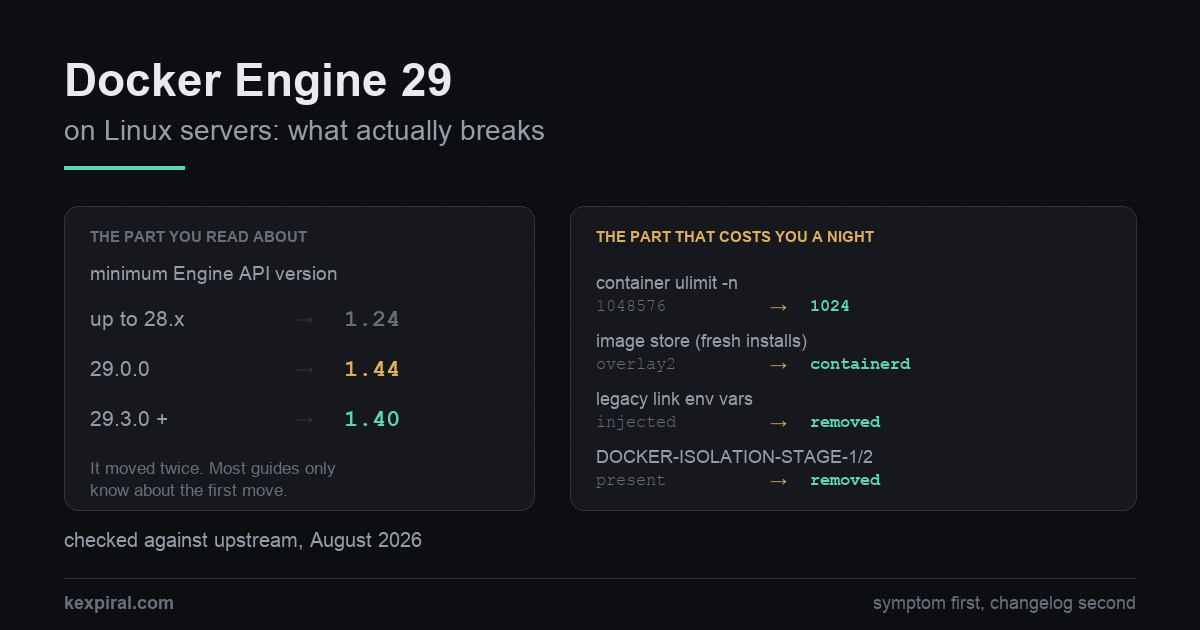
This is what actually breaks, in the order you are likely to meet it, with the fix and the upstream source for each. It is written for people running Docker Engine on Linux servers — not Docker Desktop, where several of these questions have different answers. The diagnostic commands only read state; anything that changes the system is a config edit, an install or a restart, and is obvious as such. Where upstream has not published a date or a version, this article says so rather than inventing one.
Start from the symptom, not from the changelog
Almost nobody arrives at this page from the changelog. They arrive from an error string, or from a container that will not start, or from a dashboard that says the environment is unreachable. So this table comes first: find your symptom, then read the section that explains it.[rel29]
| What you see | What it actually is | Where it is fixed |
|---|---|---|
client version 1.24 is too old. Minimum supported API version is 1.44 | A client older than the daemon's API floor. The floor moved in 29.0.0 — and moved back in 29.3.0. | Update the client. The daemon-side override is a bridge, not a fix. |
client version 1.52 is too new. Maximum supported API version is 1.44 | The mirror image: a new client against an old daemon. Nearly always a pinned Docker-in-Docker service in CI. | Pin the DinD image to the same major version as the daemon, and move both together. |
docker images is empty after installing 29 | The containerd image store is the default on fresh installs. Your overlay2 content is hidden, not deleted. | Switch the backend back, or export and re-import deliberately. |
| Containers hit connection ceilings that were never there before | The default nofile limit inside containers dropped from 1048576 to 1024. | --ulimit per container, or default-ulimits on the daemon. |
CI jobs fail on a service health check; No HOST or PORT found | Legacy link environment variables are no longer injected, so the helper that waits for the service never sees it. | A user-defined network and DNS. The escape-hatch variable is temporary. |
| A container reaches a published port it should not be able to reach | The DOCKER-ISOLATION-STAGE-1 and -STAGE-2 chains were removed in 29.0. | Publish to 127.0.0.1 instead of the wildcard address. |
Your DOCKER-USER firewall rules stopped applying | Only happens if you enabled the nftables backend, which is experimental and opt-in. | Switch back, or write your own nftables table with a lower priority. |
A Go build fails on github.com/docker/docker | The module moved to github.com/moby/moby/client and .../api. | Rewrite the imports; the client API changed shape at the same time. |
# Three numbers decide everything that follows. Get them before you change
# anything, on the machine that is actually misbehaving.

# 1. Engine version, and the API floor this daemon enforces.
docker version
# Server: Docker Engine - Community
#  Engine:
#   Version:          29.3.0
#   API version:      1.54 (minimum version 1.40)
#                                             ^^^^
# Do NOT assume 1.44. Engine 29.0.0 raised the floor from 1.24 to 1.44, and
# 29.3.0 lowered it again to 1.40. Which one you get depends on where in the
# 29 series you landed, and almost everything written about this in late 2025
# predates the second change. Read the number, do not remember it.

# 2. Which image store this daemon is using.
docker info -f '{{ .DriverStatus }}'
# [[driver-type io.containerd.snapshotter.v1]]              -> containerd store
# [[Backing Filesystem extfs] [Supports d_type true] ...]   -> legacy overlay2
docker info 2>/dev/null | grep -i 'storage driver'
# Storage Driver: overlayfs   -> containerd snapshotter
# Storage Driver: overlay2    -> graph driver

# 3. Which packet-filtering backend. nftables is opt-in and experimental in 29.x,
#    so on an untouched host this should say iptables.
docker info 2>/dev/null | grep -i 'firewall'

# And the one that is not a Docker question, but constrains Docker anyway:
stat -fc %T /sys/fs/cgroup/
# cgroup2fs -> unified hierarchy, nothing to do
# tmpfs     -> cgroup v1 or hybrid: deprecated in 29.0, supported until May 2029
Three of those rows are the same underlying change seen from different sides, and two of them are not documented anywhere you would think to look. Before touching anything, establish the three facts that determine which of them apply to you.
The API floor moved twice, and the number you read is probably wrong
This is the famous one. Engine 29.0.0 raised the minimum Engine API version the daemon will speak to 1.44, which corresponds to Docker 25.0. The previous floor was 1.24 — itself only introduced in Docker 25.0, replacing a floor of 1.12 that had stood since 2016 — so this was the second tightening in two years, and the first one anybody noticed. Any client that hardcoded an older version, or that never learned to negotiate, stopped working the moment the daemon restarted. That is why the upgrade took out Traefik, Portainer, Testcontainers, Watchtower, half a dozen self-hosted dashboards and a good number of CI pipelines in the same week.[pr51186][blog29]
Here is the part that almost no published article contains. In 29.3.0, released in March 2026, upstream lowered the floor again — from 1.44 back to 1.40, which corresponds to Docker 19.03. The default in the current source is 1.40, and 1.24 remains reachable only as an explicit override. So a client at API 1.41 or 1.43 that was rejected in December works again today, and a troubleshooting guide that tells you the minimum is 1.44 is describing the first three minor lines of a series that has moved well past them. Check your own daemon rather than the internet's memory of it — the release-to-API mapping is published, and it is the only version of this story that stays true.[pr52067][config][apimatrix]
| Daemon version | Minimum API version | What that rejects |
|---|---|---|
| 25.0 – 28.x | 1.24 | Almost nothing. Older engines had a floor of 1.12, unchanged since 2016. |
| 29.0.0 – 29.2.x | 1.44 | Every client older than Docker 25.0. This is the wave of breakage everyone wrote about. |
| 29.3.0 and later | 1.40 | Clients older than Docker 19.03. A meaningful relaxation, and almost never mentioned. |
| Any, with the override | down to 1.24 | No command-line flag: the daemon.json key or DOCKER_MIN_API_VERSION. Upstream calls it exceptional-case only, with no published removal date. |
# The symptom, produced by the daemon, not the client:
#
#   Error response from daemon: client version 1.24 is too old.
#   Minimum supported API version is 1.44, please upgrade your client to a
#   newer version
#
# And its mirror image, which appears in CI far more often than on servers -
# a NEW client talking to an OLD daemon, typically a pinned docker:dind service:
#
#   Error response from daemon: client version 1.52 is too new.
#   Maximum supported API version is 1.44

# The correct fix is always to update the client. Every tool listed later in
# this article shipped a build that negotiates the API version instead of
# hardcoding one.

# The escape hatch is for the case where the client is a vendor appliance you
# cannot update this week. It is set on the DAEMON, not on the client, and it
# is available in daemon.json only - there is no dockerd command-line flag.
cat /etc/docker/daemon.json 2>/dev/null   # read it first, do not clobber other keys

# /etc/docker/daemon.json
{
  "min-api-version": "1.24"
}

sudo systemctl restart docker
docker version | grep -i 'minimum version'

# The equivalent, if you would rather leave daemon.json alone:
sudo systemctl edit docker.service
# [Service]
# Environment="DOCKER_MIN_API_VERSION=1.24"

# Upstream is unambiguous about the status of both: API versions older than the
# default "are deprecated and to be removed in a future release", and the
# environment variable and configuration option "should only be used for
# exceptional cases". No removal date is published anywhere. Treat this as a
# bridge of unknown length, put a ticket on it, and do not let it become the
# permanent shape of your fleet.
One word of caution about the override, because it is the kind of setting that outlives the incident that created it. Upstream describes older API versions as deprecated and to be removed in a future release, and describes both the environment variable and the configuration key as being for exceptional cases only. No removal date is published. Docker's own policy is to keep a deprecated feature for at least one stable release and to aim for months of notice on retirements, so this will not vanish overnight — but "at least one release" is a floor, not a plan. Use the override to survive a week, not to define a policy.[config][lifecycle]
"All my images are gone" is a reinstall, not an upgrade
The second most reported problem is the most alarming and the least dangerous: you install Docker 29, run docker images, and the list is empty. Nothing has been deleted. Engine 29 makes the containerd image store the default backend, but — and this is the sentence that resolves nearly every report — only on fresh installations. An in-place package upgrade keeps the overlay2 graph driver and keeps showing you your images. Purging the packages and reinstalling them counts as fresh, and so does rebuilding the host from configuration management, which is how most people meet this without believing they did anything unusual.[cstore]
| Question | overlay2 (graph driver) | containerd snapshotter |
|---|---|---|
| When you get it | Any upgrade from 28 or earlier keeps it | Fresh installs of 29.0+, except with userns-remap |
docker info reports | Storage Driver: overlay2 | Storage Driver: overlayfs and a driver-type of io.containerd.snapshotter.v1 |
| Where the content lives | Under data-root, normally /var/lib/docker | In containerd's own storage, which data-root does not move |
| Disk footprint | Uncompressed layers only | Compressed and uncompressed, so noticeably larger for the same images |
| Multi-platform images and attestations | Not supported | Supported — the actual reason the default changed |
| Switching between them | Hides the other backend's images and containers | Same in reverse. Nothing is deleted; there is no in-place conversion |
# "I upgraded and all my images are gone."
#
# Almost every report of this turns out to be a REINSTALL, not an upgrade.
# Docker 29 makes the containerd image store the default on fresh installations
# only; an in-place package upgrade keeps the overlay2 graph driver. Purging the
# packages and installing them again counts as fresh, and so does rebuilding the
# host from your configuration management.
#
# Nothing has been deleted. The two backends cannot see each other's content:
# switching "temporarily hides images and containers created with the other
# backend. Your data remains on disk."

docker info -f '{{ .DriverStatus }}'
docker system df

# To see the old content again, point the daemon back at where it lives:
# /etc/docker/daemon.json
{
  "features": { "containerd-snapshotter": false },
  "storage-driver": "overlay2"
}
sudo systemctl restart docker
# Understand what this buys you: the legacy graph drivers are themselves now
# deprecated, and Docker states the graph driver backend will be removed in a
# future release. Switching back is a stay of execution, not a destination.

# Moving forward deliberately instead. There is no supported in-place
# conversion: the documented paths are a registry round trip, or save/load.
docker save -o /var/tmp/keep.tar app:1.4 app:1.5
# ... switch the daemon to the containerd store, restart, then:
docker load -i /var/tmp/keep.tar

# An experimental automatic switch exists. Read what it actually does before
# using it: it only fires when there are NO containers at all and the image
# count is at or below the threshold you set.
# /etc/docker/daemon.json
{
  "features": { "containerd-migration": true }
}
# and, for the threshold, a systemd drop-in:
#   Environment="DOCKER_MIGRATE_SNAPSHOTTER_THRESHOLD=5"
# The documentation labels this experimental and tells you to take backups
# first. On a server, exporting the handful of images you actually care about
# is less work than recovering from a migration that half-happened.

# Two operational consequences that surface weeks later, not on day one:
#
#  - The containerd store keeps layers both compressed and uncompressed, so the
#    same images occupy noticeably more disk than they did under overlay2.
#
#  - "data-root" in daemon.json does NOT move containerd's content. If you put
#    /var/lib/docker on its own partition, containerd's storage is configured
#    separately - otherwise it quietly fills the root filesystem instead, which
#    is a page you will read at 03:00 rather than now.
#
#  - The containerd store is unavailable when user-namespace remapping is
#    enabled. That is a known bug, not a policy, and userns-remap hosts are
#    excluded from the fresh-install default for exactly that reason.
The two backends cannot see each other's content. Upstream is explicit that switching "temporarily hides images and containers created with the other backend" and that "your data remains on disk". If you have just switched and the list looks empty, do not start pruning to reclaim space — you would be deleting the half you can see while paying for the half you cannot.
Two consequences show up weeks later rather than on the day. The containerd store keeps layers both compressed and uncompressed, so the same images take up meaningfully more disk than they did under overlay2. And data-root in daemon.json does not move containerd's content: if you carefully put /var/lib/docker on its own volume, containerd's storage is configured separately and will otherwise fill the root filesystem instead. There is also one case where the new default simply does not apply — hosts using user-namespace remapping are excluded, because of an open bug rather than a policy decision. And be clear-eyed about what switching back buys you: the legacy graph drivers are themselves deprecated, and Docker has said the backend will be removed in a future release. Going back to overlay2 is a stay of execution.[daemon][iss47377]
Every container's file-descriptor limit dropped to 1024
This is the change I would bet on being misdiagnosed most often, because it is not in the breaking-changes section at all. It is a sub-bullet underneath a containerd version bump. Docker Engine 29.0.0 shipped containerd 2.1.5, which stopped setting LimitNOFILE=infinity in its systemd unit — so the default soft limit on open files inside every container drops from 1048576 to 1024. Later 29.x releases carry newer containerd versions, and all of them keep the new behaviour.[iss51485][ctd215]
# The 29.0 change with the widest blast radius is not under a "breaking
# changes" heading at all. It is a sub-bullet under a containerd version bump.

docker run --rm ubuntu:24.04 bash -c 'ulimit -n; ulimit -Hn'
# soft 1048576   with containerd.io 1.7.x (Docker 28 and earlier)
# soft 1024      with containerd.io 2.1.5, shipped with Docker Engine 29.0.0
#
# Only the SOFT limit is documented as changing. The hard limit becomes
# whatever systemd's DefaultLimitNOFILE gives you on that host, so read both
# numbers on your own machine rather than trusting a value from an article.

# What happened: containerd 2.1.5 stopped setting LimitNOFILE=infinity in its
# systemd unit, so containers now inherit systemd's ordinary default. Docker
# Engine made the same change for BUILD containers back in v25.0; version 29
# extends it to every container. The reasoning is sound - with an effectively
# unlimited value, software that sizes its own buffers from `ulimit -n`
# (MySQL is the classic case) could consume the machine - and it is documented
# in the release notes. It is simply not where anyone looks.

# 1024 is a real ceiling, and the failures it produces rarely mention file
# descriptors: an Nginx worker refusing connections at a number that looks
# arbitrary, a JVM selector loop throwing at load, a connection pool that
# stalls under exactly the traffic it handled last week.

# Per container, which is the right place if only one workload needs it:
docker run --ulimit nofile=65535:65535 ...

# Or restore a default for every container on the host:
# /etc/docker/daemon.json
{
  "default-ulimits": {
    "nofile": { "Name": "nofile", "Soft": 65535, "Hard": 65535 }
  }
}

# The release notes show 1048576 in this example, which restores the exact old
# behaviour. Prefer a considered number. Copying 1048576 back wholesale also
# copies back the problem the change was made to solve, and you will not be the
# one who remembers that in two years.
The reasoning behind it is good, and the maintainers explain it clearly: an effectively unlimited value combined with a Go runtime quirk could raise the soft limit to the hard limit, and software that sizes its own buffers from ulimit -n — MySQL being the standing example — would then eat the machine. Docker made the same change for build containers back in v25.0; version 29 simply extends it to all of them. The problem is not the change, it is that 1024 is a real ceiling and the failures it produces almost never mention file descriptors. You get an Nginx worker refusing connections at a number that looks arbitrary, a JVM selector throwing under load, a pool that stalls at exactly the traffic it handled last week. If you upgraded and something got slower or flakier under load without any code changing, check this first.[rel29]
Legacy link variables are gone, and CI found out first
Docker 29 stopped injecting the legacy link environment variables — DB_PORT_5432_TCP_ADDR and its family — into containers. They were deprecated years ago and the replacement, DNS on a user-defined network, has worked since 2016. The problem is that plenty of container entry point scripts and CI helpers still read them, and the resulting failure says nothing about Docker at all. The canonical case is GitLab Runner: the helper container that waits for a services: entry to come up exits with FATAL: No HOST or PORT found, so the job fails on a health check while the service container itself is running perfectly well.[pr50719][gllinks]
# Docker 29 stopped injecting the legacy link environment variables:
#   DB_PORT_5432_TCP_ADDR, DB_PORT_5432_TCP_PORT, DB_NAME, DB_ENV_*
# They were deprecated years ago. A surprising number of CI images and entry
# point scripts still read them, and the failure does not mention Docker.

# The symptom in a GitLab CI job with a services: block is a health check that
# never passes: the runner's wait-for-service helper exits 1 with
#   FATAL: No HOST or PORT found
# and the job fails before your script runs. The service container itself
# started perfectly well - which is why this looks like an infrastructure
# outage rather than a Docker change.

# Confirm it in two lines. The db container must be on the DEFAULT BRIDGE:
# legacy links do not work on user-defined networks at all.
docker run -d --name db postgres:18
docker run --rm --link db:db alpine env | grep -c '^DB_PORT_'
# 0 on Engine 29, non-zero before it

# The fix is to stop parsing those variables. DNS on a user-defined network has
# worked since 2016, does not need --link at all, and survives restarts:
docker rm -f db
docker network create appnet
docker run -d --name db --network appnet postgres:18
docker run --rm --network appnet postgres:18 pg_isready -h db
# In Compose this is already the default: services on the same project network
# resolve each other by service name.

# The escape hatch, when the image is not yours to change and the release is
# next week. Daemon-side, and explicitly temporary:
sudo systemctl edit docker.service
# [Service]
# Environment="DOCKER_KEEP_DEPRECATED_LEGACY_LINKS_ENV_VARS=1"
sudo systemctl restart docker
# Upstream wording: "the escape hatch will be removed in a later version".
This one has a real edge to it: at the time of writing the corresponding GitLab Runner issue is still open, with the documented workaround being either to set the escape-hatch environment variable on the daemon or to pin the runner's Docker version. If your CI runs service containers, test this on one runner before rolling the upgrade across the fleet — not because it is hard to fix, but because the failure appears in every job at once and looks like an infrastructure outage rather than a configuration change.
The isolation chains were removed, which is a reachability change
This is the change with the least noise and the most consequence. Engine 29 reworked the iptables rules for bridge networks and removed the DOCKER-ISOLATION-STAGE-1 and DOCKER-ISOLATION-STAGE-2 chains entirely. The release notes state the effects plainly, and they are worth reading twice if you have ever treated separate bridge networks as a security boundary: containers can now reach ports published to host addresses by containers in other networks when the userland proxy is not running, and ports on container addresses in other networks using the nat-unprotected gateway mode.[pr49981][packet]
# 29.0 reworked the iptables rules for bridge networks and removed the
# DOCKER-ISOLATION-STAGE-1 and DOCKER-ISOLATION-STAGE-2 chains. The release
# notes state the two consequences plainly:
#
#   - containers can now access ports published to host addresses by containers
#     in other networks when the userland proxy is not running
#   - containers can now access ports on container addresses in other networks
#     that have gateway mode "nat-unprotected"
#
# If you were using separate bridge networks as a security boundary, re-read
# that. It is a reachability change, and nothing in the upgrade tells you.

# Find every port you publish to a wildcard address. Each one is a port that
# containers in other networks may now reach through the host.
docker ps --format '{{.Names}} {{.Ports}}' | grep '0.0.0.0'

# The durable fix is to stop publishing to the wildcard when you only meant
# localhost. This has always been the correct form and does not depend on any
# chain existing:
docker run -p 127.0.0.1:5432:5432 postgres:18

# In Compose:
#   ports:
#     - "127.0.0.1:5432:5432"

# Check the current shape of the rules rather than the shape you remember:
sudo iptables -S | grep -c 'DOCKER-ISOLATION'   # 0 on Engine 29
sudo iptables -S DOCKER-USER

# DOCKER-USER still exists and still works under the default iptables backend.
# It is only absent if you deliberately switch the daemon to nftables - which
# is the next section, and the answer there is "not on a production host yet".| Behaviour | Up to 28.x | From 29.0 | What to do |
|---|---|---|---|
| Bridge network isolation chains | DOCKER-ISOLATION-STAGE-1 and -STAGE-2 | Removed | Re-check anything published to a wildcard address. |
| Legacy link environment variables | Injected automatically | Not injected | Use DNS on a user-defined network. |
DOCKER-USER chain | Present | Present under iptables, absent under nftables | Do not enable the nftables backend if you rely on it. |
| SCTP checksum mangle rule | Only with DOCKER_IPTABLES_SCTP_CHECKSUM=1 | Removed | The variable now has no effect at all. |
| macvlan and ipvlan-l2 default gateway | Inferred | Only if --gateway is in the IPAM config | Set the gateway explicitly in the network definition. |
| Encrypted overlay networks | Broken on 28.2.2 and 25.0.13–14 | Broken on 29.0.0 to 29.2.0 | 29.2.1 fixes it, but a fixed node cannot carry traffic to an unfixed one. Move the whole Swarm off the affected builds together. |
Nothing in the upgrade tells you this happened, and nothing in your monitoring will either — it is a widening of reachability, not an error. The durable answer is not to reinstate the chains but to stop publishing to the wildcard address when you meant localhost, which was always the correct form and does not depend on any chain existing. While you are in there, one downgrade hazard is worth writing down: a network created on 29 by requesting a prefix size from the default address pools becomes unusable on an older daemon and must be deleted and recreated, so record your network definitions before you start rather than after.[pr50114]
nftables is real, experimental, and has no DOCKER-USER chain
Engine 29 also introduced an nftables backend, and it is worth being precise about its status because the coverage was not: it is experimental and opt-in, the default remains iptables, and it cannot be enabled at all while the daemon is in Swarm mode. Upstream states outright that configuration options, behaviour and implementation may all change. On a current distribution your iptables rules are usually being executed by the nftables kernel machinery anyway, so switching buys you very little today. The reason to know about it now is what it does to your firewall: in Docker's nftables implementation there is no DOCKER-USER chain, and your rules are not migrated into the new tables. Whether they still run depends on history — switching an existing host leaves the old jump from FORWARD in place, so they keep firing until that jump goes or the host reboots, while a host that started on nftables never had the jump and silently ignores them. Two machines with identical configuration, two different firewalls.[nft][pr50476]
# The nftables backend in 29.x is EXPERIMENTAL and opt-in. The default is still
# iptables, which on a current distribution is usually iptables-nft underneath
# anyway - so you are already using the nftables kernel machinery either way.
# Upstream: "configuration options, behavior and implementation may all change
# in future releases", and it "cannot be enabled when the Docker daemon is
# running in Swarm mode".

docker info 2>/dev/null | grep -i 'firewall'

# Opting in, if you are testing it somewhere that is not production:
# /etc/docker/daemon.json
{
  "firewall-backend": "nftables"
}
sudo systemctl restart docker

sudo nft list tables
# table ip docker-bridges
# table ip6 docker-bridges

# The part that quietly changes your security posture:
# "In Docker's nftables implementation, there is no DOCKER-USER chain."
# Your rules are not migrated. Whether they still run depends on history:
# switching an existing host to nftables leaves the old FORWARD jump to
# DOCKER-USER in place, so those rules keep firing until the jump is removed
# or the host reboots. A host that started on nftables never had the jump, so
# the same rules do nothing at all. Both states look identical in your
# configuration management, which is the dangerous part.
sudo iptables -S FORWARD | grep DOCKER-USER   # if this prints, you have both worlds

# The replacement is your own table, with base chains of the same type and hook
# as Docker's and a LOWER priority number, so yours run first. "filter" is the
# same priority Docker uses, so subtract from it:
#
#   table ip my-filter {
#       chain my-forward {
#           type filter hook forward priority filter - 1; policy accept;
#           iifname "eth0" ip saddr != 192.0.2.2 counter drop
#       }
#   }

# One more difference that catches everybody: in nftables an accept is not
# final, so you cannot permit something Docker drops simply by accepting it
# earlier. Use a firewall mark and tell the daemon to honour it:
#   dockerd --bridge-accept-fwmark=1
#   dockerd --bridge-accept-fwmark=0x1/0x3    # with a mask
github.com/docker/docker is no longer your import path
If you consume the Docker API from Go, version 29 is a rewrite rather than a bump, and it is the one change on this page that cannot be worked around with a configuration key. The module github.com/docker/docker is deprecated in favour of github.com/moby/moby/client and github.com/moby/moby/api; the parent module is now explicitly an internal implementation detail, and releases are tagged with a docker- prefix. On top of the move, the client API itself changed shape:[rel29]
- Options structs replace positional arguments across image, config and prune operations. This is a mechanical but wide edit — it touches nearly every call site in a typical integration.
- Return values are wrapped in structs.
ImageInspect,ImageHistory,ImageLoadandImageSaveno longer return what they used to, andImagePullandImagePushreturn objects that expose message iterators. - Filters moved. The client has its own filters type, so anything importing the old filters package needs refactoring rather than re-pointing.
- Addresses are typed. IP addresses and subnets are now
netip.Addrandnetip.Prefixinstead of strings andnet.IPNet, which is a genuine improvement and a genuine morning of work. client.ImageCreateis gone, replaced byImagePullorImageImportdepending on what you were actually doing with it.
cgroup v1 is deprecated, with an actual date
Docker 29 deprecates cgroup v1 — and unusually for a deprecation, it comes with a date. Upstream states that support continues until May 2029, and that the last release in May 2029 may not itself support cgroup v1 but at least one maintained branch will. That is a genuinely generous runway, and it means nothing on your servers stops working this year because of it.[deprecated][iss51111]
It is worth acting on early anyway, for a reason that has nothing to do with Docker's timeline: your distribution will get there first. systemd removed the legacy and hybrid hierarchies in v258, so a host still booted with systemd.unified_cgroup_hierarchy=0 — usually a parameter somebody added years ago to keep an old runtime happy, and then never removed — hits that wall at the operating-system level long before 2029. The parameter is trivial to find and usually trivial to remove; the awkward part is discovering it during a maintenance window rather than on an ordinary Tuesday.[systemd258][cgroupv2]
The ecosystem: what broke, and the version that fixed it
The compatibility table is the part of this story that is genuinely well documented, largely because Portainer wrote up the fallout in detail while it was happening. Most of these were fixed within weeks. The value in reading the list now is not the fixes, it is noticing which of these you run.[portblog]
| Tool | What broke | Fixed in |
|---|---|---|
| Traefik | The Docker provider hardcoded API version 1.24, so no routes were configured at all. | 3.6.1 — the hardcoded version was replaced with negotiation. |
| Portainer | The bundled client was capped at API 1.41 with no negotiation, and a strict minimum-version check refused the connection; environments showed as unreachable. | 2.33.5 LTS / 2.36.0 STS. |
| Testcontainers for Java | docker-java defaulted to API 1.32; tests failed to find a valid Docker environment. | 2.0.2, which ships a negotiating docker-java. |
| Docker SDK for Python | DEFAULT_DOCKER_API_VERSION was 1.41 in 6.1.3. | 7.1.0 (1.44). Better still, negotiate rather than pin. |
| GitLab Runner | Version mismatches across runner, job image and DinD service; separately, service health checks fail with No HOST or PORT found. | Pin the DinD image or set the API version. The health-check issue was still open at the time of writing. |
| JetBrains IDEs | The Docker plugin was rejected by a v29 daemon. | Plugin build 253.28294.x, shipped in 2025.2.5 and in the 2025.3 releases. |
| Watchtower (containrrr) | Pinned to API 1.25, in a restart loop against a v29 daemon. | No upstream fix. The repository was archived read-only in December 2025. |
| CapRover | docker-modem pinned at API 1.43 — one version short of the 29.0 floor. | 1.14.1. |
Ansible community.docker | KeyError: 'ApiVersion' from the changed JSON casing in docker version. | Engine 29.0.1 restored the previous field names. |
| Docker Compose | Very old builds sit below the API floor; no compatibility matrix is published. | Install the current docker-compose-plugin from the same repository as the engine. |
The pattern is consistent: everything that broke had a hardcoded API version somewhere instead of negotiating one, and everything that was fixed was fixed by adding negotiation. Portainer is the clearest illustration — its bundled client was capped at API 1.41 and a strict check against the daemon's reported minimum refused the connection outright, on a daemon that would have been perfectly happy to talk to a client that asked properly. GitLab Runner is awkward for a different reason: the runner, the job image and the Docker-in-Docker service each carry their own client, and any two of them can end up on opposite sides of the floor. The practical rule there is to pin the DinD service image to the same major version as the daemon that runs it, and to change both together.[traefik][testcontainers][glrunner]
The rest of the list is a decent audit of your own supply chain. Watchtower is the instructive case: pinned to API 1.25, no official fix, and the repository was archived read-only in December 2025 — so an unattended process with permanent access to your Docker socket was the thing that stopped working, and there is nobody to fix it. That is worth a moment's thought independently of Docker 29. If a tool holds your socket, its maintenance status is part of your security posture, and this upgrade was an unusually clear audit of which of your tools still have maintainers.[watchtower][portainer][jetbrains]
Upgrading, pinning, and getting back
None of the mechanics here are clever. Upgrading is an ordinary apt or dnf transaction with the standard five packages, and the documented way to install a specific version is the documented way to go back to one. What matters is the order, and knowing in advance what a rollback will not undo.[installubuntu][installrhel]
# Upgrading is an ordinary package transaction. The care is in the order, and
# in knowing in advance what a rollback will and will not undo.

# --- Debian / Ubuntu ---------------------------------------------------------
apt list --all-versions docker-ce | head
sudo apt update
sudo apt install docker-ce docker-ce-cli containerd.io \
                 docker-buildx-plugin docker-compose-plugin

# Staying on 28 deliberately - read the last section before choosing this:
sudo apt-mark hold docker-ce docker-ce-cli containerd.io
apt-mark showhold

# Going back. Take the exact version strings from the lists above. Pin
# containerd.io too: leaving it unpinned keeps containerd 2.x and its systemd
# unit, so the file-descriptor change described earlier survives the rollback.
apt list --all-versions containerd.io | head
VERSION_STRING=5:28.5.2-1~ubuntu.24.04~noble
CONTAINERD_STRING=1.7.29-1~ubuntu.24.04~noble
sudo apt install docker-ce="$VERSION_STRING" docker-ce-cli="$VERSION_STRING" \
                 containerd.io="$CONTAINERD_STRING" \
                 docker-buildx-plugin docker-compose-plugin

# --- RHEL / Rocky / AlmaLinux / Fedora ---------------------------------------
dnf list docker-ce --showduplicates | sort -r | head
sudo dnf install docker-ce docker-ce-cli containerd.io \
                 docker-buildx-plugin docker-compose-plugin
sudo systemctl enable --now docker
# A specific version, in the same shape as the apt form:
sudo dnf install docker-ce-3:28.5.2-1.el9 docker-ce-cli-3:28.5.2-1.el9 \
                 containerd.io docker-buildx-plugin docker-compose-plugin
# Pinning is a dnf feature, not a Docker one, and the plugin package name
# depends on which dnf you have:
#   RHEL / Rocky / Alma (dnf4):  sudo dnf install python3-dnf-plugin-versionlock
#   Fedora (dnf5):               sudo dnf install dnf5-plugin-versionlock
#   then:                        sudo dnf versionlock add docker-ce docker-ce-cli containerd.io

# Four things a downgrade does not undo:
#
#  1. If the daemon was switched to the containerd image store, a 28.x daemon
#     cannot see those images. They are still on disk; they are not in the
#     graph driver, and there is no conversion.
#  2. A network created on 29 by asking the default pool for a prefix size
#     (--subnet 0.0.0.0/24) is unusable on an older daemon. It has to be
#     deleted and recreated - so record your network definitions before you
#     start, not after.
#  3. Rootless installations from 29.5 onwards no longer receive slirp4netns
#     through Docker packaging. Reinstall it from your distribution if you go
#     back to a build that expects it.
#  4. The container file-descriptor limit, unless you pinned containerd.io as
#     well. That change lives in containerd's systemd unit, not in dockerd.
One more thing to know if your automation parses Docker's output rather than calling the API: 29.0.0 changed the field casing in docker version --format=json, which broke Ansible's Docker collection with a bare KeyError. That was corrected in 29.0.1, so it only affects anyone still sitting on the very first release — but it is a good reminder that --format json is an interface with a version, and pinning to a patch release is cheap insurance for anything that scrapes it.[ansible]
Verifying, properly
"The daemon started" is not verification. Run this before the upgrade, keep the output, run it again afterwards and diff the two — the point is that most of what changed in version 29 is a default, and a changed default produces different output rather than an error.
#!/usr/bin/env bash
# docker29-check.sh - Run it BEFORE the upgrade, keep the output, run it again
# afterwards and diff the two.
#
# Everything here only reads state, with one exception: the ulimit probe starts
# a throwaway container and will PULL ubuntu:24.04 if the host does not already
# have it. On a metered link, or on a host where you are watching disk, pull it
# in advance or swap in an image you already have.
set -uo pipefail

echo "=== engine, api floor, client ==="
docker version

echo "=== image store, storage driver, cgroup driver, firewall backend ==="
docker info 2>/dev/null | grep -Ei 'storage driver|driver-type|cgroup|firewall|logging driver|userns'

echo "=== the ulimit that changed underneath you ==="
docker run --rm ubuntu:24.04 bash -c 'ulimit -n; ulimit -Hn'

echo "=== everything that should be running, is ==="
docker ps --format '{{.Names}} {{.Status}} {{.Image}}' | sort

echo "=== images the daemon can actually see, and how much space they take ==="
docker images --format '{{.Repository}}:{{.Tag}}' | sort | head -50
docker system df

echo "=== published ports, from the host's point of view ==="
# -p needs root; without it you get the ports but not the owning process.
sudo ss -tlnp 2>/dev/null

echo "=== packet filtering: which world are we in ==="
sudo iptables -S DOCKER-USER 2>/dev/null || echo "no DOCKER-USER chain"
sudo iptables -S | grep -c DOCKER-ISOLATION
sudo nft list tables 2>/dev/null || echo "nft binary not present"

echo "=== every client that talks to this daemon ==="
# Anything listed here is a candidate for the API floor problem: an agent, a
# management UI, a CI runner, a monitoring exporter.
sudo ss -xp 2>/dev/null | grep docker.sock | sort -u
Two things the script cannot check for you. First, Compose: there is no published compatibility matrix between Compose versions and Engine API versions, and the upstream issue asking for one was closed as a question, so the only reliable approach is to install the current docker-compose-plugin from the same repository as the engine rather than reasoning about which old build might still work. Second, every process holding your Docker socket — an agent, an exporter, a management UI, a CI runner. Each of those carries its own API client, and each is a candidate for the first section of this article.[compose]
So should you upgrade?
The answer is yes, and the reason is not the feature list. Upstream marks docker-28.x as unmaintained, and defines unmaintained as no longer actively developed, not accepting contributions, and out of scope for security advisories. The only other maintained branch is 25.0, kept alive for two specific downstream distributions with an expected end of maintenance of December 2026 — four months from now, which makes it a fallback rather than a plan. Staying on 28 is not the conservative choice it feels like; it is running an unsupported version to avoid the inconvenience of a supported one.[branches]
| Your situation | The honest answer |
|---|---|
| Single-host Compose estate, images you build yourself | Upgrade. Audit container ulimit -n first; that is the only change likely to surprise you. |
| CI runners using Docker-in-Docker | Test on one runner first. Pin the DinD service image to the daemon's major version, and change both together. |
| You depend on a self-hosted management UI | Check its maintenance status before you check Docker's. For several of these tools the UI, not the engine, was the blocker. |
You maintain custom DOCKER-USER firewall rules | Upgrade — they keep working under the default iptables backend. Do not opt into nftables. |
| You rely on separate bridge networks as a boundary | Read the networking section before upgrading, not after. This is the change with real security consequences. |
| You are staying on 28 to be safe | docker-28.x is unmaintained upstream and out of scope for security advisories. This is the riskier option, not the safer one. |
- Inventory the clients before the daemon. Everything holding your Docker socket has its own API client. That list — not the engine version — is what determines whether this upgrade is a non-event or an afternoon.
- Do the ulimit audit first, on 28. Run
docker run --rm ubuntu:24.04 bash -c 'ulimit -n'today and write down which workloads care. It is the cheapest ten minutes on this page and the change most likely to surface as a mysterious performance regression a fortnight later. - Upgrade in place. Do not reinstall. An in-place upgrade keeps overlay2 and keeps your images visible. If you rebuild hosts from configuration management, decide deliberately which image store the rebuilt host should use, because the default changed underneath that path.
- Re-check your published ports. The isolation chains are gone. Anything you publish to
0.0.0.0is now reachable from containers in other networks in cases where it previously was not. Move the ones you meant to keep local to127.0.0.1. - Leave nftables alone. It is experimental, it removes the
DOCKER-USERchain, and it is unavailable in Swarm. There is no production reason to opt in yet.
If you are upgrading the operating system underneath as well, upgrading Ubuntu 24.04 to 26.04 on servers covers the release that removes cgroup v1 outright and swaps six other defaults while it is there. If reading this has mostly made you wonder whether the container platform is worth its complexity, when not to use Kubernetes makes the case for the smaller answer, and boring cloud architectures is the longer argument for choosing infrastructure that changes slowly on purpose.
Frequently asked questions
What is the minimum API version in Docker Engine 29?
It depends on the patch release, which is the detail most guides miss. Engine 29.0.0 raised the minimum from 1.24 to 1.44, and 29.3.0 lowered it again to 1.40. The current default in the upstream source is 1.40, with 1.24 reachable only through an explicit override. Check your own daemon with docker version — the server section prints the API version and the minimum in the same line — rather than trusting a number from an article written in late 2025.
How do I fix "client version is too old. Minimum supported API version is 1.44"?
Update the client, which is almost always a tool rather than the docker CLI: Traefik 3.6.1, Portainer 2.33.5 LTS or 2.36.0 STS, Testcontainers for Java 2.0.2, the Docker SDK for Python 7.1.0, CapRover 1.14.1. If you genuinely cannot update it this week, the daemon can be told to accept older versions by setting "min-api-version": "1.24" in /etc/docker/daemon.json (there is no equivalent command-line flag) or DOCKER_MIN_API_VERSION=1.24 in a systemd drop-in. Upstream describes both as being for exceptional cases and says older versions will be removed in a future release, without publishing a date.
Why are all my Docker images gone after upgrading to version 29?
They are almost certainly not gone. Engine 29 makes the containerd image store the default on fresh installations only, and the two backends cannot see each other's content — upstream describes the switch as hiding images and containers while the data stays on disk. If you performed an in-place package upgrade you should still be on overlay2 and should still see everything; if you purged and reinstalled, or rebuilt the host from configuration management, you got the new default. Run docker info -f '{{ .DriverStatus }}' to see which backend is active. To get the old view back, set "features": {"containerd-snapshotter": false} in daemon.json and restart. Do not run docker system prune while you are confused about this.
Why did my containers start hitting "too many open files" after upgrading?
Because the default file-descriptor limit inside containers dropped from 1048576 to 1024. Docker Engine 29 packages containerd 2.1.5, which stopped setting LimitNOFILE=infinity in its systemd unit, so containers now inherit systemd's ordinary default. Docker made the same change for build containers in v25.0 and version 29 extends it to all containers. Fix it per workload with --ulimit nofile=65535:65535, or set default-ulimits in daemon.json. Pick a number you can justify rather than restoring 1048576 — the old value is what the change was made to get away from.
Does Docker 29 break my DOCKER-USER firewall rules?
Not under the default iptables backend, where DOCKER-USER still exists and still works. It only disappears if you deliberately enable the experimental nftables backend, where upstream states plainly that there is no DOCKER-USER chain and your rules are not migrated. There is a trap in how they stop applying: switching an existing host leaves the old jump from the FORWARD chain in place, so the rules keep firing until that jump is removed or the host reboots, while a freshly installed nftables host ignores them from the start. What did change for everyone is that the DOCKER-ISOLATION-STAGE-1 and DOCKER-ISOLATION-STAGE-2 chains were removed, which widens what containers in one network can reach in another. That is a reachability change rather than a firewall change, and it is the part of this release worth auditing.
Should I enable the nftables backend in Docker 29?
Not on a production host. It is explicitly experimental — upstream warns that configuration options, behaviour and implementation may all change — it cannot be enabled while the daemon is in Swarm mode, and it removes the DOCKER-USER chain. On a modern distribution your iptables rules are already being executed by the nftables kernel machinery, so the practical gain today is small. If you do want to test it, do it on a host where you can afford to be wrong about the firewall.
Is it safe to stay on Docker Engine 28?
Less safe than upgrading, which is the opposite of how it feels. Upstream's branch table marks docker-28.x as unmaintained, and defines that as no longer actively developed, not accepting contributions, and out of scope for security advisories. The only maintained branches are docker-29.x and 25.0, and 25.0 is kept alive for two specific downstream distributions with an expected end of maintenance in December 2026. Pinning to 28 for a fortnight while you fix a client is reasonable; pinning to it as a policy means running a version that will not receive security fixes.
Can I roll back from Docker 29 to 28?
Yes — install the specific older version with your package manager, exactly as the installation documentation describes. Three things the rollback does not undo. If the daemon was switched to the containerd image store, a 28.x daemon cannot see those images; they are on disk but not in the graph driver, and there is no conversion. A network created on 29 by requesting a prefix size from the default address pools is unusable on an older daemon and must be deleted and recreated. And rootless installations from 29.5 onwards no longer receive slirp4netns through Docker packaging, so reinstall it from your distribution if you go back to a build that expects it.
Does Docker Engine 29 still support cgroup v1?
Yes. Version 29 deprecates it, but upstream commits to supporting it until May 2029, and notes that even then at least one maintained branch will keep the support. Nothing on your servers stops working this year because of Docker. The pressure comes from the other direction: systemd removed the legacy and hybrid hierarchies upstream, so your Linux distribution will drop cgroup v1 well before Docker does. A host still booted with systemd.unified_cgroup_hierarchy=0 should be cleaned up now, while it is a one-line change rather than an upgrade blocker.
The init system underneath moved as well: systemd 260 deleted the SysV generator, rc-local.service and systemd-sysv-install outright, so migrating SysV init scripts and rc.local to systemd units is now a dated piece of work rather than an optional tidy-up.
The resource-control layer moved in the same releases: systemd 258 removed cgroup v1 outright, so every host now boots the unified hierarchy whether or not anything asked it to. migrating from cgroup v1 to cgroup v2 covers the audit, the file-by-file conversion, and the two translations that change behaviour rather than spelling.
The runtime underneath is on the same clock: containerd 1.7 leaves extended support in September 2026, and for Kubernetes 1.36 the project's support matrix lists only 2.3.0+ and 2.2.0+ — no 1.x entry at all. migrating containerd 1.7 to 2.x covers the version-3 configuration rewrite, the registry conversion that stops the CRI plugin from loading, and why 2.3 is the only branch worth targeting.
Sources
Docker's release notes, documentation and the moby source tree are the authority for everything about the engine itself; the affected projects' own trackers for the compatibility claims. Two honest caveats about the list. The version in which each third-party tool was fixed generally comes from that project's release notes rather than from the bug report linked here, so follow the project if you need to confirm it. And where upstream publishes no date or version — the removal of the API-version override is the notable case — this article says so instead of guessing.
- Docker — Docker Engine v29 release notes: the authoritative changelog for every behaviour change described here, including the API floor, the containerd packaging bump and the networking rules
- Docker — Docker Engine v29: Foundational Updates for the Future; the announcement post, and the source for the DOCKER_MIN_API_VERSION workaround
- Docker — Engine API reference: the version matrix mapping each Engine release to its maximum and minimum API version, which is the only reliable way to know what your daemon will accept
- Docker — Deprecated Engine features: the table that carries the cgroup v1 deprecation and its May 2029 support horizon
- Docker — containerd image store: fresh installs versus upgrades, how to check which backend is active, and the fact that switching hides rather than deletes content
- Docker — Docker and nftables: the experimental backend, the tables it creates, and the statement that there is no DOCKER-USER chain
- Docker — Packet filtering and firewalls: the iptables model, the DOCKER-USER chain and the gateway modes referenced in the networking section
- Docker — dockerd reference: daemon.json keys, default-ulimits, storage-driver and the feature flags used in this article
- Docker — Configure the daemon, including the data directory location and why containerd's storage is configured separately
- Docker — Install Docker Engine on Ubuntu: the apt repository, the exact package set and the documented way to install a specific version
- Docker — Install Docker Engine on RHEL: the dnf repository and the equivalent version-pinning procedure
- Docker — Release lifecycle: the stages Docker applies to features and the notice it commits to before retiring them
- moby/moby — Branches and tags: the branch maintenance table showing docker-29.x maintained and docker-28.x unmaintained, and the definition of unmaintained
- moby/moby — daemon/config/config.go: the MaxAPIVersion, defaultMinAPIVersion and MinAPIVersion constants, and the comment describing min-api-version as an exceptional-case option
- moby/moby #51186 — daemon: raise minimum API version to v1.44, the change that shipped in 29.0.0
- moby/moby #52067 — lower minimum API version from v1.44 to v1.40, the change that shipped in 29.3.0 and that most published coverage predates
- moby/moby #49981 — the bridge iptables rework that removed the DOCKER-ISOLATION-STAGE-1 and DOCKER-ISOLATION-STAGE-2 chains
- moby/moby #50719 — legacy link environment variables are no longer added automatically, with the DOCKER_KEEP_DEPRECATED_LEGACY_LINKS_ENV_VARS escape hatch
- moby/moby #50476 — the --bridge-accept-fwmark daemon option that lets a firewall mark override Docker's drop rules
- moby/moby #50114 — requesting a prefix size from the default address pools, and the warning that such networks are unusable after a downgrade
- moby/moby #51485 — LimitNOFILE is silently changed to the host soft limit with the new containerd: the report, the maintainer's explanation and the resulting release-note text
- moby/moby #51111 — the cgroup v1 deprecation tracking issue for Docker Engine
- moby/moby #47377 — the userns-remap bug that keeps the containerd image store unavailable when user-namespace remapping is enabled
- containerd v2.1.5 — the runtime version packaged with Docker Engine 29, and the origin of the changed LimitNOFILE default
- Linux kernel documentation — Control Group v2, the hierarchy Docker will require once cgroup v1 support ends
- systemd v258 release notes — the removal of the legacy and hybrid cgroup hierarchies upstream, which is why your Linux distribution will drop cgroup v1 well before Docker does
- traefik #12253 — the Docker provider's hardcoded API version 1.24 against a v29 daemon, fixed by moving to version negotiation
- portainer #12925 — local Docker environment unreachable on Engine 29, the primary report carrying the maintainers' fixed-version announcement; builds before 2.33.5 capped their Docker client at API 1.41 and checked the daemon's reported minimum strictly
- Portainer — Docker v29, and the fall-out: the most complete public inventory of management tools broken by the API floor and their fixed versions
- testcontainers-java #11235 — docker-java's default API version rejected by Engine 29, and the properties file workaround
- GitLab Runner #39129 — API version mismatches between the runner, the job image and the Docker-in-Docker service on Engine 29
- GitLab Runner #39131 — service health checks fail on Docker 29 because the wait-for-service helper relied on the legacy link environment variables that are no longer injected
- watchtower #2122 — a tool pinned to API version 1.25 whose repository has since been archived read-only, and what that means for anything holding your Docker socket that nobody maintains
- docker/docker-py — the Docker SDK for Python, whose DEFAULT_DOCKER_API_VERSION moved from 1.41 in 6.1.3 to 1.44 in 7.1.0
- community.docker #1185 — KeyError: 'ApiVersion' from the docker version JSON shape change in 29.0.0, corrected in 29.0.1
- JetBrains IJPL-217878 — the IDE Docker plugin rejected by a v29 daemon until the plugin build shipped with the 2025.3 releases
- docker/compose #13371 — the absence of a published Compose-to-Engine API compatibility matrix, and why old Compose builds fail against v29
Was this useful?