Docker Engine 29 で壊れるもの
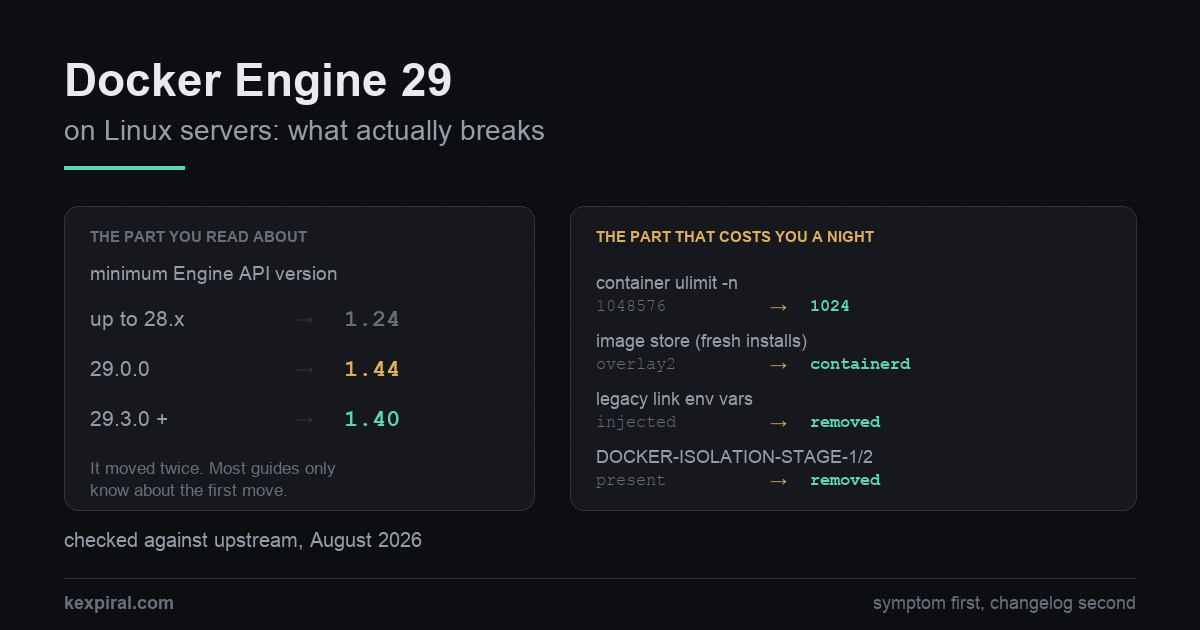
API の下限は 2 度動き、containerd イメージストアへの切り替えは新規インストールだけ、そして全コンテナのファイルディスクリプタ上限が 1048576 から 1024 へ静かに落ちました。9 か月分の影響を上流の一次情報で確認します。
- Docker
- containerd
- Linux
- DevOps
Docker Engine 29 は 2025 年 11 月にリリースされ、何年も問題なく動いていたソフトウェアを驚くほど広範囲に壊しました。9 か月経ったいま興味深いのは壊れたこと自体ではありません。最初の 2 週間に書かれた記事の大半がいまや間違っていることです。誰もが記事にしたあの変更は、3 つ先のマイナーリリースで一部撤回されました。今月 Linux サーバーをアップグレードしようとしている人は、もう存在しないバージョンの Docker 29 に向けて書かれた助言を読まされていることになります。
この記事では、実際に壊れるものを、遭遇しやすい順に、修正方法と上流の出典つきで整理します。対象は Linux サーバー上の Docker Engine であり、Docker Desktop ではありません(いくつかの項目は Desktop だと答えが変わります)。診断用のコマンドは状態を読むだけです。システムに手を加えるものは設定の編集、インストール、再起動のいずれかであり、見ればそれと分かります。上流が日付やバージョンを公表していない箇所は、推測で埋めずにその旨を明記します。
変更履歴ではなく、症状から切り分ける
このページに変更履歴から辿り着く人はほとんどいません。たいていはエラー文字列か、起動しないコンテナか、環境が到達不能だと言い張るダッシュボードから来ます。だから最初に表を置きます。自分の症状を見つけて、その説明にあたる節を読んでください。[rel29]
| 見えている症状 | 実際に起きていること | 対処 |
|---|---|---|
client version 1.24 is too old. Minimum supported API version is 1.44 | クライアントがデーモンの API 下限より古い。下限は 29.0.0 で上がり、29.3.0 で戻った。 | クライアントを更新する。デーモン側のオーバーライドは橋渡しであって修正ではない。 |
client version 1.52 is too new. Maximum supported API version is 1.44 | 逆パターン。新しいクライアントに古いデーモン。ほぼ必ず CI で固定された Docker-in-Docker サービス。 | DinD イメージをデーモンと同じメジャーバージョンに固定し、両方同時に変更する。 |
29 を入れたら docker images が空 | 新規インストールでは containerd イメージストアが既定。overlay2 の内容は隠れているだけで消えていない。 | バックエンドを戻すか、意図的に export して再 import する。 |
| これまでなかった接続数の頭打ちが発生する | コンテナ内の nofile の既定値が 1048576 から 1024 に低下。 | コンテナ単位の --ulimit、またはデーモンの default-ulimits。 |
CI ジョブがサービスのヘルスチェックで失敗する。No HOST or PORT found | レガシーな link 環境変数が注入されなくなり、サービスの起動を待つヘルパーがそれを見つけられない。 | ユーザー定義ネットワークと DNS を使う。例外用の変数は一時しのぎ。 |
| 到達できないはずの公開ポートにコンテナが到達する | DOCKER-ISOLATION-STAGE-1 と -STAGE-2 のチェーンが 29.0 で削除された。 | ワイルドカードアドレスではなく 127.0.0.1 に公開する。 |
DOCKER-USER のファイアウォールルールが効かなくなった | 実験的でオプトインの nftables バックエンドを有効化した場合にのみ発生。 | 戻すか、優先度を下げた自前の nftables テーブルを書く。 |
github.com/docker/docker で Go のビルドが失敗する | モジュールが github.com/moby/moby/client と .../api へ移動した。 | import を書き換える。クライアント API の形も同時に変わっている。 |
# Three numbers decide everything that follows. Get them before you change
# anything, on the machine that is actually misbehaving.

# 1. Engine version, and the API floor this daemon enforces.
docker version
# Server: Docker Engine - Community
#  Engine:
#   Version:          29.3.0
#   API version:      1.54 (minimum version 1.40)
#                                             ^^^^
# Do NOT assume 1.44. Engine 29.0.0 raised the floor from 1.24 to 1.44, and
# 29.3.0 lowered it again to 1.40. Which one you get depends on where in the
# 29 series you landed, and almost everything written about this in late 2025
# predates the second change. Read the number, do not remember it.

# 2. Which image store this daemon is using.
docker info -f '{{ .DriverStatus }}'
# [[driver-type io.containerd.snapshotter.v1]]              -> containerd store
# [[Backing Filesystem extfs] [Supports d_type true] ...]   -> legacy overlay2
docker info 2>/dev/null | grep -i 'storage driver'
# Storage Driver: overlayfs   -> containerd snapshotter
# Storage Driver: overlay2    -> graph driver

# 3. Which packet-filtering backend. nftables is opt-in and experimental in 29.x,
#    so on an untouched host this should say iptables.
docker info 2>/dev/null | grep -i 'firewall'

# And the one that is not a Docker question, but constrains Docker anyway:
stat -fc %T /sys/fs/cgroup/
# cgroup2fs -> unified hierarchy, nothing to do
# tmpfs     -> cgroup v1 or hybrid: deprecated in 29.0, supported until May 2029
このうち 3 行は同じ 1 つの変更を別の角度から見たもので、2 行は普通なら探しに行かない場所にしか記載がありません。何かを触る前に、自分にどれが当てはまるかを決める 3 つの事実を確認しておきます。
API の下限は 2 度動いていて、目にした数字はたぶん古い
まずは有名なほうから。Engine 29.0.0 は、デーモンが受け付ける最小 Engine API バージョンを 1.44 に引き上げました。1.44 は Docker 25.0 相当です。それまでの下限は 1.24 でしたが、その 1.24 自体も Docker 25.0 で導入されたもので、2016 年から据え置かれていた 1.12 を置き換えたものでした。つまりこれは 2 年で 2 度目の引き締めであり、そのうち誰もが気づいた最初の 1 回だったということです。古いバージョンをハードコードしていたクライアントや、バージョンネゴシエーションを実装しなかったクライアントは、デーモンが再起動した瞬間に動かなくなりました。同じ週に Traefik、Portainer、Testcontainers、Watchtower、半ダースほどのセルフホスト型ダッシュボード、そして相当数の CI パイプラインがまとめて落ちたのはこれが理由です。[pr51186][blog29]
ここからが、公開記事にはほぼ書かれていない部分です。2026 年 3 月リリースの 29.3.0 で、上流は下限を再び引き下げました。1.44 から 1.40 へ、つまり Docker 19.03 相当までです。現行ソースの既定値は 1.40 で、1.24 は明示的なオーバーライドを設定したときにだけ到達できます。したがって、12 月に拒否されていた API 1.41 や 1.43 のクライアントは今日なら動きますし、最小値は 1.44 だと書いてあるトラブルシューティング記事は、とうに先へ進んだ系列のうち最初の 3 つのマイナーラインだけを説明していることになります。インターネットの記憶ではなく、自分のデーモンを確認してください。リリースと API バージョンの対応表は公開されており、この話のなかで唯一ずっと正しいままでいてくれるのがその確認結果です。[pr52067][config][apimatrix]
| デーモンのバージョン | 最小 API バージョン | 拒否される範囲 |
|---|---|---|
| 25.0 〜 28.x | 1.24 | 事実上なし。それ以前のエンジンの下限は 1.12 で、2016 年から据え置かれていた。 |
| 29.0.0 〜 29.2.x | 1.44 | Docker 25.0 より古いクライアントすべて。話題になった障害の波はこれ。 |
| 29.3.0 以降 | 1.40 | Docker 19.03 より古いクライアント。実質的な緩和だが、ほとんど言及されない。 |
| 任意(オーバーライド指定時) | 1.24 まで | コマンドラインフラグはない。daemon.json のキーか DOCKER_MIN_API_VERSION で指定する。上流は例外用の設定と位置づけ、削除時期は未公表。 |
# The symptom, produced by the daemon, not the client:
#
#   Error response from daemon: client version 1.24 is too old.
#   Minimum supported API version is 1.44, please upgrade your client to a
#   newer version
#
# And its mirror image, which appears in CI far more often than on servers -
# a NEW client talking to an OLD daemon, typically a pinned docker:dind service:
#
#   Error response from daemon: client version 1.52 is too new.
#   Maximum supported API version is 1.44

# The correct fix is always to update the client. Every tool listed later in
# this article shipped a build that negotiates the API version instead of
# hardcoding one.

# The escape hatch is for the case where the client is a vendor appliance you
# cannot update this week. It is set on the DAEMON, not on the client, and it
# is available in daemon.json only - there is no dockerd command-line flag.
cat /etc/docker/daemon.json 2>/dev/null   # read it first, do not clobber other keys

# /etc/docker/daemon.json
{
  "min-api-version": "1.24"
}

sudo systemctl restart docker
docker version | grep -i 'minimum version'

# The equivalent, if you would rather leave daemon.json alone:
sudo systemctl edit docker.service
# [Service]
# Environment="DOCKER_MIN_API_VERSION=1.24"

# Upstream is unambiguous about the status of both: API versions older than the
# default "are deprecated and to be removed in a future release", and the
# environment variable and configuration option "should only be used for
# exceptional cases". No removal date is published anywhere. Treat this as a
# bridge of unknown length, put a ticket on it, and do not let it become the
# permanent shape of your fleet.
オーバーライドについて 1 点だけ注意を。この種の設定は、それを生んだ障害よりも長く生き残ります。上流は古い API バージョンを非推奨とし、将来のリリースで削除するとしたうえで、環境変数と設定キーのいずれについても例外的なケース専用だと説明しています。削除時期は公表されていません。Docker 自身の方針では、非推奨になった機能は少なくとも 1 つの安定版リリースのあいだは維持され、廃止には数か月の予告期間を置くことを目指すとされています。ですから一夜で消えることはありません。ただし「少なくとも 1 リリース」は下限であって、計画ではありません。1 週間しのぐために使うのはよいとして、方針として据えるものではありません。[config][lifecycle]
「イメージが全部消えた」は再インストールであって、アップグレードではない
2 番目に報告が多い問題は、いちばん驚かされていちばん無害です。Docker 29 を入れて docker images を実行すると、一覧が空になる。何も削除されていません。Engine 29 は containerd イメージストアを既定のバックエンドにしましたが、これは新規インストール時のみです。この一文でほぼすべての報告が片づきます。パッケージのその場でのアップグレードなら overlay2 グラフドライバーがそのまま維持され、イメージも見えたままです。パッケージを purge して入れ直すのは新規インストール扱いですし、構成管理からホストを作り直すのも同じです。特別なことをした自覚がないままこの現象に出会う人の大半は、この経路です。[cstore]
| 観点 | overlay2(グラフドライバー) | containerd スナップショッター |
|---|---|---|
| どちらになるか | 28 以前からのアップグレードは維持される | 29.0 以降の新規インストール。ただし userns-remap は除く |
docker info の表示 | Storage Driver: overlay2 | Storage Driver: overlayfs と driver-type が io.containerd.snapshotter.v1 |
| データの置き場所 | data-root 配下。通常は /var/lib/docker | containerd 独自のストレージ。data-root では移動しない |
| ディスク使用量 | 非圧縮レイヤーのみ | 圧縮と非圧縮の両方。同じイメージでも明らかに大きい |
| マルチプラットフォームイメージと attestation | 非対応 | 対応。既定が変わった本当の理由 |
| 相互の切り替え | もう一方のイメージとコンテナが見えなくなる | 逆方向も同じ。削除はされず、その場での変換もない |
# "I upgraded and all my images are gone."
#
# Almost every report of this turns out to be a REINSTALL, not an upgrade.
# Docker 29 makes the containerd image store the default on fresh installations
# only; an in-place package upgrade keeps the overlay2 graph driver. Purging the
# packages and installing them again counts as fresh, and so does rebuilding the
# host from your configuration management.
#
# Nothing has been deleted. The two backends cannot see each other's content:
# switching "temporarily hides images and containers created with the other
# backend. Your data remains on disk."

docker info -f '{{ .DriverStatus }}'
docker system df

# To see the old content again, point the daemon back at where it lives:
# /etc/docker/daemon.json
{
  "features": { "containerd-snapshotter": false },
  "storage-driver": "overlay2"
}
sudo systemctl restart docker
# Understand what this buys you: the legacy graph drivers are themselves now
# deprecated, and Docker states the graph driver backend will be removed in a
# future release. Switching back is a stay of execution, not a destination.

# Moving forward deliberately instead. There is no supported in-place
# conversion: the documented paths are a registry round trip, or save/load.
docker save -o /var/tmp/keep.tar app:1.4 app:1.5
# ... switch the daemon to the containerd store, restart, then:
docker load -i /var/tmp/keep.tar

# An experimental automatic switch exists. Read what it actually does before
# using it: it only fires when there are NO containers at all and the image
# count is at or below the threshold you set.
# /etc/docker/daemon.json
{
  "features": { "containerd-migration": true }
}
# and, for the threshold, a systemd drop-in:
#   Environment="DOCKER_MIGRATE_SNAPSHOTTER_THRESHOLD=5"
# The documentation labels this experimental and tells you to take backups
# first. On a server, exporting the handful of images you actually care about
# is less work than recovering from a migration that half-happened.

# Two operational consequences that surface weeks later, not on day one:
#
#  - The containerd store keeps layers both compressed and uncompressed, so the
#    same images occupy noticeably more disk than they did under overlay2.
#
#  - "data-root" in daemon.json does NOT move containerd's content. If you put
#    /var/lib/docker on its own partition, containerd's storage is configured
#    separately - otherwise it quietly fills the root filesystem instead, which
#    is a page you will read at 03:00 rather than now.
#
#  - The containerd store is unavailable when user-namespace remapping is
#    enabled. That is a known bug, not a policy, and userns-remap hosts are
#    excluded from the fresh-install default for exactly that reason.
2 つのバックエンドは互いのコンテンツを参照できません。上流は、切り替えると「もう一方のバックエンドで作成したイメージとコンテナが一時的に見えなくなる」が「データはディスク上に残る」と明記しています。切り替えた直後に一覧が空に見えても、容量を空けようと prune を始めないでください。見えている半分を消しながら、見えない半分の容量を払い続けることになります。
当日ではなく数週間後に効いてくる副作用が 2 つあります。containerd ストアはレイヤーを圧縮状態と非圧縮状態の両方で保持するため、同じイメージでも overlay2 のときより明らかにディスクを食います。もう 1 つ、daemon.json の data-root は containerd のコンテンツを移動しません。/var/lib/docker を専用ボリュームに置いて安心していても、containerd のストレージは別に設定する必要があり、放置すればルートファイルシステムを埋めます。なお、新しい既定がそもそも適用されないケースが 1 つあります。ユーザー名前空間のリマップを使うホストは対象外で、これは方針判断ではなく未解決のバグによるものです。そして、バックエンドを戻すことで何が手に入るのかは冷静に見ておくべきです。レガシーなグラフドライバー自体が非推奨であり、Docker はこのバックエンドを将来のリリースで削除すると述べています。overlay2 に戻すのは執行猶予にすぎません。[daemon][iss47377]
全コンテナのファイルディスクリプタ上限が 1024 に落ちた
誤診がいちばん多いだろうと賭けてもいい変更がこれです。そもそも breaking changes の節に載っておらず、containerd のバージョン更新の下にぶら下がったサブ項目として書かれています。Docker Engine 29.0.0 は containerd 2.1.5 を同梱しており、この containerd は systemd ユニットで LimitNOFILE=infinity を設定しなくなりました。結果として、すべてのコンテナ内のオープンファイル数のソフトリミットの既定値が 1048576 から 1024 に下がります。その後の 29.x はより新しい containerd を同梱していますが、いずれもこの新しい挙動を引き継いでいます。[iss51485][ctd215]
# The 29.0 change with the widest blast radius is not under a "breaking
# changes" heading at all. It is a sub-bullet under a containerd version bump.

docker run --rm ubuntu:24.04 bash -c 'ulimit -n; ulimit -Hn'
# soft 1048576   with containerd.io 1.7.x (Docker 28 and earlier)
# soft 1024      with containerd.io 2.1.5, shipped with Docker Engine 29.0.0
#
# Only the SOFT limit is documented as changing. The hard limit becomes
# whatever systemd's DefaultLimitNOFILE gives you on that host, so read both
# numbers on your own machine rather than trusting a value from an article.

# What happened: containerd 2.1.5 stopped setting LimitNOFILE=infinity in its
# systemd unit, so containers now inherit systemd's ordinary default. Docker
# Engine made the same change for BUILD containers back in v25.0; version 29
# extends it to every container. The reasoning is sound - with an effectively
# unlimited value, software that sizes its own buffers from `ulimit -n`
# (MySQL is the classic case) could consume the machine - and it is documented
# in the release notes. It is simply not where anyone looks.

# 1024 is a real ceiling, and the failures it produces rarely mention file
# descriptors: an Nginx worker refusing connections at a number that looks
# arbitrary, a JVM selector loop throwing at load, a connection pool that
# stalls under exactly the traffic it handled last week.

# Per container, which is the right place if only one workload needs it:
docker run --ulimit nofile=65535:65535 ...

# Or restore a default for every container on the host:
# /etc/docker/daemon.json
{
  "default-ulimits": {
    "nofile": { "Name": "nofile", "Soft": 65535, "Hard": 65535 }
  }
}

# The release notes show 1048576 in this example, which restores the exact old
# behaviour. Prefer a considered number. Copying 1048576 back wholesale also
# copies back the problem the change was made to solve, and you will not be the
# one who remembers that in two years.
変更の理由は妥当で、メンテナーの説明も明快です。事実上無制限の値と Go ランタイムの挙動が組み合わさるとソフトリミットがハードリミットまで引き上げられることがあり、ulimit -n を見て自前のバッファサイズを決めるソフトウェア(定番の例が MySQL です)がマシンを食い潰してしまう。Docker は v25.0 でビルドコンテナに同じ変更を入れており、バージョン 29 はそれを全コンテナに広げただけです。問題は変更そのものではなく、1024 が現実に届く上限であり、そこで起きる障害がファイルディスクリプタに言及しない点にあります。Nginx のワーカーが中途半端な数で接続を拒否する、負荷時に JVM のセレクタが例外を投げる、先週まで捌けていたトラフィックちょうどでプールが詰まる。アップグレード後にコードを変えていないのに負荷時の遅さや不安定さが増したなら、まずここを見てください。[rel29]
レガシー link 変数の削除に最初に気づくのは CI
Docker 29 は、レガシーな link 環境変数(DB_PORT_5432_TCP_ADDR とその仲間)をコンテナに注入するのをやめました。これらは何年も前に非推奨になっており、代替であるユーザー定義ネットワーク上の DNS は 2016 年から使えます。問題は、いまだにこれらを読むコンテナのエントリポイントスクリプトや CI のヘルパーが多く、そのとき出るエラーが Docker について何も語らないことです。代表例が GitLab Runner です。services: の起動を待つヘルパーコンテナが FATAL: No HOST or PORT found で終了するため、サービスコンテナ自体は問題なく動いているのに、ジョブはヘルスチェックの段階で失敗します。[pr50719][gllinks]
# Docker 29 stopped injecting the legacy link environment variables:
#   DB_PORT_5432_TCP_ADDR, DB_PORT_5432_TCP_PORT, DB_NAME, DB_ENV_*
# They were deprecated years ago. A surprising number of CI images and entry
# point scripts still read them, and the failure does not mention Docker.

# The symptom in a GitLab CI job with a services: block is a health check that
# never passes: the runner's wait-for-service helper exits 1 with
#   FATAL: No HOST or PORT found
# and the job fails before your script runs. The service container itself
# started perfectly well - which is why this looks like an infrastructure
# outage rather than a Docker change.

# Confirm it in two lines. The db container must be on the DEFAULT BRIDGE:
# legacy links do not work on user-defined networks at all.
docker run -d --name db postgres:18
docker run --rm --link db:db alpine env | grep -c '^DB_PORT_'
# 0 on Engine 29, non-zero before it

# The fix is to stop parsing those variables. DNS on a user-defined network has
# worked since 2016, does not need --link at all, and survives restarts:
docker rm -f db
docker network create appnet
docker run -d --name db --network appnet postgres:18
docker run --rm --network appnet postgres:18 pg_isready -h db
# In Compose this is already the default: services on the same project network
# resolve each other by service name.

# The escape hatch, when the image is not yours to change and the release is
# next week. Daemon-side, and explicitly temporary:
sudo systemctl edit docker.service
# [Service]
# Environment="DOCKER_KEEP_DEPRECATED_LEGACY_LINKS_ENV_VARS=1"
sudo systemctl restart docker
# Upstream wording: "the escape hatch will be removed in a later version".
この項目には現在進行形の棘があります。執筆時点で対応する GitLab Runner の issue はまだオープンで、記載されている回避策はデーモン側で例外用の環境変数を設定するか、Runner の Docker バージョンを固定するかのどちらかです。CI でサービスコンテナを使っているなら、フリート全体に展開する前に 1 台の Runner で試してください。修正が難しいからではなく、失敗が全ジョブで同時に発生するため、設定変更ではなくインフラ障害に見えるからです。
分離チェーンの削除は、到達可能性そのものの変更
話題になった量がいちばん少なく、影響がいちばん大きい変更がこれです。Engine 29 はブリッジネットワーク向けの iptables ルールを作り直し、DOCKER-ISOLATION-STAGE-1 と DOCKER-ISOLATION-STAGE-2 のチェーンを完全に削除しました。リリースノートはその影響を率直に書いており、別々のブリッジネットワークをセキュリティ境界として扱ってきた人は 2 回読む価値があります。userland プロキシが動いていない場合、コンテナは他ネットワークのコンテナがホストアドレスに公開したポートに到達できるようになり、さらに nat-unprotected ゲートウェイモードを使う他ネットワークのコンテナアドレス上のポートにも到達できます。[pr49981][packet]
# 29.0 reworked the iptables rules for bridge networks and removed the
# DOCKER-ISOLATION-STAGE-1 and DOCKER-ISOLATION-STAGE-2 chains. The release
# notes state the two consequences plainly:
#
#   - containers can now access ports published to host addresses by containers
#     in other networks when the userland proxy is not running
#   - containers can now access ports on container addresses in other networks
#     that have gateway mode "nat-unprotected"
#
# If you were using separate bridge networks as a security boundary, re-read
# that. It is a reachability change, and nothing in the upgrade tells you.

# Find every port you publish to a wildcard address. Each one is a port that
# containers in other networks may now reach through the host.
docker ps --format '{{.Names}} {{.Ports}}' | grep '0.0.0.0'

# The durable fix is to stop publishing to the wildcard when you only meant
# localhost. This has always been the correct form and does not depend on any
# chain existing:
docker run -p 127.0.0.1:5432:5432 postgres:18

# In Compose:
#   ports:
#     - "127.0.0.1:5432:5432"

# Check the current shape of the rules rather than the shape you remember:
sudo iptables -S | grep -c 'DOCKER-ISOLATION'   # 0 on Engine 29
sudo iptables -S DOCKER-USER

# DOCKER-USER still exists and still works under the default iptables backend.
# It is only absent if you deliberately switch the daemon to nftables - which
# is the next section, and the answer there is "not on a production host yet".| 挙動 | 28.x まで | 29.0 以降 | 対応 |
|---|---|---|---|
| ブリッジネットワークの分離チェーン | DOCKER-ISOLATION-STAGE-1 と -STAGE-2 | 削除 | ワイルドカードアドレスに公開しているものを見直す。 |
| レガシーな link 環境変数 | 自動で注入 | 注入されない | ユーザー定義ネットワーク上の DNS を使う。 |
DOCKER-USER チェーン | あり | iptables ではあり、nftables ではなし | 依存しているなら nftables バックエンドを有効化しない。 |
| SCTP チェックサムの mangle ルール | DOCKER_IPTABLES_SCTP_CHECKSUM=1 のときのみ追加 | 削除 | この変数はもう何の効果もない。 |
| macvlan と ipvlan-l2 の既定ゲートウェイ | 推測して設定 | IPAM 設定に --gateway がある場合のみ | ネットワーク定義でゲートウェイを明示する。 |
| 暗号化オーバーレイネットワーク | 28.2.2 と 25.0.13〜14 で不具合 | 29.0.0 から 29.2.0 で不具合 | 29.2.1 で修正。ただし修正済みノードは未修正ノードとの通信を運べない。Swarm 全体をまとめて影響のないビルドへ移す。 |
この変更が起きたことは、アップグレード中にもモニタリング上にも現れません。エラーではなく、到達範囲が広がっただけだからです。持続する対策はチェーンを復活させることではなく、localhost のつもりだったポートをワイルドカードアドレスに公開するのをやめることです。これは元々正しい書き方であり、どのチェーンの存在にも依存しません。ついでに、ダウングレード時の落とし穴を 1 つ書き留めておきます。29 上でデフォルトアドレスプールからプレフィックス長を指定して作成したネットワークは、古いデーモンでは使用不能になり、削除して作り直す必要があります。作業後ではなく作業前にネットワーク定義を記録しておいてください。[pr50114]
nftables は実在するが実験的で、DOCKER-USER チェーンがない
Engine 29 は nftables バックエンドも導入しました。報道が正確でなかったので、その位置づけははっきりさせておきます。これは実験的でオプトインであり、既定は iptables のままで、デーモンが Swarm モードのときはそもそも有効化できません。上流は、設定オプションも挙動も実装も変わりうると明言しています。最近のディストリビューションでは iptables ルールもカーネル側では nftables の仕組みで実行されているのが普通なので、いま切り替えて得られるものはほとんどありません。それでも今のうちに知っておくべき理由はファイアウォールへの影響です。Docker の nftables 実装には DOCKER-USER チェーンが存在せず、そこに置いたルールが新しいテーブルへ移行されることもありません。それでもルールが動くかどうかは経緯次第です。既存ホストを切り替えた場合は FORWARD からの古いジャンプが残るため、そのジャンプを消すかホストを再起動するまでルールは効き続けます。一方、最初から nftables で立ち上げたホストにはそのジャンプが存在せず、ルールは黙って無視されます。設定が同一の 2 台で、ファイアウォールの挙動が 2 通りに分かれるということです。[nft][pr50476]
# The nftables backend in 29.x is EXPERIMENTAL and opt-in. The default is still
# iptables, which on a current distribution is usually iptables-nft underneath
# anyway - so you are already using the nftables kernel machinery either way.
# Upstream: "configuration options, behavior and implementation may all change
# in future releases", and it "cannot be enabled when the Docker daemon is
# running in Swarm mode".

docker info 2>/dev/null | grep -i 'firewall'

# Opting in, if you are testing it somewhere that is not production:
# /etc/docker/daemon.json
{
  "firewall-backend": "nftables"
}
sudo systemctl restart docker

sudo nft list tables
# table ip docker-bridges
# table ip6 docker-bridges

# The part that quietly changes your security posture:
# "In Docker's nftables implementation, there is no DOCKER-USER chain."
# Your rules are not migrated. Whether they still run depends on history:
# switching an existing host to nftables leaves the old FORWARD jump to
# DOCKER-USER in place, so those rules keep firing until the jump is removed
# or the host reboots. A host that started on nftables never had the jump, so
# the same rules do nothing at all. Both states look identical in your
# configuration management, which is the dangerous part.
sudo iptables -S FORWARD | grep DOCKER-USER   # if this prints, you have both worlds

# The replacement is your own table, with base chains of the same type and hook
# as Docker's and a LOWER priority number, so yours run first. "filter" is the
# same priority Docker uses, so subtract from it:
#
#   table ip my-filter {
#       chain my-forward {
#           type filter hook forward priority filter - 1; policy accept;
#           iifname "eth0" ip saddr != 192.0.2.2 counter drop
#       }
#   }

# One more difference that catches everybody: in nftables an accept is not
# final, so you cannot permit something Docker drops simply by accepting it
# earlier. Use a firewall mark and tell the daemon to honour it:
#   dockerd --bridge-accept-fwmark=1
#   dockerd --bridge-accept-fwmark=0x1/0x3    # with a mask
github.com/docker/docker はもう import パスではない
Go から Docker API を使っている場合、バージョン 29 はバージョンアップというより書き直しで、このページで唯一、設定キーでは回避できない変更です。モジュール github.com/docker/docker は非推奨となり、github.com/moby/moby/client と github.com/moby/moby/api に置き換わりました。親モジュールは内部実装の詳細と明示され、リリースには docker- 接頭辞のタグが付きます。移動に加えて、クライアント API 自体の形も変わりました。[rel29]
- 位置引数がオプション構造体に置き換わりました。image、config、prune 系の操作が対象です。機械的ですが影響範囲は広く、一般的な連携コードではほぼすべての呼び出し箇所に手が入ります。
- 戻り値が構造体で包まれました。
ImageInspect、ImageHistory、ImageLoad、ImageSaveは従来の値を返さなくなり、ImagePullとImagePushはメッセージのイテレータを持つオブジェクトを返します。 - フィルタが移動しました。クライアントが独自の filters 型を持つようになったため、旧 filters パッケージを import しているコードは参照先の付け替えでは済まず、リファクタが必要です。
- アドレスが型付けされました。IP アドレスとサブネットは文字列や
net.IPNetではなくnetip.Addrとnetip.Prefixになりました。本質的な改善ですが、着手すれば午前中がまるごと消えます。 client.ImageCreateは削除されました。実際に何をしていたかに応じてImagePullかImageImportに置き換えます。
cgroup v1 は非推奨、しかも期限つき
Docker 29 は cgroup v1 を非推奨にしました。非推奨としては珍しく、日付つきです。上流はサポートを 2029 年 5 月まで継続するとし、2029 年 5 月の最終リリース自体は cgroup v1 をサポートしないかもしれないが、少なくとも 1 つのメンテナンス対象ブランチはサポートを維持すると述べています。かなり余裕のある猶予であり、これが理由で今年サーバー上の何かが止まることはありません。[deprecated][iss51111]
とはいえ早めに手を打つ価値はあります。理由は Docker のスケジュールとは無関係で、ディストリビューションのほうが先に到達するからです。systemd は v258 でレガシー階層とハイブリッド階層を削除しました。したがって systemd.unified_cgroup_hierarchy=0 を付けたまま起動しているホストは、2029 年よりずっと前に OS レベルでこの壁にぶつかります。たいていは古いランタイムを動かすために何年も前に誰かが追加し、そのまま忘れられたパラメーターです。見つけるのも消すのも普通は簡単で、厄介なのは平日の何でもない火曜日ではなく、メンテナンスウィンドウの最中に発見することです。[systemd258][cgroupv2]
エコシステム:何が壊れ、どのバージョンで直ったか
互換性の一覧は、この件のなかでは珍しくよく文書化されています。おもに Portainer が影響の全体像を進行中に詳しく書き残してくれたおかげです。ほとんどは数週間以内に修正されました。いま一覧を読む価値は修正内容そのものではなく、このうちどれを自分が使っているかに気づく点にあります。[portblog]
| ツール | 壊れた内容 | 修正バージョン |
|---|---|---|
| Traefik | Docker プロバイダーが API 1.24 をハードコードしており、ルートがまったく設定されなくなった。 | 3.6.1。ハードコードをネゴシエーションに置き換え。 |
| Portainer | 同梱のクライアントが API 1.41 で頭打ちのままネゴシエーションを行わず、厳格な最小バージョンチェックが接続を拒否したため、環境が到達不能と表示された。 | 2.33.5 LTS / 2.36.0 STS。 |
| Testcontainers for Java | docker-java の既定が API 1.32 で、有効な Docker 環境を見つけられずテストが失敗した。 | 2.0.2。ネゴシエーション対応の docker-java を同梱。 |
| Docker SDK for Python | 6.1.3 では DEFAULT_DOCKER_API_VERSION が 1.41 だった。 | 7.1.0(1.44)。固定よりネゴシエーションが望ましい。 |
| GitLab Runner | Runner、ジョブイメージ、DinD サービスの間でバージョン不一致。別件で、サービスのヘルスチェックが No HOST or PORT found で失敗する。 | DinD イメージを固定するか API バージョンを指定。ヘルスチェックの issue は執筆時点で未解決。 |
| JetBrains IDE | Docker プラグインが v29 デーモンに拒否された。 | プラグインビルド 253.28294.x。2025.2.5 と 2025.3 系のリリースに同梱。 |
| Watchtower(containrrr) | API 1.25 に固定されており、v29 デーモンに対して再起動ループに陥った。 | 上流の修正なし。リポジトリは 2025 年 12 月に読み取り専用としてアーカイブされた。 |
| CapRover | docker-modem が API 1.43 に固定。29.0 の下限にわずかに届かなかった。 | 1.14.1。 |
Ansible community.docker | docker version の JSON のフィールド名変更による KeyError: 'ApiVersion'。 | Engine 29.0.1 で以前のフィールド名に復帰。 |
| Docker Compose | 非常に古いビルドは API 下限を下回る。互換性の対応表は公開されていない。 | エンジンと同じリポジトリから現行の docker-compose-plugin を入れる。 |
パターンは一貫しています。壊れたものはどれも、ネゴシエーションをせずにどこかで API バージョンをハードコードしていましたし、直ったものはどれもネゴシエーションを足すことで直りました。最も分かりやすい例が Portainer です。同梱のクライアントは API 1.41 で頭打ちになっていてネゴシエーションを一切行わず、さらにデーモンの申告する最小バージョンに対する厳格なチェックが、接続をきっぱり拒否していました。相手は、きちんと尋ねてくるクライアントとなら喜んで話したはずのデーモンです。GitLab Runner が厄介なのは別の理由からです。Runner、ジョブイメージ、Docker-in-Docker サービスがそれぞれ自前のクライアントを抱えており、そのうち任意の 2 つが下限の反対側に分かれてしまうことがあります。実務上のルールは、DinD サービスイメージを、それを動かすデーモンと同じメジャーバージョンに固定し、両方を同時に変更することです。[traefik][testcontainers][glrunner]
残りの一覧は、自分のサプライチェーンを棚卸しする材料として悪くありません。示唆的なのは Watchtower です。API 1.25 に固定、公式の修正はなく、リポジトリは 2025 年 12 月に読み取り専用としてアーカイブされました。つまり、Docker ソケットへの恒久的なアクセス権を持つ無人プロセスが動かなくなり、しかも直してくれる人はいない、ということです。これは Docker 29 とは切り離して一度考える価値があります。あるツールがソケットを握っているなら、そのツールのメンテナンス状況はセキュリティ体制の一部であり、今回のアップグレードは、どのツールにまだメンテナーがいるかを異例なほど明確に洗い出しました。[watchtower][portainer][jetbrains]
アップグレード、バージョン固定、そして戻し方
ここでの作業手順に凝ったところは何もありません。アップグレードは標準の 5 パッケージを扱う普通の apt または dnf のトランザクションで、特定バージョンをインストールする手順として文書化されている方法が、そのまま戻すための方法になります。重要なのは順序と、ロールバックでは元に戻らないものを事前に把握しておくことです。[installubuntu][installrhel]
# Upgrading is an ordinary package transaction. The care is in the order, and
# in knowing in advance what a rollback will and will not undo.

# --- Debian / Ubuntu ---------------------------------------------------------
apt list --all-versions docker-ce | head
sudo apt update
sudo apt install docker-ce docker-ce-cli containerd.io \
                 docker-buildx-plugin docker-compose-plugin

# Staying on 28 deliberately - read the last section before choosing this:
sudo apt-mark hold docker-ce docker-ce-cli containerd.io
apt-mark showhold

# Going back. Take the exact version strings from the lists above. Pin
# containerd.io too: leaving it unpinned keeps containerd 2.x and its systemd
# unit, so the file-descriptor change described earlier survives the rollback.
apt list --all-versions containerd.io | head
VERSION_STRING=5:28.5.2-1~ubuntu.24.04~noble
CONTAINERD_STRING=1.7.29-1~ubuntu.24.04~noble
sudo apt install docker-ce="$VERSION_STRING" docker-ce-cli="$VERSION_STRING" \
                 containerd.io="$CONTAINERD_STRING" \
                 docker-buildx-plugin docker-compose-plugin

# --- RHEL / Rocky / AlmaLinux / Fedora ---------------------------------------
dnf list docker-ce --showduplicates | sort -r | head
sudo dnf install docker-ce docker-ce-cli containerd.io \
                 docker-buildx-plugin docker-compose-plugin
sudo systemctl enable --now docker
# A specific version, in the same shape as the apt form:
sudo dnf install docker-ce-3:28.5.2-1.el9 docker-ce-cli-3:28.5.2-1.el9 \
                 containerd.io docker-buildx-plugin docker-compose-plugin
# Pinning is a dnf feature, not a Docker one, and the plugin package name
# depends on which dnf you have:
#   RHEL / Rocky / Alma (dnf4):  sudo dnf install python3-dnf-plugin-versionlock
#   Fedora (dnf5):               sudo dnf install dnf5-plugin-versionlock
#   then:                        sudo dnf versionlock add docker-ce docker-ce-cli containerd.io

# Four things a downgrade does not undo:
#
#  1. If the daemon was switched to the containerd image store, a 28.x daemon
#     cannot see those images. They are still on disk; they are not in the
#     graph driver, and there is no conversion.
#  2. A network created on 29 by asking the default pool for a prefix size
#     (--subnet 0.0.0.0/24) is unusable on an older daemon. It has to be
#     deleted and recreated - so record your network definitions before you
#     start, not after.
#  3. Rootless installations from 29.5 onwards no longer receive slirp4netns
#     through Docker packaging. Reinstall it from your distribution if you go
#     back to a build that expects it.
#  4. The container file-descriptor limit, unless you pinned containerd.io as
#     well. That change lives in containerd's systemd unit, not in dockerd.
API を呼ぶのではなく Docker の出力をパースしている自動化がある場合、もう 1 つ知っておくことがあります。29.0.0 は docker version --format=json のフィールドの大文字小文字を変更し、Ansible の Docker コレクションが素の KeyError で落ちました。これは 29.0.1 で修正済みなので、影響を受けるのは最初のリリースに留まっている場合だけです。とはいえ、--format json もバージョンを持つインターフェースであり、それをスクレイプするものに対してはパッチリリースまで固定しておくのが安上がりな保険だ、というよい教訓です。[ansible]
検証をきちんとやる
「デーモンが起動した」は検証ではありません。アップグレード前にこれを実行して出力を保存し、実施後にもう一度実行して差分を取ります。要点は、バージョン 29 で変わったものの大半が既定値であり、既定値の変化はエラーではなく出力の差として現れる、ということです。
#!/usr/bin/env bash
# docker29-check.sh - Run it BEFORE the upgrade, keep the output, run it again
# afterwards and diff the two.
#
# Everything here only reads state, with one exception: the ulimit probe starts
# a throwaway container and will PULL ubuntu:24.04 if the host does not already
# have it. On a metered link, or on a host where you are watching disk, pull it
# in advance or swap in an image you already have.
set -uo pipefail

echo "=== engine, api floor, client ==="
docker version

echo "=== image store, storage driver, cgroup driver, firewall backend ==="
docker info 2>/dev/null | grep -Ei 'storage driver|driver-type|cgroup|firewall|logging driver|userns'

echo "=== the ulimit that changed underneath you ==="
docker run --rm ubuntu:24.04 bash -c 'ulimit -n; ulimit -Hn'

echo "=== everything that should be running, is ==="
docker ps --format '{{.Names}} {{.Status}} {{.Image}}' | sort

echo "=== images the daemon can actually see, and how much space they take ==="
docker images --format '{{.Repository}}:{{.Tag}}' | sort | head -50
docker system df

echo "=== published ports, from the host's point of view ==="
# -p needs root; without it you get the ports but not the owning process.
sudo ss -tlnp 2>/dev/null

echo "=== packet filtering: which world are we in ==="
sudo iptables -S DOCKER-USER 2>/dev/null || echo "no DOCKER-USER chain"
sudo iptables -S | grep -c DOCKER-ISOLATION
sudo nft list tables 2>/dev/null || echo "nft binary not present"

echo "=== every client that talks to this daemon ==="
# Anything listed here is a candidate for the API floor problem: an agent, a
# management UI, a CI runner, a monitoring exporter.
sudo ss -xp 2>/dev/null | grep docker.sock | sort -u
スクリプトでは確認できないものが 2 つあります。1 つは Compose です。Compose のバージョンと Engine API バージョンの対応表は公開されておらず、公開を求めた上流の issue は質問扱いでクローズされました。したがって確実なのは、どの古いビルドなら動くかを推論するのではなく、エンジンと同じリポジトリから現行の docker-compose-plugin をインストールすることです。もう 1 つは、Docker ソケットを掴んでいるすべてのプロセス、つまりエージェント、エクスポーター、管理 UI、CI Runner です。それぞれが自前の API クライアントを持っており、それぞれがこの記事の最初の節の候補になります。[compose]
結局、上げるべきか
答えは「上げるべき」で、理由は機能一覧ではありません。上流は docker-28.x を unmaintained と位置づけ、unmaintained を「積極的な開発を行わず、コントリビューションを受け付けず、セキュリティアドバイザリの対象外」と定義しています。ほかにメンテナンスされているブランチは 25.0 だけで、これは特定の 2 つの下流ディストリビューションのために維持されており、メンテナンス終了の予定は 2026 年 12 月、つまり 4 か月後です。計画というより退避先です。28 に留まることは、感覚に反して保守的な選択ではありません。サポート対象バージョンに移る手間を避けるために、サポート外のバージョンを動かし続けているだけです。[branches]
| 状況 | 率直な答え |
|---|---|
| 単一ホストの Compose 構成で、イメージは自前ビルド | 上げる。先にコンテナの ulimit -n を確認する。驚くとしたらそこだけ。 |
| Docker-in-Docker を使う CI Runner | まず 1 台で試す。DinD サービスイメージをデーモンのメジャーバージョンに固定し、両方同時に変更する。 |
| セルフホスト型の管理 UI に依存している | Docker より先にその UI のメンテナンス状況を確認する。今回はエンジンではなく UI が障壁だったツールが複数ある。 |
DOCKER-USER の独自ルールを運用している | 上げてよい。既定の iptables バックエンドでは引き続き動く。nftables はオプトインしない。 |
| 別々のブリッジネットワークを境界として使っている | アップグレード後ではなく前にネットワークの節を読む。セキュリティ上の影響が実在する変更。 |
| 安全のために 28 に留まっている | docker-28.x は上流で unmaintained、セキュリティアドバイザリの対象外。安全側ではなくリスクの高い側。 |
- デーモンより先にクライアントを棚卸しする。Docker ソケットを握っているものはすべて自前の API クライアントを持っています。このアップグレードが何事もなく終わるか半日仕事になるかを決めるのは、エンジンのバージョンではなくこの一覧です。
- ulimit の確認を、28 のうちに済ませる。今日のうちに
docker run --rm ubuntu:24.04 bash -c 'ulimit -n'を実行し、どのワークロードが影響を受けるか書き出しておきます。このページでもっとも安上がりな 10 分であり、2 週間後に原因不明の性能劣化として表面化しやすいのがこの変更です。 - その場でアップグレードする。入れ直さない。その場でのアップグレードなら overlay2 が維持され、イメージも見えたままです。構成管理からホストを作り直す運用なら、作り直したホストでどちらのイメージストアを使うかを意図して決めてください。その経路の既定値が変わっています。
- 公開ポートを見直す。分離チェーンはもうありません。
0.0.0.0に公開しているものは、以前は届かなかったケースでも他ネットワークのコンテナから到達できるようになりました。ローカルに閉じたいものは127.0.0.1に移します。 - nftables には手を出さない。実験的で、
DOCKER-USERチェーンがなくなり、Swarm では使えません。いま本番で有効化する理由はありません。
下回りの OS も一緒に上げるなら、サーバーの Ubuntu 24.04 から 26.04 へのアップグレード で cgroup v1 を完全に削除し、ついでに 6 つの既定値を入れ替えるリリースについて扱っています。ここまで読んでコンテナ基盤の複雑さに見合う価値があるのか疑問になったなら、Kubernetes を使わないほうがよいとき でより小さい答えを支持する論拠を、退屈なクラウドアーキテクチャ で意図的にゆっくり変わるインフラを選ぶことについての長めの議論をまとめています。
よくある質問
Docker Engine 29 の最小 API バージョンはいくつですか?
パッチリリースによって異なります。ここを外している記事がほとんどです。Engine 29.0.0 は最小値を 1.24 から 1.44 に引き上げ、29.3.0 で再び 1.40 に下げました。上流ソースの現行既定値は 1.40 で、1.24 は明示的なオーバーライドでのみ到達できます。2025 年末に書かれた記事の数字を信じるのではなく、docker version で自分のデーモンを確認してください。サーバー側の表示に API バージョンと最小値が同じ行に出ます。
「client version is too old. Minimum supported API version is 1.44」の対処法は?
クライアントを更新します。ほとんどの場合、docker CLI ではなく周辺ツールが原因です。Traefik 3.6.1、Portainer 2.33.5 LTS または 2.36.0 STS、Testcontainers for Java 2.0.2、Docker SDK for Python 7.1.0、CapRover 1.14.1 がそれぞれの修正版です。今週中にどうしても更新できない場合は、/etc/docker/daemon.json に "min-api-version": "1.24" を設定するか(同等のコマンドラインフラグはありません)、systemd の drop-in で DOCKER_MIN_API_VERSION=1.24 を指定すれば、デーモンに古いバージョンを受け付けさせられます。上流はいずれも例外的なケース用と説明し、古いバージョンは将来のリリースで削除するとしていますが、日付は公表していません。
バージョン 29 にアップグレードしたら Docker イメージが全部消えたのはなぜですか?
ほぼ確実に消えていません。Engine 29 が containerd イメージストアを既定にするのは新規インストールのときだけで、2 つのバックエンドは互いのコンテンツを参照できません。上流もこの切り替えを、データはディスク上に残したままイメージとコンテナが見えなくなるものだと説明しています。パッケージをその場でアップグレードしたなら overlay2 のままで、すべて見えているはずです。purge して入れ直した場合や、構成管理からホストを作り直した場合は新しい既定が適用されています。docker info -f '{{ .DriverStatus }}' でどちらが有効か確認できます。元の表示に戻すには daemon.json に "features": {"containerd-snapshotter": false} を設定して再起動します。状況が飲み込めていないうちに docker system prune を実行しないでください。
アップグレード後にコンテナで「too many open files」が出るのはなぜですか?
コンテナ内のファイルディスクリプタ上限の既定値が 1048576 から 1024 に下がったからです。Docker Engine 29 は containerd 2.1.5 を同梱しており、この containerd は systemd ユニットで LimitNOFILE=infinity を設定しなくなったため、コンテナは systemd の通常の既定値を継承します。Docker は v25.0 でビルドコンテナに同じ変更を入れており、バージョン 29 はそれを全コンテナに広げました。ワークロード単位なら --ulimit nofile=65535:65535 で、全体なら daemon.json の default-ulimits で対処します。1048576 に戻すのではなく、根拠を説明できる値を選んでください。旧値こそがこの変更で避けようとしたものです。
Docker 29 で DOCKER-USER のファイアウォールルールは壊れますか?
既定の iptables バックエンドでは壊れません。DOCKER-USER は引き続き存在し、機能します。消えるのは実験的な nftables バックエンドを意図的に有効化した場合だけで、上流はそこに DOCKER-USER チェーンは存在せず、ルールも移行されないと明言しています。効かなくなり方には落とし穴があります。既存ホストを切り替えた場合は FORWARD チェーンからの古いジャンプが残るため、そのジャンプを消すかホストを再起動するまでルールは効き続けます。一方、nftables で新規インストールしたホストは最初からルールを無視します。これに対し、全員に影響する変更として DOCKER-ISOLATION-STAGE-1 と DOCKER-ISOLATION-STAGE-2 のチェーンが削除され、あるネットワークのコンテナが別のネットワークに到達できる範囲が広がりました。これはファイアウォールの変更ではなく到達可能性の変更であり、今回のリリースで点検する価値があるのはこちらです。
Docker 29 で nftables バックエンドを有効にすべきですか?
本番ホストでは有効にしないでください。上流が明確に実験的と位置づけ、設定オプションも挙動も実装も変わりうると警告しています。デーモンが Swarm モードのときは有効化できず、DOCKER-USER チェーンもなくなります。最近のディストリビューションでは iptables ルールもすでにカーネル側の nftables の仕組みで実行されているため、いま得られる実利は小さいです。試すなら、ファイアウォールの設定を間違えても許容できるホストで試してください。
Docker Engine 28 のまま使い続けても安全ですか?
アップグレードするより安全ではありません。感覚とは逆です。上流のブランチ一覧は docker-28.x を unmaintained と記載し、それを「積極的な開発を行わず、コントリビューションを受け付けず、セキュリティアドバイザリの対象外」と定義しています。メンテナンス対象のブランチは docker-29.x と 25.0 だけで、25.0 は特定の 2 つの下流ディストリビューションのために維持されており、メンテナンス終了の予定は 2026 年 12 月です。クライアントを直すあいだの 2 週間だけ 28 に固定するのは妥当ですが、方針として固定し続けるのは、セキュリティ修正を受け取れないバージョンを動かし続けることを意味します。
Docker 29 から 28 にロールバックできますか?
できます。インストールのドキュメントに書かれているとおり、パッケージマネージャーで特定の古いバージョンを指定してインストールします。ただしロールバックで元に戻らないものが 3 つあります。デーモンが containerd イメージストアに切り替わっていた場合、28.x のデーモンからそれらのイメージは見えません。ディスク上にはありますがグラフドライバー側にはなく、変換手段もありません。29 上でデフォルトアドレスプールからプレフィックス長を指定して作成したネットワークは、古いデーモンでは使用不能で、削除して作り直す必要があります。さらに 29.5 以降の rootless インストールでは slirp4netns が Docker のパッケージから提供されなくなったため、それを前提とするビルドに戻すならディストリビューション側から入れ直してください。
Docker Engine 29 はまだ cgroup v1 に対応していますか?
対応しています。バージョン 29 で非推奨にはなりましたが、上流は 2029 年 5 月までのサポートを明言し、その時点でも少なくとも 1 つのメンテナンス対象ブランチはサポートを維持するとしています。Docker が理由で今年サーバー上の何かが止まることはありません。圧力は逆方向から来ます。systemd が上流でレガシー階層とハイブリッド階層を削除したため、Linux ディストリビューションのほうが Docker よりずっと早く cgroup v1 を落とします。systemd.unified_cgroup_hierarchy=0 を付けたまま起動しているホストは、アップグレードの障害になる前の、1 行の修正で済むいまのうちに片づけておくべきです。
その下で動く init システムも動いている。systemd 260 は SysV ジェネレーター、rc-local.service、systemd-sysv-install をまとめて削除した。init.d スクリプトと rc.local を systemd unit へ移行する方法は、もはや任意の片付けではなく期限のある作業である。
リソース制御の層も同じリリース群で動いた。systemd 258 は cgroup v1 のサポートを完全に削除したため、誰が求めたかにかかわらず、どのホストも統一階層で起動する。cgroup v1 から cgroup v2 への移行では、棚卸しの方法、ファイル単位の対応表、そして名前ではなく挙動が変わる二つの変換を扱っている。
その下のランタイムも同じ時計で動いている。containerd 1.7 は 2026 年 9 月に延長サポートを離れ、Kubernetes 1.36 についてプロジェクトのサポートマトリクスが挙げるのは 2.3.0+ と 2.2.0+ だけで、1.x のエントリはひとつもない。containerd 1.7 から 2.x への移行では、version 3 への設定書き直し、CRI プラグインの読み込みを止めるレジストリ変換、そして狙う価値のあるブランチが 2.3 だけである理由を扱っている。
参考情報
エンジン自体に関することは Docker のリリースノート、ドキュメント、moby のソースツリーが根拠であり、互換性に関する記述は影響を受けた各プロジェクトの issue トラッカーが根拠です。この一覧については、正直に断っておくことが 2 つあります。各サードパーティツールが修正されたバージョンは、ここからリンクしているバグ報告そのものではなく、たいていそのプロジェクトのリリースノートに基づいています。確認が必要ならプロジェクト側を追ってください。そして、上流が日付やバージョンを公表していない箇所(API バージョンのオーバーライドの削除時期が代表例です)は、推測せずにその旨を書いています。
- Docker — Docker Engine v29 release notes: the authoritative changelog for every behaviour change described here, including the API floor, the containerd packaging bump and the networking rules
- Docker — Docker Engine v29: Foundational Updates for the Future; the announcement post, and the source for the DOCKER_MIN_API_VERSION workaround
- Docker — Engine API reference: the version matrix mapping each Engine release to its maximum and minimum API version, which is the only reliable way to know what your daemon will accept
- Docker — Deprecated Engine features: the table that carries the cgroup v1 deprecation and its May 2029 support horizon
- Docker — containerd image store: fresh installs versus upgrades, how to check which backend is active, and the fact that switching hides rather than deletes content
- Docker — Docker and nftables: the experimental backend, the tables it creates, and the statement that there is no DOCKER-USER chain
- Docker — Packet filtering and firewalls: the iptables model, the DOCKER-USER chain and the gateway modes referenced in the networking section
- Docker — dockerd reference: daemon.json keys, default-ulimits, storage-driver and the feature flags used in this article
- Docker — Configure the daemon, including the data directory location and why containerd's storage is configured separately
- Docker — Install Docker Engine on Ubuntu: the apt repository, the exact package set and the documented way to install a specific version
- Docker — Install Docker Engine on RHEL: the dnf repository and the equivalent version-pinning procedure
- Docker — Release lifecycle: the stages Docker applies to features and the notice it commits to before retiring them
- moby/moby — Branches and tags: the branch maintenance table showing docker-29.x maintained and docker-28.x unmaintained, and the definition of unmaintained
- moby/moby — daemon/config/config.go: the MaxAPIVersion, defaultMinAPIVersion and MinAPIVersion constants, and the comment describing min-api-version as an exceptional-case option
- moby/moby #51186 — daemon: raise minimum API version to v1.44, the change that shipped in 29.0.0
- moby/moby #52067 — lower minimum API version from v1.44 to v1.40, the change that shipped in 29.3.0 and that most published coverage predates
- moby/moby #49981 — the bridge iptables rework that removed the DOCKER-ISOLATION-STAGE-1 and DOCKER-ISOLATION-STAGE-2 chains
- moby/moby #50719 — legacy link environment variables are no longer added automatically, with the DOCKER_KEEP_DEPRECATED_LEGACY_LINKS_ENV_VARS escape hatch
- moby/moby #50476 — the --bridge-accept-fwmark daemon option that lets a firewall mark override Docker's drop rules
- moby/moby #50114 — requesting a prefix size from the default address pools, and the warning that such networks are unusable after a downgrade
- moby/moby #51485 — LimitNOFILE is silently changed to the host soft limit with the new containerd: the report, the maintainer's explanation and the resulting release-note text
- moby/moby #51111 — the cgroup v1 deprecation tracking issue for Docker Engine
- moby/moby #47377 — the userns-remap bug that keeps the containerd image store unavailable when user-namespace remapping is enabled
- containerd v2.1.5 — the runtime version packaged with Docker Engine 29, and the origin of the changed LimitNOFILE default
- Linux kernel documentation — Control Group v2, the hierarchy Docker will require once cgroup v1 support ends
- systemd v258 release notes — the removal of the legacy and hybrid cgroup hierarchies upstream, which is why your Linux distribution will drop cgroup v1 well before Docker does
- traefik #12253 — the Docker provider's hardcoded API version 1.24 against a v29 daemon, fixed by moving to version negotiation
- portainer #12925 — local Docker environment unreachable on Engine 29, the primary report carrying the maintainers' fixed-version announcement; builds before 2.33.5 capped their Docker client at API 1.41 and checked the daemon's reported minimum strictly
- Portainer — Docker v29, and the fall-out: the most complete public inventory of management tools broken by the API floor and their fixed versions
- testcontainers-java #11235 — docker-java's default API version rejected by Engine 29, and the properties file workaround
- GitLab Runner #39129 — API version mismatches between the runner, the job image and the Docker-in-Docker service on Engine 29
- GitLab Runner #39131 — service health checks fail on Docker 29 because the wait-for-service helper relied on the legacy link environment variables that are no longer injected
- watchtower #2122 — a tool pinned to API version 1.25 whose repository has since been archived read-only, and what that means for anything holding your Docker socket that nobody maintains
- docker/docker-py — the Docker SDK for Python, whose DEFAULT_DOCKER_API_VERSION moved from 1.41 in 6.1.3 to 1.44 in 7.1.0
- community.docker #1185 — KeyError: 'ApiVersion' from the docker version JSON shape change in 29.0.0, corrected in 29.0.1
- JetBrains IJPL-217878 — the IDE Docker plugin rejected by a v29 daemon until the plugin build shipped with the 2025.3 releases
- docker/compose #13371 — the absence of a published Compose-to-Engine API compatibility matrix, and why old Compose builds fail against v29
Was this useful?