cgroup v1 は終わった。正しく移行する。
systemd 258 が cgroup v1 のサポートを完全に削除した。誰が要求したかとは無関係に、ホストは統合階層で起動する。監査の手順、ファイル単位の変換、そしてこの移行について流布している四つの誤りをまとめる。
- Linux
- cgroups
- systemd
- コンテナ
たいていの移行は意思決定から始まる。この移行は事実から始まる。2025 年 9 月、systemd 258 が cgroup v1 のサポートを完全に削除した。その 1 年前にバージョン 256 が用意した SYSTEMD_CGROUP_ENABLE_LEGACY_FORCE=1 という逃げ道もろともである。その systemd 以降を動かしているマシンでは、起動時に統合階層がマウントされ、それ以外を要求するサポートされた手段は存在しない。コンテナ基盤が cgroup をどう考えていようと、その下の OS はすでに票を投じ終えている。
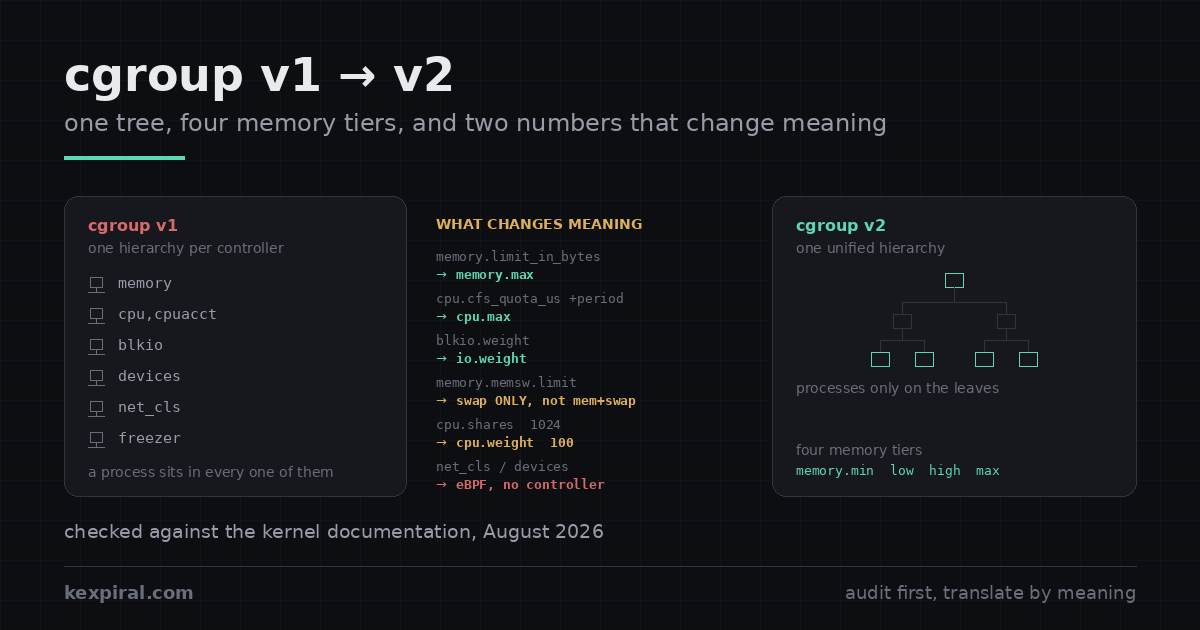
以下は、実際の運用環境で本当に起きる形での移行手順である。ハイブリッド構成に騙されずにホストの階層を判定する方法、対応する systemd ディレクティブを併記したファイル単位の変換表、数値をそのまま写すと挙動が静かに変わる二つの変換、2025 年に OCI ランタイム側でひっそり差し替えられた CPU ウェイトの計算式、そして Docker と Kubernetes が何をして何をしていないのかの正確な記述。最後の点については流通している情報の大半が誤っており、それを鵜呑みにすると障害か、あるいは 1 年分の不要な焦りのどちらかを支払うことになる。
選んだ移行ではない。そこが要点だ
症状は厄介なほど間接的だ。cgroup の問題ですと名乗って現れるものが何もないからである。監視エージェントがゼロを報告し始める。コンテナのメモリ制限が効かなくなる。旧マシンでは問題なく動いていた rootless ワークロードが起動を拒否する。8 年間 /sys/fs/cgroup/memory/memory.usage_in_bytes を読んできたスクリプトが file-not-found を吐き始めるが、その出力先は誰も見ないログなので誰も気づかない。これらはすべて同じ出来事を別の角度から見たものだ。パスが移動し、その下で意味が変わり、しかしデプロイを止めるほど大きな声でエラーを出したものは一つもなかった。[sd258]
| 現れる症状 | たいていの原因 | 対処箇所 |
|---|---|---|
| 監視エージェントが全コンテナのメモリと CPU をゼロで報告する | /sys/fs/cgroup/memory/… や cpu,cpuacct を読んでいるが、統合階層にそれらは存在しない | 変換対応表 |
cgroup に PID を追加すると write error: Device or resource busy | no-internal-process 制約。その cgroup はすでに子へコントローラを委譲している | 三つの規則 |
| 同じ制限値なのに、コンテナが以前よりはるかに多くスワップする | memory.memsw.limit_in_bytes を memory.swap.max に写した。後者はスワップ単独の意味 | メモリの意味変更 |
rootless Podman が --memory を受理するのに強制しない | systemd が memory コントローラをユーザーマネージャに委譲していない | コンテナ |
| 競合時にコンテナが以前より少ない CPU しか得られない | 線形のシェア→ウェイト変換により、1 CPU の request がデフォルト 100 に対してウェイト 39 になっていた | CPU ウェイト |
ノードイメージ更新後に kubelet が起動を拒否する | cgroup v1 ノード、kubelet v1.35 以降、failCgroupV1 がデフォルトの true のまま | Kubernetes |
--oom-kill-disable が黙って無効になる | cgroup v2 では破棄される。相当機能は存在せず、予定もない | コンテナ |
何よりも先に捨てるべき習慣が一つある。自作のツールが systemd ホスト上で /sys/fs/cgroup に直接書き込んでいるなら、それは望ましい形でこの移行を生き延びない。あのツリーの所有者は systemd であり、ユニットに変更が入るたびに自分の見解を上書きし直す。upstream の委譲ドキュメントは、サブツリーごとの書き手は 1 つという原則を提案ではなく規則として明記している。v1 では破っても大抵は誤魔化せた。厳格なトップダウン委譲を持つ v2 では誤魔化せない。[sddeleg]
このホストは実際どちらの階層で動いているのか
まず事実を確定させるところから始める。巷でよく使われるコマンドは、特定の、しかも一貫した形で嘘をつくからだ。Kubernetes が公式に示している確認方法が正しく、しかもコマンド 1 本で済む。/sys/fs/cgroup のファイルシステム種別を訊けばよい。統合階層では、そのマウントポイント自体が cgroup2 ファイルシステムなので、stat は cgroup2fs を返す。v1 では——そして重要なことに、旧来のハイブリッド構成でも——そこは tmpfs であり、その中にコントローラのディレクトリがマウントされている。[k8scg]
# The only check that cannot lie. /sys/fs/cgroup is a tmpfs under v1 and under
# the old hybrid layout, and a cgroup2 filesystem under the unified hierarchy.
stat -fc %T /sys/fs/cgroup/
# cgroup2fs   -> unified, cgroup v2 only
# tmpfs       -> cgroup v1, or hybrid: v2 mounted under a v1 tmpfs

# Why `mount | grep cgroup2` is not enough: hybrid mounts a cgroup2 hierarchy
# too, at /sys/fs/cgroup/unified, with no controllers attached to it. Grepping
# for the string finds it and tells you the opposite of the truth.
mount | grep -E '^cgroup' | sed 's/ (.*//'
# cgroup2 on /sys/fs/cgroup type cgroup2          <- unified: good
# cgroup2 on /sys/fs/cgroup/unified type cgroup2  <- hybrid:  not good

# What the kernel will actually let you control here. Under the unified
# hierarchy this file exists at the top of the tree and lists the controllers.
# Under hybrid it is not here at all - it is one level down, at
# /sys/fs/cgroup/unified/cgroup.controllers, and it is empty. Its absence from
# the top level is the clearest single tell that you are not on v2.
cat /sys/fs/cgroup/cgroup.controllers 2>/dev/null
# cpuset cpu io memory hugetlb pids rdma misc

# Where a given process ended up. Under v2 there is exactly one line and it
# starts with `0::`. More than one line means controllers are still split.
cat /proc/self/cgroup
# 0::/user.slice/user-1000.slice/session-3.scope

# And the two userspace pieces that have to agree with the kernel:
systemctl --version | head -1
docker info --format 'driver={{.CgroupDriver}} version={{.CgroupVersion}}' 2>/dev/null
mount | grep cgroup2 が単に不十分なのではなく積極的に人を誤らせるのは、このハイブリッドのせいだ。ハイブリッド構成は /sys/fs/cgroup/unified に本物の cgroup2 階層をマウントするが、そこにはコントローラが 1 つも接続されていない。grep はヒットし、v2 だと結論し、その後設定するすべての制限は v1 コントローラ側に着地する。二つ目の判別材料は /proc/self/cgroup だ。v2 では 0:: で始まる行がちょうど 1 行だけ、v1 とハイブリッドではコントローラごとに 1 行ずつ並ぶ。計画を立てる前に、下記の監査を全ホストで走らせること。私の経験上、答えが揃っていたことは一度もない。[cgman]
#!/usr/bin/env bash
# Fleet audit. Read-only: it changes nothing. Run it before you plan anything,
# because the answer is almost never uniform across a real estate of servers.
set -u

host=$(hostname -s)
ver=$(stat -fc %T /sys/fs/cgroup/ 2>/dev/null)
case "$ver" in
  cgroup2fs) mode=unified ;;
  tmpfs)     [ -d /sys/fs/cgroup/unified ] && mode=hybrid || mode=legacy ;;
  *)         mode=unknown ;;
esac

kernel=$(uname -r)
sd=$(systemctl --version 2>/dev/null | awk 'NR==1{print $2}')
printf '%-16s mode=%-8s kernel=%-14s systemd=%s\n' "$host" "$mode" "$kernel" "$sd"

# --- the things that will break, rather than the things that will complain ---

# a) v1-only controllers with no v2 equivalent. If anything you run writes to
#    these, it needs an eBPF replacement, not a path change.
for c in net_cls net_prio devices; do
  [ -d "/sys/fs/cgroup/$c" ] && echo "  uses v1-only controller: $c"
done

# b) anything with a hardcoded v1 path. This is the single most common cause of
#    a migration failing three weeks later in an agent nobody remembered.
grep -rIl --exclude-dir=.git \
     -e '/sys/fs/cgroup/memory/' \
     -e '/sys/fs/cgroup/cpu,cpuacct/' \
     -e 'memory.limit_in_bytes' \
     -e 'cpu.cfs_quota_us' \
     /etc /opt /usr/local 2>/dev/null | sed 's/^/  hardcoded v1 path: /'

# c) kernel command line pinning the old hierarchy. On systemd 258 and later
#    this parameter no longer does anything, which is its own kind of trap:
#    the host silently boots unified and the runbook still says otherwise.
grep -o 'systemd\.unified_cgroup_hierarchy=[01]' /proc/cmdline \
  | sed 's/^/  kernel cmdline: /'
grep -o 'SYSTEMD_CGROUP_ENABLE_LEGACY_FORCE=1' /proc/cmdline \
  | sed 's/^/  legacy force flag (removed in systemd 258): /'

# d) container runtimes and their drivers, which have to match the kernel
command -v docker  >/dev/null && docker info 2>/dev/null \
  | grep -E 'Cgroup (Driver|Version)' | sed 's/^/ /'
command -v podman  >/dev/null && podman info --format \
  '  podman cgroupVersion={{.Host.CgroupsVersion}} manager={{.Host.CgroupManager}}' 2>/dev/null
[ -f /var/lib/kubelet/config.yaml ] && \
  grep -E '^(cgroupDriver|failCgroupV1):' /var/lib/kubelet/config.yaml | sed 's/^/  kubelet /'
代表的な 1 台ではなく、全ホストで走らせること。2026 年になってまだ v1 で動いているマシンは、定義上ほぼ確実に誰も触っていないマシンだ——アプライアンス、2019 年に誰かが手作業で立てたビルドエージェント、構成管理の対象から意図的に外されているデータベースノード。ハードコードされた
/sys/fs/cgroup/memory/が待ち構えているのはまさにそういうホストであり、壊れても誰も気づかないのもまさにそういうホストである。
誰が本当に削除し、誰が予告しただけなのか
関係するプロジェクトは 4 つあり、それぞれのタイムラインが完全にばらばらだ。この移行にまつわる混乱の最大の原因はここにある。systemd が最も早く、最も踏み込んだ。2024 年 6 月のバージョン 256 で、逃げ道を残しつつデフォルトでの cgroup v1 起動をやめた。2025 年 9 月のバージョン 258 でコードそのものを削除した。リリースノートの記述は曖昧さがない。cgroup v1(「legacy」および「hybrid」階層)のサポートは削除された、そして cgroup v2 はシステム起動時に常にマウントされる。同リリースでカーネルの最低要件も 5.4 に引き上げられ、5.7 以降が推奨とされた。[sdnews][sd256]
| プロジェクト | 実際に起きたこと | 時期 | あなたへの意味 |
|---|---|---|---|
| systemd 256 | デフォルトでの cgroup v1 起動を停止。SYSTEMD_CGROUP_ENABLE_LEGACY_FORCE=1 を追加 | 2024年6月 | 257 もこのフラグを尊重するので、v1 を要求してそのとおりになる最後のリリースは 257 |
| systemd 258 | 逃げ道も含め cgroup v1 サポートを完全に削除。カーネル最低要件を 5.4 に、推奨を 5.7 に引き上げ | 2025年9月 | 期限はここ。 コードが持つモードは統合階層だけ |
| Kubernetes 1.35 | cgroup v1 を非推奨化。kubelet はデフォルトで v1 ノード上での起動を拒否 | 2025年12月 | failCgroupV1: false で上書き可能。削除ではない |
| Kubernetes 1.38 以降 | KEP-5573 がコードを削除しうる最速のリリース | 未定 | 見出しが示唆するより猶予はある |
| Docker Engine 29.0 | cgroup v1 を非推奨化。削除バージョンは未設定 | 2025年11月 | 非推奨化のみ。ドキュメントはサポートが 2029 年 5 月まで継続すると述べている |
| runc / crun | 線形のシェア→ウェイト変換を対数ベースのものに置き換え | 2025年中 | 移行済みノード上の CPU 優先度が変わる |
残る 3 つは、おそらくあなたが読んだ内容とは違うことをしている。そして計画上その差は大きい。Kubernetes は v1.35 で cgroup v1 を非推奨化した。kubelet はデフォルトでは v1 ノード上で起動を拒否するようになったが、そのデフォルトは設定フィールド 1 つで反転できる。KEP-5573 は、コードの削除は1.38 より早くは行わないと明言しており、しかもその 1.38 という下限に日付は付いていない。Docker は 2025 年 11 月にリリースした Engine v29.0 で cgroup v1 を非推奨化したが、削除バージョンは一切設定していない。Docker 自身の非推奨化ページは、サポートは 2029 年 5 月まで継続すると述べている。v1 をまだ必要とするエンタープライズ向けビルドが EOL を迎えるのがその時期だからだ。つまり、OS はすでに削除済み、オーケストレータは予告しただけである。計画は OS に合わせて立てること。[kep5573][dockdep]
| ディストリビューション | 既定の階層 | 備考 |
|---|---|---|
| Fedora 31 以降 | 統合階層(v2) | 主要ディストリで最初に切り替えた。Fedora 43 は systemd 258 の削除をそのまま引き継ぐ |
| Debian 11 以降 | 統合階層(v2) | Debian 13 は systemd 257 を同梱するため、legacy の経路が残る最後のリリース |
| Ubuntu 21.10 以降 | 統合階層(v2) | 実際にまだ動かしている可能性が高いのは 22.04 LTS 以降 |
| RHEL 9 以降 | 統合階層(v2) | RHEL 9.4 で v1 を正式に非推奨化。RHEL 10 は v1 では起動しない |
| SLES 15 SP6 以降 | 統合階層(v2) | SP3 から SP5 の既定はハイブリッド。grep を騙すのがこのレイアウト |
| それ以前のもの | v1 またはハイブリッド | そもそも現時点でサポート切れ。緊急なのは cgroup の話ではない |
したがって、個々のマシンにおける本当の期限は、そのディストリビューションが同梱する systemd のバージョンであって、コンテナ基盤のロードマップではない。ほとんどの環境はすでに統合階層で動いており、しかも誰にも気づかれないまま何年もそうだった——Fedora は 31 以降、Debian は 11 以降、Ubuntu は 21.10 以降、RHEL は 9 以降。作業が集中するのは取り残された部分と、ホストの実態にかかわらず v1 のパスを前提にし続けているツール類である。[rhel10][moby51111]
手組みのレイアウトを壊す三つの規則
v2 を v1 から隔てる構造上の規則は三つあり、そのいずれもが v1 時代に手組みされたレイアウトを壊す。一つ目は統合階層そのものだ。プロセスは 1 本のツリーの 1 箇所にしか存在せず、すべてのコントローラが同じ位置を参照する。/proc/self/cgroup が十数行から 1 行に縮んだのはこのためである。二つ目はトップダウンの委譲だ。子 cgroup にコントローラが存在するのは、親が cgroup.subtree_control を通じて明示的に降ろした場合だけである。三つ目が実際に痛いやつだ。[kdoc][knoint]
# DEMONSTRATION ONLY. This writes into the cgroup tree by hand, which is the
# exact thing the rest of this article tells you not to do on a systemd host.
# Read it to understand the rules, then set limits through systemd.

# Rule 1 - one tree. Under v1 a process had a position in each controller's
# hierarchy independently, which is why /proc/PID/cgroup had a dozen lines.
# Under v2 it has one, and every controller reads the same position.
cd /sys/fs/cgroup
mkdir -p demo/worker demo/batch

# Rule 2 - a controller only exists in a child if the parent hands it down.
# cgroup.controllers is what you HAVE; cgroup.subtree_control is what you GIVE.
cat demo/cgroup.controllers        # what the parent has delegated so far
echo '+cpu +memory +io' > cgroup.subtree_control   # root delegates to demo
cat demo/cgroup.controllers        # cpu io memory
echo '+cpu +memory' > demo/cgroup.subtree_control  # demo delegates to its kids
ls demo/worker/ | grep -E '^(cpu|memory)\.'        # the knobs now exist

# Rule 3 - no internal processes. A cgroup may hold processes, or hand
# resources to children, never both. This is the rule that breaks hand-built
# v1 layouts, and it fails at write() time with a very unhelpful error.
echo $$ > demo/cgroup.procs
# bash: echo: write error: Device or resource busy
#
# ... because demo already has subtree_control set. Processes live on leaves:
echo $$ > demo/worker/cgroup.procs   # fine

# The root cgroup is exempt from rule 3, which is why the mistake survives
# testing at the top level and only shows up one directory down.
no-internal-process 制約は、root 以外の cgroup はプロセスを保持するか、子にリソースを分配するかのどちらかしかできず、両方はできないと定めている。これは v1 に実在した曖昧さ——親自身のプロセスが子と競合する際の規則が定義されていなかった——を取り除くために存在する。実務上の意味は、ツリーの全階層に制限を置いた v1 レイアウトはそのままでは移せないということだ。プロセスを葉ノードまで押し下げ、中間ノードは空にしておく必要がある。しかもこの制約は、考えうる限り最も不親切な形で失敗する。cgroup.procs への echo が返すのは素っ気ない write error: Device or resource busy だけで、二つの規則のどちらを破ったのかは何も教えてくれない。root cgroup は例外扱いなので、最上位で軽くテストしただけではこの間違いは生き残る。[kdeleg]
ファイル単位の変換対応表
以下が対応表である。組ごとに systemd ディレクティブを併記した。systemd ホストであれば、実際に設定すべきなのはディレクティブのほうだからだ。変わるのは値より名前のほうが多いが、綴りではなく意味が変わる行が三つあり、そこには印を付けてある。特に注意すべきは、cpu.max が v1 の 2 ファイルを値 2 つの 1 ファイルに畳んでいること、そして CPU ウェイトのスケールが CPU シェアのスケールではないこと——デフォルト値だけを見ても 10 倍の開きがある。[sdresctl]
| cgroup v1 | cgroup v2 | systemd ディレクティブ | 備考 |
|---|---|---|---|
memory.limit_in_bytes | memory.max | MemoryMax= | 改名。意味は同じ。ハード制限であり、超過で OOM kill |
memory.soft_limit_in_bytes | memory.high | MemoryHigh= | 強化。 ソフト制限はほぼ無視されていた。memory.high は実際にスロットルする |
| — | memory.low / memory.min | MemoryLow= / MemoryMin= | 新規。保護の下限値で、v1 に相当物なし |
memory.memsw.limit_in_bytes | memory.swap.max | MemorySwapMax= | 意味が違う。 memsw はメモリ+スワップ。こちらはスワップ単独 |
memory.usage_in_bytes | memory.current | — | 改名 |
memory.failcnt | memory.events | — | 改善。low、high、max、oom、oom_kill を個別に計数 |
cpu.shares | cpu.weight | CPUWeight= | スケールが違う。 デフォルト 1024 がデフォルト 100 に。変換の節を参照 |
cpu.cfs_quota_us + cpu.cfs_period_us | cpu.max | CPUQuota= + CPUQuotaPeriodSec= | 2 ファイルが 1 つに。"$MAX $PERIOD" の形式で書く。CPUQuota= が設定するのはクォータ側だけ |
cpuacct.usage | cpu.stat | — | nr_throttled と throttled_usec を含むようになった |
blkio.weight | io.weight | IOWeight= | 改名だが、その下の計上がようやく正しくなった |
blkio.throttle.*_bps_device | io.max | IOReadBandwidthMax= など | 4 ファイルではなくネストキー 1 ファイル。バッファードライトも対象 |
pids.max | pids.max | TasksMax= | 変更なし |
freezer.state | cgroup.freeze | — | 改名。1 か 0 を書く |
devices.allow / devices.deny | —(eBPF) | DeviceAllow= | コントローラなし。 BPF_PROG_TYPE_CGROUP_DEVICE で代替 |
net_cls.classid / net_prio.* | —(eBPF) | — | コントローラも代替ファイルもなし。 cgroup パスに eBPF を使う |
| — | cpu.pressure / memory.pressure / io.pressure | — | 新規。PSI。移行のコストではなく移行する理由 |
v2 に対応物がまったく存在しない v1 コントローラが三つあり、この行が機械的な移行を設計作業に変える。net_cls と net_prio は再実装ではなく削除された。cgroup 単位のトラフィック分類とシェーピングは、現在は cgroup v2 のパスにアタッチした eBPF プログラムで行い、iptables と nftables がそれに対応するマッチを提供する。devices コントローラも同じ道をたどった。ホワイトリストのファイルの代わりに、BPF_PROG_TYPE_CGROUP_DEVICE 型の eBPF プログラムがメジャー番号・マイナー番号・デバイス種別・アクセス種別を受け取り、許可か -EPERM を返す。これらを直接使っていた基盤なら、パスの置換ではなく本物の工数を見積もること。[cgman][bpfdev]
意味が本当に変わったのはメモリだ
不注意な移行が静かに損害を出すのはメモリだ。数値はそのまま入るのに、挙動のほうが変わるからである。v1 にはハード制限が 1 つと、ほとんどのカーネルが事実上無視していたソフト制限があった。v2 には 4 段階あり、そのうち何かを殺せるのは 1 つだけだ。memory.max がハード制限で、超過すると cgroup 内 OOM kill を引き起こす。memory.high はスロットルであり、cgroup を強い回収圧力下に置く。カーネル自身の言葉を借りればOOM killer を起動することは決してない。memory.low はベストエフォートの保護、memory.min は一切回収されないハードな保護である。[kmem][kv1mem]
# --- cgroup v1: two numbers, and the second one is not what people think ---
#   memory.limit_in_bytes        = 2G   -> hard limit on memory
#   memory.memsw.limit_in_bytes  = 3G   -> hard limit on memory PLUS swap
#                                          (so: 2G RAM + up to 1G of swap)
#   memory.soft_limit_in_bytes   = 1G   -> best-effort, and widely ignored
#
# --- cgroup v2: four memory tiers, plus a separate swap cap ---------------
cd /sys/fs/cgroup/demo/worker

echo 2G       > memory.max        # hard limit. Over this, OOM kill inside the cgroup.
echo 1800M    > memory.high       # throttle. Over this, heavy reclaim - never an OOM kill.
echo 512M     > memory.low        # best-effort protection. Reclaimed only as a last resort.
echo 256M     > memory.min        # hard protection. Never reclaimed, at all.
echo 1G       > memory.swap.max   # SWAP ONLY. Not memory+swap. Read that twice.

# The migration trap, stated as arithmetic:
#   v1: memsw.limit=3G with limit=2G  ->  2G RAM, 1G swap
#   v2: memory.swap.max=3G            ->  memory.max RAM, 3G swap
# Copying 3G across gives the workload three times the swap it used to have.
# The correct translation is (memsw.limit - limit), and if that is zero you
# want memory.swap.max=0, not "unset".

# What is actually happening, rather than what you configured:
cat memory.current                 # bytes in use right now
cat memory.events                  # low high max oom oom_kill oom_group_kill
# low 0
# high 148          <- throttled 148 times: memory.high is doing work
# max 0
# oom 0
# oom_kill 0        <- and it never had to kill anything
cat memory.pressure                # PSI: how much time was lost waiting on memory
# some avg10=0.42 avg60=0.31 avg300=0.11 total=9214430
# full avg10=0.00 avg60=0.00 avg300=0.00 total=118221

# memory.high plus memory.events is the pair that turns "the box OOMs at 3am"
# into a number you can alert on before it happens. v1 could not do this.| v2 のファイル | 役割 | kill しうるか | v1 で最も近いもの |
|---|---|---|---|
memory.min | ハード保護。これ以下のメモリはどんな圧力下でも回収されない | 間接的に | なし |
memory.low | ベストエフォート保護。保護されていないものが尽きたときのみ回収される | しない | なし |
memory.high | スロットル。超えると cgroup は強い回収下に置かれ、プロセスが遅くなる | しない | memory.soft_limit_in_bytes(おおよそ) |
memory.max | ハード制限。超過して回収もできない場合、cgroup 内の OOM killer が走る | する | memory.limit_in_bytes |
memory.swap.max | スワップ使用量のみの上限。memory.max とは独立 | 間接的に | memory.memsw.limit_in_bytes からメモリ制限を引いた値 |
memory.events | カウンタ。上記それぞれに何回到達したか。oom_kill を含む | — | memory.failcnt(内訳なし) |
罠は memory.swap.max だ。数値をそのまま写すのがごく自然な行為であるだけに、はっきり書いておく価値がある。v1 の memory.memsw.limit_in_bytes はメモリとスワップの合計を制限した。v2 の memory.swap.max はスワップ単独を制限する。limit=2G, memsw=3G だったコンテナに許されていたのは RAM 2 GB とスワップ 1 GB である。ここで memory.swap.max=3G と設定すれば、以前の 3 倍のスワップを与えたことになる。しかも障害の出方はクラッシュではなく、負荷時にマシンが遅くなり、それがどのメモリグラフにも現れないという形をとる。正しい変換は v1 の 2 つの数値の差であり、その差がゼロなら、未設定のままにするのではなく明示的に 0 を書く。その代わりに手に入るのが memory.events と memory.pressure だ。前者は v1 が単一の failcnt にまとめていたカウンタを項目ごとに分解して見せてくれる。後者に至っては v1 に相当するものが一切なく、OOM killer が走るはるか前に、苦しんでいるワークロードへ警報を出せるストール時間の計測を提供する。[psi]
CPU クォータと、ようやく数字が合う I/O コントローラ
CPU は、v1 が混ぜていた二つの概念にきれいに分かれる。cpu.weight は競合時の CPU 時間の相対配分であり、アイドルなマシンでは何の効果もない。優先度を表現するための正しい道具はこちらだ。cpu.max は絶対的な上限で、マイクロ秒単位の "$MAX $PERIOD" という形式で書く。関係を取り違える人が後を絶たなかった v1 の 2 ファイルを置き換えるものである。監視に組み込む価値があるのは cpu.stat だ。nr_throttled と throttled_usec は「このサービスが遅いのは我々が上限をかけたからか?」という問いに答えてくれる。外側からこれを確かめるのは、他の手段ではほぼ不可能である。[kio]
# --- CPU: two knobs, and only one of them is a limit ---------------------
cd /sys/fs/cgroup/demo/worker

# Weight: relative share of contended CPU. Default 100, range 1-10000.
# It does nothing at all while the machine is idle.
echo 200 > cpu.weight

# Quota: an absolute ceiling, written as "$MAX $PERIOD" in microseconds.
# 150000 out of every 100000us = 1.5 CPUs. "max" removes the ceiling.
echo '150000 100000' > cpu.max
echo 20000 > cpu.max.burst      # allow short bursts above quota (v2 only)

# The v1 equivalents were three files, and the period was easy to forget:
#   cpu.shares = 200            -> but the scale was different: default 1024
#   cpu.cfs_quota_us  = 150000
#   cpu.cfs_period_us = 100000

# Throttling, which is the number people actually need and rarely find:
cat cpu.stat
# usage_usec 918422311
# nr_periods 41822
# nr_throttled 219       <- how often the quota was hit
# throttled_usec 411920  <- and how much time was lost to it

# --- IO: blkio became io, and the numbers finally mean something ----------
# v1's blkio.throttle.* only saw direct IO; buffered writes were charged to
# whatever kernel thread flushed them, so the accounting was fiction.
echo '259:0 rbps=104857600 wbps=52428800 riops=max wiops=2000' > io.max
echo 'default 100' > io.weight
cat io.stat
# 259:0 rbytes=2841579520 wbytes=1120043008 rios=48211 wios=22103 dbytes=0 dios=0
cat io.pressure
# some avg10=1.94 avg60=0.88 avg300=0.31 total=41822193

# Device numbers, because io.max will not take a path:
lsblk -no MAJ:MIN,NAME /dev/nvme0n1| v2 のファイル | 種類 | 既定値 | 用途 |
|---|---|---|---|
cpu.weight | 相対 | 100(範囲 1〜10000) | 競合時の優先度。アイドルなマシンでは効果なし |
cpu.max | 絶対 | max 100000 | 上限。150000 100000 は 1.5 CPU |
cpu.max.burst | 絶対 | 0 | 即座にスロットルせず、クォータの短時間の超過を許す |
cpu.stat | 読み取り専用 | — | nr_throttled と throttled_usec。上限が害になっている証拠 |
io.weight | 相対 | default 100 | ディスク時間の相対配分。デバイス単位または全体 |
io.max | 絶対 | 未設定 | MAJ:MIN ごとの rbps、wbps、riops、wiops |
io.latency | 目標値 | 未設定 | 帯域の数値ではなくレイテンシ目標を保護する |
I/O コントローラは、v2 のうち改名ではなく本物の改善である部分だ。v1 の blkio スロットリングはダイレクト I/O しか見ておらず、バッファードライトは最終的にフラッシュしたカーネルスレッドに課金されていた。つまり cgroup 単位の書き込み計上は、控えめに言って作り話だった。v2 の io コントローラはライトバックを理解し、ページを汚した cgroup に正しく帰属させる。この一点だけで、データベースホスト上で io.max と io.weight を設定する価値が生まれる。v1 の相当設定にはその価値がほぼなかった。io.latency と io.cost はさらに踏み込み、帯域ではなくワークロードのレイテンシ目標を保護する。どこから手を付けるか迷うなら、侵襲性が低いのは io.latency のほうだ。[kdoc]
誰も通知しなかった CPU ウェイトの変更
これは独立した節に値する。コンテナ化されたワークロードすべての CPU 優先度を動かした変更でありながら、変更が起きたのが大半の人が変更履歴を読まないコンポーネントだったからだ。Kubernetes は昔から CPU シェアを request から milliCPU × 1024 / 1000 で導出しており、1 CPU を要求したコンテナには 1024 シェアが与えられる。その後 OCI ランタイムがシェアを v2 のウェイトに変換するのだが、当初の変換はカーネルのシェア範囲 [2, 262144] に対する線形写像だった。1024 シェアでこの計算をすると、ウェイトは 39 になる——cgroup v2 のデフォルトが 100 であるのに対して、だ。[k8scpu][runcissue]
# A quiet change that moved every containerised workload's CPU priority, with
# no release note in most people's changelog because it happened in the OCI
# runtime rather than in the orchestrator.

# Kubernetes derives shares from the CPU request, and always has:
#   cpu.shares = milliCPU * 1024 / 1000
#   request 1000m -> 1024 shares      request 100m -> 102 shares

# runc then converted shares to a v2 weight. The original conversion was
# linear over the kernel's [2, 262144] share range:
#   weight = 1 + ((shares - 2) * 9999) / 262142
python3 -c 'print(1 + ((1024 - 2) * 9999) // 262142)'
# 39
#
# 39. Against a cgroup v2 default of 100. Every container asking for a full CPU
# was scheduled at roughly a third of the weight of anything not in a
# container - including the kubelet and the runtime themselves.

# The replacement is log-based, and is chosen so that one CPU lands on the
# default rather than well below it:
python3 - <<'PY'
import math
def weight(shares):
    if shares == 0: return 0
    if shares <= 2: return 1
    if shares >= 262144: return 10000
    l = math.log2(shares)
    return math.floor(10 ** ((l*l + 125*l) / 612.0 - 7/34) + 0.99)
for req, sh in (("100m",102), ("500m",512), ("1",1024), ("4",4096), ("16",16384)):
    print("%-6s shares=%-6d weight=%d" % (req, sh, weight(sh)))
PY
# 100m   shares=102    weight=17
# 500m   shares=512    weight=59
# 1      shares=1024   weight=100
# 4      shares=4096   weight=303
# 16     shares=16384  weight=942
#
# 1024 lands on exactly 100 because the curve is fitted through three fixed
# points: 2 -> 1, 1024 -> 100, and 262144 -> 10000.

# Check what your nodes are doing, because this depends on the runtime version
# and not on the Kubernetes version. The new conversion ships in runc 1.3.2 and
# later, and in crun 1.23 and later:
runc --version; crun --version 2>/dev/null
cat /sys/fs/cgroup/kubepods.slice/*/*/cpu.weight 2>/dev/null | sort -n | uniq -c
結果として、CPU を 1 個まるごと要求したコンテナは、同じノード上のコンテナ外のあらゆるもの——システムデーモンや kubelet 自身を含む——のおよそ 3 分の 1 の優先度で競合していた。修正は線形写像を対数ベースの曲線に置き換えるもので、2 シェア→ウェイト 1、1024→100、262144→10000 という三つの固定点を通るよう当てはめてある。つまり 1 CPU の request はぴったり cgroup v2 のデフォルト値に着地する。これが入っているのは runc 1.3.2 以降と crun 1.23 以降だ。ここから、見落としやすい帰結が二つ出てくる。第一に、これは Kubernetes ではなくランタイム側の変更である。runc または crun をアップグレードしたときに到来するのであって、クラスタのアップグレードと一致するとは限らない。第二に、すでに移行済みのノード上でワークロード間の相対優先度が変わる。つまり、この変更より前に v2 上で CPU 挙動をベンチマークしていたなら、そのベンチマークはもう古い。[runcpr]
/sys ではなく systemd 経由でやる
systemd ホストにおける正しいインタフェースは systemd であって、ファイルシステムではない。これは好みの問題ではない。cgroup ツリーを作るのは systemd であり、ユニットが reload・restart・再設定されるたびに、そのユニットのリソース設定について自分の見解を再適用する。したがって memory.max に echo した値の寿命は、次の無関係な変更が入るまでであり、そのときログ行を 1 行も残さずに消える。upstream の委譲ドキュメントは規則を平易に述べている。サブツリーごとに書き手は 1 つ。systemd 経由なら再起動をまたいだ永続化も無料で付いてくる。手編集では決して得られないものだ。[sddeleg][sdresctl]
# Writing into /sys/fs/cgroup by hand works exactly until systemd next touches
# that unit, at which point your values are overwritten without warning.
# systemd owns the tree; ask it, and the setting also survives a reboot.

# Try a limit on something already running, for this boot only:
systemctl set-property --runtime nginx.service MemoryHigh=1G IOWeight=50

# Make it permanent. This writes a drop-in for you - under
# /etc/systemd/system.control/nginx.service.d/, not /etc/systemd/system/, which
# is why hand-searching for your setting in the obvious place turns up nothing.
# No daemon-reload needed.
systemctl set-property nginx.service MemoryMax=2G MemoryHigh=1800M CPUWeight=200

# Or write the drop-in yourself, which is what you want in configuration
# management: /etc/systemd/system/nginx.service.d/50-resources.conf
#
#   [Service]
#   MemoryMax=2G            # -> memory.max
#   MemoryHigh=1800M        # -> memory.high
#   MemoryMin=256M          # -> memory.min
#   MemorySwapMax=0         # -> memory.swap.max
#   CPUWeight=200           # -> cpu.weight
#   CPUQuota=150%           # -> cpu.max  (150% of one CPU)
#   IOWeight=50             # -> io.weight
#   IOReadBandwidthMax=/dev/nvme0n1 100M
#   TasksMax=512            # -> pids.max
#
# Note CPUQuota is a percentage of ONE CPU, not of the machine: 150% is 1.5
# cores. This is the systemd unit that trips people most often.

# Put a limit on a command you are about to run, without writing a unit:
systemd-run --scope --user -p MemoryMax=4G -p CPUQuota=200% -- ./import-job.sh

# And look at the tree systemd actually built, not the one you configured:
systemd-cgls --unit nginx.service
systemd-cgtop --order=memory --iterations=1

# Reading the values back. Note that there is no CPUQuota property to query:
# the unit-file setting CPUQuota= is exposed as CPUQuotaPerSecUSec, and asking
# for the name you wrote is the usual reason this returns nothing.
systemctl show nginx.service -p MemoryMax -p MemoryHigh -p CPUQuotaPerSecUSec
日々の作業のほとんどは 3 つのコマンドで片付く。systemctl set-property は制限を即座に適用し、次回以降の起動のためにディスクにも書く。一時的にしたければ --runtime を付ける。systemd-run --scope -p … はこれから実行するコマンドを制限で包む。その場限りのインポートやバックアップを、祈るのではなく実際に抑え込む誠実な方法がこれだ。そして systemd-cgtop はプロセス単位ではなく cgroup 単位でリソース使用量を見せる。コンテナホストが忙しく、top が構造のない 200 個のプロセスを並べているときに本当に欲しいのはこの視点である。全員が引っかかるディレクティブが一つある。CPUQuota= はCPU 1 個に対する百分率なので、150% は 1.5 コアであって、マシン全体の 150% ではない。[sdctl][sdcgtop]
Docker、Podman、そしてついに効く rootless の制限
コンテナについては、おおむね良い知らせだ。変換はランタイムがやってくれる。--memory、--cpus、--memory-reservation、--pids-limit はすべて以前と同じ意味を保つ。着地先が memory.max、cpu.max、memory.low、pids.max に変わっただけである。統合階層のホストでは Docker は systemd cgroup ドライバと専用の cgroup 名前空間をデフォルトで使う。どちらも妥当なデフォルトだ。知っておくべき例外は --oom-kill-disable で、Docker 自身のドキュメントが v2 では破棄されると述べている。変換されるのでも警告が出るのでもなく、破棄される。設計上 v2 に相当機能は存在しないので、これに依存しているものは移植ではなく再考が必要だ。[dockrun]
# --- Docker ---------------------------------------------------------------
docker info --format 'version={{.CgroupVersion}} driver={{.CgroupDriver}}'
# version=2 driver=systemd     <- the defaults on a unified host

# Most flags are unchanged, because the daemon translates them for you:
docker run --memory 2g --memory-reservation 1g --cpus 1.5 --pids-limit 512 nginx
#          -> memory.max        memory.low       cpu.max      pids.max

# Two that are not:
#   --oom-kill-disable   is discarded on cgroup v2. Not translated - discarded.
#                        There is no v2 equivalent, by design.
#   --kernel-memory      removed from the Engine in v23.0. It is gone, not moved.

# Setting the driver explicitly, in /etc/docker/daemon.json. Use systemd unless
# something specific stops you: it is the default on v2 and it is the only
# option that keeps one writer per subtree.
#   { "exec-opts": ["native.cgroupdriver=systemd"] }

# --- Podman rootless: this is the part that only works on v2 --------------
# Under v1, an unprivileged user could not be given controllers at all, so
# rootless resource limits silently did nothing. Under v2 they work, but only
# once systemd delegates the controllers to the user manager:
#
#   /etc/systemd/system/user@.service.d/delegate.conf
#   [Service]
#   Delegate=cpu cpuset io memory pids
#
sudo systemctl daemon-reload    # then log out and back in

# Verify from inside the user session, before blaming the container:
cat /sys/fs/cgroup/user.slice/user-$(id -u).slice/cgroup.controllers
# cpuset cpu io memory pids     <- if memory is missing, --memory does nothing
podman info --format '{{.Host.CgroupsVersion}} {{.Host.CgroupManager}} {{.Host.OCIRuntime.Name}}'
# v2 systemd crun
rootless コンテナは、v2 が税ではなく機能である唯一の領域だ。v1 コントローラを非特権ユーザーに委譲することは安全とは見なされていなかったため、rootless 実装の多くは v1 ホスト上でのリソース制限をそもそもサポートしていなかった。v2 では安全なサブツリー委譲によってこれが本当に効くようになる——ただし、systemd がユーザーマネージャにコントローラを委譲した後に限る。必要なのは user@.service の drop-in と再ログインで、これが「rootless Podman が --memory を無視する」という報告のほぼすべてに共通する抜けた手順である。コンテナを責める前に自分のユーザースライス内の cgroup.controllers を確認すること。そこに memory が並んでいなければ、どんなフラグを渡しても強制されない。cpuset の委譲にはさらに systemd 244 以降が必要になる。[podman][crun]
Kubernetes:事実と、よく読まされる誤り
ここからが最も頻繁に誤って報じられている部分だ。慎重に書く。Kubernetes は cgroup v1 を削除していない。ドキュメント上は v1.35 時点で非推奨と記されており、実務上の帰結は、kubelet がデフォルトでは cgroup v1 ノード上で起動を拒否するということだ。そのデフォルトは KubeletConfiguration のフィールド failCgroupV1 であり、false に設定すれば従来の挙動に戻る。最終的に削除を行う enhancement である KEP-5573 は、削除は1.38 より早くは行わないと述べている。1.36 が cgroup v1 を削除したと書いてあるブログを読んだなら、それは間違いだ。そして「オーバーライド付きの非推奨」と「削除」の差は、計画的な移行と潰れる週末の差である。[k8scg][kep5573]
# What the cluster thinks it is standing on. Run this first; mixed node pools
# are the normal case, not the exception.
kubectl get nodes -o custom-columns=\
'NODE:.metadata.name,KERNEL:.status.nodeInfo.kernelVersion,'\
'RUNTIME:.status.nodeInfo.containerRuntimeVersion,OS:.status.nodeInfo.osImage'

# The kernel version alone does not tell you the hierarchy. Ask each node.
# Note the -it: without it, kubectl debug does not attach, the output goes to
# the debug pod's log instead of your terminal, and you are left with one
# orphaned pod per node.
kubectl get nodes -o name | while read -r n; do
  printf '%-40s ' "${n#node/}"
  kubectl debug "$n" -it --image=busybox --profile=general -- \
    stat -fc %T /host/sys/fs/cgroup/ 2>/dev/null || echo '(debug unavailable)'
done
# Clean up afterwards - the debug pods are not removed for you:
kubectl delete pod -l app.kubernetes.io/managed-by=kubectl-debug 2>/dev/null

# On the node itself - the three files that have to agree:
stat -fc %T /sys/fs/cgroup/                       # cgroup2fs
grep -E '^(cgroupDriver|failCgroupV1):' /var/lib/kubelet/config.yaml
grep -A2 'runc.options' /etc/containerd/config.toml   # SystemdCgroup = true

# --- what is actually true about Kubernetes and cgroup v1 -----------------
# cgroup v1 is DEPRECATED as of v1.35, not removed. The kubelet refuses to
# start on a v1 node by default, and that default is overridable:
#
#   /var/lib/kubelet/config.yaml
#   apiVersion: kubelet.config.k8s.io/v1beta1
#   kind: KubeletConfiguration
#   cgroupDriver: systemd
#   failCgroupV1: false        # <- the escape hatch. Buys time, not a fix.
#
# KEP-5573 states the code removal will happen no earlier than 1.38.

# The v2-only features you get in exchange, and how to see them:
NODE=$(kubectl get nodes -o jsonpath='{.items[0].metadata.name}')
kubectl get --raw "/api/v1/nodes/$NODE/proxy/metrics/cadvisor" \
  | grep -E '^container_pressure_(cpu|memory|io)_' | head
# container_pressure_memory_stalled_seconds_total{...}
# container_pressure_memory_waiting_seconds_total{...}
ノード側の要件は控えめだが、思い込まずに確認する価値がある。カーネル 5.8 以降、containerd v1.4 以降または CRI-O v1.20 以降、そして kubelet とランタイムがどちらも systemd cgroup ドライバを使うよう設定されていること——単に両者が一致していればよいのではなく、systemd ドライバであることが要件だ。最後の条件は、設定ファイル 2 つの一致に依存していたために「半分だけ動くノード」を繰り返し生んできた。v1.34 以降、kubelet は CRI ランタイムに使用ドライバを直接問い合わせるようになり、十分新しいランタイムを使っている限りこの種の問題はまとめて過去のものになる。移行の見返りとして得られるのは、v2 にしか存在しない一連の機能だ。[k8sdriver][k8spsi]
- PSI メトリクス、v1.36 で GA。 kubelet は cgroup ごとに
cpu.pressure、memory.pressure、io.pressureを読み、Summary API と cAdvisor のメトリクスエンドポイント経由で公開する。これらのファイルは v1 には存在しないので、バックポートできる機能ではない——移行する理由そのものである。 - Memory QoS。 kubelet は
memoryThrottlingFactorからmemory.highを設定でき、コンテナが殺される前に強く回収されるようにできる。これとは別に、memoryReservationPolicy: TieredReservationの下では Guaranteed な Pod にmemory.min、Burstable な Pod にmemory.lowを設定することもできる。v1.36 時点ではまだ alpha でデフォルト無効なので、依存するものではなく試すものとして扱うこと——ただし、4 段階メモリモデルが何のためにあったのかを体現しているのがこの形である。 - 制限が実際に効く rootless およびユーザー名前空間ワークロード。 Podman の節で述べたことは Kubernetes ノードにもそのまま当てはまる。ユーザー名前空間の GA と cgroup v2 が偶然ではなく地続きの話である理由がこれだ。
- Pod 単位の正直な I/O 計上。 バッファードライトが原因となった cgroup に帰属するようになり、Pod ごとのディスク使用量が、言い訳する数字ではなく手を打てる数字になる。
混在環境で間違えやすい計画上の注意を一つ。強制力を持っているのが Kubernetes ではなく systemd である以上、ノードプールはベースイメージが前進するにつれて勝手に移行していく。クラスタレベルの意思決定よりずっと先にだ。それ自体は構わないが、結果として半分のノードが v2、半分がそうでないクラスタが生まれ、同じワークロードが実質的に異なるメモリ・CPU 挙動で動くことになる——そしてそれを教えてくれるアラートはどこにもない。ノードを監査すること。クラスタのバージョンから推測してはいけない。[k8sqos]
まだ v2 でないホストで v2 を有効にする
まだ v1 やハイブリッドのホストが残っているなら、ここが機械的な作業部分であり、短い。まず、systemd 258 以降では有効化するものも無効化するものも存在しない。コードがサポートするモードは統合階層だけだ。ただし、そうしたホストでも古いカーネルパラメータは残さずに削除しておくこと。initrd 側がまだそれを解釈して v1 階層をマウントすると、PID 1 が起動を拒否し、その古いコマンドラインオプションを消せと告げてくるからである。以下はすべて、まだ選択肢が残っているほど古いホストにのみ当てはまる。そしてそうしたホストでは、コンテナランタイムの移行も同じメンテナンス枠で行うべきだ。cgroupfs ドライバのまま v2 で再起動したノードは、興味深い状態で戻ってくるノードだからである。[sd258]
# Only needed on hosts old enough to still default to v1 or hybrid. On
# systemd 258 and later there is nothing to enable: unified is the only mode.

# 1. Check you can. Kubernetes wants kernel 5.8+; systemd 258 needs 5.4 as an
#    absolute floor and recommends 5.7. Below that, upgrade the OS instead.
uname -r

# 2. Set the kernel parameter. Debian and Ubuntu. The grep guard matters:
#    without it, running this twice adds the parameter twice.
grep -q 'systemd.unified_cgroup_hierarchy' /etc/default/grub || \
  sudo sed -i 's/^GRUB_CMDLINE_LINUX="/&systemd.unified_cgroup_hierarchy=1 /' \
       /etc/default/grub
sudo update-grub

#    RHEL, Fedora, Rocky, Alma - grubby, and note ALL rather than the running
#    kernel, or the setting vanishes at the next kernel update:
sudo grubby --update-kernel=ALL --args="systemd.unified_cgroup_hierarchy=1"

# 3. Line up the container runtimes in the SAME maintenance window. A node
#    that reboots into v2 with a cgroupfs driver is a node that does not come
#    back cleanly.
#    /etc/docker/daemon.json      -> "exec-opts": ["native.cgroupdriver=systemd"]
#    /etc/containerd/config.toml  -> SystemdCgroup = true
#    /var/lib/kubelet/config.yaml -> cgroupDriver: systemd

sudo reboot

# 4. Verify, in this order. If step one disagrees with step three, stop.
stat -fc %T /sys/fs/cgroup/            # cgroup2fs
cat /sys/fs/cgroup/cgroup.controllers  # non-empty
systemctl --failed
docker info --format '{{.CgroupVersion}}/{{.CgroupDriver}}'   # 2/systemd

# Rolling back is removing the parameter and rebooting - but only while your
# systemd is older than 258. After that the parameter is inert and the only
# way back is downgrading the OS, which is not a rollback plan.| 壊れるもの | 理由 | 代わりにやること |
|---|---|---|
/sys/fs/cgroup/memory/… を読むスクリプト | 統合階層にコントローラ別ディレクトリは存在しない | フラットな v2 のパスを読むか、systemctl show に値を訊く |
| systemd 管理下の cgroup に書き込むツール | systemd はユニット変更のたびに自分の設定を黙って再適用する | systemctl set-property、または drop-in ファイル |
net_cls ベースのトラフィックマーキング | コントローラが削除され、代替ファイルもない | cgroup パスに eBPF をアタッチし、nftables からマッチする |
devices.allow のホワイトリスト | コントローラが eBPF プログラム型に置き換わった | ユニットの DeviceAllow=、または eBPF デバイスプログラム |
| ツリーの全階層に制限を置いたレイアウト | no-internal-process 制約 | プロセスを葉ノードに押し下げ、中間の cgroup は空にする |
--oom-kill-disable | 設計上、v2 では破棄される | memory.max を適正化し、memory.high で先に警告を得る |
| スワップ制限をそのまま写した設定 | memory.swap.max はメモリ+スワップではなくスワップ単独 | v1 の 2 つの値の差を設定するか、明示的に 0 を書く |
ロールバックについて二点。切り戻し手段のない移行を計画する者はいない。systemd が 257 以前のうちは、ロールバックはカーネルパラメータを外して再起動するだけで、本当に安上がりだ。258 以降になると、OS そのものをダウングレードする以外にサポートされた戻り道は存在しない。それはロールバック計画ではなく再インストールである。順序はそれに合わせること。まだ逃げ道のあるホストから先に手を付け、そこで学び、逃げ道のないホストはその後に動かす。[dockrun]
祈るのではなく検証する
検証は好みの問題ではない。下記スクリプトの要点は、各行が OK を出力するか、そうでない理由を説明するかのどちらかであり、終了コードが失敗件数になっていることだ。そのまま再起動後の自動処理に組み込める。このうち、書かれている価値のある部分が二つある。一つ目は、実際に MemoryMax が設定されている実行中ユニットの一覧を出力することだ。これを、設定したつもりのユニット一覧と突き合わせる——出力に現れないユニットは、drop-in を置いたディレクトリが間違っている。意図した状態を知らずにこれを検出する方法は存在しない。二つ目は、ツリー全体を走査してスロットリングを探すことだ。誰も苦情を言っていないサービスで nr_throttled が増え続けているのは、制限をきつく訳しすぎた典型的な兆候である。[sdcgls]
#!/usr/bin/env bash
# Post-migration verification. Every check either prints OK or explains
# itself; nothing here is judged by eye. Exit code is the number of failures.
fail=0
chk() { if eval "$2" >/dev/null 2>&1; then printf 'OK   %s\n' "$1";
        else printf 'FAIL %s\n' "$1"; fail=$((fail+1)); fi; }

chk 'unified hierarchy'        '[ "$(stat -fc %T /sys/fs/cgroup/)" = cgroup2fs ]'
chk 'controllers available'    '[ -s /sys/fs/cgroup/cgroup.controllers ]'
chk 'memory controller'        'grep -qw memory /sys/fs/cgroup/cgroup.controllers'
chk 'io controller'            'grep -qw io     /sys/fs/cgroup/cgroup.controllers'
chk 'single cgroup line'       '[ "$(wc -l < /proc/self/cgroup)" -eq 1 ]'
chk 'no v1 leftovers mounted'  '! mount | grep -q "type cgroup "'
chk 'no failed units'          '[ -z "$(systemctl list-units --state=failed --no-legend)" ]'
chk 'PSI available'            '[ -r /sys/fs/cgroup/cpu.pressure ]'

# Limits are actually applied, rather than merely configured. A unit whose
# MemoryMax reads "infinity" after you set it is a unit whose drop-in is in
# the wrong place - a very common outcome of hand-editing.
for u in $(systemctl list-units --type=service --state=running \
           --no-legend --plain | awk '{print $1}'); do
  m=$(systemctl show "$u" -p MemoryMax --value)
  [ "$m" != "infinity" ] && printf '     %-34s MemoryMax=%s\n' "$u" "$m"
done

# Nothing is being silently throttled. nr_throttled climbing on a service that
# is not busy means cpu.max is too tight, and it will not appear in load
# average. Search the whole tree, not just the top-level slices: throttling
# happens on the leaf that holds the process.
find /sys/fs/cgroup -name cpu.stat -exec \
  awk '/^nr_throttled/ && $2>0 {print FILENAME": "$0}' {} + 2>/dev/null

# Containers agree with the host.
command -v docker >/dev/null && \
  chk 'docker on v2/systemd' '[ "$(docker info -f "{{.CgroupVersion}}/{{.CgroupDriver}}")" = 2/systemd ]'

printf '\n%d failure(s)\n' "$fail"; exit "$fail"
移行前にも走らせて、出力を保存しておくこと。cgroup 移行のせいにされるものの相当な割合は、移行前からすでにそうなっていた。それを知る唯一の方法は計測しておくことだ。先週の時点で nr_throttled がすでに増え続けていたのなら、新しい階層はその原因ではない。
着手する順序
決定事項を圧縮する。正直に要約すれば、大半の人はプロジェクトを立てないまますでに移行を終えており、残っているのはホストではなくツールのほうだ——いまだに v1 のパスを読み、誰かが確認するまで静かにゼロを返し続けるスクリプト、エージェント、ダッシュボード。Kubernetes は早くても 1.38 まで、Docker はそれよりだいぶ長く猶予をくれるが、そのどちらの日付もあなたの期限ではない。あなたの期限は、次のベースイメージ更新で systemd が 258 を超えるときであり、多くの環境ではそれはもう起きている。[kep5573]
| あなたの状況が… | 期限は… | 作業は… |
|---|---|---|
すべてが cgroup2fs を返す | 静かにすでに過ぎている | ツールだけ。まだ読まれている v1 のパスを見つけて直す |
| v1 かハイブリッドの古いホストが数台 | 各ホストの次の OS アップグレード時 | カーネルパラメータとランタイムのドライバ。1 台につき 1 メンテナンス枠 |
| ベースイメージが混在した Kubernetes ノード | クラスタ更新時ではなく、ノードイメージが前進するたび | ノード単位で監査する。クラスタのバージョンから階層を推測しない |
| オーケストレータなしの Docker ホスト | Engine v29.0 で非推奨化。削除は数年先 | Docker 起因の緊急度は低い。ただしどのみち systemd がホストを先に動かす |
| cgroup ファイルを直接書く自作ツールがある | 今すぐ。そしてこれが本当のプロジェクト | ホストが足元で動く前に、systemd のインタフェースに対して書き直す |
| 変更できないアプライアンスやベンダー製エージェント | ベンダーのスケジュール。あなたのものではない | 書面で回答を取る。答えが不十分ならそのホストを隔離する |
- 計画の前に監査する。 全ホストで監査スクリプトを走らせ、出力を保存する。探すものは二つ。まだ v1 かハイブリッドのホストと、
/etc、/opt、/usr/localにハードコードされた v1 のパスだ。後者のリストはほぼ必ず前者より長く、そして本当の作業はそちらである。 - 両方の階層がまだ存在するうちに、先にツールを直す。
/sys/fs/cgroupを読むものは両方のレイアウトを扱えるようにするか、代わりにsystemctl show経由で読むようにする。ホストを動かす前にこれをやっておけば、修正対象そのものに対して修正を検証できる。 - 制限は名前ではなく意味で変換する。 変換表で挙動が変わる行は二つ。スワップ(
memory.swap.maxはスワップ単独)と CPU ウェイト(シェアとはスケールが 10 倍以上違う)だ。それ以外の行はすべて改名にすぎない。 - ランタイムとホストは同じ枠で動かす。 カーネルパラメータ、Docker のドライバ、containerd の
SystemdCgroup、kubelet のcgroupDriver——4 つまとめて、再起動 1 回、そして検証してから次のバッチへ進む。 - 見返りを回収する。
memory.highとmemory.eventsを配線し、PSI をダッシュボードに載せ、v1 では設定する価値のなかった cgroup 単位の I/O 制限を有効にする。この移行は、自分で取りに行かない限り最後に機能が残らない。
これは同じ変化の別の三つの側面と地続きであり、影響は重なり合う。SysV init スクリプトと rc.local から systemd ユニットへの移行——どちらの変更も同じ systemd リリース、同じサーバーに着地するからだ。Ubuntu 24.04 から 26.04 へのサーバーアップグレード——多くの環境が実際に線を越えるのはここである。そして Docker Engine 29 の破壊的変更——cgroup v1 の非推奨化は、この話のコンテナ側の半分にあたる。そもそもこの複雑さがどれだけ必要なのかを検討しているなら、Kubernetes を使うべきでないとき がその議論のもう一方の側だ。
よくある質問
自分のホストが cgroup v1 と v2 のどちらか確認するには?
stat -fc %T /sys/fs/cgroup/ を実行する。cgroup2fs と出れば統合階層、tmpfs と出れば v1 かハイブリッド構成だ。mount | grep cgroup2 は使ってはいけない。ハイブリッド構成は /sys/fs/cgroup/unified にコントローラを 1 つも接続しない cgroup2 階層をマウントするため、grep はヒットし、事実と正反対のことを教えてくる。二つ目の確認手段は /proc/self/cgroup で、v2 では 0:: で始まる行がちょうど 1 行だけ入っている。
Kubernetes 1.36 で cgroup v1 は削除されたのか?
いいえ。cgroup v1 は Kubernetes v1.35 時点で非推奨であり、実務上の効果は、kubelet がデフォルトで cgroup v1 ノード上での起動を拒否することだ。そのデフォルトは KubeletConfiguration のフィールド failCgroupV1 であり、false にすれば従来の挙動に戻る。最終的にコードを削除する enhancement である KEP-5573 は、削除は v1.38 より早くは行わないと述べている。広く共有されている記事のいくつかは違うことを書いているが、権威があるのは KEP のほうだ。
memory.swap.max は memory.memsw.limit_in_bytes と同じもの?
いいえ。そしてこれがこの移行全体で最も損害の大きい誤解である。cgroup v1 の memory.memsw.limit_in_bytes はメモリとスワップの合計を制限していたので、limit=2G かつ memsw=3G の cgroup は RAM 2 GB に加えてスワップ 1 GB を使えた。cgroup v2 の memory.swap.max はスワップ単独を制限する。3G をそのまま写せば、以前の 3 倍のスワップ枠を与えることになる。正しい変換は v1 の 2 つの値の差であり、その差がゼロの場合は明示的に 0 を設定する。
memory.high と memory.max の違いは?
memory.max はハード制限だ。cgroup がここに達して回収もできない場合、その cgroup 内で OOM killer が走る。memory.high はスロットルであり、超えると cgroup が強い回収圧力下に置かれてプロセスが遅くなる。カーネルドキュメントは、これを超えても OOM killer を起動することは決してないと明記している。実務上は memory.high を memory.max よりやや低く設定し、memory.events の high カウンタでアラートを出す。こうすれば何かが殺される前に警告が得られる。cgroup v1 に相当する仕組みはなかった。
cgroup v2 に移行したらコンテナの CPU が減ったのはなぜ?
v2 そのものではなく、シェア→ウェイト変換が原因だ。Kubernetes は CPU request から milliCPU × 1024 / 1000 で cpu.shares を導出するので、1 CPU の request は 1024 シェアになる。OCI ランタイムの当初の変換はこれを v2 のウェイト範囲に線形写像し、39 という値を出していた。cgroup v2 のデフォルトが 100 であるのに対してだ——つまりコンテナは、コンテナ外のプロセスのおよそ 3 分の 1 の優先度で競合していた。対数ベースの新しい変換では 1024 シェアがちょうど 100 に写るようになり、これは runc 1.3.2 以降と crun 1.23 以降に入っている。確認すべきは Kubernetes のバージョンではなくランタイムのバージョンだ。これはノードイメージやランタイムの更新とともに到来するのであって、コントロールプレーンの更新とともにではない。
systemd.unified_cgroup_hierarchy=0 で今も cgroup v1 を強制できる?
systemd 257 以前でのみ可能で、しかもカーネルコマンドラインに systemd.unified_cgroup_hierarchy=0 と SYSTEMD_CGROUP_ENABLE_LEGACY_FORCE=1 の両方が必要だ。systemd 256 はデフォルトでの cgroup v1 起動をやめたうえでこの逃げ道を用意し、257 も依然としてこれを尊重する。systemd 258 は逃げ道ごと cgroup v1 サポートを完全に削除した。258 以降で systemd はこのオプションを解釈しないが、放置せず削除しておくこと。initrd 側がまだそれを解釈して v1 階層をマウントすると、PID 1 が起動を拒否し、その古いコマンドラインオプションを消せと告げてくるからである。
devices、net_cls、net_prio コントローラの代替は何?
三つとも eBPF である。デバイスアクセス制御は BPF_PROG_TYPE_CGROUP_DEVICE 型の eBPF プログラムになり、メジャー番号・マイナー番号・デバイス種別・アクセス種別を受け取って許可か -EPERM を返す。systemd ホストであれば、ユニットの DeviceAllow= ディレクティブがこれを裏で駆動してくれる。ネットワークの分類と優先度付けには v2 のコントローラも代替インタフェースファイルも存在しない。cgroup パスに eBPF プログラムをアタッチし、iptables または nftables からマッチさせる。変換対応表のうち、パスの置換ではなく設計作業を要求してくるのがこの三行である。
cgroup v2 で rootless Podman がメモリ制限を無視するのはなぜ?
ほぼ必ず、systemd が memory コントローラをあなたのユーザーマネージャに委譲していないからだ。user@.service の drop-in に Delegate=cpu cpuset io memory pids を書き、systemd を reload し、ログアウトして入り直す。確認は cat /sys/fs/cgroup/user.slice/user-$(id -u).slice/cgroup.controllers で行う。このリストに memory がなければ、Podman にどんなフラグを渡しても強制されない。cpuset の委譲にはとくに systemd 244 以降が必要だ。cgroup v1 では非特権ユーザーへのコントローラ委譲が安全とは見なされておらず、rootless 実装の多くはこれをサポートしていなかった。つまりこれは v2 が持ち込んだ退行ではなく、v2 が追加した機能である。
Docker のコマンドを書き換える必要はある?
ほとんどの場合、必要ない。--memory、--cpus、--memory-reservation、--pids-limit はいずれも意味を保ったまま memory.max、cpu.max、memory.low、pids.max に変換される。重要な例外は二つ。--oom-kill-disable は cgroup v2 では相当機能なしに破棄されること、そして --kernel-memory は v23.0 の時点で Engine から削除済みであることだ。統合階層のホストでは Docker は systemd cgroup ドライバと専用の cgroup 名前空間をデフォルトで使うので、特別な理由がない限りどちらも触らないほうがよい。
性能上の利点はあるのか、それとも純粋な移行コストなのか?
実際の利点はあり、I/O と可観測性に集中している。v1 の blkio コントローラはダイレクト I/O しか計上しなかったため、バッファードライトはフラッシュしたカーネルスレッドに課金され、cgroup 単位の書き込み制限はほぼ装飾でしかなかった。v2 の io コントローラはライトバックを理解して正しく帰属させるので、データベースホストやビルドホストで io.max と io.latency を設定する価値が生まれる。加えて PSI——cpu.pressure、memory.pressure、io.pressure——は v2 にしか存在せず、これはマシンが圧迫されていると事前に知ることと、何かが死んでから知ることの差である。
その下のランタイムも同じ時計で動いている。containerd 1.7 は 2026 年 9 月に延長サポートを離れ、Kubernetes 1.36 についてプロジェクトのサポートマトリクスが挙げるのは 2.3.0+ と 2.2.0+ だけで、1.x のエントリはひとつもない。containerd 1.7 から 2.x への移行では、version 3 への設定書き直し、CRI プラグインの読み込みを止めるレジストリ変換、そして狙う価値のあるブランチが 2.3 だけである理由を扱っている。
同じノードの Service データプレーンは別の時計で動いている。Kubernetes 1.37 は kube-proxy の ipvs モードを feature gate の裏で非推奨にし、1.40 で既定オフ、1.43 でコードそのものが消える。kube-proxy を IPVS から nftables へ移行するでは、カーネル 5.13 という下限、気づかないうちに変わる NodePort の挙動、そして誰も片付けなければトラフィックを飲み込む残留 kube-ipvs0 を扱っている。
リリース単位の補足をひとつ。1.37 の帳簿は、多くの記事が言っているものとは違う。実際に Pod を ContainerCreating で止めうるのは SELinuxMount の GA 昇格であって、cgroup v1 の失敗は 1.35、Static Pod の制限は 1.34、containerd の崖はこれから来る 1.38 だ。Kubernetes 1.37 へのアップグレードで実際に壊れるものでは、この三つの列を分けたうえで、アップグレードの後ではなく前に走らせるべき監査を示している。
参考資料
一次資料を優先する。ここで引用したインタフェースファイルはすべてカーネルドキュメントが定義しており、何がいつ削除されたかについて信頼できる記述は各プロジェクト自身のリリースノートと enhancement proposal だけである。この記事が二次的な報道と食い違う箇所——特に Kubernetes と Docker について——で対立しているのは見出しに対してであって、一次資料に対してではない。
- Linux kernel — Control Group v2: the normative document. Every interface file, default value and range quoted in this article was checked here, including the fact that memory.max defaults to "max" and cpu.max defaults to "max 100000"
- Control Group v2 — Memory interface files: memory.min, memory.low, memory.high and memory.max, and the sentence that going over memory.high never invokes the OOM killer. This is the four-tier model cgroup v1 did not have
- Control Group v2 — IO interface files: io.weight, io.max with its rbps/wbps/riops/wiops keys, io.latency and io.cost. The v2 io controller is also the first one that accounts for writeback correctly
- Control Group v2 — No Internal Process Constraint: non-root cgroups can only distribute resources to children when they hold no processes of their own. This single rule is what breaks hand-rolled v1 layouts on contact
- Control Group v2 — Delegation: the model that makes rootless containers possible, and the reason a delegated subtree must not be allowed to write its own resource-control files
- Linux kernel — Memory Resource Controller (cgroup v1): the source for what memory.limit_in_bytes and memory.memsw.limit_in_bytes actually meant, which is the only way to see how different memory.swap.max is
- cgroups(7) — the manual page, including the statement that there is no direct equivalent of the net_cls and net_prio controllers, and that iptables gained support for eBPF filters hooking on cgroup v2 pathnames instead
- BPF_PROG_TYPE_CGROUP_DEVICE — the eBPF program type that replaced the v1 devices controller: it receives major, minor, device type and access type, and returns allow or -EPERM
- systemd — NEWS: the upstream changelog and the authoritative statement of what happened in which release. The v258 section carries both the cgroup v1 removal and the kernel baseline bump quoted here
- systemd v258 release notes — "Support for cgroup v1 ('legacy' and 'hybrid' hierarchies) has been removed", and the bump of the minimum kernel baseline to v5.4 with v5.7 recommended
- systemd v256 release notes — the release that stopped booting cgroup v1 by default and introduced the SYSTEMD_CGROUP_ENABLE_LEGACY_FORCE=1 escape hatch that v258 then took away
- systemd.resource-control(5) — MemoryMax=, MemoryHigh=, MemoryLow=, MemoryMin=, MemorySwapMax=, CPUWeight=, CPUQuota=, IOWeight=, IOReadBandwidthMax= and TasksMax=: the directive names for every interface file in the conversion table
- systemctl(1) — set-property, and the fact that it applies changes immediately and stores them on disk for future boots unless --runtime is passed
- systemd-run(1) — --scope and --property=, the pair that lets you put a limit on a command you are about to run without writing a unit file first
- systemd-cgls(1) — recursively show control group contents: the fastest way to see the tree systemd actually built, as opposed to the one you think you configured
- systemd-cgtop(1) — top control groups by resource usage, which is the per-cgroup view that plain top cannot give you
- systemd — Control Group APIs and Delegation: upstream's own rules for who owns which part of the tree, and why writing into systemd's cgroups from outside systemd is a bug rather than a technique
- Kubernetes — About cgroup v2: the requirements (kernel 5.8 or later, containerd v1.4+, cri-o v1.20+, systemd cgroup driver), the stat -fc %T check, and the deprecation notice marking cgroup v1 deprecated as of v1.35
- KEP-5573, Remove cgroup v1 support — the document that says removal "will be done no earlier than 1.38". Worth reading before believing any headline that says Kubernetes has already removed it
- Kubernetes blog — New Conversion from cgroup v1 CPU Shares to v2 CPU Weight: why a container requesting 1 CPU ended up below the default weight on v2, and the replacement formula
- runc pull request 4785 — the dependency bump that pulls the new shares-to-weight conversion into runc. The conversion itself lives in the opencontainers/cgroups library, which is where the change reaches everyone regardless of orchestrator
- runc issue 4772 — the report behind that change: the linear conversion gave 1024 shares a weight of 39 against a default of 100, so containers lost CPU to everything not in a container
- Kubernetes blog — Autoconfiguration for Node Cgroup Driver Goes GA: the kubelet now asks the CRI runtime which cgroup driver it uses instead of trusting two files to agree
- Kubernetes — Understand PSI metrics: pressure stall information read from cpu.pressure, memory.pressure and io.pressure, which exist only under cgroup v2
- Kubernetes blog — Tiered Memory Protection with Memory QoS: the kubelet writing memory.high and, under memoryReservationPolicy, memory.min and memory.low. None of this has a cgroup v1 equivalent
- Docker — Runtime metrics: the cgroup v2 requirements (containerd v1.4+, kernel v4.15+ with v5.2+ recommended), the default driver being systemd on v2 and cgroupfs on v1, and the sentence that --oom-kill-disable is discarded on v2
- Docker Engine — Deprecated features: the table row recording that support for cgroup v1 was deprecated in Engine v29.0, with no removal version set, and that the kernel memory limit was removed back in v23.0
- moby issue 51111 — the proposal to deprecate cgroup v1 while maintaining it until the enterprise distributions that still need it reach end of life. This is why Docker's deadline is much later than systemd's
- Rootless Containers — cgroup v2: the systemd user-manager Delegate= drop-in that gives an unprivileged user real cpu, memory, io and pids limits, and the note that delegating cpuset needs systemd 244 or newer
- crun — the OCI runtime with native cgroup v2 support and the default on current Podman installations, which matters because runc reached v2 later and older builds handle it badly
- Red Hat Enterprise Linux 10 release notes — the release where systemd no longer supports booting in cgroup v1 mode at all, for readers whose deadline is an enterprise distribution rather than upstream
- Linux kernel — PSI, Pressure Stall Information: what the numbers in cpu.pressure, memory.pressure and io.pressure mean, and why "some" and "full" are different questions
Was this useful?